Introduzzjoni
This manual provides detailed instructions for the installation, operation, and maintenance of your Pioneer AVIC-ZH0999W Car Navigation System. Please read this manual thoroughly before using the product to ensure correct and safe operation. Keep this manual for future reference.
Karatteristiċi tal-Prodott
- 7-inch Wide VGA Display: Enjoy clear visuals on the 200mm wide screen.
- Multimedia Integrata: Supports Full Seg TV, DVD-V, CD, Bluetooth, USB, SD, FM, and AM tuner functions.
- Free Map Data Updates: Receive free map data updates for up to 3 years from the product's release date (until April 2018).
- Ħażna fuq HDD ta' 100GB: Ample storage for maps and media.
- Operazzjoni tal-Vuċi: Control various functions using voice commands for convenience and safety.
- Steering Wheel Remote Control Compatibility: Seamlessly operate the navigation system using your vehicle's genuine steering wheel remote control (requires separate cable for some models).
- Navigazzjoni Avvanzata: Features multi-field map matching, 3D map matching, and a crystal 3D hybrid sensor for precise vehicle positioning, even on complex roads.
- Optimized Route Search: Utilizes unique algorithms to calculate optimal routes, considering real-time traffic information and predicted travel times.
Setup u Installazzjoni
Installazzjoni xierqa hija kruċjali għal prestazzjoni ottimali. Huwa rakkomandat li l-unità tiġi installata minn professjonist kwalifikat.

Immaġni: Quddiem view of the Pioneer AVIC-ZH0999W car navigation system unit.

Immaġni: The AVIC-ZH0999W unit seamlessly integrated into a car dashboard, showcasing its 7-inch wide display.
Connecting the Steering Wheel Remote Control
The AVIC-ZH0999W supports genuine steering wheel remote controls from various domestic car manufacturers (Toyota, Honda, Subaru, Mazda, Suzuki, Daihatsu, Mitsubishi, Nissan). This allows for convenient operation without taking your hands off the steering wheel.
- A separate steering wheel remote control cable is required for most vehicles.
- For Toyota/Daihatsu vehicles, a compatible steering wheel remote control cable (KJ-Y101SC equivalent) is included with the AVIC-ZH0999W.
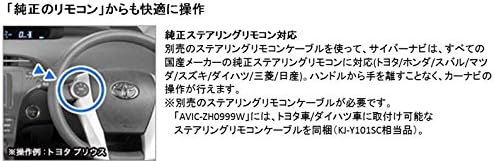
Immaġni: Illustration demonstrating the use of a steering wheel remote control to operate the navigation system, with a focus on a Toyota Prius steering wheel.
Istruzzjonijiet Operattivi
Basic Touch Screen Operation
The AVIC-ZH0999W features a responsive touch screen for intuitive control. You can quickly access functions and navigate menus with simple taps and swipes.

Immaġni: This diagram illustrates the system's responsiveness to driver input. The top section shows quick transitions between different screens and functions. The bottom section demonstrates map scrolling: by continuously touching a desired location, the map moves continuously. The scrolling speed adjusts based on how far the touched point is from the center of the screen, allowing for rapid movement to distant locations. It also depicts 3D map matching and slope data analysis for precise positioning.
Karatteristiċi tan-Navigazzjoni
The Cyber Navi system offers highly accurate positioning and intelligent route guidance.
- Pożizzjonament Preċiż: Multi-field map matching and a crystal 3D hybrid sensor accurately determine your vehicle's position, even in areas not covered by standard road data. It can precisely detect slopes and differentiate between roads with slight angle differences.
- Advanced Route Search: The system calculates optimal routes by considering various factors, including real-time traffic information and predicted travel times. It identifies candidate routes, estimates required time, and selects the most efficient path.

Immaġni: This diagram explains the advanced route search algorithm. It shows how the system identifies candidate routes, calculates estimated travel times based on real-time traffic and predicted congestion, and then selects the optimal route. Factors like traffic jams, long waits at signals, and smooth flowing traffic are considered.
Daqq tal-Midja
The AVIC-ZH0999W supports a wide range of AV media sources, allowing you to enjoy various digital media simultaneously.
- iPhone/iPod: Connect your iPhone or iPod for audio and video playback. (Requires dedicated cable CD-IU51 for optimal use. Compatibility may vary by iPhone/iPod model.)
- DVD/CD: Play DVD-V, DVD-R/RW (VR mode/CPRM compatible), CD, CD-R/RW.
- Bluetooth: Stream audio wirelessly from Bluetooth-enabled devices (A2DP/AVRCP compatible).
- Apparat USB: Play awdjo files (WMA/MP3/AAC/WAV) from USB storage devices.
- Karta SD: Ilgħab awdjo/vidjo files (WMV/MP4/AVI/WMA/MP3/AAC/WAV) from SDXC compatible SD memory cards.
- HDMI: Connect HDMI-enabled devices for high-quality audio and video input.
- 3.5mm Mini Jack: Use a 3.5mm mini jack for auxiliary audio input. (Requires separate mini jack cable CD-V150M for AV or CD-150M for audio, and extension cable CD-V200ME if needed.)

Immaġni: This image displays the wide range of AV media supported by the system, including iPhone/iPod (video compatible), Full Seg TV, SD memory card (SDXC compatible), DVD-Video/DVD-R/RW/CD/CD-R/RW, HDMI, 3.5mm mini jack, Bluetooth devices (A2DP/AVRCP compatible), and USB devices.
Manutenzjoni
Tindif tal-Unità
To maintain the display's clarity and unit's functionality, regularly wipe the screen and exterior with a soft, dry cloth. Avoid using abrasive cleaners or solvents.
Map Data Updates
Your AVIC-ZH0999W includes free map data updates for a period of up to three years from its release date (until April 2018). Refer to the Pioneer website or contact customer support for instructions on how to download and install map updates.
Issolvi l-problemi
If you encounter issues with your AVIC-ZH0999W, please refer to the following general troubleshooting steps:
- Ebda Qawwa: Check all power connections and ensure the vehicle's ignition is on.
- Ebda Ħsejjes: Verify volume settings, audio source selection, and speaker connections.
- Żbalji fin-Navigazzjoni: Kun żgur li l-antenna tal-GPS hija installata sew u għandha viżibilità ċara. view of the sky. Check for updated map data.
- Touch Screen ma jirrispondix: Ipprova erġa' ibda l-unità. Jekk il-problema tippersisti, ikkuntattja l-appoġġ għall-klijenti.
For more detailed troubleshooting, please consult the full service manual or contact Pioneer customer support.
Speċifikazzjonijiet
| Brand | Pijunier |
| Isem tal-Mudell | AVIC-ZH0999W |
| Daqs tal-Iskrin | 7 Pulzier |
| Tip ta 'Wiri | Wide VGA |
| Kapaċità tal-Ħżin tal-Memorja | 100 GB (HDD) |
| Teknoloġija tal-Konnettività | USB, Bluetooth, HDMI, SD |
| Karatteristiċi Speċjali | Voice Operation, Free Map Updates |
| Tip ta 'Immuntar | Dashboard Mount, Front Glass Mount |
| Tip ta' Vettura Kompatibbli | Karozza tal-Passiġġieri |
| Piż tal-Prodott | 3.73 Kilogrammi |
| Dimensjonijiet tal-Pakkett | 33.7 x 26.4 x 16.7 ċm |
| ASIN | B00XBOCASC |
Garanzija u Appoġġ
Għal informazzjoni dwar il-garanzija, jekk jogħġbok irreferi għall-karta tal-garanzija inkluża mal-prodott tiegħek jew żur is-sit uffiċjali ta' Pioneer. website. For technical support, product inquiries, or service, please contact Pioneer customer service through their official channels.
Pijunier Uffiċjali Websit: www.pioneer-car.jp


