Introduzzjoni
This manual provides comprehensive instructions for the setup, operation, and maintenance of your Timex Marathon Digital Sport Watch, model T5K802. Please read this manual carefully to ensure proper use and to maximize the lifespan of your watch.
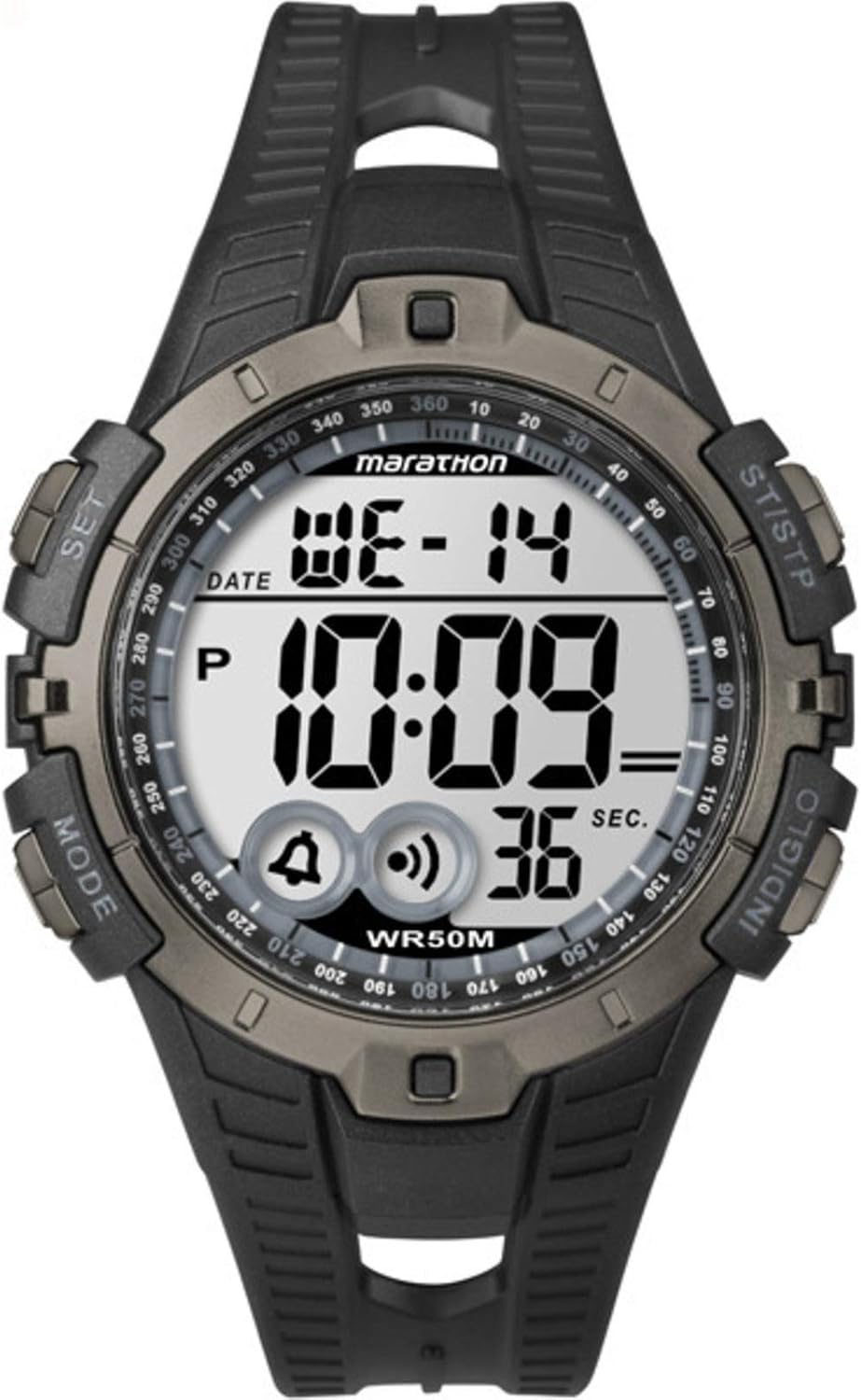
Figura 1: Timex Marathon Digital Sport Watch. The watch features a digital display showing the day (WE), date (14), and time (10:09). Below the time, icons for alarm and chime are visible, along with a seconds counter (36 SEC). Buttons are labeled 'MODE' (left bottom), 'SET' (left top), 'ST/STP' (right top), and 'INDIGLO' (right bottom). The watch face also indicates 'marathon' and 'WR50M' for water resistance.
Setup
Issettjar Inizjali tal-Ħin u d-Data
- Agħfas u żomm il- SET button (top left) until the display flashes, indicating time setting mode.
- Agħfas il- MODALITÀ button (bottom left) to cycle through the setting options: seconds, hours, minutes, year, month, date.
- Uża l- ST / STP button (top right) to adjust the flashing value. Holding the button will advance the value quickly.
- Ladarba s-settings kollha jkunu korretti, agħfas il-buttuna SET buttuna għal darb'oħra biex toħroġ mill-modalità ta' l-issettjar.
Informazzjoni dwar il-batterija
The watch is powered by one Lithium Metal battery, which is included. The battery is designed for long-lasting performance. When the display becomes dim or functions become erratic, it may be time to replace the battery.
Istruzzjonijiet Operattivi
Funzjonijiet Button Overview
- MODALITÀ: Cycles through different modes (Time, Chronograph, Alarm, Timer).
- SET: Enters and exits setting modes; confirms selections.
- ST/STP: Starts/stops chronograph; adjusts values in setting mode.
- INDIGLO: Activates the INDIGLO night-light.
Modalità Ħin
The default display shows the current time, day of the week, and date. Press the INDIGLO button to illuminate the display in low-light conditions.
Modalità Kronografu (Stopwatch)
- Mill-Modalità Ħin, agħfas MODALITÀ until "CHRONO" or a stopwatch icon appears.
- Agħfas ST / STP biex tibda l-kronografu.
- Agħfas ST / STP again to pause the chronograph.
- To reset, while paused, press and hold ST / STP until the display shows zero.
Modalità ta' Allarm
- Mill-Modalità Ħin, agħfas MODALITÀ until "ALARM" or an alarm icon appears.
- Agħfas SET biex tidħol fil-modalità tal-issettjar tal-allarm. Is-siegħa se teptip.
- Użu ST / STP biex taġġusta s-siegħa. Agħfas MODALITÀ biex timxi għal minuti.
- Użu ST / STP biex taġġusta l-minuti.
- Agħfas SET biex tikkonferma u toħroġ.
- To turn the alarm on/off, in Alarm Mode, press ST / STP. An alarm icon will appear/disappear on the main display.
Manutenzjoni
Tindif tal-Arloġġ Tiegħek
Biex tnaddaf l-arloġġ tiegħek, uża drapp artab u dryer.amp cloth. Do not use harsh chemicals or abrasive cleaners, as these can damage the watch's finish or seals. For the strap, mild soap and water can be used, then rinse thoroughly and dry.
Reżistenza għall-Ilma
This watch is water resistant to 50 meters (WR50M). This means it is suitable for recreational swimming in shallow water. It is not suitable for diving or snorkeling. Do not operate buttons underwater. Avoid exposing the watch to extreme temperature changes, which can affect the water-resistant seals.
Sostituzzjoni tal-batterija
Battery replacement should ideally be performed by a qualified watch technician to ensure the water resistance is maintained. If replacing the battery yourself, ensure the gasket is properly seated and the case back is securely fastened.
Issolvi l-problemi
| Problema | Kawża / Soluzzjoni Possibbli |
|---|---|
| Id-displej huwa vojt jew mudlam. | Low battery. Replace the battery. |
| Il-buttuni ma jirrispondux. | The watch may be in a locked mode or require a soft reset. Try removing and reinserting the battery (if comfortable) or consult a service center. |
| Il-ħin mhuwiex preċiż. | Ensure the time and date are set correctly as per the "Initial Time and Date Setting" section. Extreme temperatures or strong magnetic fields can affect accuracy. |
| Ilma ġewwa l-arloġġ. | Water resistance may have been compromised. Avoid further water exposure and seek professional repair immediately to prevent internal damage. |
Speċifikazzjonijiet
- Numru tal-Mudell: T5K802
- Dimensjonijiet: 8.89 x 6.6 x 7.62 cm (Product Size)
- Piż: 91 g
- Batterija: 1 batterija tal-Lithium Metal (inkluża)
- Reżistenza għall-Ilma: 50 metru (WR50M)
- Tip ta' wiri: Diġitali
Informazzjoni dwar Garanzija
Timex watches are manufactured to high quality standards and are warranted against manufacturing defects for a period specified by your region's warranty policy. This warranty does not cover normal wear and tear, battery life, accidental damage, or damage caused by improper use or unauthorized repairs. Please retain your proof of purchase for warranty claims.
Appoġġ għall-Klijent
Għal aktar assistenza, appoġġ tekniku, jew mistoqsijiet dwar is-servizz, jekk jogħġbok żur is-sit uffiċjali ta' Timex. website or contact their customer service department. Refer to the packaging or the official Timex websit għal dettalji ta' kuntatt speċifiċi fir-reġjun tiegħek.
Tista' ssib aktar informazzjoni fuq il- Ħanut Timex fuq Amazon.


