1. Introduzzjoni
The Pursonic UV Toothbrush Sanitizer Holder S20 is designed to provide a hygienic storage solution for your oral care items. This wall-mounted unit utilizes UV light technology to sanitize toothbrushes, including most manual and electric toothbrush heads, as well as razors. It also features a convenient toothpaste holder, helping to keep your bathroom organized and your oral hygiene tools clean.
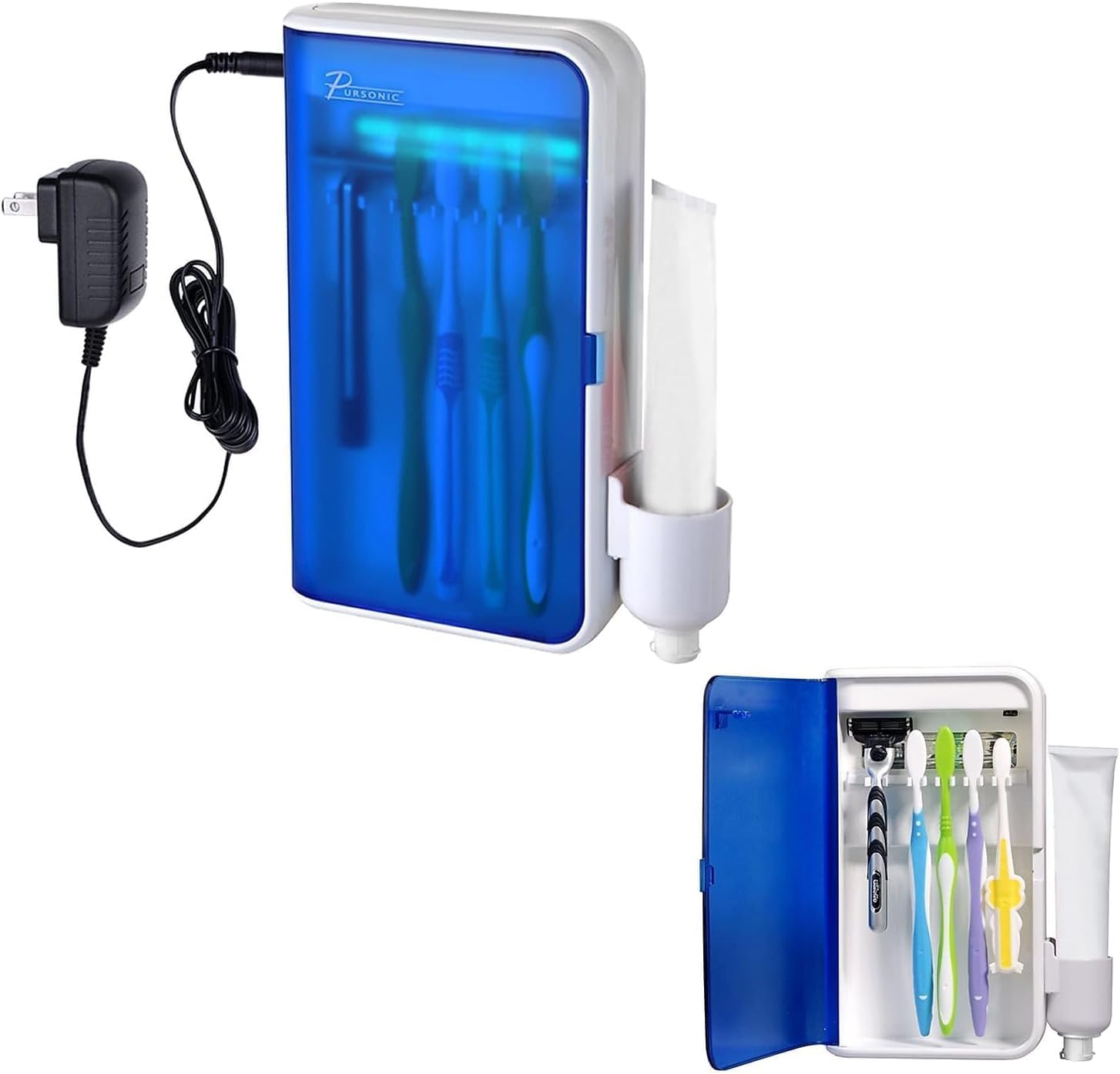
Image: Pursonic UV Toothbrush Sanitizer Holder S20, showing the unit and its packaging.
2. Kontenut tal-Pakkett
Jekk jogħġbok iċċekkja l-pakkett għall-oġġetti li ġejjin:
- Pursonic UV Toothbrush Sanitizer Holder (Model S20)
- Adapter tal-Enerġija
- Ħitan Mount Bracket
- Tejp li jwaħħal b'żewġ naħat 3M
- Toothpaste Holder Attachment
- Manwal għall-Utent

Image: The Pursonic UV Toothbrush Sanitizer Holder with its power adapter and toothpaste holder attachment.
3. Karatteristiċi
- Advanced UV Sanitization: Utilizes UV light to effectively clean toothbrushes and razors.
- Disinn Multi-Funzjonali: Features five slots for toothbrushes, a dedicated toothpaste holder, and space for razors.
- Konvenjenza Mmuntata mal-ħajt: Saves counter space and installs easily with included 3M double-sided tape.
- Timer Awtomatiku: UV light operates for 5-8 minutes per cycle for optimal sanitization.
- Kompatibilità Wiesgħa: Accommodates most manual toothbrushes, electric toothbrush heads, and standard razors.
- Durabbli u Faċli biex tnaddaf: Sleek design with sturdy construction for long-lasting use and simple maintenance.

Image: Key features of the sanitizer, highlighting the 5-8 minute sanitizing timer and easy-wipe clean design.
4. Informazzjoni dwar is-Sigurtà
- Do not look directly at the UV light when it is active.
- Żomm l-apparat 'il bogħod mill-ilma u l-umdità biex tevita perikli elettriċi.
- Ensure the device is securely mounted to prevent it from falling.
- Spluggja l-apparat qabel it-tindif.
- Dan l-apparat huwa maħsub għall-użu domestiku biss.
5. Setup u Installazzjoni
The Pursonic UV Toothbrush Sanitizer Holder is designed for wall mounting. Follow these steps for installation:
- Agħżel Post: Select a smooth, clean surface in your bathroom, such as tile, marble, glass, metal, or wood. Ensure the surface is dry and free from dust or grease.
- Naddaf il-wiċċ: Wipe the chosen wall area thoroughly with a clean cloth and allow it to dry completely.
- Applika l-Kolla: Peel the backing from the 3M double-sided adhesive tape and firmly press it onto the back of the wall mount bracket.
- Immonta l-Bracket: Press the bracket firmly onto the cleaned wall surface. Apply pressure for at least 30 seconds to ensure strong adhesion. It is recommended to let the adhesive set for 24 hours before hanging the unit.
- Hang the Sanitizer Unit: Once the bracket is securely attached, carefully hang the Pursonic UV Toothbrush Sanitizer Holder onto the bracket.
- Attach Toothpaste Holder: Slide the toothpaste holder attachment onto the side of the main unit.
- Qabbad l-Enerġija: Plug the power adapter into the unit and then into a suitable electrical outlet.

Image: Visual guide for wall mounting, showing steps from cleaning the wall to hanging the unit and cup.
6. Istruzzjonijiet Operattivi
Using your Pursonic UV Toothbrush Sanitizer Holder is simple:
- Iftah il-bieb: Gently open the front door of the sanitizer unit.
- Poġġi l-Oġġetti: Insert your toothbrushes (up to five) and/or razors into the designated slots. Ensure the bristles/blades face the UV light bulb for effective sanitization. If using an electric toothbrush, you may need to detach the head if the full brush is too tall.
- Agħlaq il-Bieb: Close the front door firmly. The UV light will automatically activate for a cycle of 5-8 minutes. A blue light will indicate that the sanitization process is active.
- Tlestija taċ-Ċiklu: The UV light will automatically turn off after the sanitization cycle is complete. You can then open the door and retrieve your clean items.
For optimal hygiene, it is recommended to sanitize your toothbrushes after each use or at least once daily.

Image: The sanitizer unit with its door open, displaying toothbrushes and a razor placed inside for sanitization.

Image: Illustration of UV light technology effectively cleaning a toothbrush head.
7. Manutenzjoni
Regular cleaning will ensure the longevity and effectiveness of your sanitizer:
- Tindif tal-Unità: Unplug the device from the power outlet. Use a soft, damp cloth to wipe the exterior and interior surfaces. Avoid abrasive cleaners or harsh chemicals.
- Cleaning the Toothpaste Holder: The toothpaste holder attachment can be removed for separate cleaning. Wash it with soap and water, then dry thoroughly before reattaching.
- Bozza UV: The UV bulb is designed for long-term use. If replacement is ever needed, please contact customer support.
- Preventing Mold: Ensure toothbrushes are not excessively wet when placed in the sanitizer to prevent moisture buildup. The unit is designed to be easy to clean to prevent mold growth.
8 Issolvi l-problemi
| Problema | Kawża Possibbli | Soluzzjoni |
|---|---|---|
| UV light does not turn on. |
|
|
| Bieb ma jagħlaqx kompletament. |
|
|
| Unit falls off the wall. |
|
|
9. Speċifikazzjonijiet
- Ditta: Pursoniku
- Isem tal-Mudell: S20
- Materjal: Plastik
- Kulur: Abjad
- Dimensjonijiet tal-Prodott: 5.75"T x 2.25"W x 7.5"Għ
- Tip ta 'Immuntar: Mount Wall
- Numru ta' Kompartimenti: 5 (for toothbrushes)
- Piż tal-oġġett: 1 Lira
- UPC: 881314244393
- Manifattur: Samsonic Trading Company, Inc
- Batteriji Meħtieġa: Iva
10. Garanzija u Appoġġ
For warranty information, technical support, or customer service inquiries, please visit the official Pursonic websit jew ikkuntattja lit-tim tal-appoġġ tal-klijenti tagħhom.
Uffiċjali Websit: www.pursonicusa.com


