1. Introduzzjoni
This manual provides detailed instructions for the installation, operation, and maintenance of your CHACON 4.3-inch Wired Videophone. Please read this manual thoroughly before installation and use to ensure proper functionality and safety. This videophone system is designed to enhance your home security by allowing you to see and communicate with visitors at your gate or front door before granting access.
2. Prodott Aktarview
The CHACON Wired Videophone system consists of an indoor monitor and an outdoor unit, designed for clear communication and visual verification of visitors.
Karatteristiċi ewlenin:
- 4.3-inch color screen for clear visitor viewing.
- Ability to control an electric strike and a gate.
- Adjustable brightness, contrast, and volume settings.
- Integrated microphone and speaker for two-way communication.
- Backlit nameplate on the outdoor unit for visibility.
- Outdoor camera with night vision capability.
- 92° viewAngolu ta' ing għal kopertura komprensiva.
- Full-duplex communication for simultaneous two-way audio.
- Ultra-flat indoor monitor with a simple and elegant design.
- Durable metal outdoor unit supplied with a mounting bracket.

Figure 2.1: The CHACON 4.3-inch Wired Videophone system, showing both the indoor monitor and the outdoor camera unit.
3. Setup u Installazzjoni
The CHACON videophone system uses a 4-wire connection for reliable communication. Professional installation is recommended.
3.1 Components Checklist:
- Indoor Monitor (with 4.3" color screen)
- Outdoor Unit (with camera, microphone, speaker, backlit nameplate)
- Mounting Bracket for Outdoor Unit
- Power Adapter (12 Volts, electric cable)
- Kejbils ta' Konnessjoni (4 wajers)
3.2 Passi ta' Installazzjoni:
- Agħżel Post: Select appropriate locations for both the indoor monitor and the outdoor unit. The outdoor unit should be placed near your gate or front door, at a height that allows for clear viewing of visitors. The indoor monitor should be in a convenient location inside your home.
- Immuntar tal-Unità ta' Barra: Securely attach the mounting bracket for the outdoor unit to a sturdy surface (e.g., wall, pillar) using appropriate screws. Then, attach the metal outdoor unit to the bracket. Ensure it is protected from direct heavy rain, although the unit is waterproof.
- Immuntar ta' Monitor ta' Ġewwa: Install the indoor monitor on a wall using the provided mounting hardware.
- Wiring: Connect the indoor monitor to the outdoor unit using the 4-wire connection cables. Ensure all connections are secure and correctly aligned according to the wiring diagram (refer to the diagram in the separate installation guide, if provided). If connecting to an electric strike or gate opener, wire these components to the outdoor unit as per their respective instructions.
- Konnessjoni tal-Enerġija: Connect the power adapter to the indoor monitor and plug it into a standard electrical outlet. The system operates on 12 Volts.
- Sistema tat-Test: After all connections are made, test the system by pressing the call button on the outdoor unit. Verify that the indoor monitor displays the video feed, and that two-way audio communication is clear. Test the electric strike and gate control functions.

Figure 3.1: The outdoor unit of the CHACON videophone system installed on a brick pillar, demonstrating a typical mounting location near a gate.
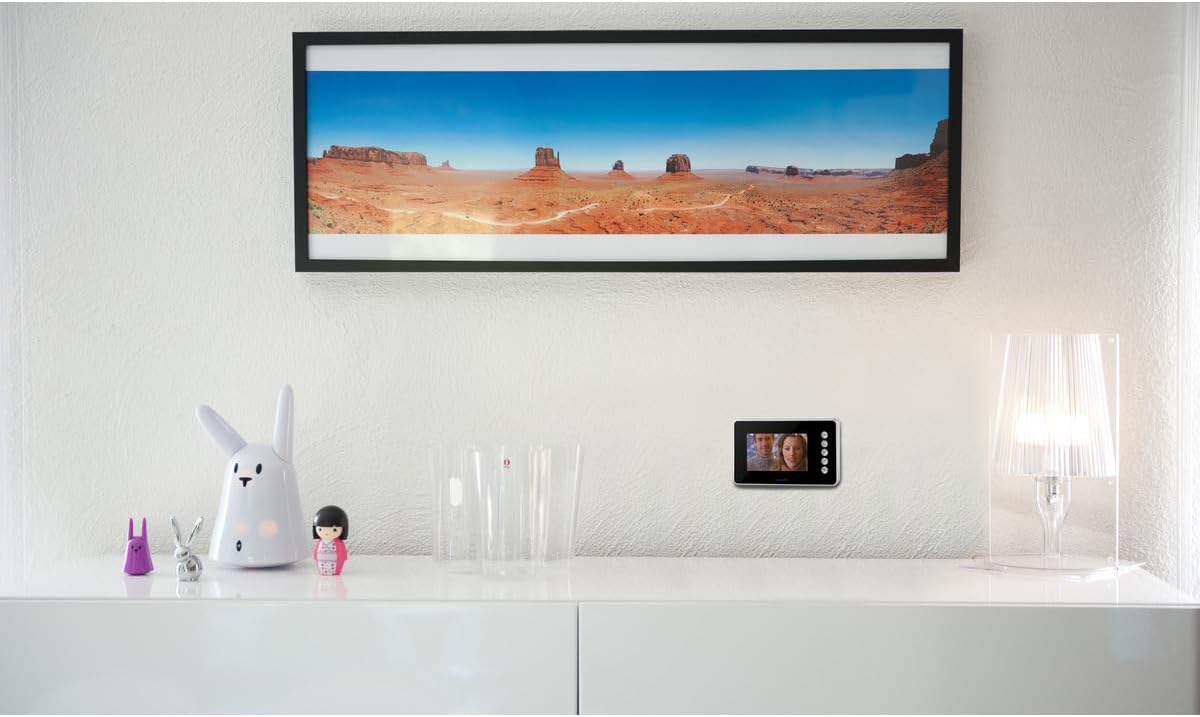
Figure 3.2: The indoor monitor of the CHACON videophone system mounted on a white wall, showing its discreet and elegant design.
4. Istruzzjonijiet Operattivi
4.1 Receiving a Call:
- When a visitor presses the call button on the outdoor unit, the indoor monitor will ring and automatically display the live video feed from the outdoor camera.
- To answer the call and initiate two-way communication, press the designated talk button on the indoor monitor.
- To end the conversation, press the talk button again or wait for the call to automatically disconnect after a set period.
4.2 Opening a Door/Gate:
- During a conversation or while viewing the live feed, press the door unlock button (often depicted as a key or door icon) on the indoor monitor to activate the electric strike and open the door.
- If connected, press the gate control button (often depicted as a gate icon) to open or close your gate.
4.3 Aġġustament tas-Settings:
- Luminożità: Use the brightness control knob or menu option on the indoor monitor to adjust the screen's brightness for optimal viewing.
- Kuntrast: Adjust the contrast setting to improve the clarity and distinction between light and dark areas on the screen.
- Volum: Control the volume of the speaker and microphone on the indoor monitor to ensure comfortable listening and clear communication.
- Viżjoni bil-lejl: The outdoor camera automatically switches to night vision mode in low-light conditions, providing clear images even in darkness. No manual adjustment is typically required for this feature.
5. Manutenzjoni
Regular maintenance ensures the longevity and optimal performance of your CHACON videophone system.
- Tindif: Use a soft, dry cloth to clean the indoor monitor screen and the outdoor unit. For stubborn dirt, a slightly damp Jista' jintuża drapp, iżda evita prodotti tat-tindif li joborxu jew umdità eċċessiva.
- Unità ta 'barra: Iċċekkja perjodikament l-unità ta' barra għal kwalunkwe ostaklu (eż. ħmieġ, brimba)webs) on the camera lens or microphone/speaker grilles. Gently clean as needed.
- Konnessjonijiet: Occasionally inspect all wiring connections to ensure they are secure and free from corrosion or damage.
- Karatteristika li ma jgħaddix ilma minnha: While the outdoor unit is waterproof, avoid directing high-pressure water jets directly at it.
6 Issolvi l-problemi
If you encounter issues with your videophone system, refer to the following common problems and solutions:
| Problema | Kawża Possibbli | Soluzzjoni |
|---|---|---|
| L-ebda immaġni fuq il-monitor ta' ġewwa | Loose wiring connection; Power issue; Damaged camera. | Check all 4-wire connections. Ensure power adapter is securely plugged in. If problem persists, contact support. |
| L-ebda ħoss jew ħoss mgħawweġ | Volume too low; Loose wiring; Microphone/speaker obstruction. | Adjust volume settings. Check wiring connections. Clear any obstructions from microphone/speaker grilles. |
| Door/Gate control not working | Incorrect wiring to electric strike/gate opener; Power issue to strike/gate. | Verify wiring to the electric strike/gate opener. Ensure these devices have their own power supply if required. |
| Kwalità tal-immaġni fqira (imċajpra, skura) | Dirty camera lens; Insufficient lighting; Incorrect brightness/contrast. | Clean the camera lens on the outdoor unit. Adjust brightness and contrast settings on the indoor monitor. |
If you are unable to resolve the issue using these steps, please contact CHACON customer support.
7. Speċifikazzjonijiet
Detailed technical specifications for the CHACON Wired Videophone 4.3":
| Karatteristika | Speċifikazzjoni |
|---|---|
| Brand | CHACON |
| Isem tal-Mudell | ĊACON 34802 |
| Numru tal-Mudell tal-Oġġett | 34802 |
| Kulur | Iswed |
| Materjal | Metal (Outdoor Unit) |
| Dimensjonijiet tal-Prodott (L x W x H) | 29.4 x 21.8 x 9.2 cm (Overall package/product size); 670 grams |
| Daqs tal-Iskrin | 4.3 Pulzier |
| Teknoloġija tal-Konnettività | Konnessjoni 4-Wire |
| Sors tal-Enerġija | Kejbil Elettriku |
| Input Voltage | 12 Volts |
| Tip ta 'Immuntar | Mount Wall |
| Karatteristiċi Speċjali | Integrated Microphone, Night Vision Camera, Backlit Nameplate |
| ViewIng Angolu | 92° |
| Modalità tal-Ħruġ tal-Awdjo | Stereo |
| Metodu ta' Kontroll | Voice (Intercom Function) |
| Waterproof | Yes (Outdoor Unit) |
8. Garanzija u Appoġġ
Warranty information for your CHACON videophone is typically provided with your purchase documentation. Please refer to the warranty card or contact your retailer for specific details regarding coverage and duration.
For technical support, spare parts, or further assistance, please visit the official CHACON webis-sit jew ikkuntattja lid-dipartiment tas-servizz tal-konsumatur tagħhom. L-informazzjoni ta' kuntatt ġeneralment tista' tinstab fuq l-imballaġġ tal-prodott jew fuq il-manuskritt tal-manifattur. websit.
Manifattur: Chacon
Pajjiż ta' Oriġini: il-Belġju


