1. Prodott Aktarview
The Fujifilm XF16-55mmF2.8 R LM WR is a high-performance standard zoom lens designed for Fujifilm X-series cameras. It features a constant maximum aperture of F2.8 across its entire zoom range, equivalent to 24-84mm in 35mm format. This lens incorporates advanced optical design with three aspherical and three ED glass elements to minimize aberrations and deliver edge-to-edge sharpness. Its weather-resistant construction ensures durability in various shooting conditions.

Figura 1: Quddiem view of the Fujifilm XF16-55mmF2.8 R LM WR lens.
- Tul Fokali: 16-55mm (24-84mm equivalent in 35mm format).
- Apertura massima: Constant F2.8.
- Disinn ottiku: 17 elements in 12 groups, including 3 aspherical and 3 ED elements.
- Awtomatiku: High-speed, quiet linear motor.
- Kostruzzjoni: Weather-resistant, dust-resistant, and -10°C low-temperature operation.
- Kisi: Nano-Gi coating technology for reduced flare and ghosting.
2. Setup
2.1 Twaħħil tal-Lenti
- Kun żgur li kemm il-kamera kif ukoll il-lenti huma mitfija.
- Neħħi l-għatu tal-lenti ta' wara mil-lenti u l-għatu tal-body mill-kamera.
- Align the white mounting mark on the lens barrel with the white mounting mark on the camera body.
- Daħħal il-lenti fil-muntatura tal-kamera u dawwarha lejn l-arloġġ sakemm tikklikkja f'postha. Tisforzax il-lenti.
- Erġa' poġġi l-għatu tal-lenti ta' quddiem meta ma tkunx qed tużah.

Figure 2: Aligning and attaching the lens to the camera body.
2.2 It-Tneħħija tal-Lenti
- Kun żgur li l-kamera tkun mitfija.
- Waqt li tagħfas il-buttuna tar-rilaxx tal-lenti fuq il-korp tal-kamera, dawwar il-lenti kontra l-arloġġ sakemm tieqaf.
- Carefully remove the lens from the camera mount.
- Attach the rear lens cap to the lens and the body cap to the camera to protect the sensor and lens elements.
3. Tħaddim tal-Lenti
3.1 Żumjar
To adjust the focal length, rotate the zoom ring on the lens barrel. The lens offers a versatile 16-55mm range, suitable for various photographic situations from wide-angle landscapes to medium telephoto portraits.

Figure 3: The zoom ring on the lens barrel.
3.2 Iffukar
The lens features a fast and quiet linear motor for autofocus. For manual focusing, rotate the focus ring located towards the front of the lens. Ensure your camera's focus mode is set to manual focus (MF) if you wish to use the manual focus ring.
3.3 Kontroll tal-Apertura
The lens is equipped with an aperture ring, allowing for direct control over the aperture setting. Rotate the aperture ring to select your desired F-stop. The lens maintains a constant F2.8 aperture throughout its zoom range, providing consistent low-light performance and depth-of-field control.

Figure 4: The aperture ring on the lens barrel.
4. Manutenzjoni
4.1 Tindif tal-Lenti
- Uża pinzell tal-blower biex tneħħi t-trab u l-partiċelli maħlula mill-wiċċ tal-lenti.
- Għal tbajja’ jew marki tas-swaba’, uża drapp tal-mikrofibra nadif u artab iddisinjat speċifikament għal lentijiet ottiċi. Applika ammont żgħir ta’ soluzzjoni għat-tindif tal-lentijiet fuq id-drapp, mhux direttament fuq il-lenti.
- Evita li tuża materjali li joborxu jew kimiċi ħarxa, għax dawn jistgħu jagħmlu ħsara lill-kisi tal-lenti.
4.2 Ħażna u Immaniġġjar
- Always attach the front and rear lens caps when the lens is not in use to protect the optical elements.
- Aħżen il-lenti f'post frisk u niexef, 'il bogħod mix-xemx diretta u minn temperaturi estremi.
- The lens is weather-resistant, but prolonged exposure to heavy rain or dust should be avoided. If exposed, wipe it dry with a clean cloth as soon as possible.
- Evita li twaqqa’ l-lenti jew li tissottomettiha għal impatti qawwija.
5 Issolvi l-problemi
- Lenti mhux rikonoxxuta mill-kamera: Ensure the lens is securely attached to the camera body and that the camera is powered on. Clean the electrical contacts on both the lens and camera with a dry, soft cloth.
- L-awtofokus mhux qed jaħdem: Check if the camera's focus mode is set to autofocus (AF). Ensure there is sufficient light and contrast in the scene for the autofocus system to operate effectively.
- L-immaġnijiet huma mċajpra: Verify that the lens is properly focused. Check the camera's shutter speed to ensure it is fast enough to prevent motion blur, especially in low light or with moving subjects. Consider using a tripod for sharper images.
- Trab jew tbajja’ fuq l-istampi: First, clean the front and rear elements of the lens as described in the Maintenance section. If spots persist, they may be on the camera sensor, which requires professional cleaning.
6. Speċifikazzjonijiet
| Isem tal-Mudell | XF16-55mmF2.8 R LM WR |
| Brand | Fujifilm |
| Tul Fokali | 16-55mm (24-84mm equivalent in 35mm format) |
| Apertura massima | F2.8 (kostanti) |
| Apertura Minima | F22 |
| Kostruzzjoni tal-Lenti | 17 elements in 12 groups (including 3 aspherical and 3 ED elements) |
| Angolu ta ' View | 83.2° - 29° |
| Numru ta 'Xfafar tad-Dijaframma | 9 (dijaframma tond) |
| Distanza Minima ta 'Fokus | 0.3m (Wide), 0.4m (Telephoto) |
| Tkabbir Massimu | 0.16x (Telephoto) |
| Daqs tal-Filtru | Ø77mm |
| Dimensjonijiet Esterni | Ø83.3mm x 106mm (approx.) |
| Piż | 655g (1.44 lbs) |
| Reżistenza għat-temp | Dust-resistant, moisture-resistant, and -10°C low-temperature operation |
| Muntaturi Kompatibbli | Fujifilm X Mount |
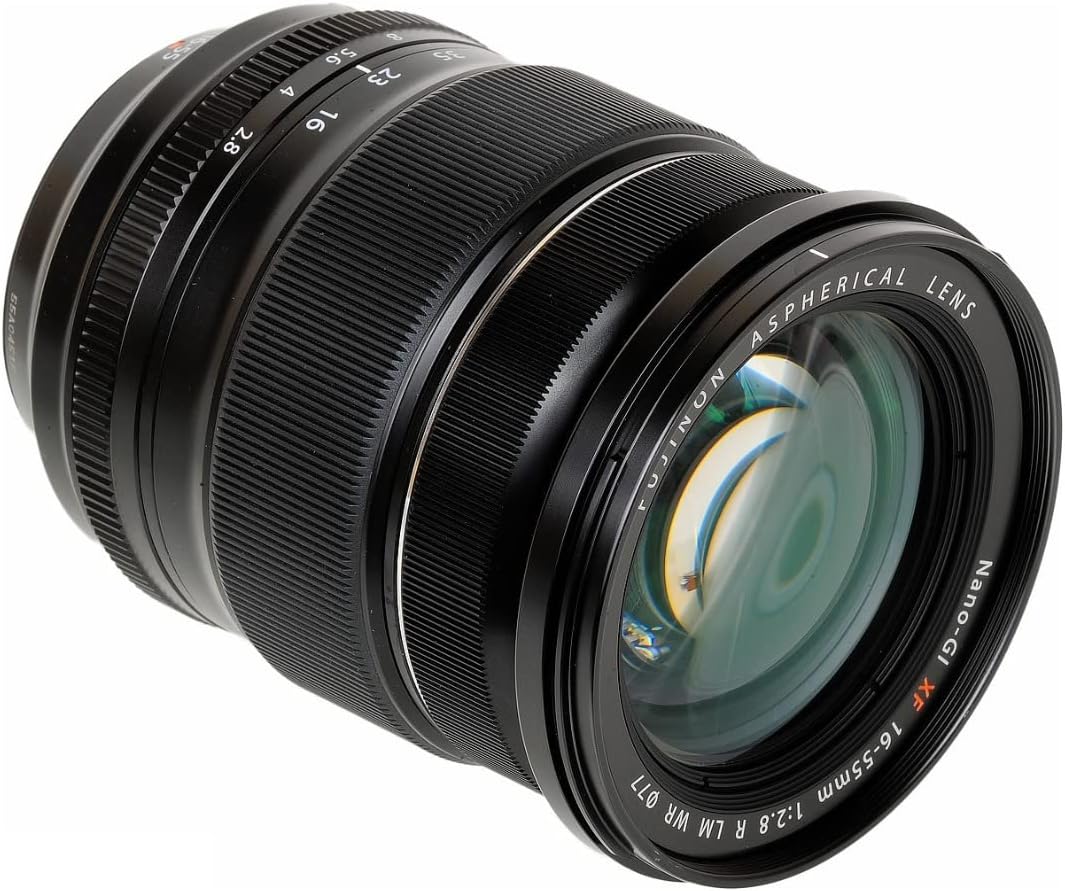
Figure 5: Optical diagram illustrating the lens elements and groups.
7. Garanzija u Appoġġ
This Fujifilm XF16-55mmF2.8 R LM WR lens comes with a Kopertura ta' sena għax-xogħol u kopertura ta' sena għall-partijiet. This warranty does not cover accessories not made by the manufacturer, batteries, or flash equipment.
For further support, technical assistance, or warranty claims, please visit the official Fujifilm webis-sit jew ikkuntattja lid-dipartiment tas-servizz tal-konsumatur tagħhom. Żomm il-prova tax-xiri tiegħek għall-validazzjoni tal-garanzija.
Appoġġ onlajn: www.fujifilm.com


