1. Introduzzjoni
This manual provides detailed instructions for the installation, operation, and maintenance of your D-Link DCS-8350LH 2K QHD Indoor Wi-Fi Camera. Please read this manual thoroughly before using the product to ensure proper setup and functionality.
The D-Link DCS-8350LH is designed to provide precise and detailed surveillance for your home or small office. It features 2K QHD resolution, color night vision, AI-based detection, and two-way audio for comprehensive monitoring.
2. Informazzjoni dwar is-Sigurtà
- Kun żgur li l-kamera tkun installata f'post stabbli biex tevita li taqa'.
- Use only the power adapter supplied with the camera.
- Do not expose the camera to water or moisture. This product is for indoor use only.
- Evita li tpoġġi l-kamera ħdejn sorsi ta’ sħana jew fid-dawl tax-xemx dirett.
- Do not attempt to open or repair the camera yourself. Refer all servicing to qualified personnel.
- Żomm il-kamera u l-aċċessorji tagħha fejn ma jintlaħqux mit-tfal.
3. Prodott Aktarview
Familiarize yourself with the components of your D-Link DCS-8350LH camera.
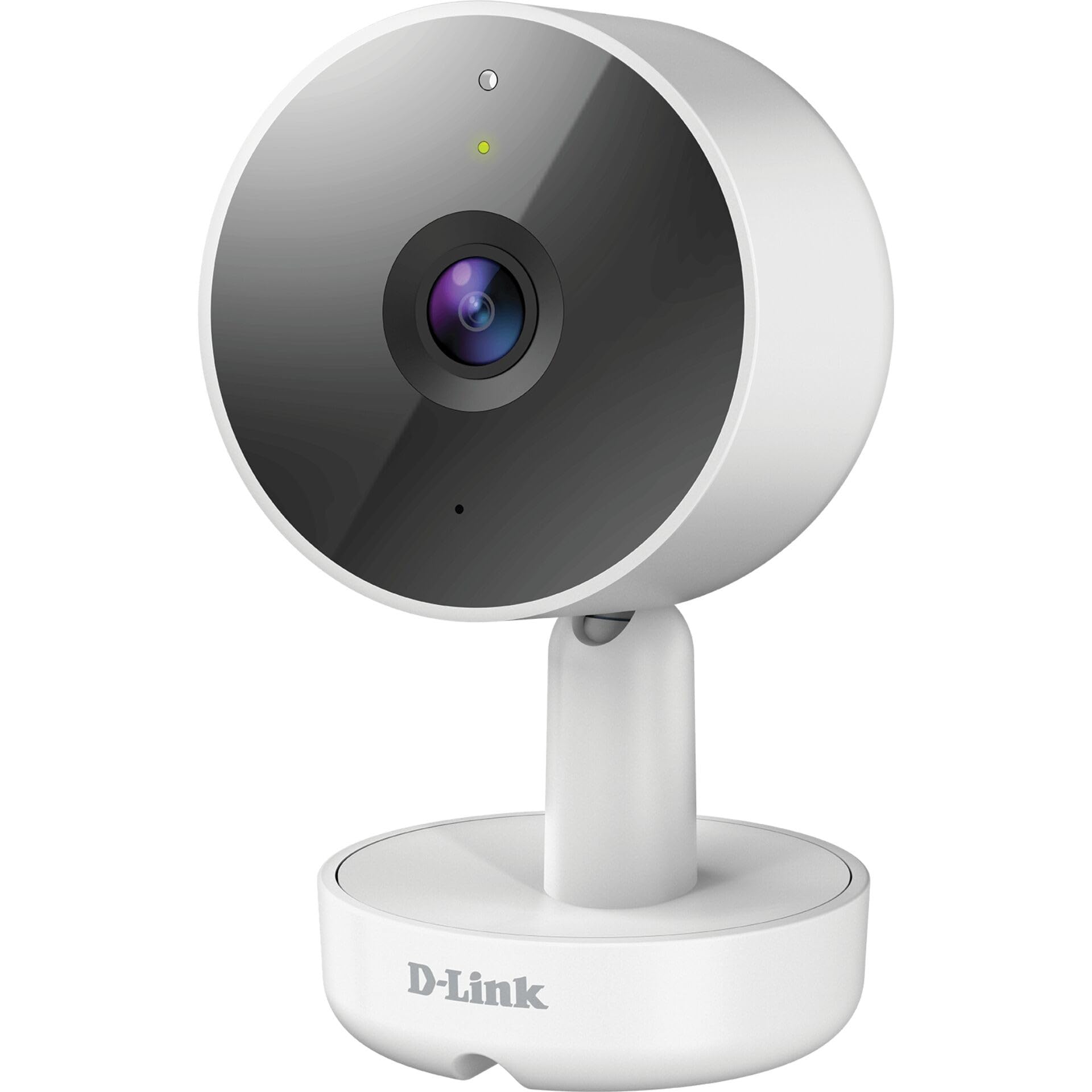
Figura 3.1: Quddiem View tal-Kamera
- 1. Lenti: Jaqbad vidjo.
- 2. Status LED: Indicates camera status (e.g., power, connection).
- 3. Mikrofonu: Jaqbad l-awdjo għal komunikazzjoni f'żewġ direzzjonijiet.
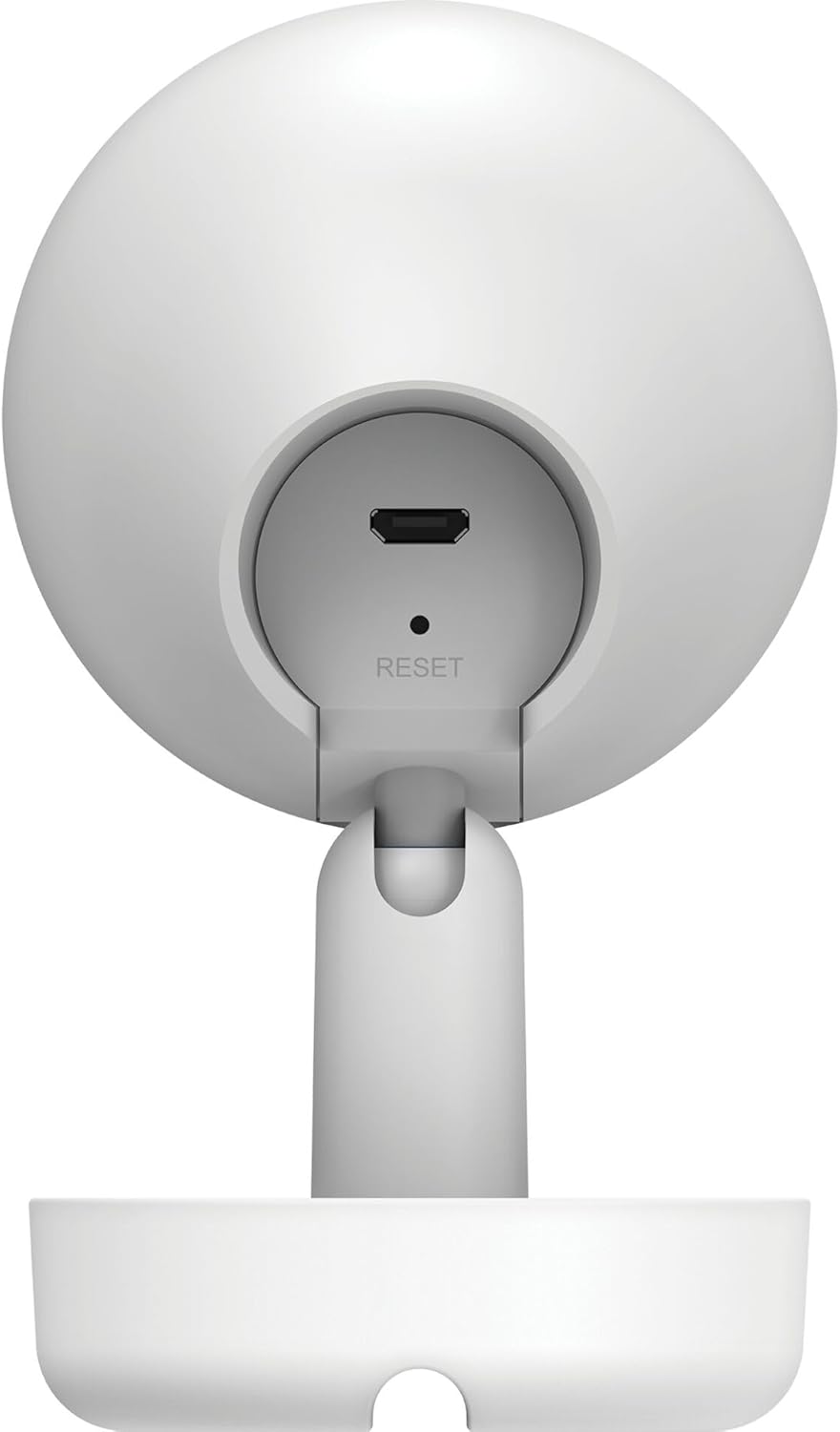
Figura 3.2: Wara View tal-Kamera
- 1. Micro USB Power Port: Tqabbad mal-adapter tal-enerġija.
- 2. Buttuna Irrisettja: Użat biex jirrestawra s-settings default tal-fabbrika.
- 3. Kelliem: Joħroġ awdjo għal komunikazzjoni f'żewġ direzzjonijiet.
- 4. MicroSD Card Slot: For local video storage (located on the side or bottom, not visible in this specific image, but mentioned in features).
4. Setup
Segwi dawn il-passi biex tissettja l-kamera D-Link DCS-8350LH tiegħek:
- Niżżel l-App mydlink: Fittex għal "mydlink" on the App Store (iOS) or Google Play (Android) and download the official mydlink app.
- Oħloq Kont mydlink: Open the app and follow the on-screen instructions to create a new mydlink account or log in if you already have one.
- Qawwa fuq il-Kamera: Connect the provided power adapter to the camera's Micro USB port and plug it into a power outlet. The status LED will begin to blink.
- Żid Apparat: In the mydlink app, tap the menu icon (usually three lines) and select "Add a Device". Scan the QR code located on the camera or its packaging.
- Qabbad mal-Wi-Fi: Follow the app's instructions to connect your camera to your home Wi-Fi network. Ensure your mobile device is connected to the same Wi-Fi network during setup.
- Pjazzament: Position your camera in the desired indoor location.

Figura 4.1: Camera and mydlink App Integration
5. Installazzjoni
The D-Link DCS-8350LH camera supports wall mounting for optimal placement.
- Agħżel Post: Agħżel post ġewwa b'dawl ċar view taż-żona li tixtieq timmonitorja u fil-firxa tan-netwerk Wi-Fi tiegħek.
- Wiċċ tal-Immuntar: Ensure the wall or surface is strong enough to support the camera.
- Sikura l-Bażi: Use appropriate screws and anchors (not included) to secure the camera's base to the chosen surface.
- Aġġusta Angolu: Once mounted, adjust the camera's angle to cover the desired viewing area. The camera has a 108-degree viewangolu tal-ing.
6. Istruzzjonijiet Operattivi
Once set up, you can access and control your camera using the mydlink app.
6.1. Ħaj View
Open the mydlink app and select your DCS-8350LH camera from the device list to view the live feed. The camera provides 2K QHD (1440p) resolution for clear images.
6.2. Viżjoni bil-Lejl bil-Kulur
The camera automatically switches to color night vision in low-light conditions, allowing you to see detailed color video even when it's dark.
6.3. AI-based Event Detection
The camera features intelligent detection capabilities:
- Sejbien tal-Persuna: Identifies human presence, reducing false alarms from pets or moving objects.
- Sejbien tal-Ħoss: Alerts you to specific sounds, including carbon monoxide and smoke alarm sounds.
Configure detection zones and sensitivity settings within the mydlink app to customize alerts.
6.4. Awdjo b'żewġ direzzjonijiet
Use the built-in microphone and speaker to communicate with people or pets near the camera. Tap the microphone icon in the live view within the mydlink app to speak.
6.5. Reġistrazzjoni u Ħażna tal-Vidjo
The DCS-8350LH offers multiple recording options:
- Karta MicroSD: Insert a microSD card (not included) into the camera's slot for local storage of recorded video clips.
- mydlink Cloud Recording: Utilize the mydlink Cloud service for secure off-site storage. Free and paid subscription plans are available.
- Smartphone Recording: Capture snapshots and video clips directly to your smartphone via the mydlink app.
7. Manutenzjoni
7.1. Tindif
To clean the camera, gently wipe the lens and exterior surfaces with a soft, dry cloth. Do not use liquid cleaners or abrasive materials.
7.2. Aġġornamenti tal-Firmware
Regularly check for firmware updates through the mydlink app. Keeping your camera's firmware up-to-date ensures optimal performance, security, and access to new features.
8 Issolvi l-problemi
If you encounter issues with your D-Link DCS-8350LH camera, refer to the following common solutions:
- Camera Offline / Wi-Fi Disconnection:
- Kun żgur li l-kamera tinsab fil-firxa tar-router Wi-Fi tiegħek.
- Check your Wi-Fi network status.
- Erġa' ibda l-kamera billi tneħħi u terġa' twaħħal l-adapter tal-enerġija.
- If the issue persists, try resetting the camera to factory defaults (see below) and re-adding it to the mydlink app.
- Kwalità Fqira tal-Vidjo:
- Kun żgur li l-lenti tal-kamera hija nadifa.
- Iċċekkja l-veloċità tal-konnessjoni tal-internet tiegħek. Konnessjoni stabbli u veloċi hija meħtieġa għal streaming 2K QHD.
- Adjust the camera's position to avoid glare or obstructions.
- Irrisettjar il-Kamera:
To restore the camera to its factory default settings, use a paperclip or a thin object to press and hold the recessed Irrisettja button (refer to Figure 3.2) for approximately 10 seconds while the camera is powered on. The status LED will change, indicating a reset. You will then need to reconfigure the camera through the mydlink app.
9. Speċifikazzjonijiet
| Karatteristika | Dettall |
|---|---|
| Isem tal-Mudell | DCS-8350LH |
| Riżoluzzjoni ta' Reġistrazzjoni tal-Vidjo | 1440p (2K QHD) |
| ViewIng Angolu | 108 Grad |
| Protokoll tal-Konnettività | Wi-Fi |
| Teknoloġija tal-Komunikazzjoni mingħajr Fili | Bluetooth (for initial setup) |
| Użu fuq ġewwa/barra | Ġewwa |
| Sors tal-Enerġija | Kurdun Elettriku |
| Konsum tal-Enerġija | 8 Watts |
| Fattur tal-Formola | Koppla |
| Tip ta 'Immuntar | Mount Wall |
| Materjal | Plastik |
| Dimensjonijiet tal-oġġett (L x W x H) | 6.67 x 6.57 x 11.14 ċm |
| Piż | 320 gramma |
| Komponenti Inklużi | Kamera ta' ġewwa |
| Tip ta' Kontrollur | Amazon Alexa |
10. Garanzija u Appoġġ
For warranty information, technical support, and further assistance, please visit the official D-Link website or contact D-Link customer service. Keep your purchase receipt as proof of purchase.
You can find the latest support resources, FAQs, and contact details at www.dlink.com.


