Introduzzjoni
This manual provides detailed instructions for the installation, operation, and maintenance of the GeoVision GV-FE5302 5MP H.264 WDR Fisheye IP Camera. The GV-FE5302 is an indoor fisheye camera designed for comprehensive surveillance, offering a wide field of view and advanced monitoring capabilities.
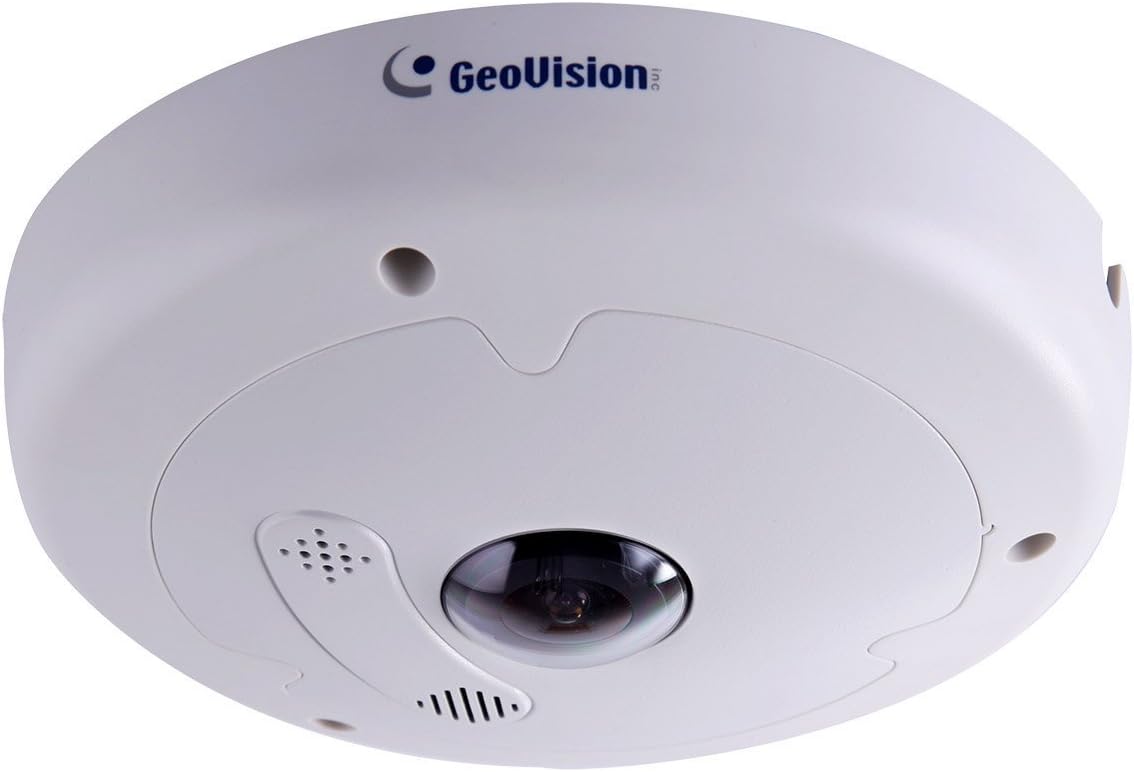
Immaġni: Quddiem view of the Geovision GV-FE5302 Fisheye IP Camera, showing its dome shape and central lens.
Karatteristiċi Ewlenin
- High Resolution Imaging: 1/2.5" progressive scan CMOS sensor, 5MP effective video resolution, up to 10 fps at 2560 x 1920.
- Streaming Doppju: Supports H.264 and MJPEG dual streams.
- Funzjonalità ta' Jum u Lejl: Equipped with a removable IR-cut filter for optimal performance in varying light conditions.
- Durabilità: Vandal resistance (IK10+ for metal casing).
- Qawwa fuq Ethernet (PoE+): IEEE 802.3at compliant for simplified installation.
- Ħażna Lokali: Built-in micro SD card slot (SD/SDHC) for local recording.
- Kapaċitajiet Awdjo: Built-in microphone and speaker for two-way audio.
- Medda Dinamika Wiesgħa (WDR): Enhances image quality in high-contrast lighting.
- Advanced Surveillance Features: Motion detection, privacy mask, alert notification, digital object tracking, defog, tampering alarm, virtual PTZ, auto pan function, visual automation, text overlay.
- Konnettività: ONVIF (Profile S) conformant, Wi-Fi support via Mini USB slot for WiFi Adapter.
- Flessibbli Viewing: Provides 360° and 180° panorama views, with different angles accessible by multiple users simultaneously.
Setup u Installazzjoni
The GV-FE5302 camera is designed for indoor use and can be mounted on ceilings or walls. Ensure proper power and network connectivity during installation.
1. Għażliet ta 'Immuntar
The camera supports both ceiling and wall mounting. Choose a location that provides the desired field of view u jkun qrib ħafna ta' konnessjonijiet tal-enerġija u tan-netwerk.
- Muntaġġ tas-saqaf: Ideal for 360° panoramic views of a room.
- Muntaġġ tal-ħajt: Suitable for 180° panoramic views along a wall.

Image: Geovision GV-FE5302 camera mounted on a ceiling, providing an overhead view.

Image: Geovision GV-FE5302 camera mounted on a wall, capturing a wide horizontal view.
2. Konnessjoni tal-Enerġija u tan-Netwerk
The camera supports Power over Ethernet Plus (PoE+, IEEE 802.3at), allowing both power and data to be transmitted over a single Ethernet cable. Alternatively, it can be powered via an AC/DC adapter (not included) and connected to a network via Ethernet or Wi-Fi (using a compatible Wi-Fi adapter in the Mini USB slot).
- Connect an Ethernet cable from a PoE+ enabled switch or injector to the camera's Ethernet port.
- If not using PoE+, connect a compatible AC/DC power adapter to the camera's power input and an Ethernet cable to a network switch or router.
- For Wi-Fi connectivity, insert a compatible Wi-Fi adapter into the Mini USB slot and configure network settings via the web interface.
3. Konfigurazzjoni Inizjali
Aċċessa l-kamera web interface bl-użu ta' a web browser. Refer to the GeoVision documentation for default IP addresses and login credentials. From the web interface, you can configure network settings, video parameters, motion detection zones, and other advanced features.
It-tħaddim tal-Kamera
The GV-FE5302 offers versatile monitoring options through its web interface and integration with GV-System software.
1. Fisheye De-warping and ViewModi
The camera captures a hemispherical fisheye image, which can be de-warped into conventional rectilinear projections for easier viewing. Multiple viewIl-modi ta' ing huma disponibbli:
- Fisheye Source Image: The raw, undistorted hemispherical view maqbuda mill-kamera.
- Uniku View: A de-warped, rectilinear view focusing on a specific area.
- 180° Panorama View: A wide, horizontal view, typically used when the camera is wall-mounted.
- 360° Panorama View: A full circular panoramic view, ideal for ceiling-mounted cameras.
- Quad View: Divides the screen into four sections, each showing a different de-warped perspective.
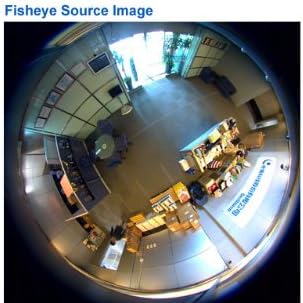
Immaġni: Eżample of the raw fisheye source image captured by the camera, showing a wide, circular field of view.

Image: A de-warped single view, focusing on a specific area within the camera's field of vision.

Image: A de-warped 180-degree panoramic view, suitable for monitoring along a wall.
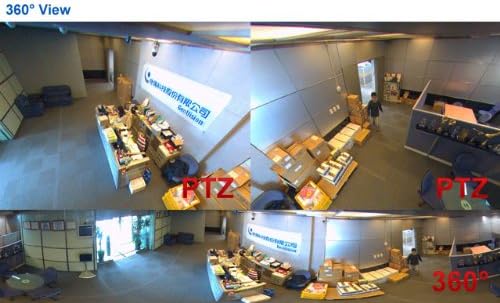
Image: A de-warped 360-degree panoramic view, providing a complete overview of a circular area.
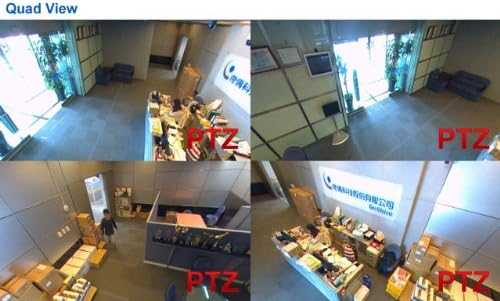
Image: A quad view display, showing four different de-warped perspectives simultaneously from the fisheye camera.
2. Funzjonijiet Avvanzati
- Virtual PTZ: Pan, Tilt, and Zoom digitally within the fisheye image without mechanical movement.
- Auto Pan: Configure the camera to automatically cycle through different viewangoli.
- Sejbien tal-Moviment: Set up detection zones to trigger recording or alerts when movement is detected.
- Maskra tal-Privatezza: Mask out specific areas within the camera's view to protect privacy.
- Notifika ta' Twissija: Receive notifications via email or other methods when events like motion detection or tampering alarms are triggered.
- Awdjo f'żewġ direzzjonijiet: Utilize the built-in microphone and speaker for communication.
Manutenzjoni
Regular maintenance ensures optimal performance and longevity of your GV-FE5302 camera.
- Tindif: Gently clean the camera lens and housing with a soft, dry cloth. Avoid abrasive cleaners.
- Aġġornamenti tal-Firmware: Periodically check the GeoVision website for firmware updates to ensure the camera has the latest features and security patches.
- Sigurtà tan-Netwerk: Ensure your network is secure and change default passwords for the camera's web interface.
- Kundizzjonijiet Ambjentali: Operate the camera within its specified temperature and humidity ranges.
Issolvi l-problemi
This section addresses common issues you might encounter with the GV-FE5302 camera.
- L-ebda Feed tal-Vidjo:
- Check power connection and ensure the camera is receiving power (PoE+ or AC/DC adapter).
- Verify network cable connection and ensure the network is operational.
- Confirm the camera's IP address and network settings are correct.
- Restart the camera and the network switch.
- Kwalità Fqira tal-Immaġni:
- Clean the camera lens for any dust or smudges.
- Check lighting conditions; ensure sufficient illumination or proper WDR settings.
- Adjust video resolution and frame rate settings in the web interface.
- Ma nistax naċċessa Web Interface:
- Ensure your computer is on the same network segment as the camera.
- Verify the camera's IP address.
- Disable any firewall or antivirus software temporarily to check for interference.
- Try resetting the camera to factory defaults (refer to GeoVision documentation for procedure).
Speċifikazzjonijiet
| Karatteristika | Dettall |
|---|---|
| Numru tal-Mudell | GV-FE5302 |
| Sensor tal-Immaġni | 1/2.5" progressive scan CMOS |
| Riżoluzzjoni tal-Vidjo Effettiva | 5 MP (2560 x 1920) |
| Frame Rata | Sa 10 fps f'2560 x 1920 |
| Kompressjoni tal-vidjo | H.264, MJPEG |
| Teknoloġija tal-Konnettività | Wireless (Wi-Fi via USB), Wired (Ethernet) |
| Protokoll tal-Konnettività | ONVIF (Profile S), Wi-Fi |
| Sors tal-Enerġija | PoE+ (IEEE 802.3at), AC/DC |
| Tip ta 'Immuntar | Muntatura tal-Limitu, Muntatura tal-Ħajt |
| Qasam ta View | 360 Degrees (Fisheye) |
| Ħażna Lokali | Built-in micro SD card slot (SD/SDHC) |
| Awdjo | Built-in microphone and speaker (Two-way audio) |
| Karatteristiċi Speċjali | Motion Sensor, WDR, Defog, Tampering Alarm, Virtual PTZ, Auto Pan, Privacy Mask, Digital Object Tracking |
| Reżistenza vandali | IK10+ (for metal casing) |
| Klassifikazzjoni tal-Protezzjoni Internazzjonali | IP67 |
| Materjal | Metall |
| Dimensjonijiet (L x W x H) | 6.6 x 1.9 x 6.6 pulzieri |
| Piż tal-oġġett | 2.4 Liri |
Garanzija u Appoġġ
For warranty information, please refer to the official GeoVision warranty policy available on their website or contact your authorized GeoVision dealer. Technical support and additional resources can be found on the GeoVision official support portal.
Manifattur: GeoVision
Data L-Ewwel Disponibbli: 25 ta’ Settembru, 2014


