1. Introduzzjoni
This instruction manual provides essential information for the proper installation, operation, and maintenance of your Intel Core i7-5820K Desktop Processor. Please read this manual thoroughly before proceeding with installation to ensure optimal performance and system stability. This processor is designed for high-performance desktop computing, offering advanced multi-core processing capabilities.
2. Prodott Aktarview
The Intel Core i7-5820K is a high-performance desktop processor featuring 6 cores and 12 threads, enabled by Intel's Hyper-Threading Technology. It operates at a base clock speed of 3.3GHz and includes 15MB of Intel Smart Cache. This processor is part of the Intel Haswell-E family and is designed for the LGA2011-v3 socket on X99 chipset motherboards. It supports DDR4 memory, providing a robust foundation for demanding applications, gaming, and content creation.

Figure 2.1: Intel Core i7-5820K Processor Retail Box. This image displays the packaging for the Intel Core i7-5820K processor, highlighting its branding and key features.
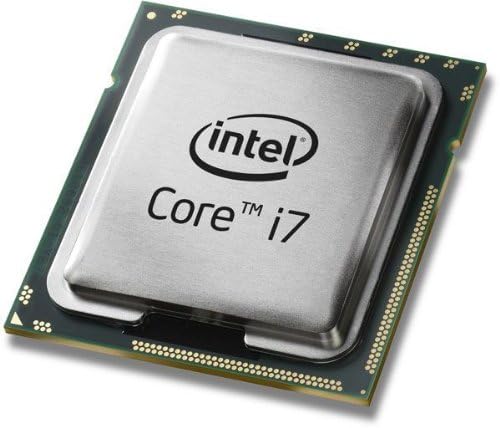
Figure 2.2: Intel Core i7-5820K Processor Top View. This image shows the top surface of the processor, featuring the Intel Core i7 branding.
3. Karatteristiċi
- 6 Qlub / 12 Ħjut: Enhanced multitasking and parallel processing capabilities.
- Teknoloġija Intel Hyper-Threading: Allows each processor core to work on two tasks simultaneously, improving overall performance.
- Intel Smart Cache: Dynamically allocates shared cache to each processor core based on workload, significantly reducing latency to frequently used data.
- Intel Quick Path Interconnect (QPI): High-speed point-to-point interconnect for improved system performance.
- Integrated Memory Controller: Supports DDR4-2133 memory for faster data access.
- Intel HD Boost: Enhances performance for multimedia and data-intensive applications.
- Turbo Boost Technology 2.0: Dynamically increases the processor's frequency as needed by taking advantage of thermal and power headroom.
- Proċessur Miftuħ: Allows for overclocking to achieve higher performance (requires compatible motherboard and cooling).
4. Setup u Installazzjoni
Installing a processor requires careful handling and adherence to specific procedures. It is recommended that installation be performed by a qualified technician. Ensure your motherboard is compatible with the LGA2011-v3 socket and X99 chipset, and supports DDR4 memory.
4.1. Qabel ma Tibda
- Kontroll tal-Kompatibbiltà: Verify that your motherboard supports the Intel Core i7-5820K processor (LGA2011-v3 socket, X99 chipset).
- Itfi: Always disconnect the power supply from the wall outlet before opening your computer case.
- Kwittanza Statika: Ilbes ċinga tal-polz anti-statika jew tmiss ta' spiss oġġett tal-metall ertjat biex tevita ħsara minn skarika elettrostatika (ESD).
- Soluzzjoni tat-Tkessiħ: This processor is sold as "CPU Only" and does not include a stock cooler. A high-quality aftermarket CPU cooler (air or liquid) is required for proper operation and thermal management.
- Pejst Termali: Have thermal paste ready, as it is essential for efficient heat transfer between the CPU and the cooler.
4.2. Passi tal-Installazzjoni tal-Proċessur
- Iftaħ is-Sokit tas-CPU: Locate the CPU socket on your motherboard. Carefully open the socket retention mechanism by pushing down and out on the lever(s).
- Orient the Processor: Align the triangular gold arrow on the corner of the processor with the corresponding mark on the CPU socket. Ensure the notches on the processor align with the keys in the socket.
- Daħħal il-Proċessur: Gently place the processor straight down into the socket. Do not force it. If it does not seat easily, re-check the alignment.
- Agħlaq is-Sokit tas-CPU: Close the socket retention mechanism by pushing the lever(s) back into place until they click.
- Applika Pejst Termali: Apply a small amount of thermal paste (typically a pea-sized dot) to the center of the CPU's integrated heat spreader (IHS).
- Installa l-Cooler tas-CPU: Follow the instructions provided with your aftermarket CPU cooler to properly install it onto the motherboard, ensuring firm and even contact with the CPU. Connect the cooler's fan cable to the designated CPU_FAN header on the motherboard.

Figure 4.1: Intel Core i7-5820K Processor Angled View. This image provides an angled perspective of the processor, showing its metallic heat spreader and green substrate.
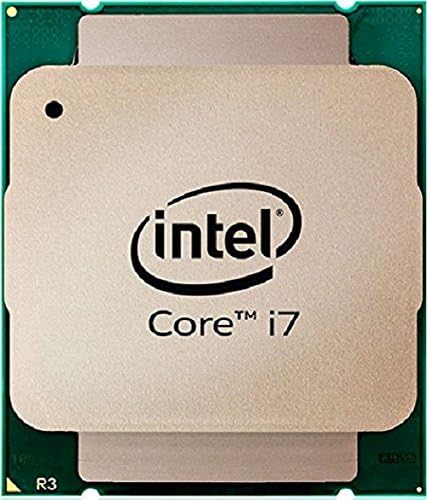
Figure 4.2: Intel Core i7-5820K Processor Bottom View. This image displays the underside of the processor, showing the contact pads that interface with the motherboard socket.
5. It-Tħaddim tal-Proċessur
Once installed, the Intel Core i7-5820K processor operates automatically within your system. Its performance is managed by the operating system and motherboard BIOS/UEFI settings.
5.1. Użu Ġenerali
- The processor will dynamically adjust its clock speed and power consumption based on workload, utilizing Intel Turbo Boost Technology 2.0 for peak performance when needed.
- Ensure your operating system and drivers (especially chipset drivers) are up to date for optimal performance and stability.
- For multi-GPU configurations (SLI/CrossFire), be aware that the i7-5820K provides 28 PCIe lanes. While sufficient for many setups, high-end multi-GPU configurations or extensive PCIe storage might benefit from processors with 40 lanes.
5.2. Overclocking (Utenti Avvanzati)
The Intel Core i7-5820K is an unlocked processor, allowing for overclocking to achieve higher clock speeds. Overclocking can increase performance but also generates more heat and may void your warranty if not done correctly. Proceed with caution and at your own risk.
- Rekwiżiti: Overclocking requires a compatible X99 motherboard with robust power delivery, an effective high-performance cooling solution, and adequate power supply.
- Is-Settings tal-BIOS/UEFI: Adjust CPU core ratio, voltage, and other parameters within your motherboard's BIOS/UEFI interface.
- Monitoraġġ: Use reliable software to monitor CPU temperature and stability during and after overclocking.
- Ittestjar ta' Stabbiltà: Thoroughly test system stability with stress testing software after any overclocking adjustments.
6. Manutenzjoni
The Intel Core i7-5820K processor itself requires minimal maintenance. However, maintaining the overall system environment is crucial for its longevity and performance.
- Tneħħija tat-Trab: Regularly clean your computer case and CPU cooler to prevent dust buildup, which can impede airflow and lead to higher temperatures. Use compressed air for this purpose.
- Pejst Termali: Over several years, thermal paste can dry out and become less effective. If you notice consistently high CPU temperatures, consider reapplying fresh thermal paste. This involves carefully removing the CPU cooler, cleaning off old paste, and applying new paste.
- Aġġornamenti tas-Sistema: Keep your operating system, motherboard BIOS/UEFI, and drivers updated to ensure compatibility and access to performance improvements or bug fixes.
7 Issolvi l-problemi
If you encounter issues with your system after installing the processor, consider the following troubleshooting steps:
- Ebda Qawwa/Ebda Wiri:
- Kun żgur li l-kejbils tal-enerġija kollha (24-pin ATX, 8-pin CPU) huma konnessi sew mal-motherboard.
- Verify that the CPU is correctly seated in its socket and the retention mechanism is fully closed.
- Iċċekkja li l-moduli tar-RAM huma mqiegħda sew fis-slots tagħhom.
- Consult your motherboard manual for POST (Power-On Self-Test) codes or diagnostic LEDs, which can indicate specific hardware issues.
- Instabbiltà/Ħsarat tas-Sistema:
- Monitor CPU temperatures using software. High temperatures can lead to throttling or crashes. Ensure your CPU cooler is properly installed and functioning.
- Jekk ikun hemm overclocking, erġa' lura għas-settings default tal-BIOS biex teskludi l-overclocking bħala l-kawża.
- Mexxi għodod dijanjostiċi tal-memorja biex tiċċekkja għal problemi fir-RAM.
- Prestazzjoni Fqira:
- Ensure your operating system power plan is set to "High Performance."
- Verify that all drivers, especially chipset drivers, are installed and up to date.
- Check for background applications consuming excessive CPU resources.
If issues persist, consult your motherboard's support resources or Intel's official support channels.
8. Speċifikazzjonijiet
| Karatteristika | Speċifikazzjoni |
|---|---|
| Mudell tal-Proċessur | Intel Core i7-5820K |
| Numru tal-Mudell tal-Oġġett | BX80648I75820K |
| Qlub | 6 |
| Ħjut | 12 |
| Veloċità tal-Arloġġ Bażiku | 3.3 GHz |
| Frekwenza Turbo Max | 3.6 GHz |
| Cache | 15 MB Intel Smart Cache |
| Tip ta ’sokit | LGA2011-v3 |
| Memory Types Supported | DDR4-2133 |
| Max Memory Channels | 4 |
| Korsiji PCIe | 28 |
| Qawwa tad-Disinn Termali (TDP) | 140 W |
| Grafika tal-proċessur | None (Requires discrete graphics card) |
| Dimensjonijiet tal-Prodott (LxWxH) | 5.5 x 5.5 x 2 pulzieri |
| Piż tal-oġġett | 4.8 uqija |
| Data L-Ewwel Disponibbli | 29 ta’ Awwissu, 2014 |
9. Garanzija u Appoġġ
For detailed warranty information, please refer to Intel's official website or the warranty documentation included with your purchase. Intel provides technical support for its products.
9.1. Ċaħda Legali
Please note that a 15% restocking fee may apply if the product is opened or used. A 10-day return policy is typically in effect. Review the specific terms and conditions of your retailer at the time of purchase.
9.2. Ikkuntattja l-Appoġġ
For technical assistance, driver downloads, or further product information, visit the official Intel support websit:


