1. Introduzzjoni
This manual provides detailed instructions for the installation, operation, and maintenance of your Azurewave AW-NB041 WiFi and Bluetooth PCIe Mini-Card. This highly integrated wireless local area network (WLAN) solution allows users to enjoy digital content through the latest wireless technology without the need for extra cables. It combines Bluetooth 3.0 HS class II and provides a complete 2.4GHz Bluetooth system, fully compliant with Bluetooth 3.0 HS and v2.1, supporting EDR of 2Mbps and 3Mbps for data and audio communications.
The AW-NB041H module is designed for high performance, cost-effectiveness, and low power consumption, fitting easily into a PCI Express and USB Combo Half Mini Card slot.
2. Karatteristiċi tal-prodott
- Compliant with IEEE 802.11n standard for reliable wireless connectivity.
- Supports 1 (Transmit) x 1 (Receive) technology for WiFi.
- Antenna configuration: Main antenna for WiFi 1T x 1R and Bluetooth TX/RX; Auxiliary antenna for Bluetooth TX/RX and WiFi TX/RX.
- High-speed wireless connection up to 150Mbps.
- Low power consumption and high performance design.
- Enhanced wireless security features.
- Fully qualified Bluetooth v3.0+HS.
- Full-speed operation with Piconet and Scatternet support.
- Electrical compliance to USB1.1 & 2.0 through a proprietary 10-Pin Connector.
- Utilizes Direct Sequence Spread Spectrum (DSSS), Orthogonal Frequency Division Multiplexing (OFDM), BPSK, QPSK, CCK, and QAM baseband modulation technologies.
- Integrated Ralink RT3090 with CSR BC04 solution.
3. Informazzjoni dwar is-Sigurtà
- Importanti: The Vcc (supply voltage) for this module is 3.3V. Applying 5V is not allowed and will damage the device.
- Always handle electronic components with care to avoid electrostatic discharge (ESD). Use an anti-static wrist strap if available.
- Kun żgur li l-kompjuter tiegħek ikun mitfi u skonnettjat mill-plagg tal-ħajt qabel l-installazzjoni.
- Refer to your computer's manufacturer manual for specific instructions on opening the chassis and accessing internal components.
- Żomm il-modulu 'l bogħod mill-umdità u minn temperaturi estremi.
4. Kontenut tal-Pakkett
The package should contain the following item:
- 1 x Azurewave AW-NB041 WiFi and Bluetooth PCIe Mini-Card
Note: Drivers and installation software are typically provided by your operating system or can be downloaded from the manufacturer's websit.
5. Setup u Installazzjoni
Follow these steps to install the AW-NB041 PCIe Mini-Card into your compatible device:
- Ipprepara s-Sistema Tiegħek: Power off your computer completely and disconnect the power cord. If it's a laptop, remove the battery.
- Xażi Miftuħa: Carefully open your computer's chassis or access panel to expose the internal components. Refer to your computer's manual for specific instructions.
- Locate PCIe Mini-Card Slot: Identify an available half-size PCIe Mini-Card slot on your motherboard.
- Installa l-Karta: Gently insert the AW-NB041 card into the PCIe Mini-Card slot at an angle. Once seated, push down the card until it clicks into place or secure it with the retaining screw (if applicable).
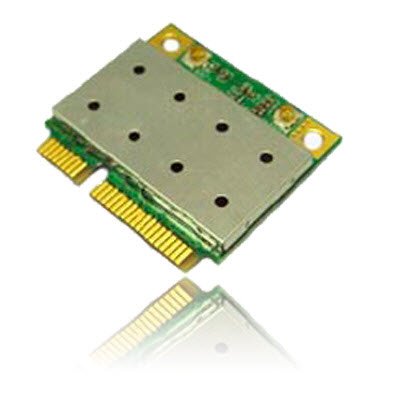
Image of the Azurewave AW-NB041 PCIe Mini-Card, showing its compact form factor and connectors.
- Qabbad l-antenni: If your system has internal antennas, carefully connect them to the appropriate connectors on the AW-NB041 card (Main for WiFi/BT, Aux for BT/WiFi).
- Xażi mill-qrib: Reassemble your computer's chassis and reconnect the power cord/battery.
- Installa Sewwieqa: Power on your computer. Your operating system may automatically detect and install the necessary drivers. If not, download the latest drivers for the Ralink RT3090 (for WiFi) and CSR BC04 (for Bluetooth) chipsets from the Azurewave support website or your computer manufacturer's websit.
6. Istruzzjonijiet Operattivi
6.1. Konnessjoni ma' Netwerk WiFi
- Ensure the WiFi function is enabled in your operating system settings.
- Click on the WiFi icon in your system tray (Windows) or menu bar (macOS/Linux).
- Agħżel in-netwerk WiFi mixtieq tiegħek mil-lista ta' netwerks disponibbli.
- Daħħal iċ-ċavetta tas-sigurtà tan-netwerk (password) jekk tintalab.
- Click 'Connect'. Your device should now be connected to the WiFi network.
6.2. It-tqabbil ta' apparati Bluetooth
- Kun żgur li l-Bluetooth huwa attivat fis-settings tas-sistema operattiva tiegħek.
- Put your Bluetooth device (e.g., headphones, mouse, keyboard) into pairing mode. Refer to your device's manual for specific instructions.
- On your computer, go to Bluetooth settings (e.g., 'Bluetooth & other devices' in Windows, 'Bluetooth' in macOS).
- Click 'Add Bluetooth or other device' or similar option.
- Select your Bluetooth device from the list and follow the on-screen prompts to complete the pairing process.
7. Manutenzjoni
The AW-NB041 module is designed for long-term reliability with minimal maintenance. However, consider the following general guidelines:
- Żomm Nadif: Periodically clean the interior of your computer to prevent dust buildup, which can affect performance and cooling.
- Aġġornamenti tas-sewwieq: Ensure your WiFi and Bluetooth drivers are kept up-to-date. Check the Azurewave support website or your computer manufacturer's websit għall-aħħar verżjonijiet.
- Kundizzjonijiet Ambjentali: Operate the device within recommended temperature and humidity ranges to ensure optimal performance and longevity.
8 Issolvi l-problemi
8.1. No WiFi or Bluetooth Connection
- Iċċekkja l-Installazzjoni Fiżika: Ensure the card is properly seated in its slot and any antennas are securely connected.
- Ivverifika s-Sewwieqa: Confirm that the correct WiFi (Ralink RT3090) and Bluetooth (CSR BC04) drivers are installed and up-to-date in your operating system's Device Manager.
- Ippermetti l-Wireless: Make sure WiFi and Bluetooth are enabled in your operating system settings and any physical switches on your computer.
- Ibda mill-ġdid: Reboot il-kompjuter tiegħek.
8.2. Slow WiFi Speed
- Qawwa tas-Sinjal: Ensure you are within good range of your WiFi router.
- Interferenza: Imminimizza l-interferenza minn apparati elettroniċi oħra (eż., microwaves, telefowns mingħajr fili).
- Settings tal-router: Check your router's settings for optimal channel selection and 802.11n mode.
- Aġġornament tas-sewwieq: Update your WiFi drivers to the latest version.
8.3. Kwistjonijiet ta' Tqabbil tal-Bluetooth
- Apparat fil-Modalità ta' Tqabbil: Confirm your Bluetooth device is in discoverable/pairing mode.
- Firxa: Ensure the Bluetooth device is close to your computer.
- Neħħi l-Koppji Eżistenti: If the device was previously paired, remove it from your computer's Bluetooth settings and try pairing again.
- Aġġornament tas-sewwieq: Update your Bluetooth drivers to the latest version.
9. Speċifikazzjonijiet
| Karatteristika | Speċifikazzjoni |
|---|---|
| Numru tal-Mudell | AW-NB041 |
| Manifattur | Azurewave |
| Fattur tal-Formola | PCIe MiniCard (HalfSize) |
| Interface tal-Ħardwer | PCI-Express, USB (via 10-Pin Connector) |
| Apparati Kompatibbli | Desktop (with compatible PCIe Mini-Card slot) |
| WiFi Standard | IEEE 802.11b/g/n |
| Bluetooth Standard | Bluetooth v3.0+HS, v2.1+EDR |
| Data Transfer Rate (WiFi) | Sa 150 Mbps |
| Data Transfer Rate (Bluetooth) | 2Mbps (EDR), 3Mbps (EDR) |
| Chipset | Ralink RT3090 (WiFi), CSR BC04 (Bluetooth) |
| Antenna Support | 1T1R (WiFi), TX/RX (Bluetooth) |
| Provvista Voltage (Vcc) | 3.3V (Do not use 5V) |
10. Garanzija u Appoġġ
For warranty information and technical support, please refer to the documentation provided with your purchase or visit the official Azurewave websit. Tista' wkoll tikkuntattja lill-bejjiegħ direttament għall-għajnuna.
Please have your product model number (AW-NB041) and purchase details ready when contacting support.


