Introduzzjoni
This manual provides essential instructions for the safe and efficient operation of your Yamaha HTR-2067 5.1 Channel AV Receiver. Please read this manual thoroughly before using the unit to ensure proper setup and performance. Keep this manual in a safe place for future reference.
Informazzjoni dwar is-Sigurtà
- Sors tal-Enerġija: Qabbad l-unità biss ma' sokit tal-AC tal-volumtage speċifikat fuq il-pannell ta 'wara.
- Ventilazzjoni: Aċċerta ruħek li jkun hemm ventilazzjoni adegwata. Timblokkax il-fetħiet tal-ventilazzjoni.
- Ilma u Umdità: Tesponix l-unità għax-xita jew għall-umdità. Tpoġġix oġġetti mimlija b'likwidi fuq l-unità.
- Oġġetti Barranin: Ddaħħalx oġġetti barranin fil-fetħiet tal-unità.
- Servizzi: Tippruvax tagħmel manutenzjoni fuq din l-unità int stess. Irreferi għal kull manutenzjoni għand persunal tas-servizz kwalifikat.
- Impedenza tal-Ispeaker: Ensure connected speakers have an impedance of 6 ohms or higher. Refer to the "CAUTION: SEE INSTRUCTION MANUAL FOR CORRECT SETTING" label near the speaker terminals.
Setup
Il-Panew ta 'wara Matulview
The following image illustrates the rear panel of the Yamaha HTR-2067 receiver, highlighting various connection points for audio, video, and speakers.
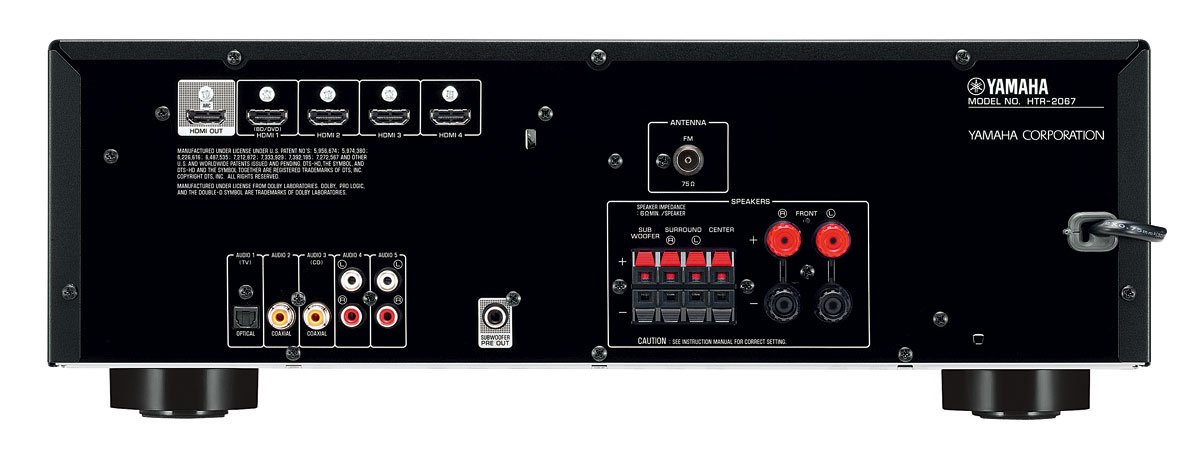
Figure 1: Rear Panel of Yamaha HTR-2067 AV Receiver
1. Spakkjar
Carefully remove the receiver and all accessories from the packaging. Retain the packaging materials for future transport or storage.
2. Konnessjoni tal-Ispeakers
Connect your speakers to the corresponding terminals on the rear panel. Ensure correct polarity (+ to + and - to -) for each speaker. The HTR-2067 supports a 5.1 channel setup.
- Kelliema ta' Quddiem (X/L): Qabbad mat-terminals "FRONT".
- Kelliem taċ-Ċentru: Qabbad mat-terminal "ĊENTRU".
- Kelliema Surround (X/R): Qabbad mat-terminals "SURROUND".
- Subwoofers: Connect a powered subwoofer to the "SUBWOOFER PRE OUT" RCA jack.
Refer to the speaker impedance warning on the rear panel, which states "SPEAKER IMPEDANCE 6Ω MIN / SPEAKER".
3. Konnessjoni ta' Apparati Awdjo/Vidjo
Use the appropriate cables to connect your source devices (e.g., Blu-ray player, game console, TV) to the receiver.
- Konnessjonijiet HDMI:
- HDMI OUT (ARC): Connect to your TV's HDMI input (preferably one supporting ARC for audio return).
- HDMI 1 (BD/DVD), HDMI 2, HDMI 3, HDMI 4: Connect your video source devices here.
- Konnessjonijiet Awdjo Diġitali:
- OPTICAL (AUDIO 1 (TV)): For optical digital audio from a TV or other device.
- COAXIAL (AUDIO 2): For coaxial digital audio from a CD player or other device.
- Konnessjonijiet Awdjo Analoġiċi:
- AUDIO 3 (CD), AUDIO 4, AUDIO 5: For analog audio devices using RCA cables.
4. Konnessjoni tal-Antenni
For FM radio reception, connect the supplied FM antenna to the "ANTENNA FM 75Ω" terminal on the rear panel.
5. Konnessjoni tal-Enerġija
After all other connections are made, plug the power cord into an AC wall outlet.
Istruzzjonijiet Operattivi
1. Power On/Off
Agħfas il- QAWWA button on the front panel or remote control to turn the receiver on or off.
2. Għażla tal-Input
Select the desired input source using the input selector buttons on the front panel or the remote control. For example, agħfas BD / DVD for a Blu-ray player connected to HDMI 1.
Il- XENA buttons (BD/DVD, TV, CD, Radio) provide one-touch power-on and input selection, along with pre-set sound programs.
3. Aġġustament tal-Volum
Adjust the master volume using the large knob on the front panel or the VOLUM +/- buttuni fuq il-kontroll remot.
4. Sound Modes (CINEMA DSP)
The HTR-2067 features CINEMA DSP with 17 DSP programs. Use the PROGRAMM buttons on the remote control to cycle through different sound fields and enhance your listening experience.
5. Modalità ECO
Activate the ECO mode to reduce power consumption by approximately 20%. This setting can be toggled via the remote control or system menu.
Manutenzjoni
- Tindif: Wipe the unit with a soft, dry cloth. Do not use chemical cleaners or abrasive materials.
- Ventilazzjoni: Iċċekkja perjodikament li l-fetħiet tal-ventilazzjoni mhumiex imxekkla bit-trab jew bil-fdalijiet.
- Korda tal-Enerġija: Spezzjona l-korda tad-dawl regolarment għal kwalunkwe ħsara.
Issolvi l-problemi
| Problema | Kawża Possibbli | Soluzzjoni |
|---|---|---|
| Ebda qawwa | Il-korda tal-enerġija skonnettjata; l-unità tinsab fil-modalità standby. | Ensure power cord is securely plugged in; press POWER button. |
| L-ebda ħoss | Incorrect input selected; speakers not connected; volume too low; mute activated. | Select correct input; check speaker connections; increase volume; deactivate mute. |
| Ebda video | Incorrect input selected; HDMI cable loose or faulty; TV input incorrect. | Select correct input; check HDMI connections; ensure TV is on correct input. |
| Riċeviment ħażin tar-radju | L-antenna mhix imqabbda jew pożizzjonata ħażin. | Connect FM antenna; adjust antenna position for better reception. |
Jekk il-problema tippersisti, ikkonsulta tekniku tas-servizz kwalifikat.
Speċifikazzjonijiet
| Karatteristika | Dettall |
|---|---|
| Brand | Yamaha |
| Mudell | HTR-2067 |
| Kanali | 5.1 Channel Surround Sound |
| Pass-through 4K | Yes (4K 24/30p) |
| DSP Programs | CINEMA DSP (17 programs) |
| Mod ECO | Yes (approx. 20% less power consumption) |
| Konnettività | HDMI, Optical, Coaxial, Analog RCA, FM Antenna |
| Impedenza tal-Ispeaker | 6 ohms minimu |
| Piż tal-oġġett | 8.72 kg |
| Dimensjonijiet (madwar) | 55.7 x 41.4 x 22.4 ċm (Dimensjonijiet tal-Pakkett) |
Garanzija u Appoġġ
Għal informazzjoni dwar il-garanzija u appoġġ għall-klijenti, jekk jogħġbok irreferi għall-karta tal-garanzija inkluża mal-prodott tiegħek jew żur is-sit uffiċjali ta' Yamaha. websit. Żomm l-irċevuta tax-xiri tiegħek bħala prova tax-xiri.
For technical assistance or service inquiries, contact your authorized Yamaha dealer or service center.


