1. Introduzzjoni
The Mastech MS2115A is a professional-grade digital clamp meter designed for accurate measurement of DC/AC current, DC/AC voltage, resistance, capacitance, frequency, and duty cycle. It features True RMS for AC measurements, a built-in Non-Contact Voltage (NCV) detector, diode check, continuity test, and a reading hold function. This manual provides essential information for safe and effective operation of your MS2115A clamp metru.
2. Informazzjoni dwar is-Sigurtà
Please read and understand all safety information before operating this device. Failure to follow these instructions may result in electric shock, fire, or damage to the meter.
- Always ensure the meter is in the correct function mode before making measurements.
- Applikax voltage or current that exceeds the maximum rated limits of the meter.
- Oqgħod attent ħafna meta taħdem ma' ċirkwiti ħajjin. Volum għolitages can be lethal.
- Spezzjona l-wajers tat-test għal ħsara qabel kull użu. Tużax jekk l-insulazzjoni tkun kompromessa.
- Tħaddimx il-miter jekk jidher li għandu l-ħsara jew jekk il-kaxxa tkun miftuħa.
- Ibdel il-batteriji immedjatament meta jidher l-indikatur ta' batterija baxxa biex tiżgura qari preċiż.
- Aderixxi mal-kodiċijiet tas-sigurtà lokali u nazzjonali.
3. Karatteristiċi tal-prodott
The Mastech MS2115A clamp meter offers a range of advanced features for electrical testing:
- LCD with 5999 counts for precise readings.
- Jaw size up to ϕ40mm (1.6 inches) for large conductors.
- DC/AC current measurement up to 1000A.
- Tests AC/DC voltage, current, resistance, capacitance, frequency, and duty cycle.
- Built-in Mhux Kuntatt Voltage (NCV) detector for live wire detection without physical contact.
- True RMS for accurate AC voltage and AC current measurements of non-sinusoidal waveforms.
- Work light for illumination in dimly lit areas.
- Auto power off function to conserve battery life.
- Diode check and continuity test with audible buzzer.
- Reading hold function to freeze the displayed measurement.
4. Prodott Aktarview
Familiarize yourself with the components of your Mastech MS2115A clamp metru.

Figura 4.1: Quddiem View of Mastech MS2115A Clamp Metru. This image displays the front of the Mastech MS2115A Digital Clamp Meter, highlighting its large LCD screen, rotary dial for function selection, clamp jaw, and input terminals. Key buttons such as RANGE, HZ%, MAX/MIN, REL, and HOLD are visible, along with the Mastech branding.
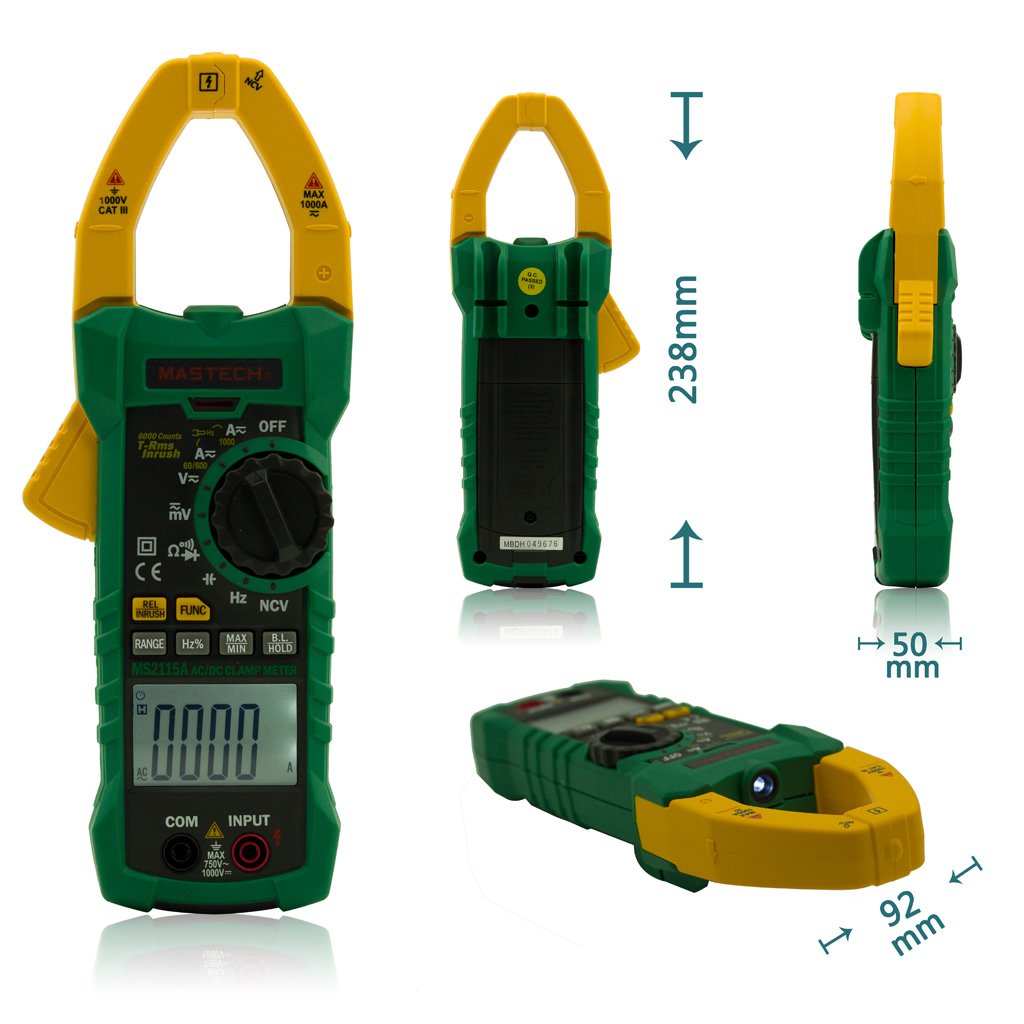
Figure 4.2: Mastech MS2115A Clamp Meter Dimensions. This image provides multiple views of the Mastech MS2115A, including front, back, side, and bottom angles, with measurements indicating its approximate height (238mm), width (92mm), and thickness (50mm). This helps users understand the physical size and form factor of the device.

Figure 4.3: Mastech MS2115A Clamp Meter Package Contents. This image shows the complete contents included with the Mastech MS2115A clamp meter. It features the clamp meter itself, a pair of red and black test leads, a carrying case, and a user manual. Please note that the 9V battery is typically not included and must be purchased separately.
5. Setup
5.1 Installazzjoni tal-batterija
The Mastech MS2115A requires a 9V battery for operation. Please note that the battery is typically not included in the package and must be purchased separately.
- Kun żgur li l-miter ikun MITFI.
- Sib l-għatu tal-kompartiment tal-batterija fuq wara tal-miter.
- Uża tornavit biex tħoll il-vit(i) li jassiguraw l-għatu tal-batterija.
- Neħħi l-għatu tal-batterija.
- Qabbad batterija ġdida ta' 9V mal-klipps tal-batterija, filwaqt li tosserva l-polarità korretta.
- Poġġi l-batterija fil-kompartiment.
- Erġa’ poġġi l-għatu tal-batterija u waħħalha bil-vit(i).
6. Istruzzjonijiet Operattivi
6.1 Power On/Off
To power on the meter, rotate the function dial from the OFF position to any desired measurement function. To power off, rotate the dial back to the OFF position. The meter features an auto power-off function to conserve battery life after a period of inactivity.
6.2 Għażla tal-Funzjoni
Use the central rotary dial to select the desired measurement function (e.g., V∼, V−, A∼, A−, Ω, Diode/Continuity, CAP, Hz%). Some positions may have multiple functions; press the FUNC buttuna biex tgħaddi minnhom.
6.3 Measuring AC/DC Current (Clamp Xedaq)
- Rotate the dial to the A∼ (AC Current) or A− (DC Current) position.
- Agħfas il-grillu tax-xedaq biex tiftaħ il-clamp xedaq.
- Dawwar konduttur wieħed biss bis-clamp xedaq. Kun żgur li x-xedaq ikun magħluq għalkollox.
- Read the current value on the LCD. For DC current, observe the polarity indicator.
6.4 Kejl AC/DC Voltage
- Daħħal iċ-ċomb aħmar tat-test fil- INPUT terminal and the black test lead into the COM terminali.
- Rotate the dial to the V∼ (AC Voltage) or V− (DC Voltage) pożizzjoni.
- Qabbad il-wajers tat-test b'mod parallel maċ-ċirkwit jew il-komponent li qed jiġi ttestjat.
- Aqra l-voltage value on the LCD. For DC voltage, observe the polarity indicator.
6.5 Kejl tar-Reżistenza (Ω)
- Daħħal iċ-ċomb aħmar tat-test fil- INPUT terminal and the black test lead into the COM terminali.
- Rotate the dial to the Ω (Resistance) position.
- Kun żgur li ċ-ċirkwit jew il-komponent ma jkollux l-enerġija qabel ma tqabbad il-wajers tat-test.
- Qabbad il-wajers tat-test mal-komponent biex tkejjel ir-reżistenza tiegħu.
- Aqra l-valur tar-reżistenza fuq l-LCD.
6.6 Measuring Capacitance (CAP)
- Daħħal iċ-ċomb aħmar tat-test fil- INPUT terminal and the black test lead into the COM terminali.
- Rotate the dial to the CAP (Capacitance) position.
- Kun żgur li l-kapaċitatur ikun skarikat kompletament qabel ma tqabbad il-wajers tat-test.
- Qabbad il-wajers tat-test mal-kapaċitatur.
- Aqra l-valur tal-kapaċità fuq l-LCD.
6.7 Diode Check and Continuity Test
- Daħħal iċ-ċomb aħmar tat-test fil- INPUT terminal and the black test lead into the COM terminali.
- Rotate the dial to the Diode/Continuity position. Press FUNC to switch between diode and continuity modes if necessary.
- For Diode Check: Connect the red lead to the anode and the black lead to the cathode of the diode. The forward voltage drop will be displayed. Reverse the leads to check for open circuit.
- For Continuity Test: Connect the test leads across the circuit or component. An audible beep indicates continuity (low resistance).
6.8 Vol. Mingħajr Kuntatttage (NCV) Sejbien
- Rotate the dial to the NCV position.
- Move the top front part of the meter (near the clamp jaw) close to the conductor or outlet you wish to test.
- Il-miter jindika l-preżenza tal-volum tal-ACtage through an audible beep and/or visual indicator on the LCD.
6.9 Special Functions (RANGE, HZ%, MAX/MIN, REL, HOLD)
- FIRXA: Press to switch between auto-ranging and manual ranging. In manual mode, press repeatedly to cycle through ranges.
- HZ%: Press to measure frequency (Hz) or duty cycle (%) in relevant voltage/current modes.
- MAX / MIN: Press to record the maximum and minimum readings during a measurement session.
- REL (Kejl Relattiv): Press to store the current reading as a reference value. Subsequent measurements will be displayed as the difference from this reference.
- ŻOMM: Agħfas biex tiffriża l-qari attwali fuq id-displej. Agħfas mill-ġdid biex tirrilaxxa.
7. Manutenzjoni
7.1 Tindif
Biex tnaddaf il-miter, imsaħ il-kaxxa b'adamp cloth and a mild detergent. Do not use abrasives or solvents. Ensure the meter is powered off and disconnected from any circuits before cleaning.
7.2 Sostituzzjoni tal-batterija
When the low battery indicator appears on the LCD, replace the 9V battery as described in Section 5.1. Prompt battery replacement ensures continued accuracy and proper operation.
8 Issolvi l-problemi
If you encounter issues with your MS2115A, refer to the following common problems and solutions:
- Ebda Display: Check if the meter is powered on. Ensure the battery is correctly installed and has sufficient charge. Replace the battery if necessary.
- Qari Skorrett: Verify that the function dial is set to the correct measurement mode. Ensure test leads are properly connected and not damaged. For current measurements, ensure only one conductor is within the clamp jaw. Check battery level.
- Ebda Ħoss ta' Kontinwità: Ensure the meter is in continuity mode. Check if the circuit has very high resistance or is open.
- NCV Mhux Qed Jiskopri: Ensure the meter is in NCV mode. The NCV function detects AC voltage; it will not detect DC voltage. Ensure the sensor area is close enough to the live conductor.
If problems persist, contact Mastech customer support for further assistance.
9. Speċifikazzjonijiet
The following table outlines the general specifications for the Mastech MS2115A Digital Clamp Miter:
| Speċifikazzjoni | Valur |
|---|---|
| Brand | Mastech |
| Numru tal-Mudell | MS2115A |
| Tip ta' Kejl | Ammeter (Clamp Miter) |
| Stil | Diġitali |
| Sors tal-Enerġija | Li jaħdem bil-batterija (9V) |
| Wiri | LCD, 5999 għadd |
| Daqs tax-Xedaq | Up to ϕ40mm (1.6 inches) |
| Kurrent AC / DC | Sa 1000A |
| RMS Veru | Għal AC Voltage and AC Current |
| Dimensjonijiet tal-Pakkett | 10.63 x 5.83 x 2.36 pulzieri |
| Piż tal-oġġett | 1.41 Liri |
10. Garanzija u Appoġġ
The Mastech MS2115A Digital DC/AC Clamp Meter is manufactured by Mastech. For warranty information, technical support, or service inquiries, please refer to the official Mastech webis-sit jew ikkuntattja lid-dipartiment tas-servizz tal-konsumatur tagħhom. Żomm l-irċevuta tax-xiri tiegħek bħala prova tax-xiri għal kwalunkwe talba ta' garanzija.


