1. Introduzzjoni
Thank you for choosing the Mastech MS2115B True RMS Digital Clamp Meter. This instrument is designed for safe and accurate measurement of various electrical parameters. This manual provides essential information for the proper and safe operation, maintenance, and troubleshooting of your device. Please read this manual thoroughly before use and retain it for future reference.
2. Informazzjoni dwar is-Sigurtà
To ensure safe operation and service of the meter, follow these safety precautions:
- Dejjem żomm mal-kodiċijiet tas-sigurtà lokali u nazzjonali.
- Tużax il-miter jekk jidher li hu bil-ħsara jew jekk l-insulazzjoni fuq il-wajers tat-test tkun kompromessa.
- Qatt ma tapplika aktar mill-vol nominalitage, as marked on the meter, between terminals or between any terminal and ground.
- Uża kawtela kbira meta taħdem bil-voltages above 60V DC or 30V AC RMS. These voltages joħolqu periklu ta' xokk.
- Keep your fingers behind the probe barriers when making measurements.
- Disconnect the test leads from the circuit before changing functions.
- Neħħi l-wajers tat-test mill-miter qabel ma tiftaħ l-għatu tal-batterija.
- Replace the battery as soon as the low battery indicator appears to avoid incorrect readings.
- Tħaddimx il-miter f'ambjenti b'gass, fwar jew trab splussiv.
- Żgura li l-clamp jaw is fully closed when taking current measurements.
3. Prodott Aktarview
The Mastech MS2115B is a True RMS digital clamp meter designed for professional and home use. It offers a wide range of measurement capabilities and features for electrical testing.
3.1 Karatteristiċi ewlenin
- Dual Display with 6000 counts for clear readings.
- Jaw size up to Ø40mm (1.6 inch) for various conductor sizes.
- Auto Ranging and Manual Ranging capabilities.
- DC/AC current measurement up to 1000A.
- Tests AC/DC voltage and current, resistance, capacitance, frequency, and duty cycle.
- True RMS (Root Mean Square) measurement for accurate readings on non-sinusoidal waveforms.
- NCV (Vol. Mingħajr Kuntatttage Detector) for identifying live wires without direct contact.
- Inrush current measurement for motor startup analysis.
- Data Hold, MAX/MIN Value Measurement, and Relative Measurement functions.
- Diode test and Continuity Buzzer (<50 ohm).
- Display Backlight and Work Light for use in dimly lit areas.
- Low Battery Display and Auto Power Off for extended battery life.
- USB interface for data communication with Windows OS.
3.2 Komponenti
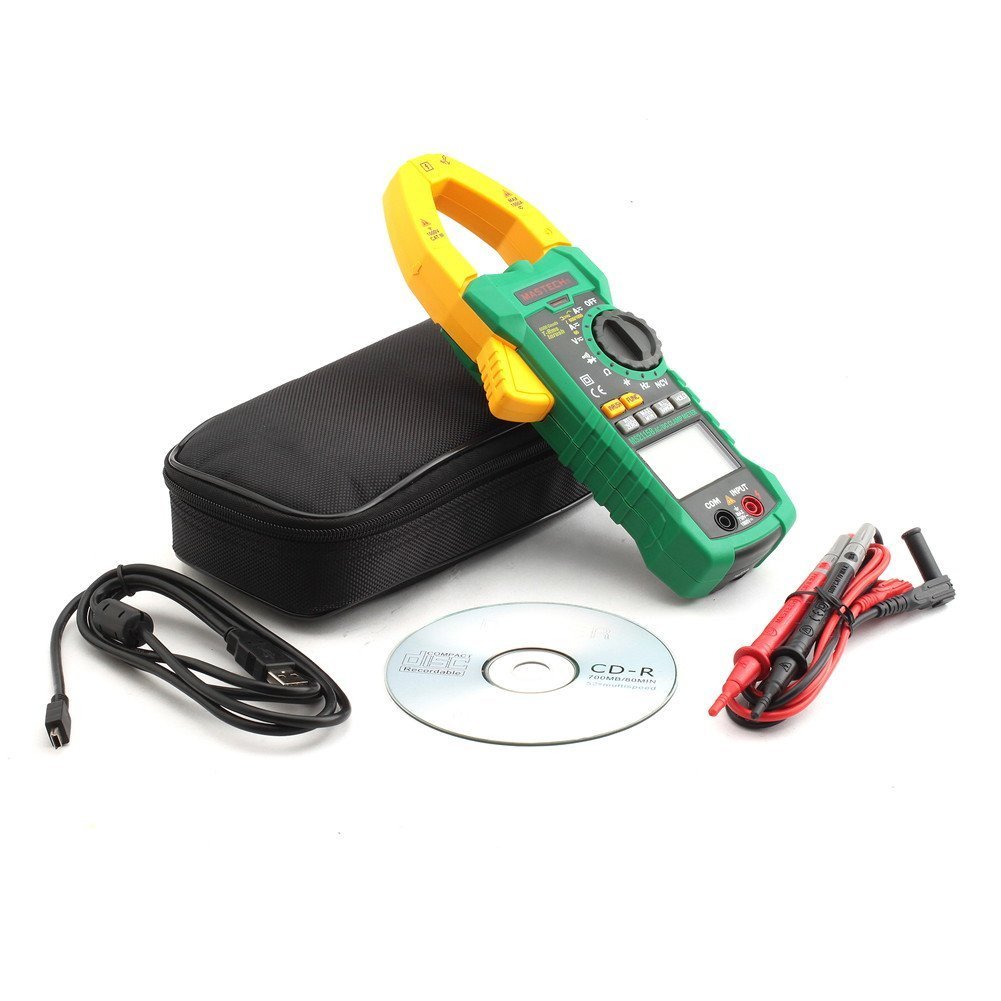
Familiarize yourself with the main components of the MS2115B clamp metru:


4. Setup
4.1 Installazzjoni tal-batterija
The Mastech MS2115B requires batteries for operation. Please note that batteries are not included in the package.
- Ensure the meter is turned OFF and disconnect all test leads.
- Sib l-għatu tal-kompartiment tal-batterija fuq wara tal-miter.
- Uża tornavit biex tħoll il-kamin li jżomm l-għatu tal-batterija.
- Neħħi bir-reqqa l-għatu tal-batterija.
- Daħħal il-batteriji meħtieġa, waqt li tosserva l-polarità korretta (+ u -).
- Ibdel l-għatu tal-batterija u waħħalha bil-kamin.

4.2 Konnessjoni tal-wajers tat-test
Għal voltage, resistance, capacitance, frequency, diode, and continuity measurements, connect the test leads:
- Insert the red test lead into the "INPUT" terminal.
- Insert the black test lead into the "COM" (common) terminal.
4.3 USB Interface Setup (for Windows OS)
The MS2115B features a USB interface for data logging and analysis on a computer running Windows OS.
- Install the provided communication software from the included CD onto your Windows computer.
- Connect the USB communication cable to the meter's USB port and to an available USB port on your computer.
- Follow the software instructions to establish communication and begin data transfer.
5. Istruzzjonijiet Operattivi
5.1 Mixgħul/Mitfi u Mitfi Awtomatiku
- To power on, rotate the rotary switch from "OFF" to any desired measurement function.
- To power off, rotate the rotary switch back to "OFF".
- The meter features an Auto Power Off function to conserve battery life. It will automatically turn off after approximately 15 minutes of inactivity. To disable this feature temporarily, refer to the full user manual for specific button combinations during power-on.
5.2 Buttuni tal-Funzjoni
- FUNC: Selects between different measurement modes within a single rotary switch position (e.g., AC/DC voltage, Dajowd/Kontinwità).
- FIRXA: Toggles between auto-ranging and manual ranging. In manual ranging, press repeatedly to cycle through ranges.
- ŻOMM: Freezes the current display reading. Press again to release.
- MAX / MIN: Displays the maximum or minimum reading recorded since activation. Press repeatedly to cycle through MAX, MIN, and current readings.
- REL/ZERO: Activates relative measurement mode, displaying the difference between the current reading and a stored reference value. Also used for zeroing DC current readings.
- INRUSH: Measures the inrush current (startup current) of motors or other inductive loads.
- Dawl ta' wara/Dawl tax-Xogħol: Activates the display backlight and work light for improved visibility.
5.3 Measurement Procedures
5.3.1 Volt DC / ACtage Kejl
- Connect the red test lead to the "INPUT" terminal and the black test lead to the "COM" terminal.
- Rotate the rotary switch to the V (Voltage) position. Press FUNC to select between DC V= jew AC V~.
- Touch the test probes to the desired test points in the circuit.
- Aqra l-voltagIl-valur fuq il-wiri.
5.3.2 DC/AC Current Measurement (Clamp)
- Rotate the rotary switch to the A (Current) position. Press FUNC to select between DC A= jew AC A~.
- Iftaħ il-clamp jaw and enclose only one conductor of the circuit. Ensure the jaw is fully closed.
- For DC current, press REL/ŻERO to zero the display before measurement if needed.
- Aqra l-valur attwali fuq id-displej.
5.3.3 Kejl tar-Reżistenza
- Connect test leads as for voltage.
- Rotate the rotary switch to the Ω Pożizzjoni (ta' Reżistenza).
- Kun żgur li ċ-ċirkwit li qed jiġi ttestjat ma jkollux l-enerġija.
- Touch the test probes across the component or circuit to measure resistance.
- Aqra l-valur tar-reżistenza fuq il-wiri.
5.3.4 Kejl tal-Kapaċitanza
- Connect test leads as for voltage.
- Rotate the rotary switch to the KAP Pożizzjoni (Kapaċità).
- Kun żgur li l-kapaċitatur ikun skarikat kompletament qabel il-kejl.
- Tmiss il-probi tat-test mat-terminals tal-kapaċitatur.
- Aqra l-valur tal-kapaċitanza fuq il-wirja.
5.3.5 Kejl tal-Frekwenza u ċ-Ċiklu tad-Dazju
- Connect test leads as for voltage.
- Rotate the rotary switch to the Hz /% Pożizzjoni (Frekwenza/Ċiklu ta' Dazju).
- Agħfas FUNC to toggle between Frequency (Hz) and Duty Cycle (%).
- Touch the test probes to the signal source.
- Aqra l-valur tal-frekwenza jew taċ-ċiklu ta' xogħol fuq id-displej.
5.3.6 Diode Test and Continuity
- Connect test leads as for voltage.
- Rotate the rotary switch to the Dajowd/Kontinwità pożizzjoni.
- Agħfas FUNC to select between Diode test or Continuity test.
- For Diode Test: Touch the red probe to the anode and the black probe to the cathode. The display shows the forward voltage drop. Reverse the probes to check for open circuit.
- For Continuity Test: Touch the probes to the circuit. A continuous beep indicates continuity (resistance less than 50 ohms).
5.3.7 NCV (Mhux Kuntatt Voltage) Sejbien
- Rotate the rotary switch to the NCV pożizzjoni.
- Mexxi l-parti ta' fuq tal-clamp meter near a conductor or outlet.
- Il-miter se joħroġ ħoss ta’ ħoss u l-indikatur NCV se jixgħel jekk il-volum tal-ACtage jiġi skopert.
5.3.8 Inrush Current Measurement
- Rotate the rotary switch to the A~ Pożizzjoni (Kurrent AC).
- Agħfas il- INRUSH buttuna.
- Iftaħ il-clamp jaw and enclose only one conductor of the circuit where the inrush current is to be measured.
- Turn on the device or motor. The meter will capture and display the peak inrush current.
6. Manutenzjoni
6.1 Tindif
- Perjodikament imsaħ il-każ b'adamp drapp u deterġent ħafif. Tużax abrażivi jew solventi.
- Żomm it-terminals tad-dħul ħielsa mill-ħmieġ u l-umdità.
6.2 Sostituzzjoni tal-batterija
When the low battery indicator appears on the display, replace the batteries immediately to ensure accurate readings. Refer to Section 4.1 for battery installation instructions.
6.3 Ħażna
- If the meter is not used for an extended period, remove the batteries to prevent leakage and damage.
- Aħżen il-miter f'post frisk u niexef, 'il bogħod mix-xemx diretta u minn temperaturi estremi.
7 Issolvi l-problemi
If you encounter issues with your Mastech MS2115B, refer to the following common troubleshooting steps:
| Problema | Kawża Possibbli | Soluzzjoni |
|---|---|---|
| Il-miter ma jixgħelx. | Batteriji mejta jew installati ħażin. | Iċċekkja l-polarità tal-batterija; ibdel il-batteriji. |
| L-ebda qari jew "OL" muri. | Open circuit, out of range, or incorrect function selected. | Check circuit connections, select appropriate range/function, ensure continuity. |
| Qari mhux preċiż. | Low battery, dirty test leads/terminals, external interference. | Replace batteries, clean leads/terminals, move away from strong electromagnetic fields. |
| Auto Power Off activates too quickly. | Normal operation (15 min inactivity). | Press any button or rotate the switch to reset the timer. Refer to the full manual to disable this feature if needed. |
| Clamp current reading is zero or incorrect. | Multiple conductors in jaw, jaw not fully closed, DC current not zeroed. | Ensure only one conductor is in the jaw, close jaw completely, press REL/ZERO for DC current. |
If the problem persists after trying these steps, please contact Mastech customer support or your local distributor for assistance.
8. Speċifikazzjonijiet Tekniċi
The following table outlines the technical specifications for the Mastech MS2115B Digital Clamp Miter:
| Funzjoni tal-Kejl | Firxa | Eżattezza |
|---|---|---|
| DC Voltage | 600mV / 6V / 60V / 600V / 1000V | ±(0.5% + 3) for 600mV-600V, ±(0.8% + 2) for 1000V |
| AC Voltage | 600mV / 6V / 60V / 600V / 750V | ±(0.8% + 3) for 600mV-600V, ±(1% + 4) for 750V |
| Kurrent DC | 60A/600A/1000A | ± (3.0% + 3) |
| Kurrent AC | 60A/600A/1000A | ± (2.5% + 3) |
| Reżistenza | 600Ω / 6kΩ / 60kΩ / 600kΩ / 6MΩ / 60MΩ | ±(1.0% + 3) for 600Ω-6MΩ, ±(1.5% + 3) for 60MΩ |
| Kapaċità | 6nF / 60nF / 600nF / 6uF / 60uF / 600uF / 6mF / 60mF | ± (4.0% + 3) |
| Frequency (from Clamp) | 0 ~ 10kHz | ± (1.5% + 5) |
| Frequency (AC Voltage) | 0 ~ 10kHz | ± (1.5% + 5) |
| Frekwenza Loġika | 0 ~ 60MHz | ± (0.5% + 3) |
| Iċ-Ċiklu tax-Xogħol | 10% ~ 90% | ±3.0% |
| Test tad-Diode | 2.7V | Quddiem voltagqatra e |
| Buzzer tal-Kontinwità | <50 ohm | Beep li jinstema' |
Speċifikazzjonijiet Ġenerali:
- Wiri: Dual Display, 6000 counts
- Ftuħ tax-xedaq: Ø40mm (1.6 pulzier)
- RMS Veru: Iva
- NCV: Iva
- Inrush: Iva
- Żamma tad-Data: Iva
- MAX / MIN: Iva
- Kejl Relattiv: Iva
- Dawl ta' wara/Dawl tax-Xogħol: Iva
- Indikazzjoni Baxxa tal-Batterija: Iva
- Mitfi Awtomatiku: Iva
- Interface USB: Yes (Windows OS compatible)
- Sors tal-Enerġija: Imħaddem bil-batterija (Batteriji mhux inklużi)
- Dimensjonijiet: Madwar 26 x 14 x 6.6 ċm
- Piż: Madwar 720g
- Manifattur: MASTECH
- Numru tal-Mudell: MS2115B
- ASIN: B00LD8IIJS
- UPC: 702382755386, 702382755881, 706551142168
9. Garanzija u Appoġġ
For warranty information, please refer to the documentation provided with your purchase or contact the seller directly. Mastech products typically come with a manufacturer's warranty against defects in materials and workmanship.
For technical support, troubleshooting assistance beyond this manual, or inquiries about replacement parts, please contact Mastech customer service or your authorized Mastech distributor. Contact details can usually be found on the manufacturer's official webis-sit jew fuq il-fattura tax-xiri tiegħek.


