Introduzzjoni
Grazzi tax-xiriasing the Marantz CD5005 CD Player. This manual provides detailed instructions for the proper setup, operation, and maintenance of your new audio component. The CD5005 is designed to deliver high-quality audio playback from various disc formats, including CD, CD-R, CD-RW, MP3, and WMA files. It features high-quality audio components such as the CS4398 DAC and Marantz HDAM SA2, ensuring exceptional sound reproduction. Please read this manual thoroughly before using the unit to ensure optimal performance and longevity.
Istruzzjonijiet tas-Sigurtà
Always follow these basic safety precautions when operating the CD5005 CD Player:
- Sors tal-Enerġija: Qabbad l-unità biss ma' sokit tal-AC tal-volumtage speċifikat fuq il-pannell ta 'wara.
- Ventilazzjoni: Ensure adequate ventilation. Do not block ventilation openings. Avoid installing in confined spaces.
- Ilma u Umdità: Tesponix l-unità għax-xita, umdità, jew umdità eċċessiva. Tpoġġix oġġetti mimlija b'likwidi fuq l-unità.
- Sħana: Żomm l-unità 'l bogħod minn sorsi ta' sħana bħal radjaturi, reġistri tas-sħana, stufi, jew apparat ieħor li jipproduċi sħana.
- Tindif: Skonnettja l-unità mill-plagg tal-ħajt qabel ma tnaddafha. Uża biss drapp niexef.
- Servizzi: Tippruvax tagħmel manutenzjoni fuq l-unità int stess. Irreferi għal kull manutenzjoni għand persunal tas-servizz kwalifikat.
- Immaniġġjar tad-Diska: Handle discs by their edges. Avoid touching the shiny surface. Keep discs clean and free from scratches.
Kontenut tal-Pakkett
Ivverifika li l-pakkett tiegħek fih l-oġġetti li ġejjin:
- Marantz CD5005 CD Player
- Korda tal-Enerġija li tista 'tinqala'
- Audio Cables (L/R Analog)
- Digital Audio Cable (Coaxial)
- Unità ta' Kontroll mill-bogħod
- AA Batteries for Remote Control (x2)
- Quick Setup Guide (Printed)
- Interactive CD-ROM Manual (except Japan)
Prodott Overview
Front Panel

Figura 1: Quddiem view of the Marantz CD5005 CD Player. This image shows the disc tray, display, control buttons, and headphone jack on the front panel.
The front panel of the CD5005 features the disc tray, a clear dual-line display, essential playback control buttons (Play, Pause, Stop, Skip), and a headphone output with a dedicated volume control. The power button is located on the left side.
Panel ta' wara

Figura 2: Wara view of the Marantz CD5005 CD Player. This image displays the various input and output terminals, including analog audio outputs, digital coaxial and optical outputs, and the AC power inlet.
The rear panel provides connectivity options including gold-plated analog audio outputs, digital coaxial output, and digital optical output for connecting to an amplifier or receiver. A remote control input/output terminal is also present for system integration, along with the detachable AC power inlet.
Kontroll mill-bogħod
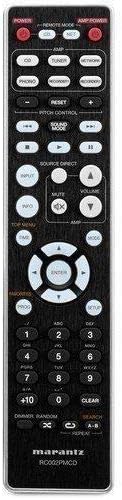
Figure 3: The remote control unit for the Marantz CD5005 CD Player. This remote allows for comprehensive control of the CD player's functions, including playback, track selection, pitch control, and display dimmer.
The included remote control unit provides full functionality for the CD5005, including features not available on the front panel such as pitch control, display dimmer, track randomization, and various repeat functions. It also allows for control of other compatible Marantz components.
Setup
1 Tqegħid
Place the CD5005 on a stable, level surface away from direct sunlight, heat sources, and excessive vibration. Ensure there is adequate space around the unit for proper ventilation.
2. Connecting Audio Cables
Choose one of the following methods to connect the CD5005 to your amplifer jew riċevitur:
- Konnessjoni Analoġika: Use the supplied L/R analog audio cables to connect the AUDIO OUT jacks on the CD5005 to the corresponding CD input jacks on your amplifier. Ensure red plugs connect to red jacks (right channel) and white plugs to white jacks (left channel).
- Konnessjoni Koassjali Diġitali: Use the supplied digital coaxial cable to connect the COAXIAL DIGITAL AUDIO OUT jack on the CD5005 to a digital coaxial input on your amplifier jew riċevitur.
- Konnessjoni Ottika Diġitali: Use an optical digital audio cable (not supplied) to connect the OPTICAL DIGITAL AUDIO OUT jack on the CD5005 to a digital optical input on your amplifier jew riċevitur.
Nota: Do not connect both analog and digital outputs to the same input on your amplifier simultaneously, as this may cause interference or unexpected behavior. Select the appropriate input on your amplifier after connecting.
3. Konnessjoni tal-Korda tal-Enerġija
Connect the detachable power cord to the AC inlet on the rear panel of the CD5005, then plug the other end into a suitable AC wall outlet.
4. Installazzjoni ta 'batteriji tal-kontroll mill-bogħod
Open the battery compartment on the back of the remote control unit. Insert two AA batteries, ensuring correct polarity (+/-) as indicated inside the compartment. Close the cover securely.
Istruzzjonijiet Operattivi
Daqq Bażiku tas-CD
- Agħfas il- QAWWA buttuna fuq il-pannell ta' quddiem jew fuq il-kontroll remot biex tixgħel l-unità.
- Agħfas il- FTUĦ/MAGĦLUQ buttuna biex tiftaħ it-trej tad-diska.
- Place a CD, CD-R, CD-RW, MP3, or WMA disc onto the disc tray with the label side facing up.
- Agħfas il- FTUĦ/MAGĦLUQ Agħfas il-buttuna mill-ġdid biex tagħlaq it-trej tad-diska. L-unità se taqra d-diska.
- Agħfas il- PLAY buttuna biex tibda d-daqq.
- Biex twaqqaf id-daqq, agħfas il- PAWŻA buttuna. Agħfas mill-ġdid biex tkompli.
- Biex twaqqaf il-plejbek, agħfas il-buttuna STOP buttuna.
- Uża l- SKIP buttuni biex tinnaviga bejn it-traċċi.
Advanced Features (Remote Control)
- Kontroll taż-żift: Uża l- KONTROLL TAL-PITCH buttons on the remote to adjust the playback speed and pitch.
- Wiri tat-Test tas-CD: If a disc supports CD Text, the display will show track and artist information. Use the DISPLAY button on the remote to cycle through display modes.
- Irrepeti daqq: Agħfas il- IRREpeti button on the remote to select repeat modes (e.g., repeat one track, repeat all tracks, repeat A-B segment).
- Daqq każwali: Agħfas il- KAŻ button on the remote to play tracks in a random order.
- Ħruġ tal-headphones: Connect headphones to the front panel headphone jack. Adjust the LIVELL knob next to the jack to control headphone volume independently. Note that plugging in headphones does not mute the main analog or digital outputs.
- Kontroll tal-App: The CD5005 supports app control via RC-5 with a compatible Marantz network player. Refer to the network player's manual for details on this integration.
Manutenzjoni
Tindif tal-Unità
Wipe the exterior surfaces of the CD5005 with a soft, dry cloth. Do not use abrasive cleaners, waxes, or solvents, as these can damage the finish. Avoid spraying liquids directly onto the unit.
Disc Handling and Care
- Always hold discs by their edges to prevent fingerprints and scratches on the playing surface.
- If a disc is dirty, wipe it gently from the center outwards with a soft, lint-free cloth. Do not use circular motions.
- Do not use solvents such as benzene, thinner, or commercially available record cleaners, as they may damage the disc.
- Store discs in their cases when not in use to protect them from dust and scratches.
- Avoid exposing discs to direct sunlight or high temperatures for extended periods.
Issolvi l-problemi
If you experience issues with your Marantz CD5005, refer to the following common problems and solutions:
| Problema | Kawża Possibbli | Soluzzjoni |
|---|---|---|
| Ebda qawwa | Il-korda tal-enerġija mhux imqabbda sew. | Iċċekkja l-konnessjoni tal-korda tal-enerġija mal-unità u mas-sokit tal-ħajt. |
| Ebda output tal-ħoss | Incorrect audio cable connection; wrong input selected on ampaktar ħaj; ampVolum tal-lifer baxx wisq. | Ivverifika l-konnessjonijiet tal-kejbil tal-awdjo. Agħżel l-input korrett fuq tiegħek ampvalur. Żieda ampvolum lifier. |
| Id-diska ma tilgħabx / żball "Ebda Diska" | Diska mdaħħla ħażin; id-diska hija maħmuġa jew mibruxa; il-format tad-diska mhux appoġġjat. | Insert disc with label side up. Clean the disc. Try a different disc. Ensure disc format (CD, CD-R/RW, MP3, WMA) is supported. |
| Skipping or intermittent playback | Disc is dirty or scratched; unit is subject to vibration. | Naddaf id-diska. Poġġi l-unità fuq wiċċ stabbli 'l bogħod mill-vibrazzjonijiet. |
| Il-kontroll mill-bogħod ma jaħdimx | Batteries are depleted or inserted incorrectly; obstacle between remote and unit; remote sensor blocked. | Replace batteries, ensuring correct polarity. Remove any obstacles. Ensure the remote sensor on the unit is clear. |
If the problem persists after trying these solutions, please contact Marantz customer support.
Speċifikazzjonijiet
| Karatteristika | Dettall |
|---|---|
| Numru tal-Mudell | CD5005 |
| Kompatibilità tad-Diska | CD, CD-R/RW, MP3, WMA |
| Konvertitur Diġitali għal Analogu (DAC) | CS4398 |
| Analog Output Circuit | Marantz HDAM SA2 |
| Outputs | Analog L/R (Gold-plated), Digital Coaxial, Digital Optical, Headphone |
| Karatteristiċi Speċjali | Pitch Control, CD Text Display, App Control (via RC-5 with Marantz network player), Auto Standby |
| Konsum tal-Enerġija (Standby) | Baxx |
| Dimensjonijiet tal-Prodott (W x D x H) | 17.3 x 14.6 x 4.1 pulzieri (43.9 x 37.1 x 10.4 ċm) |
| Piż tal-oġġett | 11.02 liri (5.0 kg) |
| Manifattur | Marantz |
| Kulur | Iswed |
Garanzija u Appoġġ
For warranty information and customer support, please refer to the warranty card included with your product or visit the official Marantz websit. Żomm il-prova tax-xiri tiegħek għal talbiet ta' garanzija.
Marantz Uffiċjali Websit: www.marantz.com


