1. Introduzzjoni
This user manual provides essential information for the proper setup, operation, maintenance, and troubleshooting of your Ozone OES-BAS-22 Electronic Safe-Core. Please read this manual thoroughly before using the safe to ensure optimal performance and security. This electronic safe is designed to provide secure storage for your valuables.
2. Prodott Aktarview
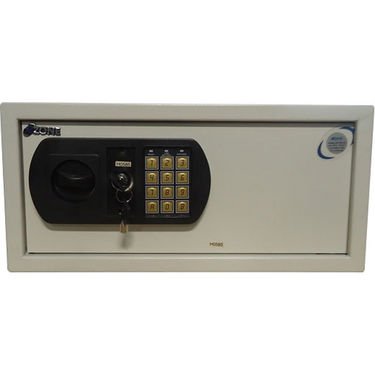
This image displays the front panel of the Ozone OES-BAS-22 Electronic Safe-Core, highlighting the electronic keypad, key override lock, and the overall compact design. The keypad allows for digital code entry, while the key provides an alternative access method.
3. Setup
3.1. Installazzjoni tal-batterija
- Locate the battery compartment, typically on the inside of the safe door.
- Iftaħ l-għatu tal-batterija.
- Insert the required number of batteries (usually AA or AAA, refer to the compartment label) ensuring correct polarity (+/-).
- Agħlaq l-għatu tal-batterija sew.
3.2. Issettjar tal-Kodiċi Inizjali
- With the safe door open, locate the reset button (often a small red or green button) on the inside of the door or near the battery compartment.
- Press the reset button. You should hear a beep or see an indicator light.
- On the keypad, enter your desired new code (typically 3-8 digits).
- Confirm the code by pressing the 'E' or '#' button.
- Test the new code with the door open to ensure it works correctly before closing the safe.
4. Istruzzjonijiet Operattivi
4.1. Opening the Safe with Electronic Code
- Daħħal il-kodiċi personali tiegħek fuq it-tastiera.
- Press the 'E' or '#' button.
- Within 5 seconds of a successful code entry, turn the handle clockwise (or counter-clockwise, depending on model) to open the door.
4.2. Opening the Safe with Override Key
- Locate the keyhole, usually hidden behind a small cover on the keypad panel.
- Insert the override key and turn it.
- While holding the key turned, rotate the handle to open the safe door.
4.3. L-Għeluq u l-Qfil tas-Sejf
- Agħlaq il-bieb tas-safe sew.
- Turn the handle counter-clockwise (or clockwise) until the bolts are fully extended and the door is securely locked.
4.4. Tibdil tal-Kodiċi Personali Tiegħek
- With the safe door open, press the reset button.
- Daħħal il-kodiċi l-ġdid mixtieq tiegħek (3-8 ċifri) fuq it-tastiera.
- Press the 'E' or '#' button to confirm.
- Verify the new code by entering it with the door open before closing.
5. Manutenzjoni
- Sostituzzjoni tal-batterija: Replace batteries annually or when the low battery indicator (if present) illuminates. Always use new, high-quality batteries of the specified type.
- Tindif: Naddaf il-barra tas-sejf b'ċarruta ratba u damp cloth. Avoid abrasive cleaners or solvents that could damage the finish or keypad.
- Ħażna taċ-Ċwievet: Store override keys in a secure location away from the safe itself. Do not store them inside the safe.
- Verifika tal-Mekkaniżmu: Periodically check the locking bolts and door hinges for smooth operation. Do not lubricate the electronic lock mechanism.
6 Issolvi l-problemi
| Problema | Soluzzjoni |
|---|---|
| Is-safe ma tiftaħx bil-kodiċi. | Ensure batteries are fresh and correctly installed. Re-enter code carefully. Try the override key. |
| It-tastiera ma tirrispondix. | Check battery power. Replace batteries if necessary. Ensure no foreign objects are obstructing buttons. |
| L-allarm jinstema' b'mod mhux mistenni. | This safe features a visual alarm. Ensure the safe is not being tampered with. If persistent, contact customer support. |
| Il-bieb ma jagħlaqx jew ma jissakkarx sew. | Check for any obstructions inside the safe or around the door frame. Ensure the handle is fully turned to engage bolts. |
7. Speċifikazzjonijiet
| Karatteristika | Dettall |
|---|---|
| Brand | Ożonu |
| Mudell | OES-BAS-22 |
| Tip Lock | Elettroniku |
| Karatteristika Speċjali | Portabbli |
| Piż tal-oġġett | 12.2 kg (26.9 Liri) |
| Allarm | Viżwali |
| Livell ta 'Reżistenza għall-Ilma | Mhux Reżistenti għall-Ilma |
| UPC | 783942612165 |
| Dimensjonijiet tal-Pakkett | 42.9 x 38 x 20 ċm |


