1. Introduzzjoni
This manual provides comprehensive instructions for the installation, operation, and maintenance of the Aiphone TD-1H/B 1-Call Audio Master Station. This selective call intercom unit is designed for reliable audio communication within the TD-H series system. Please read this manual thoroughly before installation and operation to ensure correct usage and optimal performance.
2. Kontenut tal-Pakkett
Verify that all items listed below are present in the package:
- Aiphone TD-1H/B Master Station
- Handset
- Mounting Hardware (typically included, assume for manual)
- Manwal ta 'Istruzzjoni (dan id-dokument)
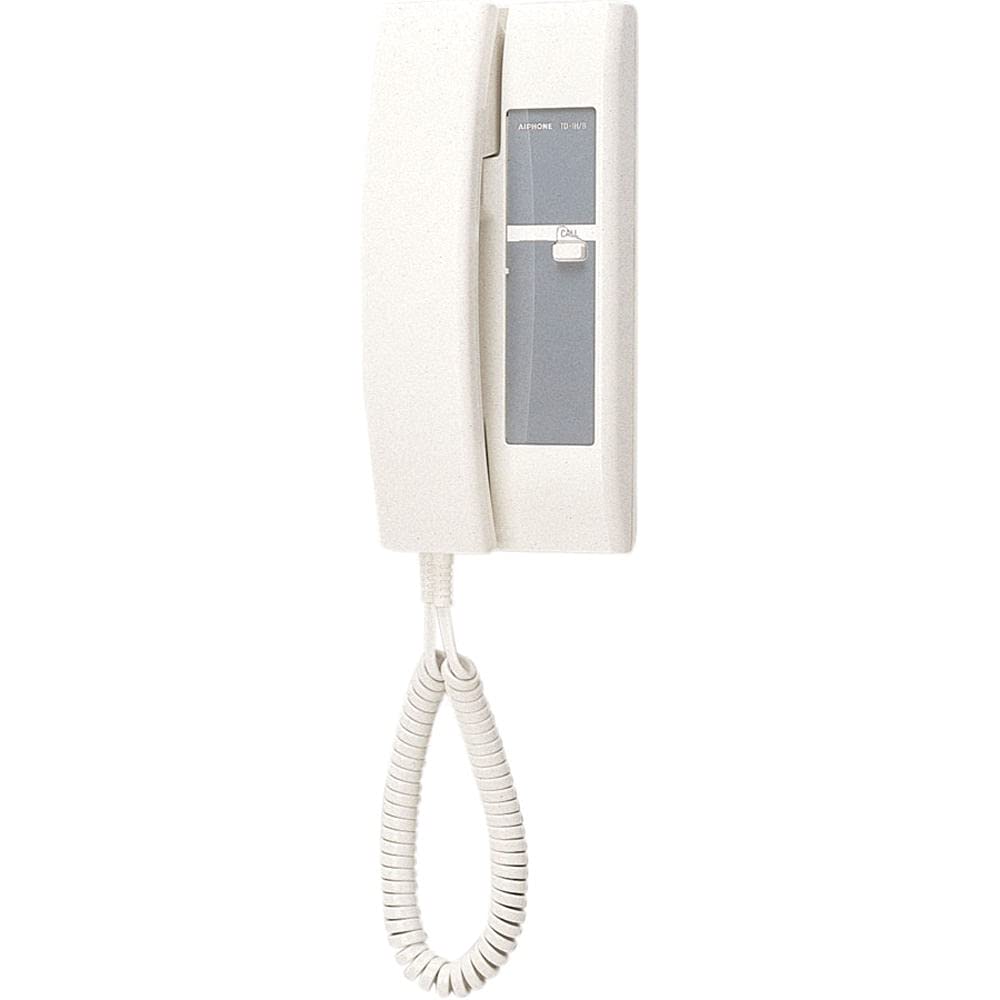
Figura 1: Aiphone TD-1H/B 1-Call Audio Master Station. This image shows the white master station unit with its attached coiled handset cord and handset resting in the cradle. The front panel includes the Aiphone logo and model number, along with a "CALL" button and a backlit directory area.
3. Setup u Installazzjoni
3.1 Prekawzjonijiet tas-Sigurtà
- Disconnect power before performing any wiring or installation.
- Ensure all wiring complies with local electrical codes.
- Do not install in locations exposed to direct water spray or excessive humidity.
3.2 Mounting the Master Station
- Select a suitable flush-mount location, typically near an entrance or central area.
- Ensure adequate space for wiring connections behind the unit.
- Secure the mounting bracket (if separate) or the unit directly to the wall using the provided screws and anchors.
3.3 Konnessjonijiet tal-Wiring
The TD-1H/B is a wired system component. Refer to the system wiring diagram provided with your complete TD-H series intercom system for specific connection details. General wiring steps include:
- Connect the appropriate wires from the main intercom system to the terminals on the back of the TD-1H/B master station.
- Ensure all connections are secure and correctly polarized.
- After wiring, carefully attach the master station to its mounting location.
4. Istruzzjonijiet Operattivi
4.1 Tagħmel Sejħa
- Neħħi l-idejn mill-benniena.
- Press the "CALL" button located on the front panel. This will initiate a call to the designated station.
- Speak into the handset to communicate.
4.2 Riċeviment ta' Sejħa
- When a call is received, the unit will emit an audible signal.
- Lift the handset to answer the call and begin communication.
- Replace the handset to end the call.
4.3 Aġġustament tal-Volum
Volume adjustments for the speaker and microphone are typically controlled at the main system unit or through internal potentiometers accessible during installation. Consult the full TD-H series system manual for specific volume control procedures.
5. Manutenzjoni
5.1 Tindif
- Wipe the exterior of the master station with a soft, dry cloth.
- Għal ħmieġ iebsa, uża ftit damp cloth with a mild, non-abrasive cleaner.
- Do not use harsh chemicals, solvents, or abrasive cleaning materials.
5.2 Kontrolli regolari
- Periodically check all visible wiring for signs of wear or damage.
- Ensure the handset cord is not tangled or damaged.
- Test the call function regularly to confirm proper operation.
6 Issolvi l-problemi
This section addresses common issues. For more complex problems, contact Aiphone technical support or a qualified technician.
| Problema | Kawża Possibbli | Soluzzjoni |
|---|---|---|
| L-ebda awdjo waqt is-sejħa | Loose wiring connection; System power off; Handset not seated correctly. | Check wiring connections; Verify system power; Ensure handset is fully seated. |
| Ma tistax tagħmel sejħa | "CALL" button malfunction; System fault; Incorrect wiring. | Test "CALL" button; Check main system status; Inspect wiring. |
| Awdjo mgħawweġ | Interference; Damaged wiring; Volume settings too high/low. | Check for sources of interference; Inspect wiring for damage; Adjust system volume. |
7. Speċifikazzjonijiet
| Karatteristika | Dettall |
|---|---|
| Mudell | TD-1H/B |
| Brand | Aiphone |
| Tip ta' Prodott | 1-Call Audio Master Station |
| Series Compatibility | TD-H Series Intercom Systems |
| Immuntar | Immonta bil-flus |
| Kulur | Abjad |
| Sors tal-Enerġija | Corded Electric (powered by main system) |
| Teknoloġija tal-Konnettività | Bil-fili |
| Dimensjonijiet (L x W x H) | 3.6 x 4.9 x 10.1 pulzieri (9.144 cm x 12.446 cm x 25.654 cm) |
| Piż | 1.25 lbs (0.57 kg) |
| Materjal tal-Kostruzzjoni | Plastic ABS |
8. Garanzija u Appoġġ
For information regarding warranty coverage, technical support, or service, please refer to the official Aiphone website or contact Aiphone customer service directly. Keep your purchase receipt as proof of purchase for warranty claims.
Aiphone Official Websit: www.aiphone.com


