1. Introduzzjoni
The Attop YD-719 Quad-Copter is an 8-inch remote-controlled aerial vehicle designed for recreational flight. It features a 4-channel remote control system, 3-axis flight control for stable operation, and a built-in camera capable of recording video and capturing still images. The quad-copter utilizes 2.4 GHz wireless technology for reliable communication and is powered by a rechargeable battery.
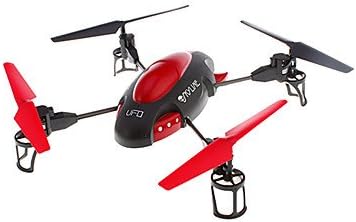
Image 1.1: The Attop YD-719 Quad-Copter, showcasing its red and black design with four propellers.
2. Prekawzjonijiet tas-Sigurtà
- Always operate the quad-copter in open areas, away from people, animals, buildings, and power lines.
- Ittirx f'riħ qawwi jew f'kundizzjonijiet ħżiena tat-temp.
- Kun żgur li l-batterija hija kompletament iċċarġjata qabel kull titjira.
- Żomm subgħajk u ħwejjeġ maħlula 'l bogħod mill-iskrejjen li jduru.
- Is-superviżjoni tal-adulti hija rakkomandata għal utenti iżgħar.
- Do not attempt to modify the quad-copter or its components.
- Avoid flying near airports or restricted airspace.
3. Kontenut tal-Pakkett
Ivverifika li l-oġġetti kollha huma preżenti fil-pakkett:
- Attop YD-719 Quad-Copter
- Kontroll mill-bogħod
- Rechargeable Battery (for quad-copter)
- Four (4) Extra Rotor Blades
- Two (2) USB Charging Cables
- Gwida għall-Utent (dan id-dokument)
4. Komponenti Overview
4.1 Quad-Copter
The quad-copter features four rotors, a central body housing the electronics and camera, and landing gear. The built-in camera is located on the underside of the main body.

Immaġni 4.1: Ġenb view of the YD-719 Quad-Copter, showing the sleek body and propeller arms.
4.2 Kontroll mill-Bogħod
The remote control is a 4-channel device operating on 2.4 GHz frequency, providing precise control over the quad-copter's movements. It typically includes two joysticks for flight control and various buttons for functions like trim adjustments, photo/video capture, and power.
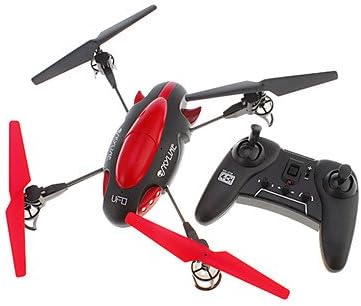
Image 4.2: The Attop YD-719 Quad-Copter alongside its remote control, illustrating their relative sizes.
5. Setup
5.1 Quad-Copter Battery Charging
- Locate the rechargeable battery within the quad-copter's compartment.
- Connect one end of the provided USB charging cable to the battery and the other end to a USB power source (e.g., computer USB port, USB wall adapter).
- The charging indicator light will illuminate during charging and typically turn off or change color when fully charged. Refer to the specific indicator behavior in the product documentation if available.
- Il-ħin tal-iċċarġjar huwa ta' madwar 60-90 minuta. Tiċċarġjax iżżejjed.

Immaġni 5.1: Il-qiegħ view of the YD-719 Quad-Copter, showing the battery compartment and wiring.
5.2 Installazzjoni tal-Batterija tal-Kontroll mill-Bogħod
- Iftaħ il-kompartiment tal-batterija fuq wara tal-kontroll remot.
- Daħħal tliet (3) batteriji AAA, waqt li tiżgura l-polarità korretta (+/-).
- Agħlaq il-kompartiment tal-batterija sew.
5.3 Installazzjoni/Sostituzzjoni tal-Propeller
The quad-copter comes with four extra rotor blades. If replacement is necessary:
- Carefully remove the damaged propeller by gently pulling it upwards from the motor shaft.
- Note the direction of rotation for each propeller. Propellers are typically marked (e.g., A or B) and must be installed on the correct motor.
- Press the new propeller firmly onto the motor shaft until it is seated securely.

Image 5.2: Close-up of a propeller and motor assembly on the YD-719 Quad-Copter.
6. Istruzzjonijiet Operattivi
6.1 Tqabbil tal-Kontroll mill-bogħod
- Place the quad-copter on a flat, level surface.
- Turn on the quad-copter's power switch. The LED lights will flash.
- Ixgħel il-kontroll mill-bogħod.
- Push the left joystick (throttle) all the way up, then all the way down. The quad-copter's LED lights will stop flashing and remain solid, indicating successful pairing.
6.2 Tluq u Inżul
- Tlugħ: After pairing, slowly push the left joystick (throttle) upwards to increase motor speed and lift the quad-copter off the ground.
- Inżul: Slowly pull the left joystick (throttle) downwards to decrease motor speed and gently land the quad-copter. Once landed, pull the throttle all the way down to stop the motors.
6.3 Kontrolli Bażiċi tat-Titjira
- Titla/Inżel: Left joystick (throttle) up/down.
- Quddiem/Lura: Right joystick up/down.
- Dawwar Xellug/Lemin (Yaw): Left joystick left/right.
- Fly Left/Right (Roll): Right joystick left/right.
6.4 Reġistrazzjoni ta' Vidjows u Tieħu Ritratti
The YD-719 is equipped with a built-in camera. Refer to the remote control diagram (if provided in a physical manual) for specific buttons to activate video recording or still photo capture. Typically, a short press activates photo mode, and a long press activates video recording.
7. Manutenzjoni
7.1 Tindif
Use a soft, dry cloth to wipe down the quad-copter after use. Avoid using water or cleaning solvents, as they may damage electronic components.
7.2 Kura tal-Iskrun
Regularly inspect propellers for damage (bends, cracks, chips). Replace any damaged propellers immediately to ensure stable flight and prevent further damage to the quad-copter.
7.3 Ħażna tal-batterija
When not in use for extended periods, store the quad-copter battery at approximately 50% charge in a cool, dry place. Remove batteries from the remote control if it will not be used for a long time.
8 Issolvi l-problemi
- Quad-Copter not responding: Ensure both quad-copter and remote control are powered on and successfully paired. Check remote control batteries.
- Titjira instabbli: Check for damaged propellers and replace if necessary. Ensure the quad-copter is placed on a level surface before pairing. Perform trim adjustments on the remote control if the quad-copter drifts.
- Ħin qasir ta' titjira: Ensure the quad-copter battery is fully charged. Battery performance may degrade over time.
- Il-kamera mhux qed tirrekordja: Ensure the quad-copter is powered on and the camera function is correctly activated via the remote control. Check if the memory card (if applicable) is inserted and has sufficient space.
9. Speċifikazzjonijiet
| Karatteristika | Speċifikazzjoni |
|---|---|
| Numru tal-Mudell | YD-719 |
| Manifattur | Attop |
| Dimensjonijiet (madwar) | 36.83 x 34.93 x 11.43 ċm (14.5 x 13.75 x 4.5 pulzieri) |
| Piż (madwar) | 680.39 g (1.5 lbs) |
| Kanali ta' Kontroll | 4-Kanal |
| Kontroll tat-Titjira | 3-Assi |
| Teknoloġija bla fili | 2.4 GHz |
| Batterija Quadcopter | 600 mAh Rikargabbli |
| Batterija tal-Kontroll mill-bogħod | 3 x AAA (mhux inklużi) |
| Karatteristika Speċjali | Built-in Camera (Video/Photo) |
10. Garanzija u Appoġġ
For warranty information or technical support, please refer to the contact details provided with your purchase documentation or visit the manufacturer's official websit. Żomm il-prova tax-xiri tiegħek għal talbiet ta' garanzija.


