1. Introduzzjoni
This manual provides detailed instructions for the safe and effective use of your Canon VIXIA HF-R52 HD Digital Camcorder. Please read this manual thoroughly before operating the camcorder and retain it for future reference.
Karatteristiċi ewlenin:
- 3.28 Megapixel Full HD CMOS Image Sensor: Captures true 1920 x 1080 resolution video with natural color, even in low light.
- 57x Advanced Zoom & SuperRange Optical Image Stabilizer: Provides stable video across a wide zoom range.
- DIGIC DV 4 Image Processor: Ensures exceptional imaging performance and enables simultaneous dual recording.
- 32GB Internal Flash Drive & SD Card Slot: Offerti ample storage for up to 12 hours of HD video, expandable with SD memory cards.
- Wi-Fi inkorporat: Facilitates easy sharing, live streaming, and remote control via compatible mobile devices.
- 3.0-inch Capacitive Touch Panel LCD: Intuitive interface for easy operation and control.
- Modalità tat-trabi: Dedicated features for capturing and organizing a child's growth and development.
2. Setup
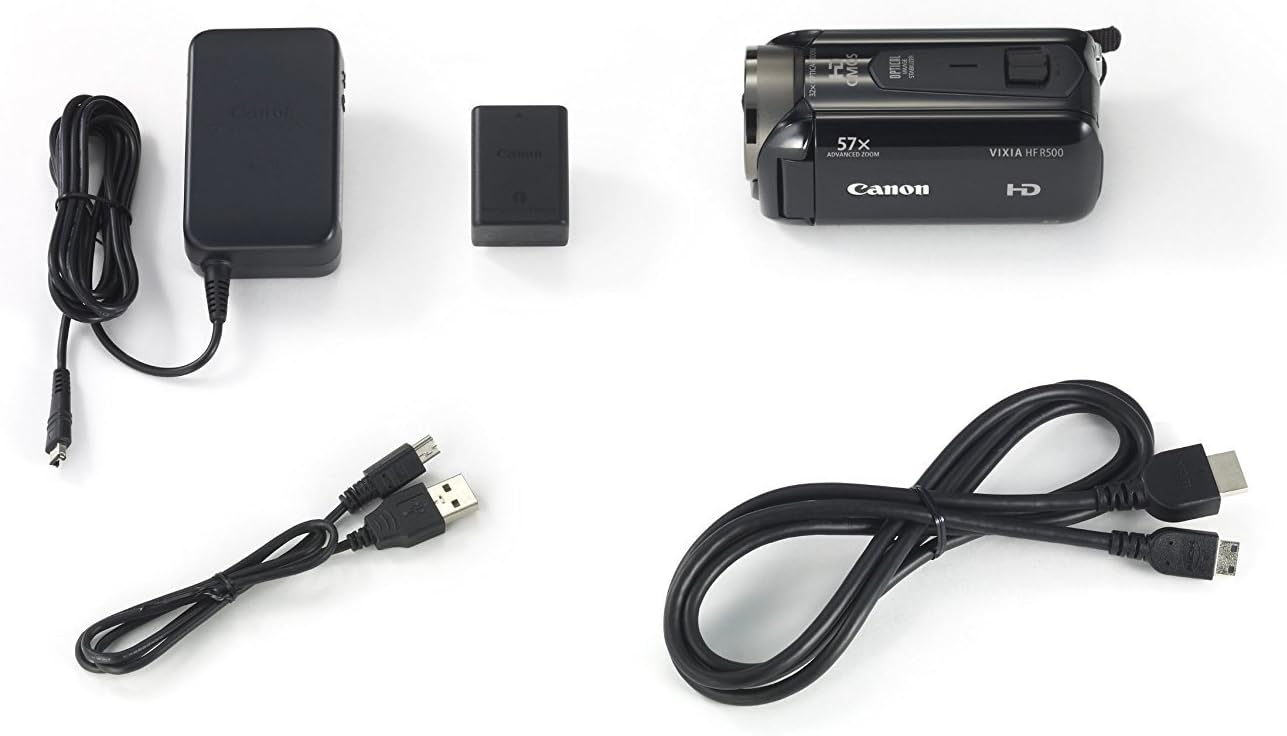
2.1. Kontenut tal-Pakkett
Ivverifika li l-oġġetti kollha huma preżenti fil-pakkett:
- Canon VIXIA HF-R52 HD Digital Camcorder
- Pakkett tal-batterija
- Adapter tal-Enerġija kompatt
- Cable USB
- Cable HDMI
- Manwal ta 'Istruzzjoni (dan id-dokument)
2.2. Installazzjoni u Iċċarġjar tal-batterija
- Iftaħ l-għatu tal-kompartiment tal-batterija.
- Insert the battery pack, ensuring it clicks into place.
- Agħlaq l-għatu tal-kompartiment tal-batterija.
- Connect the compact power adapter to the camcorder and a power outlet to charge the battery. The charging indicator will illuminate.
2.3. Inserzjoni tal-Kard tal-Memorja
- Iftaħ il-qoxra tal-islott tal-karta SD.
- Insert an SD memory card with the label facing the front of the camcorder until it clicks.
- Agħlaq il-qoxra tal-islott tal-karta SD.
2.4. Attaching the Hand Strap and Lens Cap
Securely attach the hand strap for comfortable and safe handling. Ensure the lens cap is attached to protect the lens when not in use.

3. Tħaddim tal-Vidjokamera
3.1. Power On/Off
To power on the camcorder, open the LCD panel. To power off, close the LCD panel or press and hold the power button located inside the LCD panel area.
3.2. LCD Touch Panel Usage
The 3.0-inch capacitive touch panel LCD allows for intuitive control. Tap to select menu options, adjust settings, or focus on subjects. The display is clear and responsive.

3.3. Reġistrazzjoni ta' Vidjows u Tieħu Ritratti
To start recording video, press the REC button. Press it again to stop. To take a still photo, press the PHOTO button.
3.4. Funzjonalità taż-Zoom
Use the zoom lever to zoom in (T) or out (W). The camcorder features a 57x Advanced Zoom for capturing distant subjects and a SuperRange Optical Image Stabilizer to minimize camera shake, even when shooting handheld or while walking.
3.5. Special Recording Modes
- Modalità tat-trabi: Activates optimal settings for recording children and automatically saves videos to a dedicated Baby Album. Includes features like Pre-Record and Touch Decoration.
- Audio Scene Select: Offers five modes (Standard, Music, Forest and Birds, Speech, Noise Suppression) to optimize audio recording based on the environment.
- AUTO Intelliġenti: Automatically selects optimal settings from 38 shooting situations.
- Cinema-Look Filters: Apply one of seven cinematic styles (e.g., Cinema Standard, Dramatic B&W, Sepia) to your video.
- Video Snapshot: Records short video clips and allows for background music integration.
- 24p Cinema & 30p Progressive Modes: Provides film-like feel or optimized footage for online sharing.
3.6. Wireless Functions
- Wi-Fi inkorporat: Connects to home networks or mobile devices via the Canon Movie Uploader app for sharing and live streaming.
- Live Streaming: Stream video to iOS or Android devices, even remotely over the internet, using the CameraAccess plus app.
- Monitoraġġ mill-bogħod: Compatible with the optional Camera Pan Table CT-V1 for remote monitoring of a 200-degree area.
4. Manutenzjoni
4.1. Tindif
- Uża drapp artab u niexef biex tnaddaf il-qafas tal-videocam.
- For the lens and LCD screen, use a lens cleaning cloth and specialized cleaning fluid if necessary. Avoid harsh chemicals.
4.2. Kura tal-batterija
- Iċċarġja l-batterija kompletament qabel kull użu.
- Aħżen il-batteriji f'post frisk u niexef meta ma tkunx qed tuża.
- Evita li tesponi l-batteriji għal temperaturi estremi.
4.3. Ħażna
When storing the camcorder for extended periods, remove the battery and memory card. Store the camcorder in a dry, dust-free environment, preferably in its carrying case.
5 Issolvi l-problemi
If you encounter issues with your camcorder, refer to the following common solutions:
- Il-kamera ma tixgħelx: Kun żgur li l-batterija hija ċċarġjata kompletament u mdaħħla b'mod korrett.
- Poor video quality in low light: Utilize the 3.28 Megapixel Full HD CMOS Image Sensor and DIGIC DV 4 Image Processor which are designed for improved low-light performance. Consider adding external lighting if available.
- Skrin tattili li ma jirrispondix: Ensure the screen is clean and dry. Apply gentle pressure as capacitive screens respond to touch, not force.
- Kwistjonijiet tal-awdjo: Check microphone connections and settings in the Audio Scene Select menu.
- Connectivity problems (Wi-Fi/USB): Ensure the camcorder is within range of the Wi-Fi network or that the USB cable is securely connected to a compatible device. Refer to the Canon Movie Uploader or CameraAccess plus app instructions for specific device compatibility.
- Ħajja qasira tal-batterija: Ensure the battery is fully charged. High capacity battery packs are designed for extended use, but continuous recording or heavy Wi-Fi usage will consume power faster.
If problems persist, consult the Canon support websit jew ikkuntattja lis-servizz tal-konsumatur.
6. Speċifikazzjonijiet
| Karatteristika | Speċifikazzjoni |
|---|---|
| Brand | Kanonku |
| Numru tal-Mudell | 9173B004 |
| Dimensjonijiet tal-Prodott | 4.6 x 2.1 x 2.2 pulzieri |
| Piż tal-oġġett | 8.3 uqija |
| Teknoloġija tas-Sensor tar-Ritratti | CMOS |
| Riżoluzzjoni tal-Qbid tal-Vidjo | 1080p |
| Tul Fokali Massimu | 89.6 Millimetru |
| Tip ta' Memorja Flash | SD |
| Format tal-Qbid tal-Vidjo | AVCHD; MPEG-4 |
| Format awdjo appoġġjat | AAC |
| Daqs tal-Iskrin | 3 Pulzier |
| Teknoloġija tal-Konnettività | USB, Wi-Fi |
| Kulur | Iswed |
7. Garanzija u Appoġġ
7.1. Ċaħda Legali
This product is covered under warranty by Canon. For specific warranty terms and conditions, please refer to the warranty card included with your product or visit the official Canon support websit.
7.2. Appoġġ għall-Klijent
For further assistance, technical support, or service inquiries, please visit the Canon Store or the official Canon support websit.


