Introduzzjoni
This manual provides detailed instructions for the setup, operation, and maintenance of your NETGEAR Unite Pro 4G LTE Mobile WiFi Hotspot, model AC-781S. This device offers portable internet connectivity, allowing multiple devices to share a 4G LTE connection.
Setup
Kontenut tal-Pakkett
Ivverifika li l-pakkett tiegħek fih l-oġġetti li ġejjin:
- NETGEAR Unite Pro 4G LTE Mobile WiFi Hotspot (Model AC-781S)
- Ċarġer tal
- Batterija tal-jone tal-litju
Inserting the SIM Card and Battery
To begin using your hotspot, you must first insert a compatible SIM card and the battery.
- Neħħi bir-reqqa l-għatu ta' wara tal-apparat.
- Locate the SIM card slot. Insert your Mini SIM card into the designated slot, ensuring proper orientation.
- Insert the provided Lithium Ion battery into its compartment.
- Erġa' poġġi l-għatu ta' wara, waqt li tiżgura li jikklikkja sew f'postu.

Immaġni: Quddiem view of the NETGEAR Unite Pro Hotspot, showing the touchscreen display with network information.
Tixgħel
Press and hold the Power button located on the device until the screen illuminates and the NETGEAR logo appears. The device will then initiate its startup sequence.
It-tħaddim tal-Apparat
Navigating the Touchscreen Display
The NETGEAR Unite Pro features a touchscreen display for easy navigation. Use your finger to tap on icons and swipe through menus to access various settings and information.
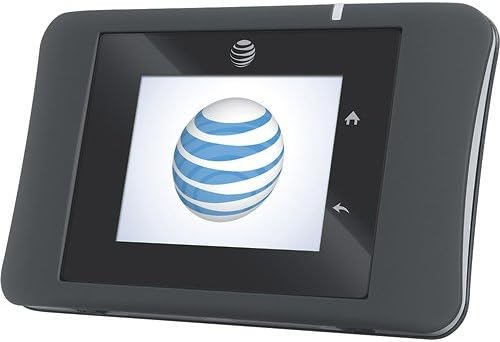
Immaġni: Quddiem view of the NETGEAR Unite Pro Hotspot, displaying the AT&T logo during startup.
Konnessjoni mal-Wi-Fi
To connect your devices to the hotspot:
- On the hotspot's display, locate the Wi-Fi network name (SSID) and password.
- On your client device (e.g., smartphone, laptop), search for available Wi-Fi networks.
- Select the hotspot's SSID from the list and enter the password when prompted.
Ġestjoni ta' Apparati Konnessi
The Unite Pro can support connectivity for up to 15 devices simultaneously. You can view connected devices and manage network access through the device's web interface.
Karatteristiċi Avvanzati
- Spinta tal-Batterija: The device can act as a power bank to charge other USB-powered devices. Connect your device to the hotspot's USB port using a compatible cable.
- WPS (Wi-Fi Protetta Setup): Use the WPS button on the device for quick and secure connection to compatible Wi-Fi devices without manually entering the password.
- Web Interface: For advanced settings, such as changing Wi-Fi name/password, parental controls, or APN settings, access the device's web interface billi tittajpja
192.168.1.1fi a web browser while connected to the hotspot's Wi-Fi network.
Manutenzjoni
Iċċarġjar tal-Apparat
To charge your NETGEAR Unite Pro, connect the provided charger to the Micro USB port located on the bottom edge of the device. The battery indicator on the screen will show charging status.

Immaġni: Taħt view of the hotspot, highlighting the Micro USB charging port and external accessory connectors.
Ħajja tal-batterija
The device is equipped with a Lithium Ion battery designed for extended use. Expect up to 16 hours of active use and up to 472 hours of standby time, depending on network conditions and usage patterns.
Tindif
Use a soft, dry cloth to clean the exterior of the device. Avoid using liquid cleaners or abrasive materials, as these may damage the device.
Issolvi l-problemi
If you encounter issues with your NETGEAR Unite Pro, consider the following:
- Ebda Konnessjoni tal-Internet: Ensure the SIM card is correctly inserted and activated with your service provider. Check the signal strength indicator on the device screen. Verify that the Access Point Name (APN) settings are correctly configured via the web interface.
- Veloċitajiet bil-mod: Check the number of connected devices. Too many devices or heavy usage can reduce speeds. Ensure you have good signal strength.
- L-Apparat Mhux Jixgħel: Ensure the battery is charged. Connect the device to the charger and attempt to power it on again.
- Random Restarts: This could indicate a faulty unit or battery. Ensure the battery is properly seated. If the issue persists, contact customer support.
Speċifikazzjonijiet
| Karatteristika | Dettall |
|---|---|
| Dimensjonijiet tal-Prodott | 2.23 x 0.77 x 3.64 pulzieri |
| Piż tal-oġġett | 4.4 uqija |
| Numru tal-Mudell tal-Oġġett | AC-781S |
| Batteriji | 1 batterija tal-jone tal-litju meħtieġa (inkluża) |
| OS | Google Android (internal system) |
| Frekwenza | 5 GHz (Dual-Band support) |
| Teknoloġiji ta' Komunikazzjoni mingħajr Fili | 4G, Wi-Fi (802.11b, 802.11g, 802.11n) |
| Karatteristiċi Speċjali | WPS |
| Riżoluzzjoni tal-Wiri | 240 x 320 pixel |
| Input tal-Interface tal-Bniedem | Touchscreen b'Appoġġ għall-Stylus |
| Fattur tal-Formola | Candy Bar |
| Kulur | Iswed |
| Ħin tat-Taħdit bit-Telefon | 600 Minuta |
| Ħin ta' Standby tat-Telefon (bid-dejta) | 472 sigħat |
| Manifattur | AT&T (Original Carrier) / NETGEAR (Brand) |
| Data L-Ewwel Disponibbli | 20 ta’ Diċembru 2013 |
Informazzjoni u Appoġġ dwar il-Garanzija
For warranty details, technical support, and additional resources, please refer to the documentation included with your product or visit the official NETGEAR support websit. Żomm il-prova tax-xiri tiegħek għal talbiet ta' garanzija.


