1. Introduzzjoni
This manual provides detailed instructions for the installation, setup, and operation of your GIGABYTE GA-B85M-DS3H motherboard. Designed for 4th Generation Intel Core processors, this motherboard features GIGABYTE Ultra Durable 4 Plus Technology, GIGABYTE Hybrid digital power engine, and GIGABYTE UEFI DualBIOS for reliable performance. Please read this manual thoroughly before beginning installation to ensure proper setup and to maximize the benefits of your new motherboard.
2. Informazzjoni dwar is-Sigurtà
- Always disconnect the power cord from the wall outlet before touching any component.
- Ilbes ċinga tal-polz anti-statika meta timmaniġġja l-motherboard jew komponenti oħra biex tevita ħsara minn skarika elettrostatika (ESD).
- Immaniġġja l-komponenti mit-truf tagħhom biex tevita li tmiss partijiet sensittivi.
- Żgura ventilazzjoni xierqa fil-kaxxa tal-PC tiegħek biex tevita li tissaħħan iżżejjed.
- Żomm il-motherboard 'il bogħod mill-umdità u minn temperaturi estremi.
- Refer to the CPU and memory manuals for specific installation instructions.
3. Kontenut tal-Pakkett
Ivverifika li l-oġġetti kollha elenkati hawn taħt huma preżenti fil-pakkett tal-motherboard tiegħek. Jekk xi oġġett huwa nieqes jew bil-ħsara, ikkuntattja lill-bejjiegħ tiegħek.
- GIGABYTE GA-B85M-DS3H Motherboard
- Tarka I / O
- Kejbils tad-Data SATA
- Manwal tal-Utent / Gwida għall-Installazzjoni Mgħaġġla
- CD/DVD tas-Sewwieq

Figura 3.1: Motherboard and included accessories, typically including an I/O shield, SATA cables, and documentation.
4. Layout tal-Motherboard
Familiarize yourself with the various components and connectors on your motherboard before installation.

Figura 4.1: Minn fuq għal isfel view of the GIGABYTE GA-B85M-DS3H motherboard, showing the CPU socket, RAM slots, and various headers.

Figura 4.2: Angolat view of the GIGABYTE GA-B85M-DS3H motherboard, highlighting the various ports and connectors from a different perspective.
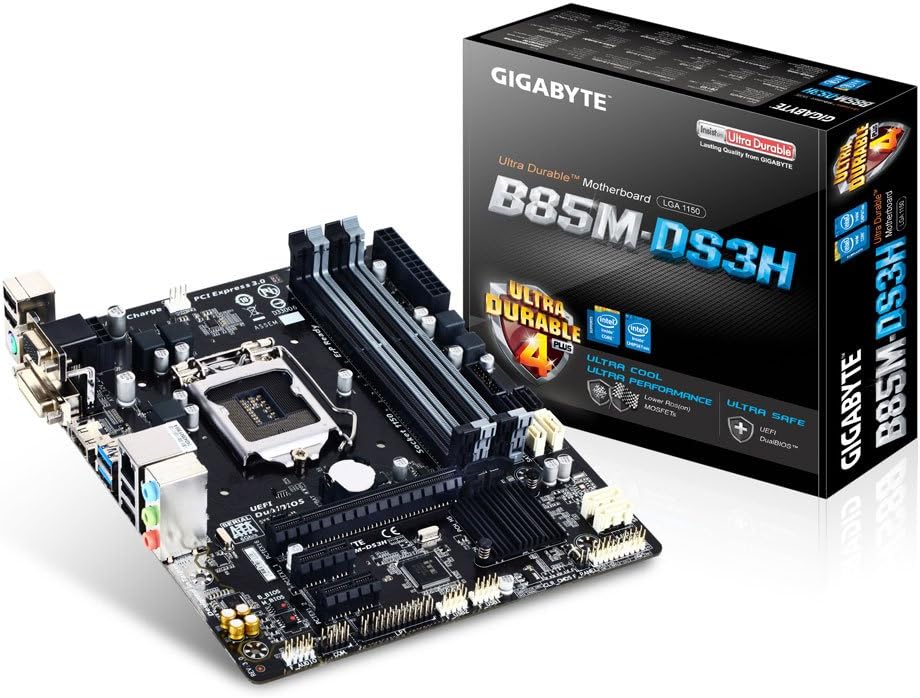
Figura 4.3: The GIGABYTE GA-B85M-DS3H motherboard displayed alongside its retail packaging, emphasizing its Ultra Durable 4 Plus features.

Figura 4.4: Close-up view of the rear I/O panel, showing ports for PS/2, D-SUB, DVI-D, HDMI, USB 3.0/2.0, LAN, and audio jacks.
Figura 4.5: Diagram illustrating key features such as High Quality Audio Capacitors, Audio Noise Guard, High ESD Protection, Long Lifespan All Solid Caps, Humidity Protection, High Temperature Protection, Power Failure Protection, and 3x Higher Surge Protection.
5. Konfigurazzjoni u Installazzjoni
5.1. Installazzjoni tas-CPU
- Sib is-sokit tas-CPU LGA 1150 fuq il-motherboard.
- Iftaħ il-lieva tas-sokit tas-CPU u erfa' l-pjanċa tat-tagħbija tal-metall.
- Allinja s-CPU bir-reqqa mas-sokit, filwaqt li tiżgura li t-trijangolu tad-deheb fuq is-CPU jaqbel mat-trijangolu fuq is-sokit.
- Poġġi s-CPU bil-mod fis-sokit mingħajr ma tisforzah.
- Agħlaq il-pjanċa tat-tagħbija u waħħalha bil-lieva.
- Applika l-pejst termali u installa l-cooler tas-CPU skont l-istruzzjonijiet tiegħu.
5.2. Installazzjoni tal-Memorja (RAM)
The motherboard supports up to 32GB of DDR3 1600/1333 MHz memory across four DIMM slots.
- Iftaħ il-klipps fiż-żewġt itruf tas-slott tad-DIMM.
- Allinja l-islott fuq il-modulu tal-memorja DDR3 maċ-ċavetta fl-islott tad-DIMM.
- Daħħal il-modulu tal-memorja sew fl-islott sakemm il-klipps jidħlu f'posthom.
- For dual-channel configuration, install memory modules in matching colored slots (e.g., DDR3_1 and DDR3_2).
5.3. Konnessjoni tal-Apparat tal-Ħażna (SATA)
Connect your SATA 6Gb/s (SATA3) and SATA 3Gb/s (SATA2) devices.
- The motherboard features 4x SATA 6Gb/s ports and 2x SATA 3Gb/s ports.
- Connect one end of the SATA data cable to the SATA port on the motherboard and the other end to your storage device (HDD/SSD).
- Connect the SATA power cable from your power supply to the storage device.
5.4. Installazzjoni tal-Karta tal-Espansjoni
The motherboard includes 1x PCI Express 3.0 x16 slot and 2x PCI Express 2.0 x1 slots.
- Select an appropriate PCI Express slot for your expansion card (e.g., graphics card, network card).
- Remove the corresponding metal bracket cover from your PC case.
- Allinja l-kard mas-slott u agħfas 'l isfel sew sakemm tkun f'postha sew.
- Waħħal il-kard mal-kaxxa b'kamin.
5.5. Konnetturi tal-Panew ta 'quddiem
Connect the cables from your PC case's front panel to the corresponding headers on the motherboard. Refer to the motherboard diagram (Figure 4.1) for header locations.
- F_PANEL: Power button, reset button, HDD LED, power LED.
- F_AWDJO: Front panel audio jacks.
- F_USB30: Front panel USB 3.0 ports.
- F_USB20: Front panel USB 2.0 ports.
5.6. Konnessjonijiet tal-Enerġija
Connect the main ATX power connector and the CPU power connector from your power supply to the motherboard.
- ATX (24-pin): Main power connector.
- ATX_12V (8-pin): CPU power connector.
6. Operazzjoni
6.1. Konfigurazzjoni tal-BIOS/UEFI
The GIGABYTE UEFI DualBIOS provides a user-friendly interface for configuring system settings. To enter BIOS setup, press the DEL ċavetta waqt l-istartjar tas-sistema.
- Ikkonfigura l-ordni tal-ibbutjar għall-installazzjoni tas-sistema operattiva tiegħek.
- Adjust system clock and date.
- Monitor system health (temperatures, fan speeds).
- Enable or disable integrated peripherals.
6.2. Installazzjoni tas-sewwieq
After installing your operating system, install the necessary drivers for optimal performance. Drivers can be found on the included driver CD/DVD or downloaded from the official GIGABYTE websit.
- Sewwieqa taċ-Ċipset
- Sewwieqa tal-LAN
- Sewwieqa tal-Awdjo
- Sewwieqa tal-Grafika (jekk qed tuża grafika integrata)
- Sewwieqa tal-USB 3.0
7. Manutenzjoni
7.1. Tindif
Regularly clean your PC to prevent dust buildup, which can lead to overheating and reduced performance. Use compressed air to remove dust from components and ensure proper airflow.
7.2. Aġġornamenti tal-BIOS
Iċċekkja l-GIGABYTE perjodikament website for BIOS updates. BIOS updates can improve system stability, add support for new hardware, or fix bugs. Follow the instructions provided by GIGABYTE carefully when updating the BIOS.
8 Issolvi l-problemi
- Ebda Qawwa: Kun żgur li l-kejbils kollha tal-enerġija (24-pin ATX, 8-pin CPU) huma konnessi sew. Iċċekkja l-funzjonalità tal-provvista tal-enerġija.
- Ebda Display: Verify that the monitor is connected to the correct video output (onboard or discrete graphics card). Reseat the graphics card and RAM modules.
- Instabbiltà/Ħsarat tas-Sistema: Check RAM modules for proper seating. Ensure CPU cooler is correctly installed and making good contact. Update drivers and BIOS.
- Is-Sistema Operattiva Mhux Tibbutja: Check boot order in BIOS. Verify storage device connections.
- Periferali Mhux Rilevat: Ensure USB/SATA devices are properly connected. Install necessary drivers.
9. Speċifikazzjonijiet
| Karatteristika | Dettall |
|---|---|
| Socket tas-CPU | LGA 1150 |
| Chipset | Intel B85 Express |
| Slots tal-Memorja | 4x DDR3 DIMM, Dual Channel |
| Kapaċità Massima tal-Memorja | 32GB |
| Veloċità tal-Memorja | DDR3 1600/1333 MHz |
| PCIe Slots | 1x PCI Express 3.0 x16, 2x PCI Express 2.0 x1 |
| Portijiet SATA | 4x SATA 6Gb/s, 2x SATA 3Gb/s |
| Portijiet USB (Wara) | 2x USB 3.0/2.0, 4x USB 2.0/1.1 |
| USB Ports (Internal Headers) | 2x USB 3.0/2.0, 4x USB 2.0/1.1 |
| Outputs tal-Vidjo | 1x D-Sub, 1x DVI-D, 1x HDMI |
| LAN | 10/100/1000 Mbit |
| Awdjo | Awdjo ta' Definizzjoni Għolja |
| Fattur tal-Formola | Mikro ATX (22.6 x 19.3 ċm) |
10. Garanzija u Appoġġ
For warranty information and technical support, please refer to the warranty card included with your product or visit the official GIGABYTE website. GIGABYTE provides comprehensive support resources, including FAQs, driver downloads, and contact information for technical assistance.
Uffiċjali tal-GIGABYTE Websit: www.gigabyte.com


