1. Introduzzjoni
This manual provides detailed instructions for the installation, operation, and maintenance of your Sagemcom DSI83 HD tivùsat satellite receiver. Please read this manual thoroughly before using the device to ensure proper setup and functionality. The Sagemcom DSI83 HD is a high-definition satellite receiver designed to access tivùsat satellite platform channels and other free-to-air satellite broadcasts.
2. Prodott Aktarview
The Sagemcom DSI83 HD receiver is a compact and versatile device. Familiarize yourself with its components before proceeding with installation.
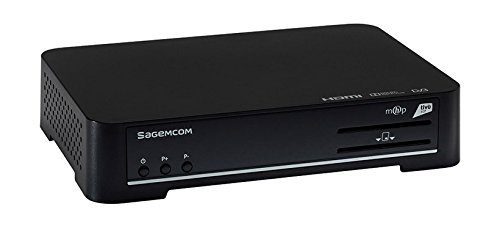
Figure 1: Sagemcom DSI83 HD Front Panel. This image displays the front panel of the Sagemcom DSI83 HD tivùsat receiver. Visible features include the Sagemcom logo, power button, channel up/down buttons, and slots for smart cards.
Karatteristiċi tal-Panew ta 'quddiem:
- Buttuna tal-Qawwa: To switch the receiver on or off (standby).
- Buttuni tal-Kanal 'l fuq/'l isfel: To navigate through channels.
- Smart Card Slot: For inserting the tivùsat smart card.
Rear Panel Features (Typical):
- LNB IN: Connection for the satellite dish cable.
- Ħruġ HDMI: Connects to your television for high-definition video and audio.
- Port Ethernet: For network connection and advanced features.
- Input ta' Enerġija: Tqabbad mal-adapter tal-enerġija.
- USB Port (if present): For potential software updates or external storage.
3. Setup
3.1 Disimballaġġ
Neħħi l-komponenti kollha mill-imballaġġ bir-reqqa. Kun żgur li l-oġġetti li ġejjin huma preżenti:
- Sagemcom DSI83 HD Receiver
- Kontroll mill-bogħod
- Adapter tal-Enerġija
- tivùsat Smart Card
- Manwal għall-Utent (dan id-dokument)
3.2 Konnessjoni mat-Televiżjoni Tiegħek
- Ensure both your television and the receiver are powered off.
- Connect one end of an HDMI cable (not included) to the HDMI output port on the rear of the DSI83 HD receiver.
- Connect the other end of the HDMI cable to an available HDMI input port on your television. Note the HDMI input number (e.g., HDMI 1, HDMI 2).
3.3 Connecting to the Satellite Dish
- Connect the coaxial cable from your satellite dish (LNB) to the 'LNB IN' port on the rear of the DSI83 HD receiver.
- The DSI83 HD supports single cable distribution systems for simplified installation.
3.4 Inserting the tivùsat Smart Card
- Locate the smart card slot on the front panel of the receiver.
- Insert the tivùsat smart card with the chip facing downwards and towards the receiver, until it clicks into place.
- Follow the activation instructions provided with your tivùsat smart card.
3.5 Konnessjoni tal-Enerġija
- Connect the power adapter to the 'Power Input' port on the receiver.
- Ipplaggja l-adapter tal-enerġija fi żbokk tal-elettriku adattat.
3.6 Wizard tas-Setup Inizjali
- Ixgħel it-televiżjoni tiegħek u agħżel is-sors tad-dħul HDMI korrett.
- Press the power button on the receiver or remote control to turn it on.
- The receiver will display an initial setup wizard. Follow the on-screen prompts to:
- Agħżel il-lingwa preferuta tiegħek.
- Configure satellite settings (if prompted).
- Perform an automatic channel scan. The receiver features automatic channel sorting (LCN) for tivùsat channels.
4. Istruzzjonijiet Operattivi
4.1 Funzjonijiet Bażiċi
- Power On/Off: Agħfas il- QAWWA buttuna fuq il-kontroll remot.
- Għażla tal-Kanal: Uża l- CH + / CH- buttuni biex tibdel il-kanali sekwenzjalment, jew daħħal in-numru tal-kanal direttament billi tuża t-tastiera numerika.
- Kontroll tal-Volum: Uża l- VOL + / VOL- buttuni biex taġġusta l-volum.
- Siekta: Agħfas il- MUTE buttuna biex issikket l-awdjo temporanjament.
4.2 Gwida Elettronika tal-Programm (EPG)
Agħfas il- EPG button on your remote control to access the Electronic Program Guide. This feature displays program schedules for current and upcoming broadcasts, allowing you to plan your viewing.
4.3 Ġestjoni tal-Kanal
- Kanali Favoriti: Tista' toħloq lista tal-kanali favoriti tiegħek għal aċċess rapidu. Irreferi għall-menu fuq l-iskrin għal struzzjonijiet dwar kif iżżid u timmaniġġja l-kanali favoriti.
- Tiftix manwali tal-Kanal: If needed, you can perform a manual channel search through the receiver's menu.
4.4 Kontroll tal-Ġenituri
The receiver includes a parental control feature to restrict access to certain channels or programs. This function is typically protected by a PIN code. Access the parental control settings via the main menu to set up and manage restrictions.
4.5 Aġġornamenti tas-Softwer (OTA)
The Sagemcom DSI83 HD supports Over-The-Air (OTA) software updates. The receiver can automatically detect and install new software versions to improve performance and add new features. Ensure your receiver is connected to the satellite signal for OTA updates.
4.6 Konnessjoni Ethernet
Connect an Ethernet cable to the receiver's Ethernet port and your home network for access to interactive services and additional functionalities, as supported by the tivùsat platform.
5. Manutenzjoni
5.1 Tindif
To clean the receiver, disconnect it from the power supply. Use a soft, dry cloth to wipe the exterior surfaces. Do not use liquid cleaners, abrasive materials, or solvents, as these can damage the finish or internal components.
5.2 Ħażna
If storing the receiver for an extended period, ensure it is disconnected from power and all cables. Store it in a cool, dry place, away from direct sunlight and extreme temperatures.
6 Issolvi l-problemi
If you encounter issues with your Sagemcom DSI83 HD receiver, refer to the following common troubleshooting steps:
- Ebda Qawwa: Check if the power adapter is securely connected to both the receiver and the electrical outlet. Ensure the outlet is functional.
- Ebda Stampa/Ħoss:
- Iċċekkja li t-TV tiegħek huwa ssettjat għas-sors tad-dħul HDMI korrett.
- Check the HDMI cable connection between the receiver and the TV.
- Ensure the receiver is powered on and not in standby mode.
- L-ebda Sinjal tas-Satellita:
- Check the satellite cable connection to the 'LNB IN' port.
- Ensure your satellite dish is correctly aligned. Severe weather can sometimes affect signal reception.
- 'Coded Signal' Message:
- Verify that the tivùsat smart card is correctly inserted into the slot.
- Ensure your smart card is activated and valid.
- Some channels may require specific subscriptions or may not be part of the tivùsat package.
- Il-Kontroll mill-bogħod Mhux Jaħdem:
- Ibdel il-batteriji fil-kontroll remot.
- Ensure there are no obstructions between the remote control and the receiver's front panel.
If the problem persists after attempting these steps, please contact Sagemcom customer support for further assistance.
7. Speċifikazzjonijiet
| Numru tal-Mudell | DSI83HD |
| Dimensjonijiet (WxHxD) | 216 mm x 40 mm x 150 mm |
| Piż | Madwar 2.2 lbs (1 kg) |
| Tuner tas-Satellita | DVB-S2 / DVB-S |
| Dekodifikazzjoni tal-vidjo | MPEG2 MP@HL (50Hz, max 15 Mbit/s), MPEG4 AVC HP@L4 (HD, 50Hz, max 20 Mbit/s), MPEG-4 AVC HP@L3 (SD, max 10 Mbit/s) |
| Dekodifikazzjoni Awdjo | MPEG-1 Layer I & II, MPEG2 Layer II, DOLBY DIGITAL (passthrough/downmixed), DOLBY DIGITAL PLUS (passthrough/transcoded/downmixed) |
| Definizzjoni tal-Vidjo | HD (Definizzjoni Għolja) |
| Konnettività | 1x HDMI, Ethernet |
| Metodu ta' Kontroll | Kontroll mill-bogħod |
| Karatteristiċi | Interactive Decoder (MHP), Radio Reception, Software Update (OTA), Automatic Channel Sorting (LCN), Automatic/Manual Channel Search, Timer, Parental Control, EPG, Favorite Channel List, Teletext/Subtitles, PIN Code, LNB/Motor Commands |
8. Garanzija u Appoġġ
For information regarding the product warranty, please refer to the warranty card included with your purchase or visit the official Sagemcom website. For technical support, troubleshooting assistance beyond this manual, or service inquiries, please contact Sagemcom customer support through their official channels.


