1. Introduzzjoni
This manual provides comprehensive instructions for the safe and efficient operation, setup, and maintenance of your HSM Classic 90.2 Cross Cut Paper Shredder. Please read this manual thoroughly before using the device and retain it for future reference.
2. Istruzzjonijiet Importanti dwar is-Sigurtà
To reduce the risk of injury or damage, always follow basic safety precautions when using this product.
- Żomm idejk, xagħar, ħwejjeġ laxki, ingravati, u ġojjelli 'l bogħod mis-slott tad-dħul tal-karta.
- Tħallix tfal jew annimali domestiċi qrib ix-shredder.
- Skonnettja t-tqattigħ tal-karti meta ma tkunx qed tużah jew qabel ma tnaddaf, iċċaqlaq, jew tbattal il-kontenitur tal-iskart.
- Do not shred metal objects, large paper clips, or adhesive labels. Small staples and paper clips may be shredded, but it is recommended to remove them to prolong blade life.
- Tisprejjax aerosols jew lubrikanti fit-tqattigħ.
- Ħaddem it-tqattigħ fuq wiċċ ċatt u stabbli.
- Tħaddimx jekk il-korda tal-enerġija tkun bil-ħsara.
3. Kontenut tal-Pakkett
Ivverifika li l-oġġetti kollha huma preżenti fil-pakkett:
- HSM Classic 90.2 Shredder Unit
- Bin tal-iskart
- Korda tal-Enerġija
- Manwal għall-Utent (dan id-dokument)
4. Setup
- Iftaħ ix-Shredder mill-pakkett: Neħħi l-komponenti kollha mill-imballaġġ bir-reqqa. Żomm l-imballaġġ għal trasport jew ħażna fil-futur.
- Position the Waste Bin: Place the shredder head securely onto the provided waste bin. Ensure it is seated correctly to activate the safety switch (if applicable).
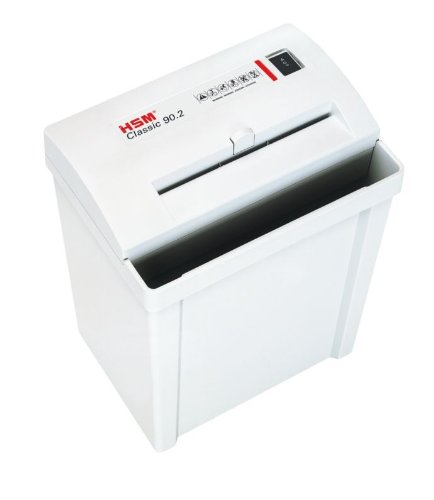
Image 1: HSM Classic 90.2 shredder with head properly seated on the waste bin. This shows the complete unit ready for operation.
- Qabbad l-Enerġija: Plug the power cord into the shredder's power inlet, then into a standard electrical outlet.
5. Istruzzjonijiet Operattivi
- Qawwa Mixgħul: Locate the power switch on the shredder head. Set it to the "ON" or "AUTO" position. The shredder is now ready for use.
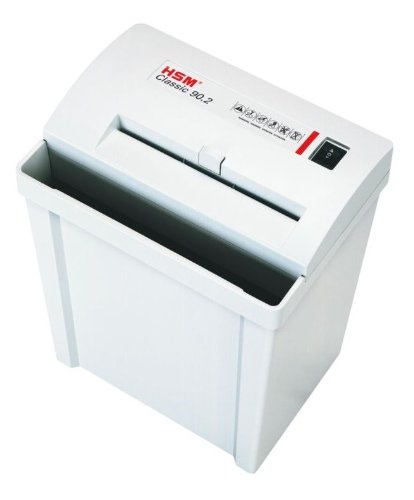
Immaġni 2: Fuq view of the shredder, highlighting the paper entry and control switch. The switch is typically located near the paper entry.
- Tqattigħ ta' Dokumenti: Insert paper into the paper entry slot. The shredder will automatically start when paper is detected and stop once shredding is complete. Do not exceed the maximum sheet capacity (refer to specifications).
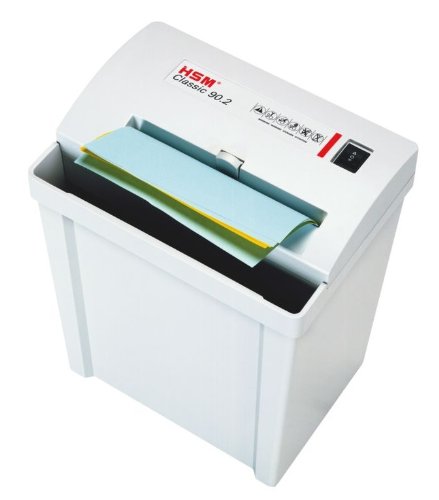
Image 3: Paper being fed into the shredder. This illustrates the correct method for inserting documents for shredding.
- It-tbattil tal-iskartar: When the waste bin is full, the shredder may stop operating. Unplug the shredder, carefully lift the shredder head off the bin, empty the shredded material, and then replace the head securely.
- Itfi: When finished shredding, set the power switch to the "OFF" position and unplug the unit from the power outlet.
6. Manutenzjoni
- Żejtjar tat-tqattigħ: For optimal performance and longevity of cross-cut shredders, regular oiling is recommended. Apply shredder oil (specifically designed for paper shredders) across the paper entry slot. Run a few sheets of paper through the shredder immediately after oiling to distribute the lubricant. Refer to the shredder oil product instructions for frequency.
- Tindif: Unplug the shredder before cleaning. Use a soft, dry cloth to wipe the exterior surfaces. Do not use abrasive cleaners or solvents.
- Clearing Paper Jams: If a paper jam occurs, switch the shredder to the "REV" (reverse) position to attempt to clear the paper. If unsuccessful, unplug the shredder and carefully remove the jammed paper manually. Exercise extreme caution to avoid injury.
7 Issolvi l-problemi
| Problema | Kawża Possibbli | Soluzzjoni |
|---|---|---|
| It-tqattigħ tal-karti ma jixgħelx. |
|
|
| Ġamm tal-karta. |
|
|
| It-tqattigħ jaħdem kontinwament. |
|
|
8. Speċifikazzjonijiet
- Ditta: HSM
- Mudell: Klassiku 90.2
- Numru tal-Mudell: SHDESM90CC
- Tip ta' Qtugħ: Cross Cut
- Livell ta 'sigurtà: P-4 & F-1 (according to DIN 66399)
- Modalità ta' Operazzjoni: Awtomatiku
- Dimensjonijiet tal-Prodott (LxWxH): 30.5 x 23.5 x 41.9 ċm (madwar 12 x 9.25 x 16.5 pulzieri)
- UPC: 633726615823
9. Garanzija u Appoġġ
For warranty information, technical support, or service inquiries, please refer to the official HSM webis-sit jew ikkuntattja lin-negozjant awtorizzat lokali tiegħek. Żomm l-irċevuta tax-xiri tiegħek bħala prova tax-xiri.


