1. Introduzzjoni
This manual provides essential instructions for the safe and effective use of your Ricoh Compatible Toner Cartridge, Model 8541625508. This high-yield toner cartridge is designed to work seamlessly with Ricoh MP C4501 and MP C5501 series printers, delivering consistent print quality.
2. Informazzjoni dwar is-Sigurtà
- Żomm il-cartridges tat-toner fejn ma jintlaħqux mit-tfal.
- Do not ingest toner. If toner is swallowed, seek medical attention immediately.
- Evita kuntatt dirett mat-trab tat-toner. Jekk iseħħ kuntatt, aħsel sew bis-sapun u l-ilma.
- Do not incinerate used toner cartridges, as this may cause toner to explode and release fine particles.
- Store cartridges in a cool, dry place away from direct sunlight and extreme temperatures.
3. Kontenut tal-Pakkett
Il-pakkett tiegħek għandu jkun fih dan li ġej:
- One (1) Ricoh Compatible Toner Cartridge (Black, Cyan, Magenta, or Yellow, depending on your purchase).
4. Istruzzjonijiet ta 'installazzjoni
Follow these steps to install the toner cartridge into your Ricoh MP C4501 or MP C5501 series printer:
- Itfi l-Printer: Ensure your printer is turned off and unplugged from the power source before beginning the installation process.
- Iftaħ il-Qoxra ta' Quddiem: Locate and open the front cover of your printer to access the toner cartridge compartment.
- Neħħi l-Kartriġ il-Qadim (jekk applikabbli): Gently pull out the empty toner cartridge by its handle. Place it in a protective bag for recycling.
- Iftaħ il-Kartuċċa l-Ġdida mill-pakkett: Carefully remove the new compatible toner cartridge from its packaging.
- Ħawwad bil-mod: Żomm il-kartriġ il-ġdid orizzontalment u ħawdu bil-mod 5-6 darbiet biex tqassam it-toner b'mod uniformi ġewwa.
- Neħħi s-Siġilli Protettivi: Remove any orange protective caps, seals, or pull-tabs from the cartridge. Be careful not to touch the green drum surface.
- Daħħal Skartoċċ Ġdid: Align the new toner cartridge with the corresponding slot in the printer and slide it in until it clicks firmly into place. Ensure it is fully seated.
- Agħlaq il-Qoxra: Close the front cover of the printer securely.
- Ixgħel il-Printer: Plug in and turn on your printer. The printer will typically perform a self-test and recognize the new cartridge.
- Ipprintja l-Paġna tat-Test: Ipprintja paġna ta' prova biex tikkonferma l-installazzjoni xierqa u l-kwalità tal-istampar.
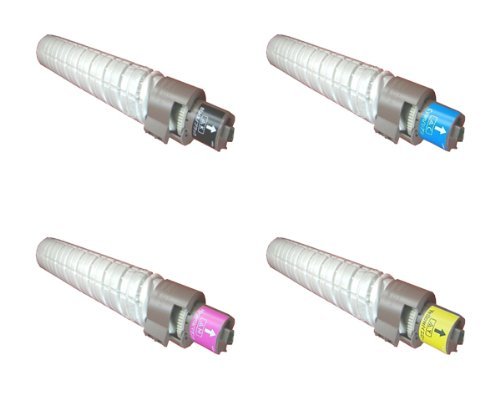
This image displays the compatible toner cartridge, similar to the one you have purchased. Note the packaging and the general shape of the cartridge before installation.
5. Użu u Kura
- Monitor Toner Levels: Your printer's display or software will indicate current toner levels. Replace the cartridge when prompted or when print quality deteriorates significantly.
- Immaniġġja b'Kura: Avoid touching the green drum surface on the cartridge, as oils from your skin can affect print quality.
- Konsiderazzjonijiet Ambjentali: Dispose of empty toner cartridges responsibly through recycling programs.
6. Ħażna
For optimal performance and longevity, store unused toner cartridges:
- In their original, unopened packaging.
- In a cool, dry environment (e.g., 10-30°C or 50-86°F).
- 'Il bogħod mix-xemx diretta, sorsi ta' sħana, u umdità eċċessiva.
- Horizontally, not vertically.
7 Issolvi l-problemi
If you encounter issues with your toner cartridge, refer to the table below:
| Problema | Kawża Possibbli | Soluzzjoni |
|---|---|---|
| Poor Print Quality (faded, streaks, spots) | Low toner, uneven toner distribution, dirty drum, incorrect printer settings. | Gently shake cartridge, check printer settings, perform a printer cleaning cycle, or replace cartridge if empty. |
| Kartriġ Mhux Rikonoxxut | Improper installation, protective seals not removed, printer firmware issue. | Reinstall cartridge, ensure all protective seals are removed, check printer's display for error codes, consult printer manual for firmware updates. |
| Toner Leakage | Damaged cartridge, improper installation. | Carefully remove cartridge, inspect for damage. If damaged, replace. Ensure proper installation. Clean any spilled toner with a damp drapp. |
8. Speċifikazzjonijiet
- Numru tal-Mudell: 8541625508
- Mudelli ta' Printer Kompatibbli: Ricoh MP C4501, Ricoh MP C5501
- Tip: Skartoċċ tat-Toner Kompatibbli
- Karatteristika: Rendiment Għoli
- Komponenti Inklużi: Skartoċċ Toner
9. Garanzija u Appoġġ
For information regarding warranty coverage or technical support, please refer to the seller's policies or contact their customer service directly. Keep your purchase receipt as proof of purchase.