1. Introduzzjoni
This manual provides detailed instructions for the operation and maintenance of your Casio W-735H-8A2VDF Digital Wristwatch. This timepiece is designed for durability and functionality, featuring a 10-year battery, 100-meter water resistance, and a vibration alarm. Please read this manual thoroughly to ensure proper use and to maximize the lifespan of your watch.

Stampa 1.1: Quddiem view of the Casio W-735H-8A2VDF Digital Wristwatch. The watch features a grey resin case and strap, a black digital display with time, date, and mode indicators, and buttons labeled 'ADJUST', 'MODE', 'LIGHT', 'SPLIT', and 'START'. The bezel is marked 'VIBRATION ALARM' and 'SUPER ILLUMINATOR'.
2. Setup
2.1 L-issettjar tal-Ħin u d-Data
- Fil-Modalità Żamma tal-Ħin, żomm il-buttuna aġġusta (fuq ix-xellug) sakemm is-sekondi jibdew jteptpu, u dan jindika l-iskrin tas-settings.
- Agħfas il- MODALITÀ button (bottom left) to cycle through the settings: Seconds → DST (Daylight Saving Time) → Hour → Minute → Year → Month → Day.
- Uża l- BIDU buttuna (fuq il-lemin) biex iżżid il-valur li jteptep jew il- Maqsum button (bottom right) to decrease it. For seconds, pressing BIDU jirrisettjahom għal 00.
- Ladarba s-settings kollha jkunu korretti, agħfas il-buttuna aġġusta buttuna biex toħroġ mill-iskrin tas-settings.
2.2 Issettjar tal-Allarm
- Mill-Modalità taż-Żamma tal-Ħin, agħfas il-buttuna MODALITÀ button until you reach the Alarm Mode (indicated by 'ALM' on the display).
- Żomm il- aġġusta sakemm iċ-ċifri tas-siegħa tal-allarm jibdew jteptep.
- Uża l- BIDU u Maqsum buttuni biex tissettja s-siegħa u l-minuta tal-allarm mixtieqa.
- Agħfas il- MODALITÀ button to toggle between setting the hour and minute.
- Agħfas il- aġġusta button to exit the alarm setting screen.
2.3 Activating Vibration Alarm and Hourly Sinjal tal-Ħin
- Fil-Modalità tal-Allarm, agħfas il-buttuna BIDU button to toggle the alarm ON/OFF. An alarm indicator will appear when active.
- Agħfas il- Maqsum button to toggle the Hourly Time Signal ON/OFF. A signal indicator will appear when active.
- To activate the vibration for the alarm, press and hold the BIDU button in Alarm Mode until 'VIB' appears on the display. Repeat to deactivate.
3. Istruzzjonijiet Operattivi
3.1 Navigazzjoni tal-Modalità
Agħfas il- MODALITÀ buttuna (xellug t'isfel) biex tiċċikla bejn il-modi differenti:
- Modalità taż-Żamma tal-Ħin (ħin attwali, data)
- Stopwatch Mode ('ST')
- Countdown Timer Mode ('TR')
- Alarm Mode ('ALM')
Stampa 3.1: Ġenb view of the Casio W-735H-8A2VDF Digital Wristwatch. This image highlights the four operational buttons on the watch's sides, labeled 'ADJUST', 'MODE', 'SPLIT', and 'START', which are used for navigating modes and setting functions.
3.2 Funzjoni tal-Istopwatch
- Enter Stopwatch Mode ('ST').
- Agħfas BIDU (fuq il-lemin) biex tibda tieħu l-ħin.
- Agħfas BIDU għal darb'oħra biex twaqqaf il-ħin.
- Agħfas aġġusta (top left) to reset the stopwatch to zero.
- Biex tirrekordja ħinijiet maqsuma, agħfas Maqsum (bottom right) while the stopwatch is running. The display will show the split time. Press Maqsum again to return to elapsed time.
3.3 Funzjoni tat-Tajmer tal-Countdown
- Enter Countdown Timer Mode ('TR').
- Żomm il- aġġusta button until the timer settings begin to flash.
- Uża l- BIDU u Maqsum buttuni biex tissettja l-ħin tal-countdown mixtieq (sigħat, minuti, sekondi).
- Agħfas aġġusta biex toħroġ mill-iskrin tas-setting.
- Agħfas BIDU biex tibda l-countdown. Agħfas BIDU għal darb'oħra biex twaqqaf/terġa' tibda.
- When the countdown reaches zero, the watch will emit an alarm or vibrate (if set). Press any button to stop the alert.
3.4 Using the Illuminator (LED Backlight)
Agħfas il- DAWL buttuna (fin-nofs tal-qiegħ) biex iddawwal id-displej għal użu faċli viewing in low-light conditions. The backlight duration is preset.
4. Manutenzjoni
4.1 Tindif tal-Arloġġ Tiegħek
Regularly wipe your watch with a soft, dry cloth to remove dirt and moisture. For stubborn dirt, use a soft cloth dampLaħlaħ bl-ilma u deterġent newtrali ħafif, imbagħad imsaħ niexef. Evita li tuża aġenti volatili bħal thinner jew benżin, għax jistgħu jagħmlu ħsara lill-komponenti tar-reżina.
4.2 Prekawzjonijiet dwar ir-Reżistenza għall-Ilma
Your Casio W-735H-8A2VDF is rated for 100-meter water resistance. This means it is suitable for swimming and snorkeling. However, avoid operating the watch buttons while it is submerged in water. Do not use the watch for scuba diving or other types of diving that require air tanks.
4.3 Sostituzzjoni tal-batterija
The watch is equipped with an LR44 battery designed for approximately 10 years of operation. When the display becomes dim or functions become erratic, it indicates that the battery power is low. Battery replacement should be performed by a qualified technician to ensure proper water resistance and function. Do not attempt to replace the battery yourself.

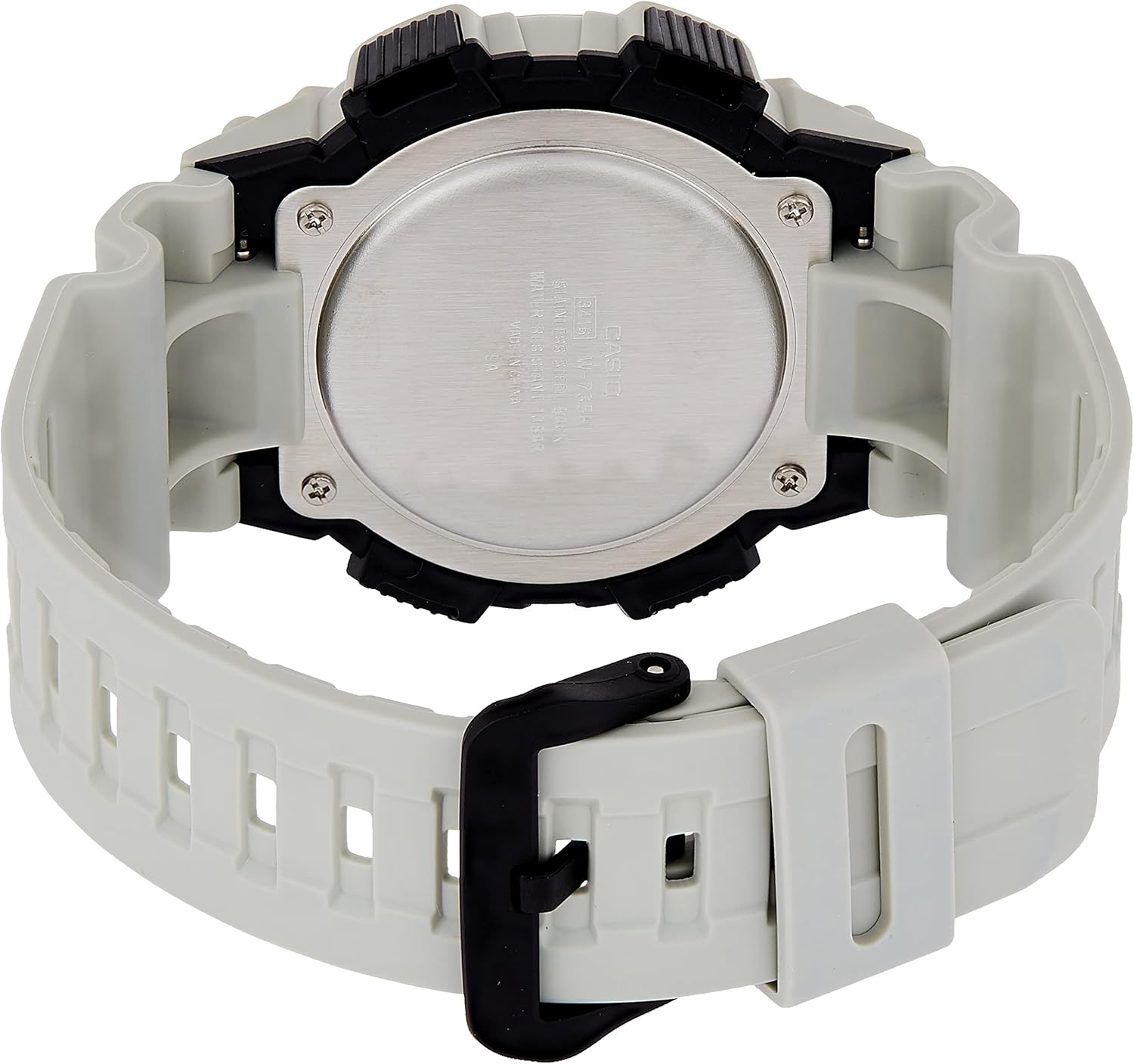
Stampa 4.1: Lura view of the Casio W-735H-8A2VDF Digital Wristwatch. The stainless steel case back is visible, engraved with 'CASIO', 'WATER RESIST 10BAR', 'STAINLESS STEEL BACK', and 'SHOCK RESIST', along with the model number.
5 Issolvi l-problemi
- Il-Ħin/Data mhix korretta: Re-enter the Timekeeping Mode and adjust the time and date settings as described in Section 2.1. Ensure DST (Daylight Saving Time) is set correctly for your region.
- Alarm Not Sounding/Vibrating: Check if the alarm is activated in Alarm Mode (Section 2.3). Verify that the vibration alarm is enabled if you prefer vibration over sound.
- Id-displej huwa vojt jew dgħajjef: This usually indicates a low battery. Contact a qualified watch technician for battery replacement.
- Buttons Are Unresponsive: If the watch is unresponsive, try pressing all four buttons simultaneously for a few seconds to perform a soft reset. If the issue persists, the battery may be completely depleted or there may be an internal malfunction requiring professional service.
6. Speċifikazzjonijiet
| Numru tal-Mudell | W-735H-8A2VDF |
| Reżistenza għall-Ilma | 100 metru (10 BAR) |
| Tip ta 'batterija | 1 x LR44 (approx. 10-year life) |
| Eżattezza | ±30-il sekonda fix-xahar (medja) |
| Funzjonijiet | Timekeeping, Stopwatch, Countdown Timer, Multi-function Alarms (with vibration), Hourly Time Signal, LED Backlight |
| Dimensjonijiet | 3.15 x 4.8 x 3.54 pulzieri |
| Piż | 1.06 uqija |

Stampa 6.1: The Casio W-735H-8A2VDF Digital Wristwatch displayed on a wrist, illustrating its size and fit for daily wear.
7. Garanzija u Appoġġ
For detailed information regarding the product warranty, please refer to the warranty card included with your purchase or visit the official Casio website. For customer support, service, or inquiries about replacement parts, please contact Casio customer service directly through their official channels.
Uffiċjali tal-Casio Websit: www.casio.com


