Manwal tal-Utent tal-Arloġġ tal-Allarm Diġitali LCD Eurotime Mudell 23708-00
Mudell: 23708-00
Introduzzjoni
This manual provides instructions for the setup, operation, and maintenance of your Eurotime LCD Digital Alarm Clock, Model 23708-00. Please read this manual thoroughly before using the product to ensure proper function and longevity.
The Eurotime LCD Digital Alarm Clock features an LCD display, 7-color changing LED lighting, multiple natural alarm tones, and displays time, date, day of the week, and indoor temperature. It also includes a snooze function and a countdown feature.
Informazzjoni dwar is-Sigurtà
- Żomm l-apparat 'il bogħod mill-ilma u umdità għolja.
- Tesponix l-apparat għal dawl tax-xemx dirett jew temperaturi estremi.
- Use only the specified battery type (3 x 1.5V AAA batteries).
- Tħallatx batteriji qodma u ġodda, jew tipi differenti ta 'batteriji.
- Armi l-batteriji użati b'mod responsabbli skont ir-regolamenti lokali.
- Tippruvax tiżżarma jew issewwi l-apparat int stess. Ikkuntattja persunal kwalifikat għas-servizz.
Kontenut tal-Pakkett
- Eurotime LCD Digital Alarm Clock (Model 23708-00)
- 3 x 1.5V Batteriji AAA
- Manwal għall-Utent (dan id-dokument)
Prodott Overview
Iffamiljarizza ruħek mal-komponenti u l-kontrolli tal-arloġġ tal-allarm tiegħek.
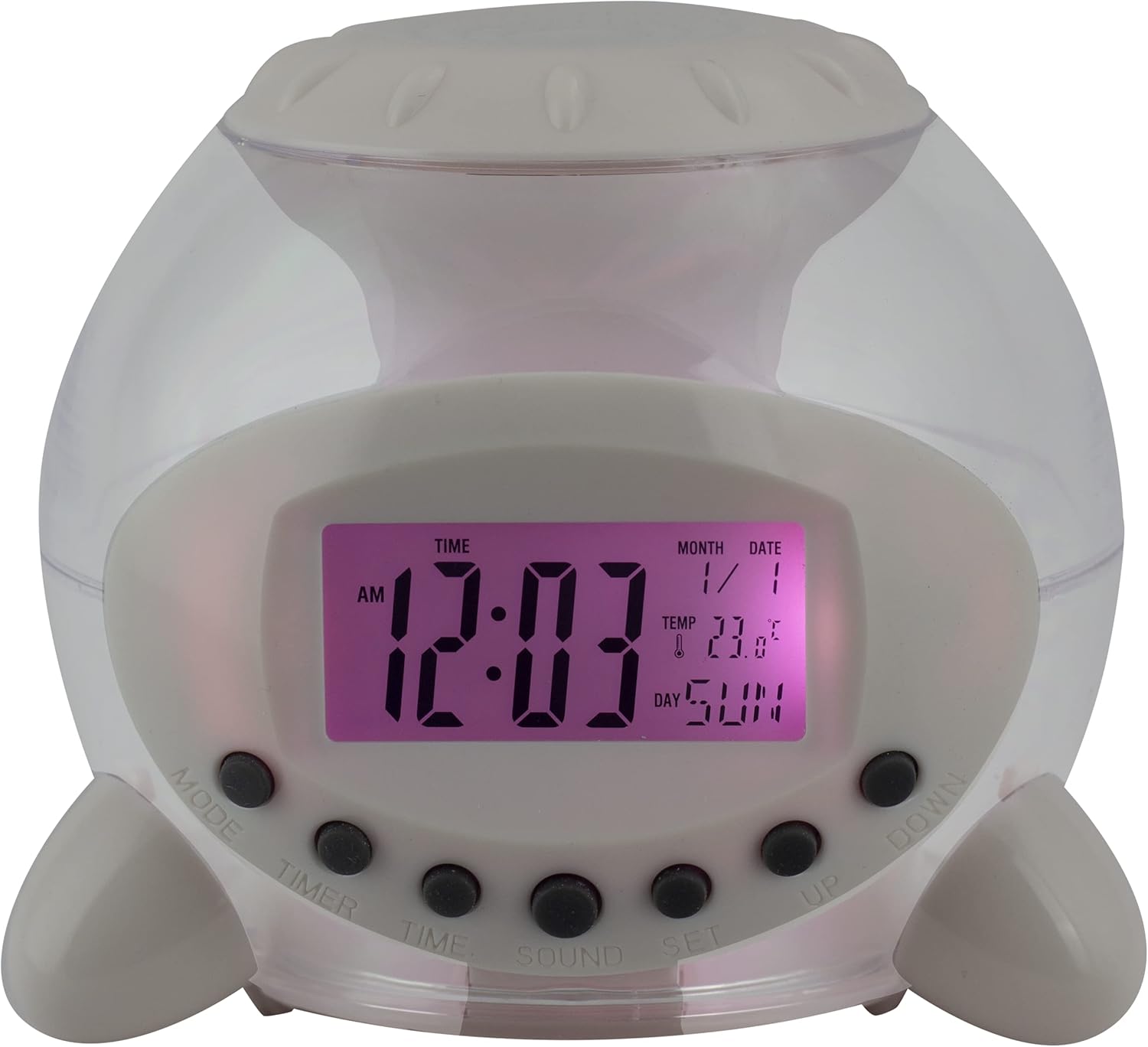
Figura 1: Quddiem View of the Alarm Clock. This image displays the front of the Eurotime LCD Digital Alarm Clock, highlighting its transparent plastic housing and the central LCD screen. The screen shows the time (12:03 AM), month (1), date (1), temperature (23.8°C), and day (SUN). Below the screen are control buttons labeled MODE, TIMER, TIME, SOUND, and SET, along with UP and DOWN buttons.

Figura 2: Ġenb View with Control Buttons. This image shows a side perspective of the alarm clock, emphasizing the array of control buttons located on the front-bottom edge. The transparent housing allows a glimpse of the internal structure and the LED lighting effect. The buttons are clearly visible for user interaction.

Figura 3: Ġenb View with Internal Lighting. This image provides another side view, illustrating the transparent housing and the internal LED lighting. The light emanates from the base, creating a soft glow within the clock's structure, demonstrating its color-changing feature.
Buttuni tal-Kontroll:
- MODALITÀ: Switches between time display, alarm setting, and countdown timer.
- TIMER: Activates and sets the countdown timer.
- ĦIN: Used to set the current time and date.
- ĦOSS: Selects alarm tones or natural sounds.
- SET: Confirms settings or enters setting mode.
- FUQ ISFEL: Adjusts values during setting modes.
Setup
1. Installazzjoni tal-batterija
- Locate the battery compartment on the bottom of the alarm clock.
- Iftaħ l-għatu tal-kompartiment tal-batterija.
- Insert three (3) 1.5V AAA batteries, ensuring correct polarity (+/-).
- Agħlaq l-għatu tal-kompartiment tal-batterija sew.
Nota: The clock will automatically power on after battery installation. The display may flash, indicating it's ready for time setting.
Istruzzjonijiet Operattivi
1. L-issettjar tal-Ħin u d-Data
- Fil-modalità tal-wiri tal-ħin normali, agħfas il- ĦIN Agħfas il-buttuna darba. Iċ-ċifri tas-sigħat jibdew jteptep.
- Uża l- UP or 'L isfel buttuni biex taġġusta s-siegħa.
- Agħfas ĦIN again to move to minute setting. Adjust with UP or 'L isfel.
- Kompli agħfas ĦIN to cycle through year, month, and date settings, adjusting each with UP or 'L isfel.
- After setting the date, press ĦIN one last time or wait a few seconds for the settings to be saved and return to normal display.
2. Issettjar tal-Allarm
- Agħfas il- MODALITÀ button until "ALARM" appears on the display (or an alarm icon).
- Agħfas il- SET buttuna. Iċ-ċifri tas-siegħa tal-allarm se jteptep.
- Uża l- UP or 'L isfel buttuni biex taġġusta s-siegħa tal-allarm.
- Agħfas SET again to move to minute setting. Adjust with UP or 'L isfel.
- Agħfas SET one last time to confirm the alarm time.
- Biex tattiva/tiddiżattiva l-allarm, agħfas il-buttuna UP button in alarm display mode. An alarm icon will appear/disappear.
3. Funzjoni Snooze
When the alarm sounds, press any button (except SET or MODALITÀ) to activate the snooze function. The alarm will pause and sound again after a few minutes (duration is adjustable, refer to advanced settings if available).
Biex titfi l-allarm kompletament, agħfas il-buttuna SET agħfas il-buttuna meta tkun qed tinstema'.
4. Color Changing LED Lighting
The alarm clock features a 7-color changing LED light. This function typically activates automatically when the alarm sounds or can be manually toggled. Refer to the MODALITÀ or SET button for specific controls related to the lighting, if available.
5. Natural Alarm Tones
To select an alarm tone:
- In alarm setting mode (after pressing MODALITÀ to display alarm time), press the ĦOSS buttuna.
- Uża l- UP or 'L isfel buttons to cycle through the available natural alarm tones.
- Agħfas SET biex tikkonferma l-għażla tiegħek.
6. Countdown Feature
Biex tuża t-tajmer tal-countdown:
- Agħfas il- MODALITÀ button until "TIMER" appears on the display.
- Agħfas il- TIMER buttuna. Iċ-ċifri tas-siegħa se jteptep.
- Użu UP or 'L isfel to set the desired countdown hour.
- Agħfas TIMER again to set minutes, then seconds.
- Agħfas SET biex tibda l-countdown.
- To pause or resume, press SET. Biex tirrisettja, agħfas MODALITÀ.
Manutenzjoni
Tindif
- Imsaħ l-arloġġ b'ċarruta ratba u niexfa.
- Do not use abrasive cleaners or solvents, as they may damage the plastic housing or display.
Sostituzzjoni tal-batterija
When the display dims or functions become erratic, it is time to replace the batteries. Follow the "Battery Installation" steps in the Setup section.
Issolvi l-problemi
| Problema | Kawża Possibbli | Soluzzjoni |
|---|---|---|
| Id-displej huwa vojt jew mudlam. | Batteriji baxxi jew eżawriti. Installazzjoni ħażina tal-batterija. | Replace batteries with new 1.5V AAA batteries. Ensure correct polarity. |
| L-allarm ma jdoqqx. | Alarm is not activated. Alarm volume is too low (if adjustable). | Ensure the alarm icon is displayed. Check alarm settings. |
| Il-Ħin/Data mhumiex korretti. | Mhux issettjat sew wara l-installazzjoni tal-batterija jew interruzzjoni tal-kurrent. | Follow "Setting Time and Date" instructions to reset. |
| Color changing light not working. | Feature not activated or malfunction. | Check operating instructions for light activation. If problem persists, contact support. |
Speċifikazzjonijiet
- Ditta: Eurotime
- Numru tal-Mudell: 23708-00
- Dimensjonijiet tal-Prodott: 8.99 x 8.99 x 8 ċm
- Piż: 120 g
- Materjal: Plastik
- Tip ta' wiri: LCD diġitali
- Karatteristiċi Speċjali: Calendar display, Snooze, Alarm, 7-Color Changing LED, Natural Alarm Tones, Countdown Feature, Indoor Temperature Display
- Sors tal-Enerġija: 3 Batteriji AAA ta' 1.5V (inklużi)
Garanzija u Appoġġ
For warranty information or technical support, please refer to the retailer where the product was purchased or visit the official Eurotime websit. Żomm l-irċevuta tax-xiri tiegħek bħala prova tax-xiri.


