Prodott Overview
The Sagemcom Sixty Cordless Telephone and Answer Machine combines modern technology with a classic design. Its unique aesthetic, smooth finish, and touchscreen functionality make it a distinctive addition to any environment. Designed for user comfort, the Sixty offers a range of features including hands-free mode, extended battery life, and an intuitive interface for easy communication.
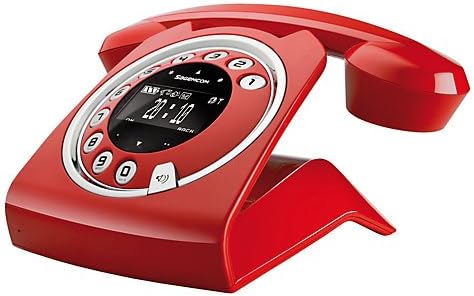
Image: The Sagemcom Sixty Cordless Telephone and Answer Machine in red, showcasing its unique retro-modern design with a circular dial and digital display.

Immaġni: Ġenb view of the Sagemcom Sixty Cordless Telephone, highlighting its sleek profile and the cradle design.
Gwida ta' Setup
1. Spakkjar
Carefully remove all components from the packaging. Ensure you have the base unit, handset, power adapter, and telephone line cord.
2. Konnessjoni tal-Unità Bażi
- Connect the power adapter to the 'DC IN' port on the back of the base unit and plug the other end into a wall outlet.
- Connect one end of the telephone line cord to the 'LINE' port on the base unit and the other end to your telephone wall jack.
3. Installazzjoni u Iċċarġjar tal-batterija
- Iftaħ il-kompartiment tal-batterija fuq l-idejn.
- Daħħal il-batteriji rikarikabbli fornuti, waqt li tosserva l-polarità korretta (+ u -).
- Agħlaq il-kompartiment tal-batterija.
- Place the handset on the base unit. The display will indicate charging. Allow the handset to charge for at least 16 hours before first use to ensure optimal battery performance.
Istruzzjonijiet Operattivi
Jagħmel u Jirċievi Sejħiet
- Biex Tagħmel Sejħa: Neħħi l-idejn jew agħfas il- Ċempel button. Dial the number using the touchscreen keypad.
- Biex Tirċievi Sejħa: Neħħi l-idejn jew agħfas il- Ċempel buttuna meta jdoqq it-telefon.
- Biex Intemm Sejħa: Poġġi l-handset lura fuq l-unità bażi jew agħfas il-buttuna Tmiem Sejħa buttuna.
Bl-użu tal-Touchscreen
The Sixty features a responsive touchscreen for navigation and input. Tap icons or numbers to select functions or dial. Swipe to scroll through lists or menus.
Modalità Ħieles bl-Idejn
Waqt sejħa, agħfas Speaker buttuna biex tattiva l-modalità hands-free. Agħfasha mill-ġdid biex terġa' lura għall-modalità handset.
Ġestjoni tal-ktieb tat-telefon
- Żieda ta' Kuntatt: Navigate to the Phonebook menu, select 'Add New Contact', enter the name and number using the touchscreen, and save. The phonebook can store up to 150 names.
- Tiftix għal Kuntatt: Access the Phonebook and use the search function or scroll through the list.
- Editjar/Tħassir ta' Kuntatt: Select the desired contact from the Phonebook and choose the 'Edit' or 'Delete' option.
Funzjonijiet tal-Magna tat-Tweġib
The integrated answering machine has a recording capacity of 10 minutes.
- Attivazzjoni/Diżattivazzjoni: Access the Answering Machine menu to turn it on or off.
- Daqq ta' Messaġġi: Select 'Play Messages' from the Answering Machine menu.
- Reġistrazzjoni ta' Messaġġ Ħiereġ: Follow the prompts in the Answering Machine menu to record a personalized outgoing message.
Manutenzjoni
Tindif tat-Telefon Tiegħek
To clean the phone, wipe it with a soft, damp cloth. Do not use abrasive cleaners or solvents, as these can damage the surface. Ensure the phone is disconnected from power before cleaning.
Kura tal-batterija
- Dejjem uża l-batteriji rikarikabbli fornuti.
- Jekk it-telefon ma se jintużax għal perjodu twil ta’ żmien, neħħi l-batteriji biex tevita t-tnixxija.
- Armi batteriji qodma b'mod responsabbli skont ir-regolamenti lokali.
Issolvi l-problemi
| Problema | Soluzzjoni Possibbli |
|---|---|
| L-ebda ton tal-arloġġ | Check if the telephone line cord is securely connected to both the base unit and the wall jack. Ensure the power adapter is plugged in. |
| Il-mowbajl mhux qed jiċċarġja | Ensure the handset is correctly placed on the base unit. Clean the charging contacts on both the handset and base unit with a dry cloth. Verify the power adapter is working. |
| Kwalità tal-ħoss fqira | Move closer to the base unit. Check for interference from other electronic devices. Ensure the telephone line cord is not damaged. |
| Il-wiri huwa vojt | Check if the handset battery is charged. If not, place it on the base unit to charge. Ensure the power adapter is connected to the base unit. |
| Ma nistax nagħmel jew nirċievi telefonati | Verify that the telephone line is active. Check all cable connections. Restart the base unit by unplugging and replugging the power adapter. |
Speċifikazzjonijiet Tekniċi
| Karatteristika | Speċifikazzjoni |
|---|---|
| Brand | Sagemcom |
| Mudell | Sittin |
| Kulur | Aħmar |
| Tip tat-Telefon | Bla fili |
| Ħin tat-Taħdit bit-Telefon | Sa 10-il Siegħa |
| Ħin ta' Standby | Sa 120-il Siegħa |
| Recording Capacity (Answering Machine) | 10 Minuta |
| Kapaċità Phonebook | 150 Ismijiet |
| ASIN | B00DX64LPI |
| L-Ewwel Data Disponibbli | 15 ta’ April, 2014 |
Garanzija u Appoġġ
For warranty information and customer support, please refer to the documentation included with your purchase or visit the official Sagemcom websit. Żomm il-prova tax-xiri tiegħek għal kwalunkwe talba ta' garanzija.


