1. Introduzzjoni
The CyberPower Ecologic EC850LCD Uninterruptible Power Supply (UPS) system is designed to provide reliable battery backup and surge protection for desktop computers, workstations, networking devices, and home entertainment systems. This compact unit utilizes simulated sine wave output to safeguard your valuable electronics during power interruptions. The EC850LCD also features an ECO Mode to reduce power consumption and energy costs when connected peripherals are not in use.
2. Karatteristiċi ewlenin
- 850VA/510W Capacity: Provides sufficient power for typical home and office setups.
- 12 Sokits NEMA 5-15R: Includes six battery backup & surge protected outlets and six surge protected outlets (three of which are ECO controlled).
- Multifunction LCD Panel: Displays real-time information on battery status, power conditions, and operational modes.
- Modalità ECO: Automatically turns off power to connected peripherals when the main computer is off or in sleep mode, optimizing energy efficiency.
- Disinn kompatt: Space-saving form factor suitable for various environments.
- Ċertifikat UL: Ensures safety and compliance with industry standards.
3. Prodott Aktarview
Familiarize yourself with the components of your CyberPower EC850LCD UPS.

Figura 1: Quddiem view of the CyberPower EC850LCD UPS, highlighting the LCD display and control buttons.

Figura 2: Angolat view of the CyberPower EC850LCD UPS, illustrating the layout of the front panel and side outlets.

Figura 3: Wara view of the CyberPower EC850LCD UPS, detailing the power cord, USB communication port, and keyhole mounting slots.

Figure 4: Dimensions of the CyberPower EC850LCD UPS, indicating its compact size for placement.
4. Istruzzjonijiet ta' Setup
- Iftaħ il-pakkett tal-UPS: Neħħi l-UPS mill-imballaġġ tiegħu bir-reqqa. Spezzjona għal kwalunkwe ħsara waqt it-tbaħħir.
- Ċarġ tal-Batterija Inizjali: For optimal performance, charge the UPS battery for at least 8 hours before initial use. Plug the UPS into a standard wall outlet.
- Qabbad Tagħmir:
- Connect critical equipment (e.g., computer, monitor, modem) to the Battery Supported and Surge Protected Outlets. These outlets provide power during outages.
- Connect non-critical equipment (e.g., printer, scanner) to the Ħwienet Protetti minn Surge. These outlets only provide surge protection.
- For ECO Mode functionality, connect your computer to one of the ECO controlled outlets (if applicable and USB connection is established).
- Konnessjoni USB (Mhux obbligatorja): Connect the included USB cable from the UPS to your computer's USB port. This enables communication for power management software (PowerPanel Personal Edition).
- Qawwa Mixgħul: Press the Power button on the front panel to turn on the UPS. The LCD display will illuminate.

Figure 5: The CyberPower EC850LCD UPS integrated into a typical desktop computer setup, demonstrating its use.

Figure 6: The CyberPower EC850LCD UPS shown mounted horizontally, illustrating flexible placement options for home entertainment systems.
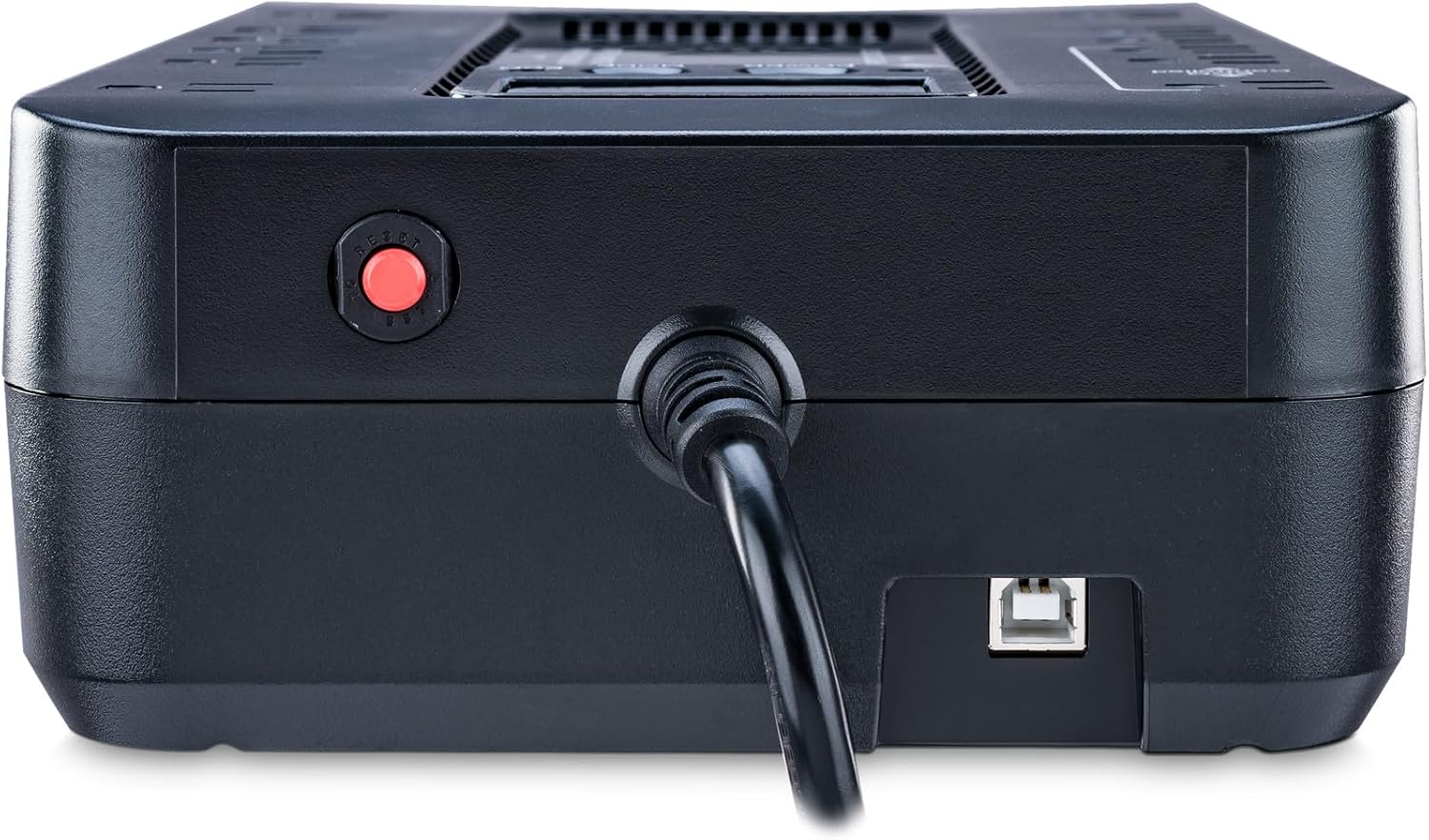
Figure 7: Close-up rear view of the CyberPower EC850LCD UPS, highlighting the USB communication port for connecting to a computer.
5. Istruzzjonijiet Operattivi
5.1. Tixgħil / Mitfi
- Biex Tixgħel: Agħfas u żomm il- QAWWA button for approximately 2 seconds until you hear a beep. The LCD will illuminate.
- Biex Tifi: Agħfas u żomm il- QAWWA button for approximately 2 seconds until you hear a beep. The LCD will turn off.
5.2. Funzjonijiet tal-Wiri LCD
The multifunction LCD panel provides real-time status updates. Press the MODALITÀ button to cycle through various display screens:
- Input Voltage: Displays the current utility power voltage.
- Ħruġ Voltage: Juri l-voltage fornuta mill-UPS lit-tagħmir konness.
- Kapaċità tal-batterija: Indicates the remaining battery charge level.
- Kapaċità tat-Tagħbija: Juri l-perċentwalitage of the UPS's maximum load being used by connected equipment.
- Estimated Runtime: Provides an estimate of how long the UPS can power connected equipment during an outage.
5.3. ECO Mode Operation
The ECO Mode feature helps conserve energy. When the UPS detects that the computer connected to the USB port is off or in sleep mode, it will automatically cut power to peripherals plugged into the ECO controlled outlets. This reduces phantom load and saves energy.
- Ensure your computer is connected to the UPS via the USB cable for ECO Mode to function.
- Plug peripherals you wish to be controlled by ECO Mode into the designated "ECO Controlled" outlets.
6. Manutenzjoni
6.1. Sostituzzjoni tal-batterija
The battery in your UPS is designed for a lifespan of 3-5 years under normal operating conditions. If the battery needs replacement, the UPS will typically indicate this via an alarm or a specific LCD message. Refer to the detailed battery replacement instructions in the full user manual (link provided in the Warranty & Support section) or contact CyberPower support.
6.2. Tindif
Biex tnaddaf il-barra tal-UPS, uża drapp artab u niexef. Tużax prodotti tat-tindif likwidi jew aerosol. Kun żgur li l-unità tkun mitfija u skonnettjata mill-plakka tal-ħajt qabel ma tnaddafha.
7 Issolvi l-problemi
This section addresses common issues you might encounter with your UPS. For more complex problems, consult the full user manual or contact technical support.
| Problema | Kawża Possibbli | Soluzzjoni |
|---|---|---|
| Il-UPS ma jixgħelx. | Battery is low or depleted; UPS is not plugged into a live outlet. | Charge the battery for at least 8 hours. Ensure the UPS is securely plugged into a functioning wall outlet. |
| UPS beeps continuously during normal operation. | Overload condition; Battery mode activated due to power outage. | Reduce the load by unplugging non-essential equipment. If on battery, save work and shut down equipment. |
| Short runtime on battery. | Il-batterija hija qadima jew mhux iċċarġjata għalkollox; Tagħbija żejda. | Allow the battery to charge fully. Reduce the connected load. Consider battery replacement if the battery is old. |
8. Speċifikazzjonijiet
| Attribut | Valur |
|---|---|
| Numru tal-Mudell | EC850LCD |
| Kapaċità (VA/Watts) | 850VA / 510W |
| Input Voltage | 120 Volts |
| Ħwienet | 12 NEMA 5-15R (6 Backup tal-Batterija u Żieda fil-Vultaġġ, 6 Żieda fil-Vultaġġ Biss) |
| Dimensjonijiet tal-Prodott (P x W x H) | 7 x 12.2 x 3.1 pulzieri |
| Piż tal-oġġett | 7.7 liri |
| Tip ta 'batterija | Sealed Lead Acid (1 x 12V included) |
| Manifattur | Sistemi CyberPower |
| Pajjiż ta' Oriġini | Vjetnam |
9. Garanzija u Appoġġ
The CyberPower EC850LCD comes with a garanzija ta' tliet snin, which includes coverage for the batteries. Additionally, it includes a $100,000 Connected Equipment Guarantee, li jipprovdi serħan tal-moħħ għall-apparati konnessi tiegħek.
For advanced power management and monitoring, FREE PowerPanel Personal Edition Management Software is available for download. This software allows you to control UPS settings, monitor power conditions, and perform graceful shutdowns of your computer during extended power outages.
For detailed information, technical support, or to download the PowerPanel software, please visit the official CyberPower website or refer to the full user guide:


