1. Introduzzjoni
This manual provides essential information for the safe and efficient installation, operation, and maintenance of your Supermicro PWS-501P-1R 500 Watt 80 PLUS Platinum Power Supply. Please read this manual thoroughly before attempting to install or operate the unit.
The Supermicro PWS-501P-1R is a high-efficiency 500 Watt internal power supply designed for 1U rack-mount systems, featuring 80 PLUS Platinum certification for superior energy efficiency.
2. Informazzjoni dwar is-Sigurtà
Dejjem osserva l-prekawzjonijiet ta' sigurtà li ġejjin biex tevita korrimenti u ħsara lit-tagħmir:
- Skonnettja l-Enerġija: Always disconnect the system from the main power source before installing, removing, or performing any maintenance on the power supply unit.
- Persunal kwalifikat: Installation and servicing should only be performed by qualified service personnel.
- L-ebda Partijiet li jistgħu jservu mill-utent: Do not open the power supply unit. There are no user-serviceable parts inside, and opening it will void the warranty and expose you to dangerous voltages.
- L-ert kif suppost: Ensure the system is properly grounded to prevent electrical shock.
- Ventilazzjoni: Aċċerta ruħek li jkun hemm fluss tal-arja adegwat madwar il-provvista tal-enerġija. Timblokkax il-fetħiet tal-ventilazzjoni.
- Kundizzjonijiet Ambjentali: Operate the power supply within the specified temperature and humidity ranges. Avoid exposure to moisture or extreme temperatures.
3. Kontenut tal-Pakkett
Verify that all items are present and in good condition. If any items are missing or damaged, contact your vendor immediately.
- Supermicro PWS-501P-1R 500 Watt Power Supply Unit
- Documentation (this user manual or similar guide)
4. Setup u Installazzjoni
Follow these steps for proper installation of the power supply into your 1U rack-mount system.
4.1 Verifiki ta' qabel l-installazzjoni
- Ensure your system chassis is compatible with a 1U form factor power supply.
- Verify that the system's power requirements do not exceed the 500 Watt output capacity of this power supply.
- Confirm that the AC input voltage matches the power supply's operating range (typically auto-sensing, but always check system specifications).
4.2 Installazzjoni Fiżika
- Itfi: Ensure the system is completely powered off and disconnected from the AC power outlet.
- Neħħi l-PSU l-Qadim (jekk applikabbli): If replacing an existing power supply, carefully disconnect all cables from the motherboard and other components. Unscrew and remove the old power supply from the chassis.
- Insert New PSU: Gently slide the Supermicro PWS-501P-1R into the designated power supply bay in your 1U chassis.
- PSU Sikura: Secure the power supply to the chassis using the appropriate screws.
- Qabbad Kejbils: Connect the power supply cables to the motherboard, CPU, and any other components (e.g., storage drives, expansion cards) as required by your system configuration. Ensure all connections are firm and correctly oriented.
- Qabbad l-Enerġija AC: Once all internal connections are made, connect the AC power cord to the power supply and then to a grounded electrical outlet.
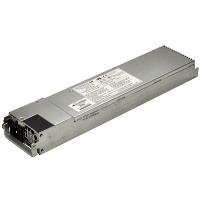
Figure 1: Supermicro PWS-501P-1R 500 Watt 1U Power Supply. The unit is a rectangular, metallic grey component with various connectors and a fan grille visible, designed for server rack integration.
5. Istruzzjonijiet Operattivi
After successful installation, follow these steps to operate your system with the new power supply.
- Qawwa Inizjali Mixgħula: With the AC power cord connected, press the system's power button. The system should initiate its boot sequence.
- Monitoraġġ tas-Sistema: Monitor your system's stability and performance. Ensure all components are receiving power correctly. Modern operating systems and BIOS/UEFI often provide basic power monitoring information.
- Itfi: To power off the system, use the operating system's shutdown procedure. For a hard shutdown, press and hold the power button until the system turns off.
6. Manutenzjoni
Manutenzjoni regolari tgħin biex tiżgura l-lonġevità u l-prestazzjoni ottimali tal-provvista tal-enerġija tiegħek.
- Tneħħija tat-Trab: Periodically (e.g., every 6-12 months), power down and disconnect the system. Use compressed air to gently clear dust from the power supply's fan and ventilation grilles. Tiftaħx il-provvista tal-enerġija casing.
- Spezzjoni tal-Cable: Occasionally inspect all power cables for signs of wear, fraying, or damage. Replace any damaged cables immediately.
- Kontroll Ambjentali: Ensure the operating environment remains clean, cool, and dry to prevent dust buildup and overheating.
7 Issolvi l-problemi
If you encounter issues with your power supply, refer to the following basic troubleshooting steps:
7.1 No Power / System Not Turning On
- Check AC Connection: Ensure the AC power cord is securely plugged into both the power supply and a working electrical outlet.
- Żbokk tat-Test: Ipprova qabbad apparat ieħor fl-istess sokit biex tikkonferma li għandu l-enerġija.
- Konnessjonijiet Interni: Verify that all power cables from the PSU are correctly and firmly connected to the motherboard and other components.
- Buttuna tal-Qawwa: Ensure the system's power button is functioning correctly.
7.2 Instabbiltà tas-Sistema / Għeluq każwali
- Is-sħana żejda: Check for proper ventilation and dust buildup. Ensure the power supply fan is spinning.
- Tagħbija żejda: Ensure the total power draw of your components does not exceed the 500 Watt capacity of the power supply.
- Konnessjonijiet sfużi: Re-check all power cable connections.
If these steps do not resolve the issue, consult Supermicro's technical support or a qualified technician.
8. Speċifikazzjonijiet
Key technical specifications for the Supermicro PWS-501P-1R power supply:
| Karatteristika | Speċifikazzjoni |
|---|---|
| Brand | Supermicro |
| Numru tal-Mudell | PWS-501P-1R |
| Output Wattage | 500 Watts |
| Ċertifikazzjoni 80 PLUS | 80 PLUS Platinum |
| Daqs tar-rack | 1U |
| Ħruġ Voltage | + 5V, + 12V |
| Fattur tal-Formola | Proprjetarju |
| Metodu tat-tkessiħ | Arja |
| Piż tal-oġġett | 4.1 Libbra (madwar 1.86 kg) |
| Dimensjonijiet tal-Prodott (LxWxH) | 17.2 x 7.2 x 4.5 pulzieri (madwar 43.7 x 18.3 x 11.4 ċm) |
| UPC | 672042094608 |
9. Garanzija u Appoġġ
For detailed warranty information regarding your Supermicro PWS-501P-1R power supply, please refer to the official Supermicro webis-sit jew il-karta tal-garanzija inkluża mal-prodott tiegħek. It-termini u l-kundizzjonijiet tal-garanzija jistgħu jvarjaw skont ir-reġjun u d-data tax-xiri.
For technical assistance, troubleshooting beyond this manual, or to inquire about replacement parts, please visit the official Supermicro support portal:
Uffiċjali tas-Supermicro Websit: www.supermicro.com
Appoġġ tas-Supermicro: Irreferi għat-taqsima tal-appoġġ fuq il-paġna uffiċjali websit għal informazzjoni ta' kuntatt, FAQs, u downloads tas-sewwieqa.


