1. Introduzzjoni
This manual provides detailed instructions for the installation, operation, and maintenance of the Jensen TRA4500 Self-contained Fender Mount Heavy Duty Radio and Speaker. The TRA4500 is designed for robust performance, featuring a full-range 5-inch by 7-inch speaker, a rubber mast antenna, and a durable ABS housing suitable for various environments. It offers 20 watts maximum power output and includes 18 FM and 12 AM station presets for versatile listening.
2. Karatteristiċi ewlenin
- Integrated radio with full-range 5-inch by 7-inch speaker and rubber mast antenna.
- Output ta 'qawwa massima ta' 20 watts.
- 18 FM and 12 AM station presets for quick access to favorite stations.
- Auto scan and Preset Scan functions for convenient tuning.
- High impact, weather-resistant ABS housing for durability.
- 3.5 mm headphone jack for private listening.
- Two-wire hookup with automatic vehicle polarity detection for simplified installation.
- Compatible with 12 Volt positive or negative ground electrical systems.
3. X'hemm fil-Kaxxa
Meta tiftaħ il-pakkett, ivverifika li l-komponenti kollha huma preżenti:
- Jensen TRA4500 Radio Unit
- Kelliem Integrat
- Rubber Mast Antenna
4. Setup u Installazzjoni
The TRA4500 is designed for fender mounting. Ensure the mounting surface is stable and can support the unit's weight. Refer to the dimensions diagram for proper placement and clearance.
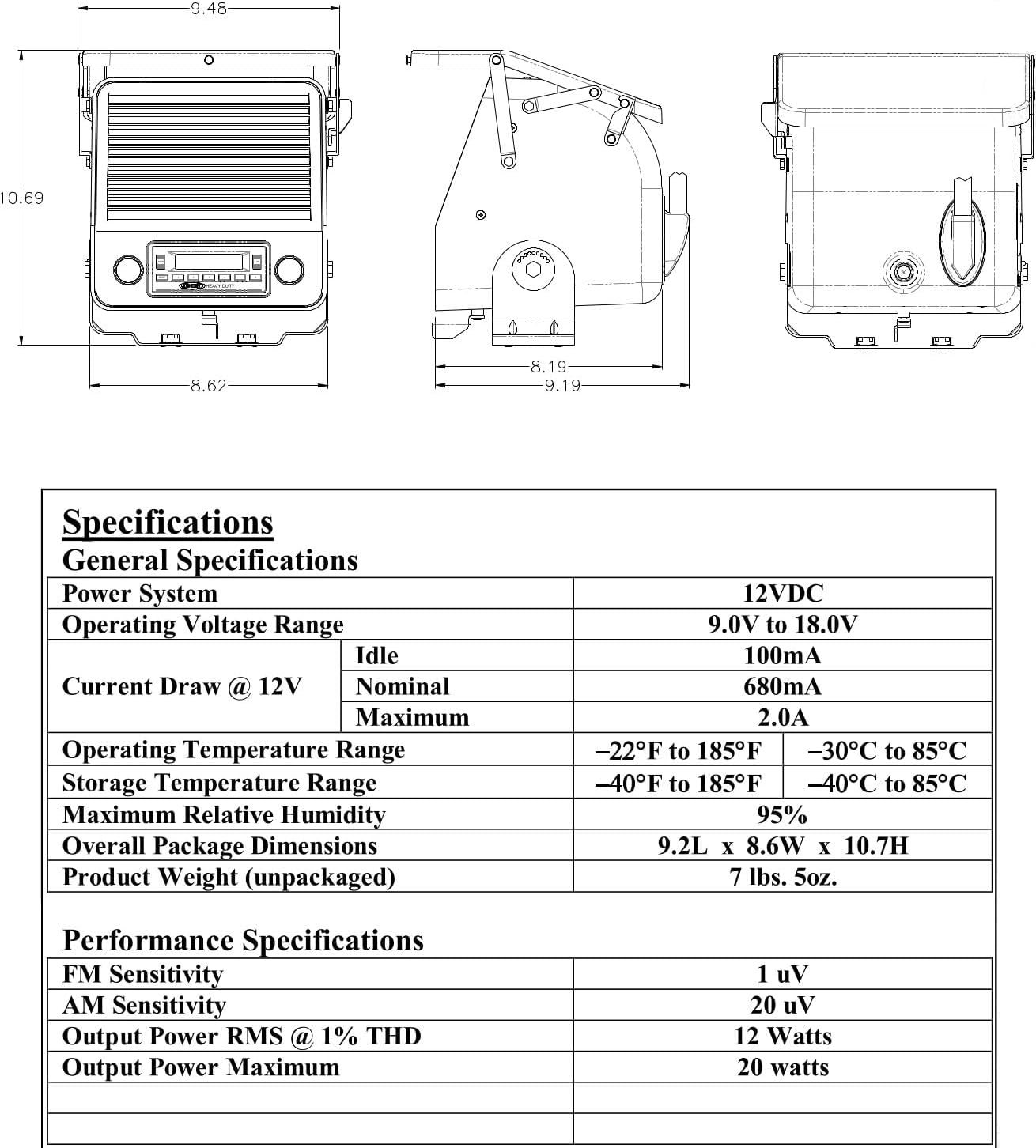
Figure 4.1: Jensen TRA4500 Dimensions. This diagram illustrates the overall dimensions of the unit, including length, width, and height, crucial for proper mounting and fitment on a vehicle fender.
4.1 Konnessjoni Elettrika
The unit requires a 12VDC power source. It features a two-wire hookup with automatic vehicle polarity detection, simplifying the connection process. Ensure the power source is capable of providing sufficient current (up to 2.0A maximum) and is properly fused.
- Connect the positive wire to a switched 12VDC power source.
- Connect the negative wire to a suitable vehicle ground (chassis).
- The unit is compatible with both positive and negative ground systems.
5. Istruzzjonijiet Operattivi
Familiarize yourself with the controls on the front panel of the TRA4500.

Figure 5.1: Jensen TRA4500 Front Panel. This image displays the main controls including the power/volume knob, tuning/selection knob, display screen, and various function buttons for radio operation.
5.1 Mixgħul/Mitfi u Volum
Rotate the left knob (PWR/SEL) clockwise to power on the unit and adjust the volume. Rotate counter-clockwise to decrease volume and power off.
5.2 Radio Tuning and Presets
- Għażla tal-Banda: Press the 'BAND' button to cycle through FM and AM bands.
- Irfinar Manwali: Use the right knob (AS/PS / DN / UP) to manually tune to desired frequencies.
- Skanjar Awtomatiku: Press and hold the 'AS/PS' button to automatically scan and store strong stations.
- Scan issettjat minn qabel: Briefly press the 'AS/PS' button to scan through stored presets.
- Ħażna ta 'Presets: Tune to a desired station, then press and hold one of the numbered preset buttons (1-6) until the display confirms storage. The unit supports 18 FM and 12 AM presets.
5.3 Kontrolli tal-Awdjo
The unit includes controls for Bass, Treble, and Loudness to customize audio output. Access these settings via the 'SEL' button (left knob) and adjust using the right knob.
5.4 Jack tal-headphones
A 3.5 mm headphone jack is provided for private listening. Inserting headphones will mute the integrated speaker.
6. Manutenzjoni
The Jensen TRA4500 is built with a high-impact, weather-resistant ABS housing, requiring minimal maintenance.
- Tindif: Uża artab, damp drapp biex tnaddaf il-barra. Evita tindif jew solventi li joborxu.
- Antenna: Periodically check the rubber mast antenna for any damage or obstruction.
- Konnessjonijiet: Kun żgur li l-konnessjonijiet elettriċi kollha jibqgħu sikuri u ħielsa mill-korrużjoni.
- Weather Cover: Keep the hinged front weather cover closed when not in use to protect the controls and display from elements.
7 Issolvi l-problemi
If you encounter issues with your TRA4500, refer to the following common problems and solutions:
| Problema | Kawża Possibbli | Soluzzjoni |
|---|---|---|
| Ebda Qawwa | Konnessjoni tal-enerġija maħlula, fjus maħruq, wajers mhux korretti. | Check power and ground connections. Inspect vehicle fuse. Verify wiring polarity. |
| Riċeviment Radju Fqir | Antenna not fully extended, antenna damage, weak signal area. | Ensure antenna is fully extended. Check antenna for damage. Try tuning to a stronger station or move to an area with better reception. |
| L-ebda ħoss mill-Ispeaker | Volume too low, headphones plugged in, speaker wire issue. | Increase volume. Disconnect headphones. Check speaker connections. |
| Buttuni ma jirrispondux | Unit frozen, moisture in controls. | Try cycling power (turn off and on). Ensure weather cover is properly sealed. Allow unit to dry if exposed to moisture. |
If the problem persists after attempting these solutions, contact Jensen customer support for further assistance.
8. Speċifikazzjonijiet
| Kategorija | Speċifikazzjoni |
|---|---|
| Sistema tal-Enerġija | 12VDC |
| Vol Operattivtage Firxa | 9V sa 18V |
| Current Draw @ 12V (Idle) | 100mA |
| Current Draw @ 12V (Nominal) | 680mA |
| Current Draw @ 12V (Max) | 2.0A |
| Sensittività FM | 1 uV |
| Sensittività AM | 20 uV |
| Output Power RMS @ 1% THD | 12W |
| Output Power Maximum | 20W |
| Dimensjonijiet ġenerali (WxHxD) | 8.6 x 10.7 x 9.2 pulzieri (21.8 x 27.2 x 23.4 ċm) |
| Piż tal-Prodott | 7.5 liri (3.4 kg) |
| Materjal tad-Djar | High impact, weather ABS |
| Konnettività | 3.5 mm Headphone Jack, Two-wire hookup |
| Teknoloġija Tuner | AM/FM, Digital |
9. Garanzija u Appoġġ
Warranty information for the Jensen TRA4500 is typically provided with the product packaging or can be found on the official Jensen website. For technical support, service, or to inquire about warranty claims, please refer to the contact information provided by Jensen.
You can also visit the official Jensen store on Amazon for more information: Jensen Store


