1. Introduzzjoni
This manual provides instructions for the APEX LD200RM remote control, designed for use with various APEX LCD and LED television models. This remote control offers full functionality for your compatible APEX television, ensuring convenient operation of all features.
Compatible APEX TV Models:
- LD3249
- LD3288, LD3288T, LD3288M
- LD4077, LE4077M
- LD4088
- LD4688
- LE3212, LE3212D
- LE4012
- LE4612
- LE3242
- LE3942
- LE40B12
- LE4243
- LE4643
- LE5043
2. Setup
2.1 Installazzjoni tal-batterija
The APEX LD200RM remote control requires two (2) AA batteries for operation. Follow these steps to install the batteries:
- Sib l-għatu tal-kompartiment tal-batterija fuq wara tal-kontroll remot.
- Agħfas 'l isfel fuq it-tab u żżerżaq l-għatu 'l barra.
- Daħħal żewġ batteriji AA, waqt li tiżgura li t-terminali pożittivi (+) u negattivi (-) ikunu allinjati sew mal-marki ġewwa l-kompartiment.
- Żerżaq l-għatu tal-kompartiment tal-batterija lura f'postu sakemm tikklikkja sew.
Nota: Dejjem ibdel iż-żewġ batteriji fl-istess ħin. Tħallatx batteriji qodma ma’ batteriji ġodda, jew tipi differenti ta’ batteriji.
2.2 Użu Inizjali
The APEX LD200RM remote control is an original replacement and typically does not require any programming or pairing. Once batteries are installed, point the remote control towards your compatible APEX television and begin operation.
3. Istruzzjonijiet Operattivi
This section details the functions of the buttons on your APEX LD200RM remote control.
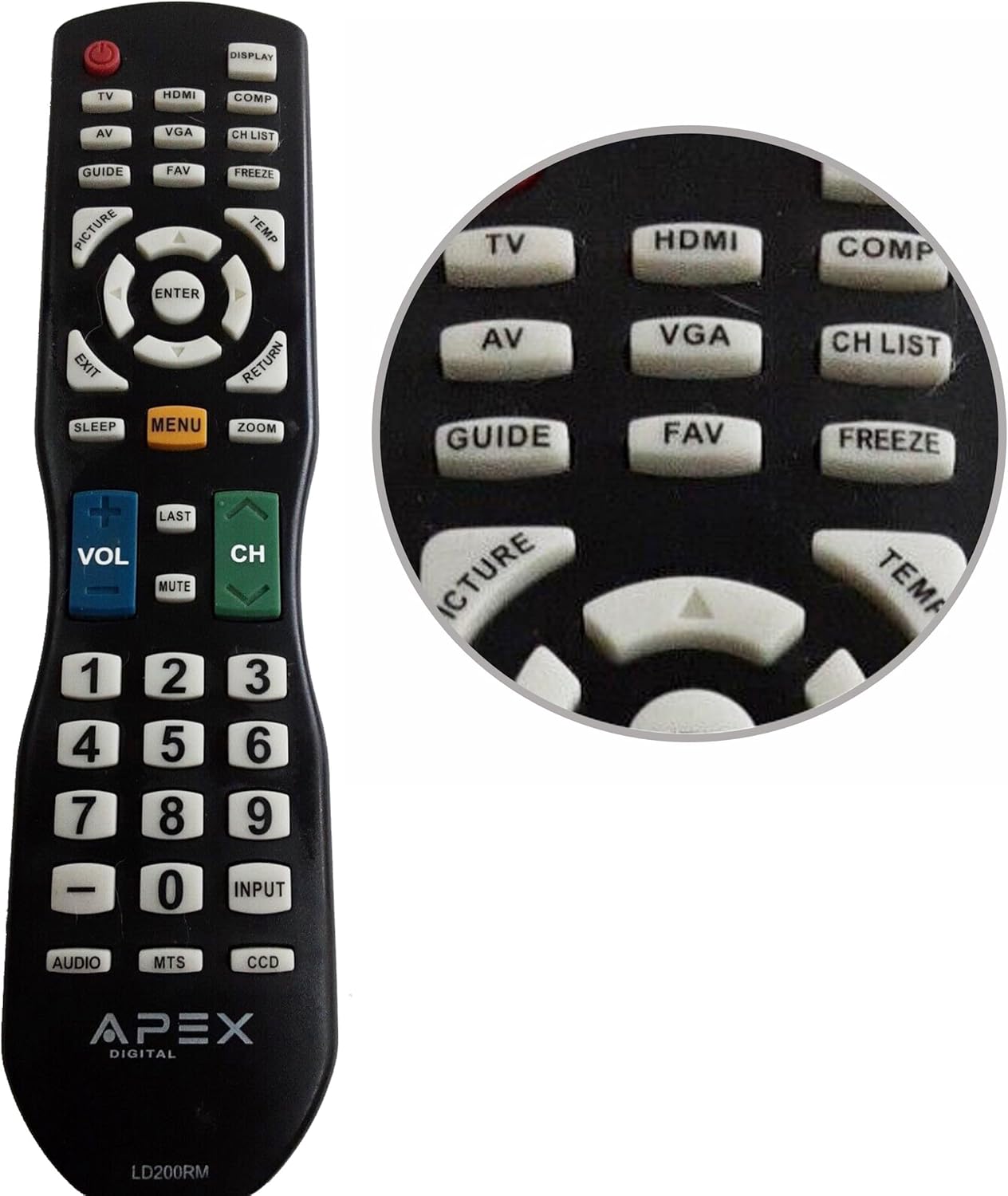
Figure 1: APEX LD200RM Remote Control Layout. This image displays the entire remote control, highlighting the arrangement of its various function buttons, including power, input selection, navigation, volume, channel, and numeric keypad.

Figure 2: Close-up of APEX LD200RM Remote Control Top Buttons. This image provides a detailed view of the upper section of the remote, focusing on buttons such as TV, HDMI, AV, VGA, COMP, CH LIST, DISPLAY, GUIDE, FAV, FREEZE, PICTURE, TEMP, MENU, ENTER, EXIT, RETURN, SLEEP, and ZOOM.
3.1 Power and Input Selection
- QAWWA (Butuna Ħamra): Ixgħel jew jitfi t-televixin.
- TV: Selects the TV tuner input.
- HDMI: Selects the HDMI input.
- TA’: Selects the Audio/Video input.
- VGA: Selects the VGA input.
- COMP: Selects the Component video input.
- DISPLAY: Juri informazzjoni fuq l-iskrin.
3.2 Kontroll tal-Kanal u l-Volum
- VOL (+/-): Iżżid jew inaqqas il-livell tal-volum.
- CH ('Il fuq/'l isfel): Ibdel il-kanal tat-televiżjoni 'l fuq jew 'l isfel.
- L-AĦĦAR: Jirritorna għall-qabel viewkanal ed.
- MUTE: Iċċekkja jew iwaqqaf l-awdjo tat-televiżjoni.
- LISTA CH: Juri l-lista tal-kanali.
3.3 Menu u Navigazzjoni
- MENU: Jiftaħ il-menù prinċipali tat-televiżjoni.
- Daħħal: Jikkonferma għażla fil-menù.
- Buttuni tal-Vleġeġ ('il fuq/'l isfel/'il fuq/'il fuq/'il fuq): Navigates through menu options and adjusts settings.
- ĦRUĠ: Joħroġ mill-menù kurrenti jew mid-displej fuq l-iskrin.
- RITORN: Jirritorna għall-menu jew l-iskrin preċedenti.
3.4 Numeric Keypad and Special Functions
- 0-9 (Numeric Buttons): Idaħħal direttament in-numri tal-kanali.
- DĦUL: Jiċċikla bejn is-sorsi ta' input disponibbli.
- GWIDA: Juri l-gwida elettronika tal-programmi (jekk disponibbli).
- FAV: Jaċċessa l-kanali favoriti.
- IFFRIŻA: Freezes the current image on the screen.
- STAMPA: Aġġusta s-settings tal-istampa.
- TEMP: (Function may vary by model, often related to picture temperature or a specific mode).
- Rqad: Issettja t-timer tal-irqad.
- ZOOM: Jaġġusta l-livell taż-żum tal-iskrin.
- AWDJO: Selects audio modes or tracks.
- MTS: Multi-channel Television Sound (stereo/SAP).
- DCC: Closed Captioning Display.
4. Manutenzjoni
4.1 Sostituzzjoni tal-batterija
When the remote control's performance degrades or it stops responding, it is likely time to replace the batteries. Refer to Section 2.1 for detailed battery installation instructions. Always use fresh AA batteries.
4.2 Tindif
Biex tnaddaf il-kontroll remot, uża drapp artab u niexef. Għal ħmieġ iebes, nixxef ftit.ampLaħlaħ id-drapp bl-ilma jew b'tindif ħafif u mhux abrażiv. Evita li tuża kimiċi ħarxa jew materjali abrażivi, għax dawn jistgħu jagħmlu ħsara lill-wiċċ jew lill-komponenti interni tar-remote.
4.3 Ħażna
Store the remote control in a cool, dry place away from direct sunlight and extreme temperatures. If the remote will not be used for an extended period, it is advisable to remove the batteries to prevent leakage and potential damage.
5 Issolvi l-problemi
- Il-kontroll remot mhux qed jirrispondi:
- Kun żgur li l-batteriji huma installati b'mod korrett bil-polarità korretta (+/-).
- Ibdel il-batteriji qodma b'batteriji AA ġodda.
- Check for any obstructions between the remote control and the television's infrared sensor.
- Ensure you are within the effective range of the television's IR receiver.
- Xi buttuni mhux qed jaħdmu:
- Dan jista' jindika li l-batterija hija baxxa. Ibdel il-batteriji.
- Ensure the remote is clean and there is no debris lodged under the buttons.
- Verify that the button function is applicable to your specific TV model. Some functions may not be supported by all compatible TVs.
- Television is not turning on/off:
- Ikkonferma li t-televiżjoni hija pplaggjata f'sokit tal-elettriku li jaħdem.
- Try using the power button directly on the television to rule out a TV issue.
6. Speċifikazzjonijiet
| Karatteristika | Dettall |
|---|---|
| Numru tal-Mudell | LD200RM |
| Brand | Apex |
| Apparati Kompatibbli | APEX LCD & LED Televisions |
| Sors tal-Enerġija | 2 x Batteriji AA (mhux inklużi) |
| Dimensjonijiet tal-Prodott | 10 x 6 x 2 pulzieri (bejn wieħed u ieħor) |
| Piż tal-oġġett | 3.2 uqija (madwar) |
| Kulur | Iswed |
| Karatteristika Speċjali | Disinn ergonomiku |
7. Informazzjoni dwar Garanzija
This APEX LD200RM remote control typically comes with a 30-day warranty from the date of purchase. This warranty covers manufacturing defects. For specific details regarding warranty claims, returns, or replacements, please refer to your purchase documentation or contact the seller directly.
8. Appoġġ
If you encounter issues not covered in this manual or require further assistance, please contact the retailer or the manufacturer's customer support. When contacting support, please have your product model number (LD200RM) and your television model number readily available.


