1. Introduzzjoni u Fuqview
This manual provides comprehensive instructions for the setup, operation, maintenance, and troubleshooting of your InFocus IN3124 Projector. Designed for clarity and ease of use, this guide will help you maximize your projector's performance and longevity.
The InFocus IN3124 is a high-performance projector featuring XGA (1024 x 868) native resolution, 4800 lumens of brightness, and a 3000:1 contrast ratio, making it suitable for various presentation environments. Its portable design allows for flexible placement and usage.
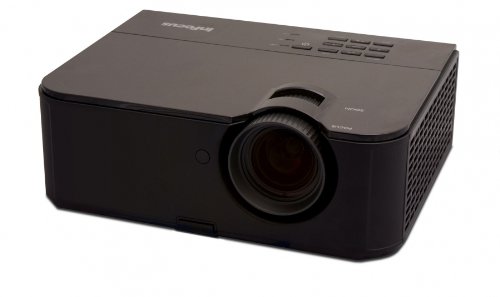
Figura 1: In-naħa ta' quddiem view of the InFocus IN3124 Projector, highlighting the main lens and the top-mounted control panel.
2. Setup
2.1 Disimballaġġ
Carefully remove the projector and all accessories from the packaging. Verify that all components listed in the packing list are present. Retain the original packaging for future transport or storage.
2.2 Tqegħid
Position the projector on a stable, level surface. Ensure adequate ventilation around the unit to prevent overheating. Maintain a clear path between the projector lens and the projection screen or surface. The optimal projection distance will vary based on the desired screen size.
2.3 Qawwa tal-Konnessjoni
- Qabbad il-korda tal-enerġija mad-dħul tal-enerġija tal-proġettazzjoni.
- Ipplaggja t-tarf l-ieħor tal-korda tad-dawl fi żbokk elettriku ertjat.
2.4 Konnessjoni tas-Sorsi tal-Input
The IN3124 projector supports various input sources. Connect your video source (e.g., computer, DVD player) to the appropriate input port on the projector. Common ports include VGA and HDMI (if available on your specific model).
- VGA: Use a VGA cable to connect to a computer's video output.
- HDMI: Use an HDMI cable for digital video and audio (check projector for HDMI port availability).
3. Istruzzjonijiet Operattivi
3.1 Tixgħel/Jitfi
- Biex Tixgħel: Press the power button on the projector's control panel or the remote control. The power indicator light will illuminate.
- Biex Tifi: Press the power button twice. The projector will enter a cooling cycle before shutting down completely. Do not unplug the projector during the cooling cycle.
3.2 Aġġustament tal-Fokus u ż-Zoom
Rotate the focus ring on the projector lens until the image appears sharp and clear. Use the zoom ring (if present) to adjust the image size to fit your screen.
3.3 Selecting Input Sources
Press the "Source" or "Input" button on the projector's control panel or remote control to cycle through available input sources (e.g., VGA, HDMI). Select the input corresponding to your connected device.
3.4 Menu Navigation and Keystone Correction
Use the menu buttons on the projector or remote to access the On-Screen Display (OSD). Navigate through the menu options to adjust settings such as brightness, contrast, color, and keystone correction. Keystone correction helps to square the image if the projector is not perfectly perpendicular to the screen.
4. Manutenzjoni
4.1 Tindif tal-Lenti
Imsaħ bil-mod il-lenti tal-proġettazzjoni b'ċarruta ratba u mingħajr suf iddisinjata speċifikament għal uċuħ ottiċi. Tużax prodotti tat-tindif li joborxu jew forza eċċessiva, għax dan jista' jħokk il-lenti.
4.2 Tindif tal-Filtri tal-Arja
Regularly check and clean the projector's air filters to ensure proper airflow and prevent overheating. Refer to the projector's specific filter access instructions. Use a soft brush or vacuum cleaner to remove dust accumulation.
4.3 Lamp Sostituzzjoni
Il-proġekter lamp għandu ħajja finita. Meta l-lamp life indicator appears or the image becomes dim, the lamp may need replacement. Consult the full service manual or manufacturer's website for detailed lamp replacement procedures and compatible lamp models. Always allow the projector to cool down completely before attempting lamp sostituzzjoni.
4.4 Ħażna
Meta ma tkunx qed tużah għal perjodi twal, aħżen il-proġettur f'post frisk u niexef, 'il bogħod mix-xemx diretta u minn temperaturi estremi. Uża l-imballaġġ oriġinali jew kaxxa protettiva biex tevita t-trab u l-ħsara.
5 Issolvi l-problemi
This section addresses common issues you might encounter with your InFocus IN3124 Projector. For more complex problems, contact customer support.
- Ebda Immaġni murija:
- Kun żgur li l-proġettazzjoni tkun mixgħula u li l-indikatur tal-enerġija jkun mixgħul solidu.
- Verify that the input source cable (VGA, HDMI) is securely connected to both the projector and the source device.
- Agħżel is-sors tad-dħul korrett billi tuża l-buttuna "Sors".
- Check if the source device is outputting a signal.
- Dim or Faded Image:
- Aġġusta s-settings tal-luminożità u l-kuntrast fil-menù tal-OSD.
- Tiżgura l-lamp is not nearing the end of its lifespan.
- Clean the projector lens and air filters.
- Check the projection mode (e.g., Eco mode might reduce brightness).
- L-immaġni hija mċajpra:
- Aġġusta ċ-ċirku tal-fokus fuq il-lenti tal-proġekter.
- Kun żgur li l-wiċċ tal-projezzjoni huwa ċatt u li l-proġettazzjoni hija stabbli.
- Check the resolution settings of your source device to match the projector's native resolution.
- Il-Kontroll mill-bogħod Mhux Jaħdem:
- Ibdel il-batteriji fil-kontroll remot.
- Kun żgur li m'hemm l-ebda ostaklu bejn ir-remote u r-riċevitur IR tal-proġettazzjoni.
- Ipponta r-remote direttament lejn il-proġettazzjoni.
6. Speċifikazzjonijiet
The following table outlines the key technical specifications for the InFocus IN3124 Projector:
| Karatteristika | Speċifikazzjoni |
|---|---|
| Numru tal-Mudell | IN3124 |
| Riżoluzzjoni tal-Wiri (Nattiva) | XGA (1024 x 868) |
| Luminożità | 4800 lumens |
| Proporzjon ta' Kuntrast | 3000:1 |
| Tip ta 'Wiri | LCD, LCoS |
| Piż tal-oġġett | 8.16 liri (3.7 kg) |
| Dimensjonijiet tal-Prodott (L x W x H) | 12.83 x 10.43 x 4.8 pulzieri (32.59 x 26.49 x 12.19 ċm) |
| Karatteristika Speċjali | Portabbli |
7. Garanzija u Appoġġ
For detailed warranty information, please refer to the warranty card included with your product packaging or visit the official InFocus websit. Il-garanzija tipikament tkopri difetti fil-manifattura għal perjodu speċifikat mid-data tax-xiri.
If you encounter issues that cannot be resolved using the troubleshooting guide, or require technical assistance, please contact InFocus customer support. Contact details can usually be found on the manufacturer's webis-sit jew fid-dokumentazzjoni tal-prodott tiegħek.


