1. Introduzzjoni
Grazzi tax-xiriasing the KLH R5100 Surround Sound Receiver. This receiver is designed to provide high-quality audio and video performance for your home entertainment system. It features multiple audio and video inputs, surround sound processing, and a powerful amplifier to deliver an immersive listening experience. Please read this manual thoroughly before operating the unit to ensure proper setup and optimal performance.
2. Informazzjoni Importanti dwar is-Sigurtà
Biex tnaqqas ir-riskju ta' xokk elettriku, nar, jew ħsara lill-unità, jekk jogħġbok osserva l-prekawzjonijiet ta' sigurtà li ġejjin:
- Sors tal-Enerġija: Connect the unit only to an AC 120V, 60Hz power supply.
- Ventilazzjoni: Ensure adequate ventilation. Do not block ventilation openings. Allow sufficient space around the unit for proper airflow.
- Ilma u Umdità: Tesponix l-unità għax-xita, umdità, jew umdità eċċessiva. Tpoġġix oġġetti mimlija b'likwidi, bħal vażuni, fuq l-unità.
- Sħana: Żomm l-unità 'l bogħod minn sorsi ta' sħana bħal radjaturi, reġistri tas-sħana, stufi, jew apparat ieħor (inkluż amplifiers) li jipproduċu sħana.
- Tindif: Skonnettja l-unità mill-plagg tal-ħajt qabel ma tnaddafha. Uża drapp niexef għat-tindif.
- Servizzi: Tippruvax tagħmel manutenzjoni fuq din l-unità int stess. Irreferi għal kull manutenzjoni għand persunal tas-servizz kwalifikat.
- Kejbils: Ipproteġi l-korda tad-dawl milli timxi fuqha jew maqrusa, partikolarment fil-plakek, ir-reċipjenti tal-konvenjenza, u l-punt fejn joħorġu mill-unità.
3. Kontenut tal-Pakkett
Jekk jogħġbok iċċekkja li l-pakkett tiegħek fih l-oġġetti li ġejjin:
- KLH R5100 Surround Sound Receiver
- Unità ta' Kontroll mill-bogħod
- Manwal tal-Utent
- Kejbils tal-Awdjo/Vidjo (tip RCA)
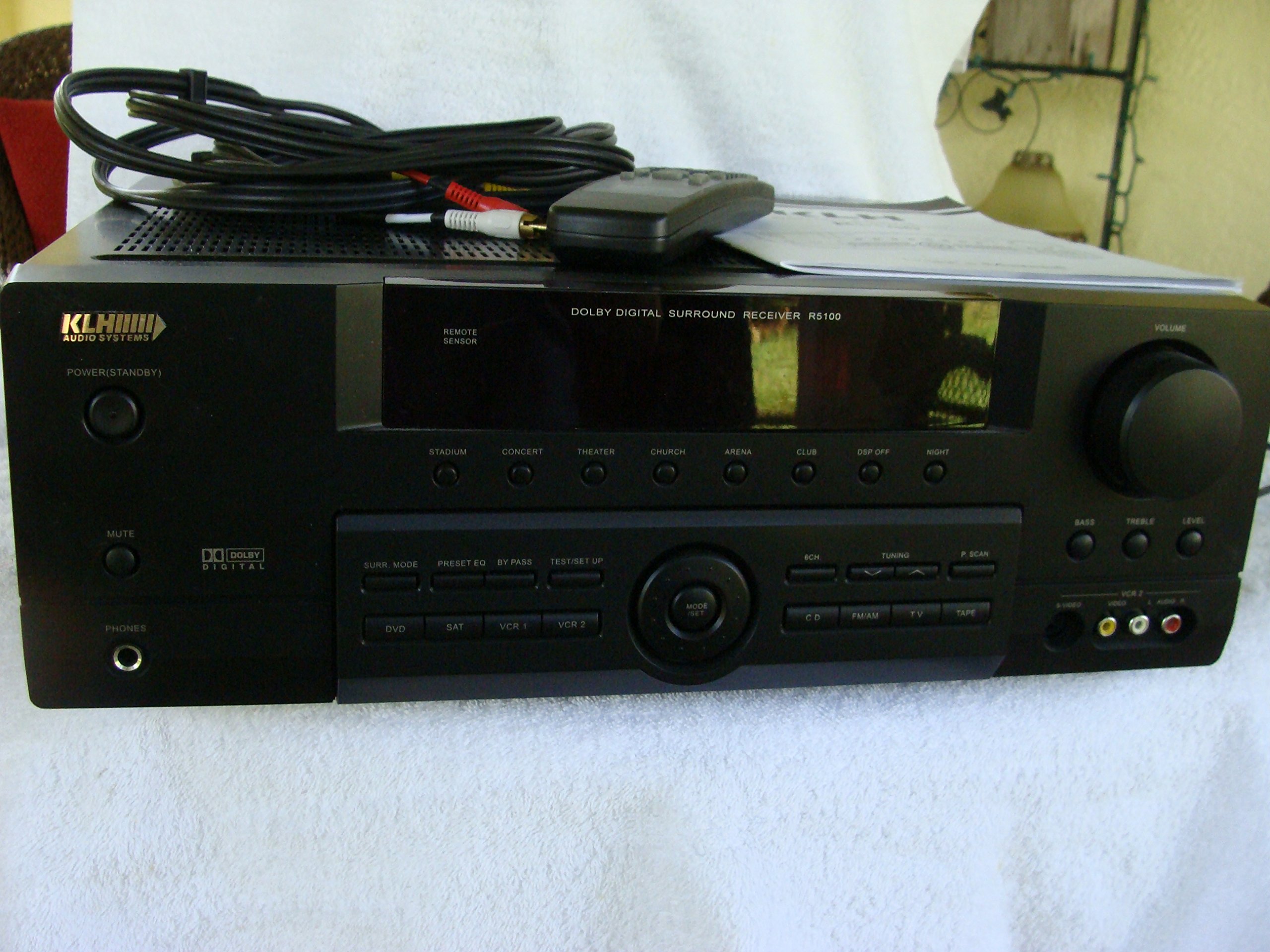
Image: The KLH R5100 receiver, its remote control, user manual, and included audio/video cables.
4. Prodott Aktarview
4.1 Kontrolli ta' Front Panel
The front panel provides access to essential controls and indicators for daily operation.

Immaġni: Dettaljata view of the receiver's front panel, highlighting the display, volume control, and input selection buttons.
- Buttuna tal-Qawwa: Ixgħel jew jitfi r-riċevitur.
- Seleturi tad-dħul: Buttons for DVD, SAT, VCR 1, VCR 2, CD, FM/AM, TV, TAPE to choose your audio/video source.
- Buttuna tal-Volum: Jaġġusta l-volum ġenerali tal-ħruġ.
- Surround Mode Buttons: Select various sound fields like Stadium, Concert, Theater, Church, Arena, Club, DSP Off, Night.
- Bass/Treble/Level: Controls for adjusting audio tone and individual channel levels.
- Jack tal-headphone: Għal smigħ privat.
4.2 Konnessjonijiet tal-Panew ta' wara
The rear panel houses all input and output terminals for connecting your audio and video components, as well as speakers.

Image: The full rear panel of the receiver, displaying all connection ports for audio, video, and speakers.
- Terminals tal-Ispeaker: Connections for Main (Front Left/Right), Center, and Rear (Surround Left/Right) speakers.
- Audio Inputs (RCA): For connecting CD players, tape decks, VCRs, TVs, and other stereo audio sources.
- Video Inputs/Outputs (RCA/S-Video): For connecting video sources like DVD players, VCRs, and TVs.
- Digital Audio Inputs (Optical/Coaxial): For connecting digital audio sources like DVD players or set-top boxes.
- 6CH Direct Input: For connecting external multi-channel decoders or players with 5.1 analog outputs.
- Barra tas-subwoofer: Ħruġ RCA għall-konnessjoni ta' subwoofer attiv.
- Terminali tal-antenna: For FM and AM antennas.
4.3 Unità ta' Kontroll mill-bogħod
The remote control provides convenient access to all receiver functions from your listening position.

Immaġni: Close-up view of the remote control unit, detailing its buttons for various functions.
- Power On/Off: Ixgħel jew jitfi r-riċevitur.
- Seleturi tad-dħul: Dedicated buttons for each input source (DVD, CD, TV, etc.).
- Volum 'il fuq/Niżżel: Jaġġusta l-volum kaptan.
- Siekta: Jissikket temporanjament l-output tal-awdjo.
- Modalità Surround: Cycles through available surround sound modes.
- Level/Test: For adjusting individual speaker levels and running a test tone.
- Kontrolli tat-tuner: For FM/AM station tuning and memory functions.
5. Setup
5.1 Konnessjoni tal-Ispeakers Tiegħek
Ensure the receiver is unplugged from the power outlet before making any connections.
- Kelliema ta' Quddiem: Connect your main left and right speakers to the 'MAIN SPEAKERS (8Ω)' terminals. Ensure correct polarity (+ to + and - to -).
- Kelliem taċ-Ċentru: Connect your center channel speaker to the 'CENTER SPEAKER (8Ω)' terminals.
- Kelliema ta' wara: Connect your surround left and right speakers to the 'REAR SPEAKERS (8Ω)' terminals.
- Subwoofers: Connect an active subwoofer to the 'SUBWOOFER OUT' RCA jack using a single RCA cable.

Immaġni: Dettaljata view of the speaker connection terminals on the rear panel.
5.2 Konnessjoni ta' Sorsi Awdjo/Vidjo
Use appropriate cables (RCA, Optical, Coaxial) to connect your source components to the receiver.
- DVD Player: Connect the audio output of your DVD player to the 'DVD' audio input jacks (RCA) on the receiver. For digital audio, use either the 'DIGITAL IN OPTICAL' or 'DIGITAL IN COAXIAL' input. Connect the video output to the 'DVD' video input.
- CD Player: Connect the audio output of your CD player to the 'CD' audio input jacks (RCA).
- TV/Cable Box: Connect the audio output of your TV or cable box to the 'TV' audio input jacks (RCA). Connect video output to the 'TV' video input.
- Mezzi Oħrajn: Use 'SAT', 'VCR 1', 'VCR 2', or 'TAPE' inputs for other audio/video components as needed.

Image: A close-up of the digital audio inputs (Coaxial, Optical) and the 6-channel direct input section on the rear panel.
5.3 Konnessjoni tal-antenna
Qabbad l-antenni FM u AM fornuti mat-terminals rispettivi tagħhom fuq il-pannell ta' wara għar-riċeviment tar-radju.
6. Istruzzjonijiet Operattivi
6.1 Operazzjoni Bażika
- Qawwa Mixgħul: Press the Power button on the front panel or remote control.
- Agħżel Input: Press the desired input selector button (e.g., 'DVD', 'CD') on the front panel or remote control to choose your source.
- Aġġusta Volum: Turn the Volume knob on the front panel or use the Volume Up/Down buttons on the remote control.
6.2 Surround Sound Modes
The R5100 offers various sound modes to enhance your listening experience:
- Stadium: Simulates the acoustics of a large stadium.
- Kunċert: Creates a concert hall ambiance.
- Teatru: Optimized for movie playback, enhancing dialogue and effects.
- Knisja: Replicates the spaciousness of a church.
- Arena: Provides a wide, open sound field.
- Klabb: Simulates a lively club environment.
- DSP Off: Disables digital sound processing for a direct stereo signal.
- Lejl: Reduces dynamic range for late-night listening without disturbing others.
Press the 'SURR. MODE' button on the remote or front panel to cycle through these modes.
6.3 Kontroll tat-Ton
Use the BASS and TREBLE controls on the front panel or remote to adjust the low and high frequency response. The LEVEL controls allow for fine-tuning of individual speaker output levels.
6.4 Tħaddim tat-Tunner
To listen to radio:
- Press the 'FM/AM' input selector.
- Use the 'TUNING' buttons on the front panel or remote to find stations.
- Press 'MEMORY' to store favorite stations, and 'P.SCAN' to scan through presets.
7. Manutenzjoni
To ensure the longevity and optimal performance of your KLH R5100 receiver, follow these maintenance guidelines:
- Tindif: Wipe the exterior surfaces with a soft, dry cloth. Do not use abrasive cleaners, waxes, or solvents as they may damage the finish.
- Ventilazzjoni: Regularly check that the ventilation openings are not obstructed by dust or debris. Use a soft brush or vacuum cleaner to gently remove any build-up.
- Korda tal-Enerġija: Inspect the power cord periodically for any signs of damage. If damaged, discontinue use and contact qualified service personnel.
- Ħażna: Jekk taħżen l-unità għal perjodu estiż, aqlagħha mill-plagg tal-elettriku u għattiha biex tipproteġiha mit-trab.
8 Issolvi l-problemi
If you encounter problems with your receiver, refer to the following common issues and solutions before seeking professional service.
| Problema | Kawża Possibbli | Soluzzjoni |
|---|---|---|
| Ebda qawwa | Power cord unplugged; Power outlet not active | Kun żgur li l-korda tal-enerġija hija mdaħħla sew; Iċċekkja s-sokit tal-enerġija b'apparat ieħor |
| L-ebda ħoss | Incorrect input selected; Speakers not connected properly; Volume too low; Mute function active | Select correct input source; Check speaker connections and polarity; Increase volume; Deactivate Mute |
| Il-kontroll mill-bogħod ma jaħdimx | Batteries depleted; Obstruction between remote and receiver; Remote sensor blocked | Replace batteries; Remove any obstructions; Ensure remote sensor on receiver is clear |
| Riċeviment ħażin tar-radju | Antenna mhux imqabbda jew pożizzjonata ħażin | Connect antennas securely; Adjust antenna position for better reception |
| Ħoss distort | Input signal too high; Speaker impedance mismatch; Damaged cables | Reduce source volume; Ensure speakers match 8Ω impedance; Check and replace damaged cables |
9. Speċifikazzjonijiet
The following are the technical specifications for the KLH R5100 Surround Sound Receiver:
- Numru tal-Mudell: R5100
- Dimensjonijiet tal-Prodott: 16.88 x 6.88 x 15.75 pulzieri
- Piż tal-oġġett: 24.2 liri
- Sors tal-Enerġija: AC 120V, 60Hz
- Konsum tal-Enerġija: 320W
- Modalità tal-Ħruġ tal-Awdjo: Jdawru
- Konfigurazzjoni tal-Kanal tal-Ħsejjes Surround: 5.1
- Teknoloġija tal-Konnettività: RCA, 3.5mm Jack, Optical, Coaxial
- Apparati Kompatibbli: Kelliema
- Tip ta 'Kontrollur: Remote
- Karatteristika Speċjali: Advanced Room Calibration (as per product listing, though specific details may vary)
- Kulur: Iswed
10. Garanzija u Appoġġ
For warranty information and customer support, please refer to the documentation included with your purchase or contact KLH customer service directly. Keep your proof of purchase for any warranty claims.


