Introduzzjoni
The Stryker SR-655HPC is a high-performance 10 Meter Amateur Radio designed for reliable and clear long-range communication. This radio features a unique design for high power output, utilizing four IRF-520 MOSFET transistors to achieve 60+ watts PEP. It is equipped with an 8-color LED-backlit faceplate with dimmer control, ensuring comfortable viewing in various lighting conditions. The SR-655HPC supports AM, FM, and SSB modes, and includes advanced features such as variable transmit frequency response, receiver tone control, digital echo, and multiple Roger beeps.

Figure 1: Stryker SR-655HPC 10 Meter Amateur Radio with connected microphone.
Karatteristiċi Ewlenin
- Ħruġ ta' Enerġija Għolja: Utilizes four FQP13N10 MOSFET transistors for 70W PEP.
- Operazzjoni Multi-Mode: Supports AM, FM, and SSB.
- Brilliant 7-Color LED Backlit Faceplate: User-selectable colors or automatic scanning, with 32-position dimmer control.
- Advanced Audio Features: Loud & Clear Receiver, Excellent Stock Mic, Digital Echo with dual front-mounted controls, Variable Talkback Control, Six Roger Beeps.
- Kontroll tal-Frekwenza: Advanced Clarifier, VFO (Variable Frequency Oscillator), PC Programmable.
- Up-Armored Receiver: Exclusive receiver protection for superior adjacent channel rejection, even in high-interference environments.
- Wiri tal-Frekwenza Diġitali: 7-Color frequency display.
Setup u Installazzjoni
Proper setup is crucial for optimal performance and safety. Ensure all connections are secure before powering on the unit.
1. Konnessjoni tal-Enerġija
Connect the radio to a stable 13.8V DC power source. A 14.2V source is recommended for best performance. Ensure correct polarity (red to positive, black to negative) to prevent damage to the unit.
2. Konnessjoni tal-antenna
Connect a suitable 10-meter amateur radio antenna to the UHF SO239 connector on the rear of the radio. Use high-quality coaxial cable with proper impedance (typically 50 ohms) for efficient power transfer and minimal signal loss. Ensure the antenna is properly tuned for the 10-meter band.
3. Konnessjoni tal-Mikrofonu
Plug the supplied microphone into the front microphone jack. Ensure the connector is fully seated.
4. L-Ewwel Tixgħil
Once all connections are made, turn the radio on using the ON/OFF/Volume control. The display should illuminate.

Figure 2: Front panel layout of the SR-655HPC, illustrating various controls and the display.
Istruzzjonijiet Operattivi
This section details the functions of the various controls and how to operate your SR-655HPC radio.
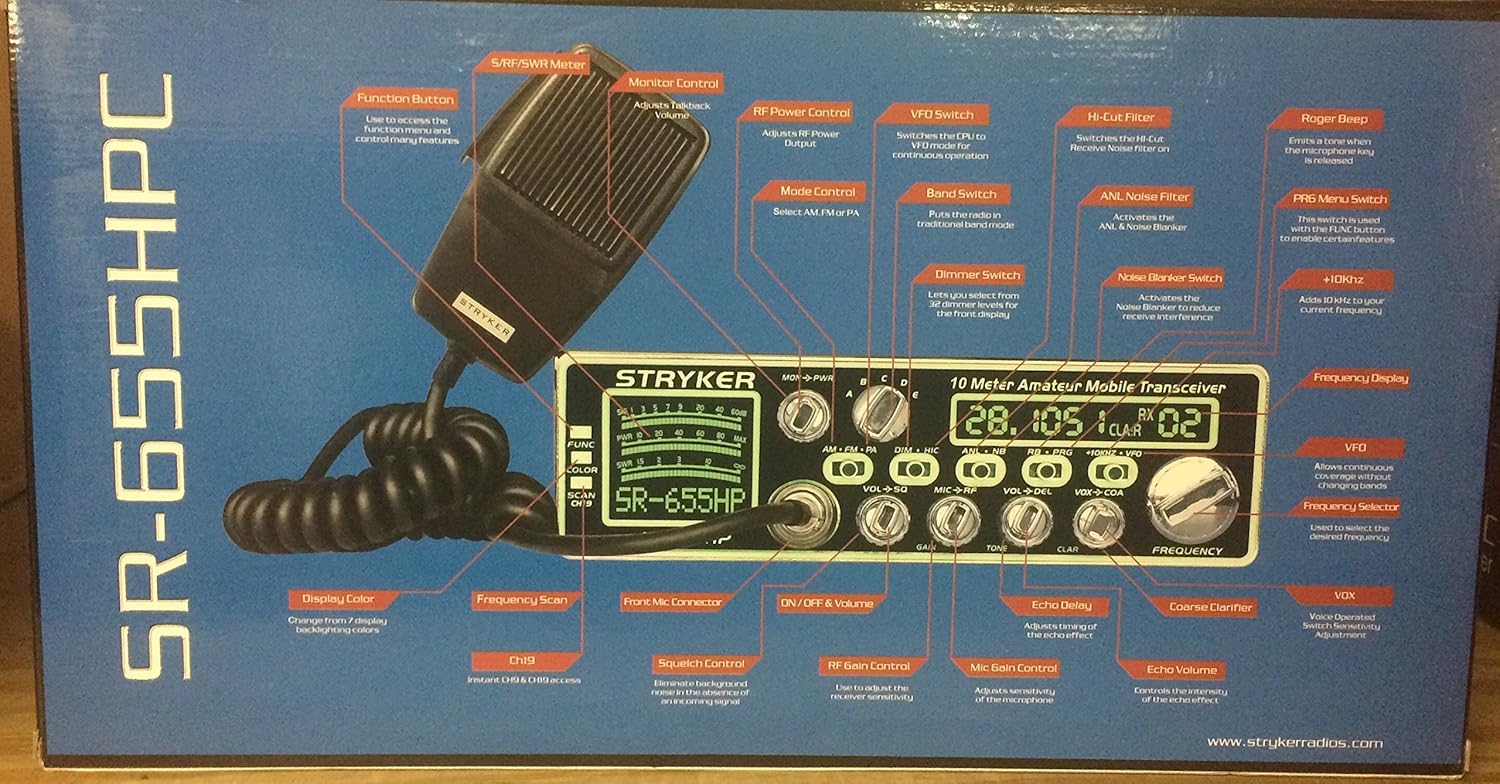
Figure 3: Detailed diagram of SR-655HPC controls and their functions, as depicted on the product packaging.
Operazzjoni Bażika
- ON/OFF & Volume: Rotate the leftmost knob to turn the radio on/off and adjust the receiver audio volume.
- Squelch (SQ): Adjust the SQ knob to eliminate background noise when no signal is present. Turn clockwise until the noise disappears.
- Mode Control (AM/FM/SSB): Select the desired modulation mode using the dedicated switch.
- Kontroll tal-Frekwenza: Use the main FREQUENCY knob to tune to the desired operating frequency. The VFO function allows continuous frequency adjustment.
- Għażla tal-Banda: The radio supports multiple frequency bands (A-L, VFO). Refer to the manual for specific band ranges.
Kontrolli Avvanzati
- Kontroll tad-Dimmer: The DIM knob adjusts the brightness of the LED display and backlighting (32 positions).
- Digital Echo: Use the ECHO and DELAY knobs to adjust the echo effect for your transmitted audio.
- Roger Beeps: The radio features six selectable Roger beeps. Activate and select them via the PRG/RB button.
- Variable Power Control: Adjust your transmit power output using the PWR control.
- Variable Talkback Control: The TALKBACK control allows you to monitor your own transmitted audio.
- Kjarifikatur: The CLARIFIER knob provides fine-tuning for SSB reception to ensure clear audio.
- Noise Blanker (NB) / Automatic Noise Limiter (ANL): These functions reduce impulse noise and continuous noise respectively.
- PC Programmable: The radio can be programmed via a PC for advanced customization. Refer to the separate PC programming guide for details.
- Kulur tal-Wiri: Press the COLOR button to cycle through the 7 available LED display colors.


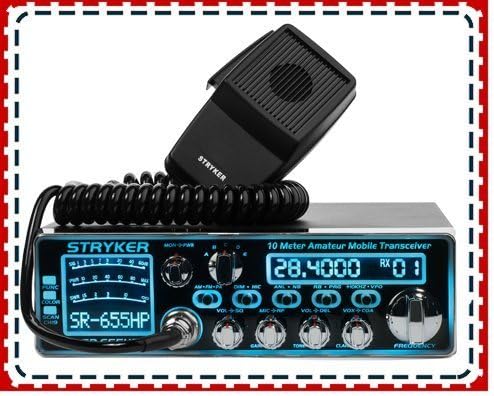
Figura 4: Eżamples of the multi-color LED display options on the SR-655HPC.
Manutenzjoni
To ensure the longevity and optimal performance of your Stryker SR-655HPC, follow these maintenance guidelines:
- Tindif: Regularly wipe the exterior of the radio with a soft, dry cloth. For stubborn dirt, a slightly damp Jista' jintuża drapp, iżda kun żgur li ma tidħol l-ebda umdità fl-unità. Evita prodotti tat-tindif jew solventi li joborxu.
- Ventilazzjoni: Ensure the radio's ventilation fins are clear of dust and obstructions to prevent overheating. Do not operate the radio in enclosed spaces without adequate airflow.
- Konnessjonijiet: Iċċekkja perjodikament il-konnessjonijiet tal-kejbil kollha (enerġija, antenna, mikrofonu) biex tiżgura li huma sikuri u ħielsa mill-korrużjoni.
- Ħażna: Meta ma tkunx qed tuża r-radju għal perjodi twal, aħżen ir-radju f'post frisk u niexef, 'il bogħod mix-xemx diretta u minn temperaturi estremi.
Issolvi l-problemi
If you encounter issues with your SR-655HPC, refer to the following common problems and solutions:
| Problema | Kawża Possibbli | Soluzzjoni |
|---|---|---|
| Ebda Qawwa | Konnessjoni tal-enerġija maħlula, fjus maħruq, vol mhux korretttage. | Check power cable connections. Verify power source voltage. Inspect and replace fuse if necessary. |
| No Receive Audio | Volume too low, squelch set too high, antenna disconnected. | Increase volume. Reduce squelch level. Check antenna connection. |
| Poor Transmit Audio | Microphone not connected properly, microphone gain too low/high. | Ensure microphone is fully plugged in. Adjust MIC GAIN control. |
| Excessive Noise on Receive | Squelch too low, NB/ANL off, external interference. | Increase squelch. Activate NB/ANL. Identify and mitigate external noise sources. |
If the problem persists after attempting these solutions, contact Stryker customer support or a qualified technician.
Speċifikazzjonijiet
| Medda ta' Frekwenzi | 28.000-29.700MHz & 24.890–24.990MHz |
| Meded ta' Frekwenza | A, B, C, D, E, F, G, H, I, J, K, L & VFO |
| Kanali | 40 (programmable) in each band |
| Input Voltage | 13.8V (14.2V recommended) |
| Antenna Konnettur | UHF SO239 |
| Kontroll tal-Frekwenza | Fażi-Locked-Loop Synthesizer |
| Frekwenza Pass | 100Hz/1KHz/10KHz/100KHz/1MHz |
| Tolleranza tal-Frekwenza | 0.005% |
| Stabbiltà tal-Frekwenza | 0.001% |
| Firxa tat-Temperatura | -20°C sa +50°C |
| Dimensjonijiet (W x H x D) | 7-7/8"W x 2-3/8"H x 9-1/4"D (approx. 17 x 9 x 3 inches) |
| Piż tal-oġġett | 5.79 liri |
| Qawwa tal-Ħruġ | 60+ watts PEP (up to 70W PEP) |
Garanzija u Appoġġ
The Stryker SR-655HPC 10 Meter Radio comes with a warranty from its respective manufacturer. For warranty claims or technical support, please refer to the documentation included with your product or visit the official Stryker website. 10-Meter Radios are intended for use by amateur radio operators only, and a license from the FCC is required for operation in the United States.

Figure 5: Important note regarding the radio's classification.


