1. Introduzzjoni
This manual provides detailed instructions for the setup, operation, and maintenance of your Vibe Axcess 5-in-1 Universal Remote. Please read this manual thoroughly before using the remote control to ensure proper functionality and to maximize your user experience. This remote is designed to control up to five different audio/video devices.
2. Prodott Aktarview
The Vibe Axcess 5-in-1 Universal Remote is designed to consolidate control of multiple home entertainment devices into a single unit. It features dedicated buttons for various functions and device types.
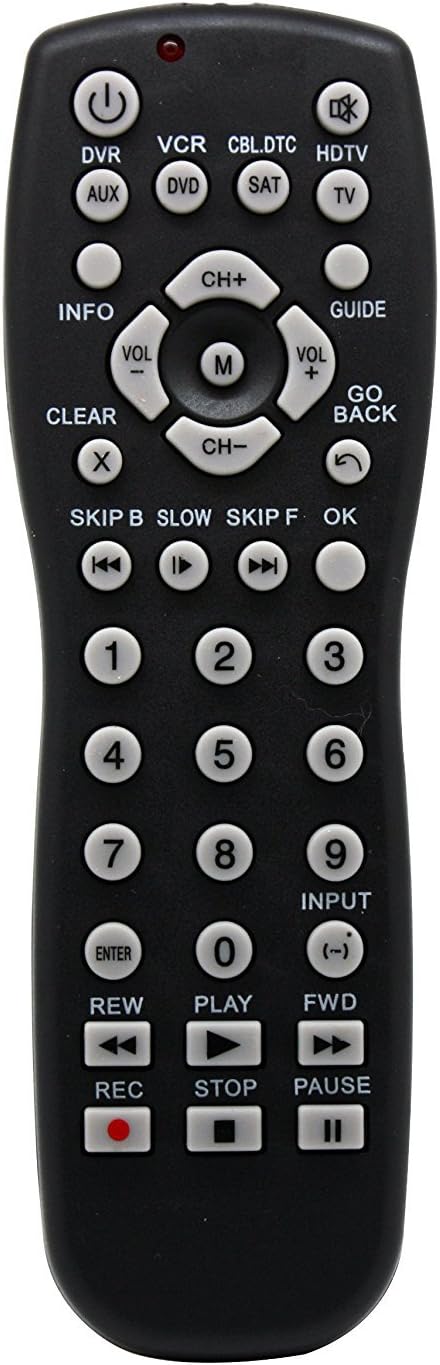
Figura 1: Quddiem view of the Vibe Axcess 5-in-1 Universal Remote. This image displays the remote's layout, including device selection buttons (DVR, VCR, CBL.DTC, HDTV, AUX, DVD, SAT, TV), navigation pad, number keys, and media control buttons (REW, PLAY, FWD, REC, STOP, PAUSE).

Figura 2: Packaging of the Vibe Axcess 5-in-1 Universal Remote. The packaging highlights the remote's 5-in-1 capability and compatibility with various device types such as DVD/VCR, HDTV, DVD, AUX, and CBL/SAT/CABLE.
3. Setup
3.1 Installazzjoni tal-batterija
- Sib l-għatu tal-kompartiment tal-batterija fuq wara tal-kontroll remot.
- Żerżaq l-għatu 'l isfel jew agħfas il-lukkett u erfa' biex tiftaħ.
- Insert two (2) AAA batteries, ensuring the positive (+) and negative (-) terminals match the diagrams inside the compartment.
- Erġa' poġġi l-għatu tal-kompartiment tal-batterija, billi żżerżaqha lura f'postha sakemm tikklikkja sew.
Nota: Always use fresh batteries and replace both batteries at the same time. Do not mix old and new batteries or different types of batteries.
3.2 Programming the Remote
To control your devices, the universal remote must be programmed with the correct codes for each device. There are typically two methods for programming:
3.2.1 Dħul Dirett tal-Kodiċi
This method involves entering a specific code from a code list (usually provided with the remote or available online) for your device's brand.
- Ixgħel l-apparat li tixtieq tikkontrolla (eż., TV, DVD player).
- Press and hold the desired device button on the remote (e.g., TV, DVD) for approximately 3 seconds until the indicator light (usually red) illuminates and stays on.
- While the indicator light is on, enter the 3-digit or 4-digit code for your device's brand using the number keys.
- If the code is valid, the indicator light will turn off. If the light flashes and remains on, the code was invalid; re-enter the code.
- Ittestja r-remote billi tagħfas il-buttuna QAWWA button. If the device turns off, the code is correct. If not, try the next code listed for your brand.
3.2.2 Tiftix Auto Code
If you cannot find a code or direct code entry fails, use the auto code search method.
- Ixgħel l-apparat li tixtieq tikkontrolla.
- Agħfas u żomm il-buttuna tal-apparat mixtieq (eż., TV) for approximately 3 seconds until the indicator light illuminates and stays on.
- Waqt li żżomm il-buttuna tal-apparat, agħfas il- QAWWA button once. The indicator light will start flashing, indicating it is searching for a code.
- Point the remote at the device and wait for the device to turn off. This may take several minutes as the remote cycles through codes.
- Ladarba l-apparat jintefa, agħfas immedjatament il-buttuna DĦUL buttuna biex issalva l-kodiċi. Id-dawl indikatur jintefa.
- Test the remote's functions. If some functions do not work, repeat the auto search process to find a more compatible code.
4. Istruzzjonijiet Operattivi
Once programmed, operating your Vibe Axcess 5-in-1 Universal Remote is straightforward.
- Agħżel Apparat: Press the corresponding device button (e.g., TV, DVD, CBL.DTC) for the device you wish to control. The indicator light will briefly illuminate to confirm selection.
- Power On/Off: Agħfas il- QAWWA buttuna biex tixgħel jew titfi l-apparat magħżul.
- Kontroll tal-Volum: Uża l- VOL+ u VOL- buttuni biex taġġusta l-volum.
- Kontroll tal-Kanal: Uża l- CH+ u CH- buttuni biex jibdlu l-kanali.
- Numri Ċwievet: Use the number keys (0-9) to directly enter channel numbers or other numerical inputs.
- Navigazzjoni: Uża l-kuxxinett direzzjonali ('il fuq, 'l isfel, xellug, lemin) u OK buttuna għan-navigazzjoni tal-menù.
- Kontrolli tal-Midja: Użu PLAY, PAWŻA, STOP, REW, FWD, u REC for controlling media playback on compatible devices.
5. Manutenzjoni
5.1 Tindif
To clean your remote, gently wipe it with a soft, dry cloth. Do not use abrasive cleaners, solvents, or harsh chemicals, as these can damage the remote's finish or internal components.
5.2 Sostituzzjoni tal-batterija
When the remote's performance degrades or the indicator light fails to illuminate, it is time to replace the batteries. Follow the battery installation steps in Section 3.1. Dispose of used batteries responsibly according to local regulations.
6 Issolvi l-problemi
- Remote mhux jaħdem:
- Iċċekkja jekk il-batteriji humiex imdaħħla sew u mhumiex eżawriti. Ibdel jekk meħtieġ.
- Ensure you have selected the correct device button (e.g., TV for your television).
- Verify that the remote is programmed with the correct code for your device. Re-program if unsure.
- Kun żgur li m'hemm l-ebda ostaklu bejn ir-remote u s-senser infra-aħmar tal-apparat.
- Xi funzjonijiet mhux qed jaħdmu:
- Some universal remote codes may not support all original remote functions. Try another code for your device brand using the programming steps.
- Ensure the device you are trying to control supports the specific function (e.g., not all TVs have a dedicated 'INFO' button function).
- Dawl indikatur mhux qed jixgħel:
- Iċċekkja u ibdel il-batteriji.
- If the issue persists after battery replacement, the remote may be faulty.
7. Speċifikazzjonijiet
- Mudell: OT795-KO
- Ditta: Vibe
- Dimensjonijiet tal-Prodott: 10.7 x 4 x 0.8 pulzieri
- Piż tal-oġġett: 4 uqija
- Batteriji: 2 batteriji AAA meħtieġa (mhux inklużi)
- Numru Massimu ta' Apparat Appoġġjat: 5
- Teknoloġija tal-Konnettività: Infra-aħmar
- Karatteristika Speċjali: Universali
8. Garanzija u Appoġġ
For information regarding warranty coverage or technical support, please refer to the documentation included with your purchase or contact the retailer where the product was acquired. Specific warranty terms may vary.


