Introduzzjoni
Thank you for choosing the Zebronics ZEB-SW2800RUCF Hero 2.1 Speaker System. This manual provides essential information for the proper setup, operation, and maintenance of your speaker system. Please read this manual thoroughly before using the product to ensure optimal performance and longevity.
Prodott Overview
The Zebronics ZEB-SW2800RUCF Hero is a 2.1 channel multimedia speaker system designed to deliver clear and powerful audio. It features a subwoofer for deep bass and two satellite speakers for balanced sound. The system includes multiple connectivity options and an integrated FM radio.
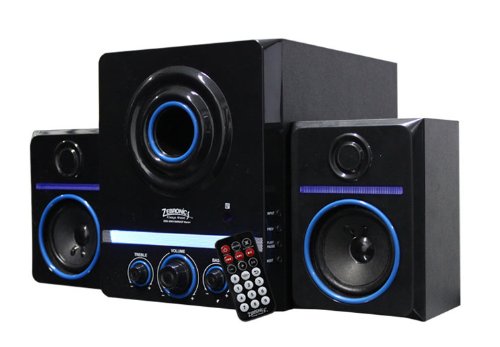
This image displays the Zebronics ZEB-SW2800RUCF Hero 2.1 speaker system. It features a central subwoofer unit with a large speaker and control knobs for treble, volume, and bass. Two satellite speakers are positioned on either side of the subwoofer. A remote control is also visible in the foreground.
Karatteristiċi Ewlenin
- Awdjo tal-Kanal 2.1: Provides a balanced sound experience with a dedicated subwoofer and two satellite speakers.
- Riżultat b'saħħtu: Total output power of 38 Watts (18W Subwoofer + 10W x 2 Satellites).
- Radju FM Integrat: Enjoy your favorite radio stations directly through the speaker system.
- Appoġġ Multimedjali: Supports USB pen drives and SD/MMC memory cards for direct playback of MP3 and WMA audio files.
- Kontrolli tal-Utent: Features on/off switch, volume, bass, and treble controls for personalized audio.
- Kontroll mill-bogħod: Operazzjoni konvenjenti mill-bogħod.
- Unitajiet tas-sewwieqa: 4-inch magnetically shielded subwoofer driver and 3 x 2-inch full-range magnetically shielded satellite drivers.
- Proporzjon Għoli tas-Sinjal għall-Ħoss: ≥80dB for clear audio.
- Distorsjoni Baxxa: ≤0.3% at 1W output @1KHz.
Setup Istruzzjonijiet
- Spakkjar: Carefully remove all components from the packaging. Ensure all parts are present: one subwoofer unit, two satellite speakers, and a remote control.
- Pjazzament: Position the subwoofer on a stable surface, preferably on the floor for optimal bass. Place the satellite speakers on either side of your listening area, ensuring they are facing towards you for the best stereo effect.
- Qabbad l-Ispeakers tas-Satellita: Connect the cables from the two satellite speakers to the corresponding output ports on the rear panel of the subwoofer unit. Ensure a secure connection.
- Qabbad is-Sors tal-Awdjo (Mhux obbligatorju): If connecting an external audio device (e.g., computer, smartphone, TV), use an appropriate audio cable (not included) to connect its audio output to the input port on the subwoofer.
- Konnessjoni tal-Enerġija: Plug the power cord of the subwoofer unit into a standard electrical outlet.
- Qawwa Mixgħul: Turn on the main power switch, usually located on the rear or front panel of the subwoofer.
Istruzzjonijiet Operattivi
Operazzjoni Bażika
- Power On/Off: Use the power switch on the subwoofer or the remote control to turn the system on or off.
- Kontroll tal-Volum: Adjust the main volume knob on the subwoofer or use the volume buttons on the remote control.
- Kontroll tal-bass: Use the bass knob on the subwoofer to adjust the level of low-frequency sound.
- Kontroll tat-Triple: Use the treble knob on the subwoofer to adjust the level of high-frequency sound.
Modi ta' Input
The speaker system supports various input sources. Use the "Mode" button on the subwoofer or remote control to switch between them.
- Modalità USB: Insert a USB pen drive into the USB port on the subwoofer. The system will automatically detect and play supported audio files (MP3, WMA).
- SD/MMC Card Mode: Insert an SD or MMC memory card into the card slot on the subwoofer. The system will automatically detect and play supported audio files (MP3, WMA).
- Modalità tar-Radju FM: Switch to FM mode. The system will automatically scan and store available radio stations. Use the previous/next track buttons on the remote or subwoofer to navigate between stations.
- Modalità AUX: If an external device is connected via the AUX input, switch to AUX mode to play audio from that device.
Funzjonijiet ta 'Kontroll mill-bogħod
Il-kontroll remot jipprovdi aċċess konvenjenti għall-funzjonijiet ewlenin kollha:
- Qawwa: Ixgħel/itfi s-sistema.
- Modalità: Switch between USB, SD/MMC, FM, and AUX inputs.
- Volum +/-: Aġġusta l-volum prinċipali.
- Play/Pawsa: Play or pause audio playback in USB/SD mode.
- Preċedenti/Li jmiss: Skip tracks in USB/SD mode or change FM stations.
- Siekta: Ixekkel jew iwaqqaf il-ħruġ tal-awdjo.
- EQ: (If available) Cycle through equalizer presets.
Manutenzjoni
- Tindif: Uża drapp artab u niexef biex tnaddaf l-uċuħ tal-ispiker. Tużax prodotti tat-tindif likwidi jew materjali li joborxu, għax jistgħu jagħmlu ħsara lill-finitura.
- Ventilazzjoni: Kun żgur li s-subwoofer u l-ispikers satellitari għandhom ventilazzjoni adegwata. Timblokkax xi ventijiet.
- Ambjent: Avoid exposing the speakers to direct sunlight, high temperatures, humidity, or dusty environments.
- Itfi: Always turn off and unplug the speaker system from the power outlet when not in use for extended periods or during electrical storms.
Issolvi l-problemi
| Problema | Kawża Possibbli | Soluzzjoni |
|---|---|---|
| Ebda qawwa | Il-korda tal-enerġija mhux imqabbda; Is-swiċċ tal-enerġija huwa mitfi; Is-sokit tal-enerġija huwa difettuż. | Ensure power cord is securely plugged in; Turn on the power switch; Test the power outlet with another device. |
| L-ebda ħoss | Volume too low; Mute function active; Incorrect input mode; Audio cables not connected properly. | Increase volume; Deactivate mute; Select the correct input mode (USB, SD, FM, AUX); Check all audio cable connections. |
| Ħoss distort | Volume too high; Source audio quality poor; Speaker placement issues. | Reduce volume; Try a different audio source; Adjust speaker placement. |
| Il-karta USB/SD mhux qed tilgħab | Skorretta file format; USB/SD card not inserted correctly; Corrupted files. | Tiżgura files are MP3 or WMA format; Reinsert USB/SD card; Try a different USB/SD card or files. |
| Riċeviment ħażin tar-radju FM | Sinjal dgħajjef; Antenna mhux estiża. | Adjust the position of the speaker system; Extend the FM antenna fully; Perform an auto-scan for stations again. |
Speċifikazzjonijiet
| Karatteristika | Dettall |
|---|---|
| Tip ta' Kelliem | Satellita, Subwoofer |
| Surround Sound Channel Konfigurazzjoni | 2.1 |
| Qawwa tal-Ħruġ (RMS) | 38 Watts (Subwoofer: 18W, Satelliti: 10W x 2) |
| Subwoofer Driver Unit | 4-inches, magnetically shielded |
| Satellite Driver Unit | 3 x 2-inches full range, magnetically shielded |
| Proporzjon tas-sinjal għall-istorbju (S/N) | ≥80dB |
| Distorsjoni | ≤0.3% at 1W output @1KHz |
| Kontrolli | On/Off switch, Volume, Bass, Treble |
| Teknoloġija tal-Konnettività | USB |
| Midja Appoġġjata | USB pen drive, SD/MMC memory cards |
| Formati Awdjo Appoġġjati | MP3, WMA |
| Karatteristiċi Speċjali | Built-in FM radio, Remote controller |
| Apparati Kompatibbli | FM Radio, MP3 Player, Smartphone, Tablet, Television |
| Użi Rakkomandati | For Smartphones or Tablets, For Televisions, Home Entertainment, Portable Audio |
| Manifattur | Zebronics |
| Numru tal-Mudell | ZEB-SW2800RUCF Hero |
| Data L-Ewwel Disponibbli | 2 ta’ Novembru 2012 |
Garanzija u Appoġġ
For warranty information and technical support, please refer to the warranty card included with your product or visit the official Zebronics websit. Żomm l-irċevuta tax-xiri tiegħek għal pretensjonijiet ta' garanzija.
For further assistance, you may contact Zebronics customer service through their official channels.


