1. Introduzzjoni
Thank you for choosing the Ferrari T150I Cavallino Collection In-Ear Headphones. This manual provides essential information for the proper setup, operation, maintenance, and troubleshooting of your new audio device. Please read this manual thoroughly before using the headphones to ensure optimal performance and longevity.
2. Kontenut tal-Pakkett
Jekk jogħġbok ivverifika li l-oġġetti kollha elenkati hawn taħt huma preżenti fl-imballaġġ tal-prodott tiegħek:
- T150I Cavallino Collection In-Ear Headphones
- Kuxxini tal-widnejn (daqsijiet varji)
- Kawża Protettiva
3. Prodott Aktarview
Familiarize yourself with the components of your T150I In-Ear Headphones.

Figura 3.1: Fuqview of the T150I Cavallino In-Ear Headphones, displaying both earbuds connected by the tangle-free cable.

Figura 3.2: Dettaljati view of the left earbud, featuring the iconic Ferrari Prancing Horse emblem on its outer casing.

Figura 3.3: Close-up of the right earbud, highlighting its sleek design and the silicone ear tip for comfortable fit.
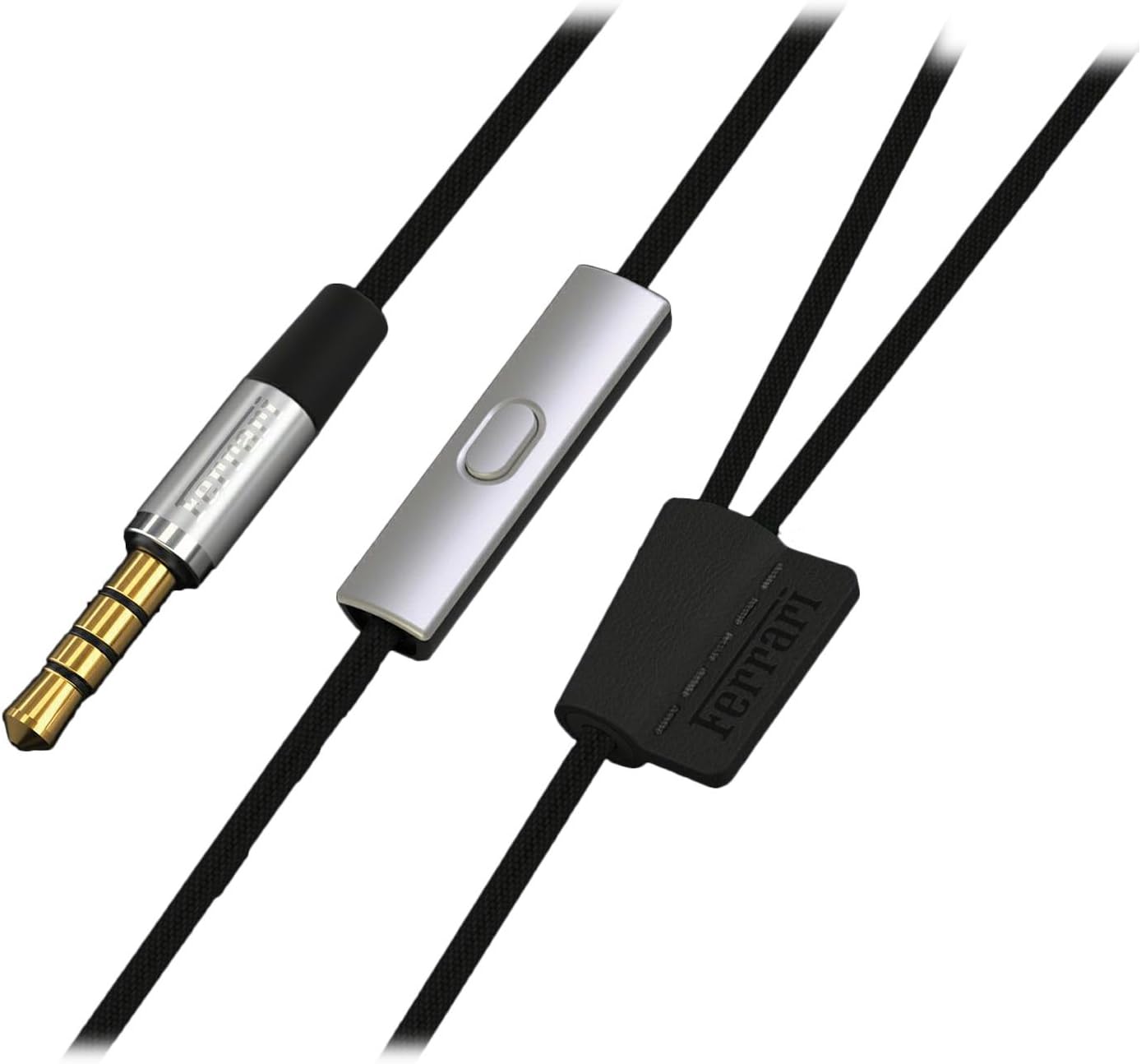
Figura 3.4: View of the 3.5mm audio jack, the in-line remote control unit, and the cable splitter with Ferrari branding.
4. Setup
4.1 Choosing the Right Ear Cushions
The T150I headphones come with multiple sizes of ear cushions to ensure a comfortable and secure fit, as well as optimal sound isolation. Experiment with the different sizes to find the pair that best fits your ear canal. A good seal is crucial for bass response and noise reduction.
- Gently pull off the pre-installed ear cushions.
- Select a new pair of ear cushions that feel snug but not uncomfortable.
- Push the new ear cushions firmly onto the headphone nozzles until they are securely attached.
4.2 Konnessjoni mat-Tagħmir Tiegħek
The T150I headphones feature a standard 3.5mm jack for universal compatibility.
- Locate the 3.5mm audio jack on your smartphone, tablet, MP3 player, or other audio device.
- Insert the 3.5mm connector of the headphones firmly into the device's audio jack.
- Kun żgur li l-konnessjoni hija sigura biex tevita interruzzjonijiet fl-awdjo.
5. Istruzzjonijiet Operattivi
5.1 Daqq tal-Awdjo
Once connected, your headphones will play audio from your device. Adjust the volume directly on your connected device.
5.2 Using the In-Line Remote Control
The T150I headphones are equipped with an in-line remote control for convenient management of calls and music playback. Specific functions may vary slightly depending on your device's operating system (e.g., iOS, Android).
- Stampa Unika: Daqq/Pawża l-mużika, Wieġeb/Tmiem is-sejħa.
- Press doppju: Aqbeż għall-binarju li jmiss.
- Istampa Tripla: Mur fil-binarju preċedenti.
- Agħfas u żomm: Activate voice assistant (e.g., Siri, Google Assistant) or decline call.
6. Manutenzjoni u Kura
Kura xierqa se testendi l-ħajja u żżomm il-prestazzjoni tal-headphones tiegħek.
- Tindif: Use a soft, dry cloth to wipe the earbuds and cable. For ear cushions, they can be gently removed and cleaned with a mild soap solution, then rinsed and thoroughly dried before reattaching.
- Ħażna: When not in use, store your headphones in the provided protective case to prevent tangling and damage.
- Evita l-umdità: Do not expose the headphones to excessive moisture or liquids. If they get wet, dry them immediately.
- Kura tal-Cable: The cable is designed to be tangle-free. Avoid sharp bends or excessive pulling on the cable, especially near the connectors.
7 Issolvi l-problemi
Jekk tiltaqa' ma' problemi bil-headphones tiegħek, irreferi għall-problemi u s-soluzzjonijiet komuni li ġejjin:
| Problema | Kawża Possibbli | Soluzzjoni |
|---|---|---|
| L-ebda ħoss jew ħoss mgħawweġ | Loose connection, incorrect volume, damaged cable/jack, incorrect audio output setting on device. | Ensure 3.5mm jack is fully inserted. Increase volume on device. Test with another audio source/device. Inspect cable for damage. Check device's audio settings. |
| Il-earbuds jaqgħu faċilment | Daqs mhux korrett tal-kuxxinett tal-widna. | Try different sizes of ear cushions provided until a secure and comfortable fit is achieved. |
| Il-kontroll mill-bogħod ma jaħdimx | Incompatibility with device, loose connection. | Ensure the 3.5mm jack is fully inserted. Some remote functions may not be fully supported by all devices. |
8. Speċifikazzjonijiet
Key technical specifications for the T150I Cavallino Collection In-Ear Headphones:
- Isem tal-Mudell: Kavallino
- Numru tal-Mudell tal-Oġġett: AAV-1LFE014K
- Teknoloġija tal-Konnettività: Bil-fili
- Jack tal-headphone: 3.5 mm Jack
- Fattur tal-Formola: Fil-widnejn
- Tqegħid tal-widnejn: Fil-widnejn
- Tip ta' Kontroll: Remote
- Karatteristika tal-Cable: Tħabbil Ħieles
- Materjal: Plastik
- Kulur: Iswed
- Piż tal-oġġett: 54.4 g (0.12 Liri)
- Dimensjonijiet tal-Prodott: 15.06 x 4.01 x 10.03 ċm
9. Garanzija u Appoġġ
For information regarding warranty coverage, technical support, or service inquiries, please refer to the warranty card included with your purchase or visit the official Ferrari product support websit. Żomm il-prova tax-xiri tiegħek għal kwalunkwe talba ta' garanzija.
Appoġġ onlajn: www.ferrari.com/en-EN/accessories (This is a placeholder link, please refer to actual product documentation for correct support URL.)


