1. Introduzzjoni
The Olympus E-PL5 is a compact mirrorless digital camera designed for both photography enthusiasts and casual users. It features a 16MP Live MOS sensor, a TruePic VI image processor, and a versatile 14-42mm lens, offering high-quality imaging in a portable form factor. This manual provides essential information for setting up, operating, and maintaining your camera.
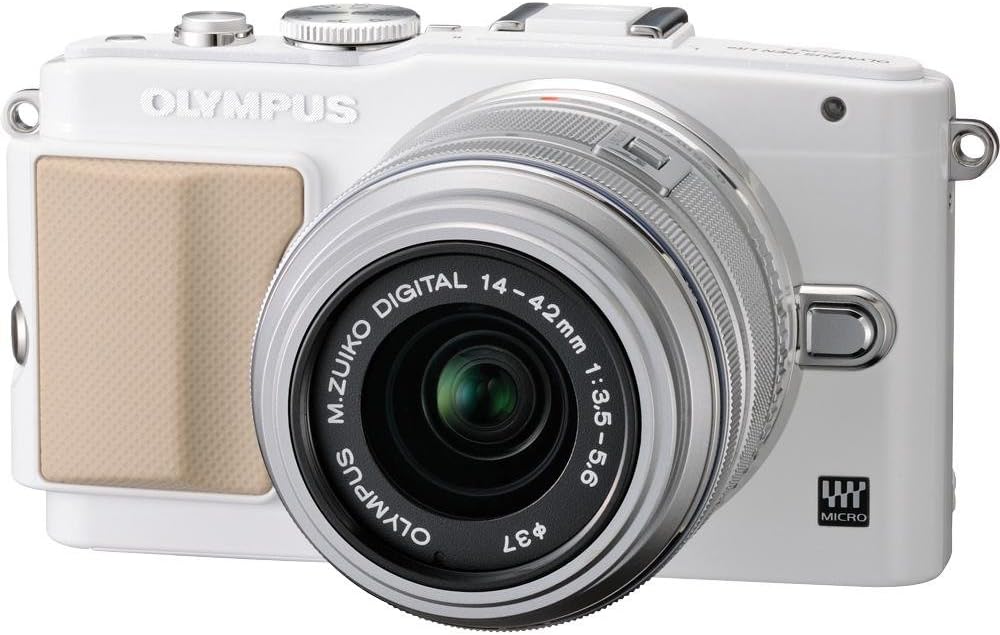
Figura 1: Quddiem view of the Olympus E-PL5 Mirrorless Digital Camera with the 14-42mm lens attached.
2. Setup
2.1 Installazzjoni tal-Batterija u l-Kard tal-Memorja
- Iftaħ l-għatu tal-batterija/karta tal-memorja li jinsab fil-qiegħ tal-kamera.
- Daħħal il-batterija bl-orjentazzjoni korretta sakemm tikklikkja f'postha.
- Insert an SD/SDHC/SDXC memory card into the slot until it clicks. Ensure the card is facing the correct direction.
- Agħlaq l-għatu sew.
2.2 Twaħħil tal-Lenti
- Neħħi l-għatu tal-body mill-kamera u l-għatu tal-lenti ta' wara mil-lenti.
- Allinja l-punt abjad fuq il-lenti mal-punt abjad fuq il-korp tal-kamera.
- Immonta l-lenti billi ddawwarha lejn l-arloġġ sakemm tikklikkja f'postha.
- Neħħi l-għatu tal-lenti ta 'quddiem.

Figura 2: Quddiem view of the camera, illustrating the lens attachment point.
3. Operazzjoni
3.1 Modi Bażiċi ta' Sparar
Dawwar id-dial tal-modalità biex tagħżel il-modalità ta' sparar mixtieqa tiegħek:
- i-Auto: Intelligent Auto mode for automatic scene detection.
- P (Programm Awtomatiku): Il-kamera tissettja l-apertura u l-veloċità tax-xater għal espożizzjoni ottimali.
- A (Prijorità tal-Apertura): You control the aperture, camera sets shutter speed.
- S (Prijorità tax-Xatter): You control the shutter speed, camera sets aperture.
- M (Manwal): Kontroll manwali sħiħ fuq l-apertura u l-veloċità tax-xater.
- SCN (Modi tax-Xena): Modi predefiniti għal sitwazzjonijiet speċifiċi (eż., Ritratt, Pajsaġġ).
- ART (Art Filters): Applika effetti kreattivi għar-ritratti tiegħek.
3.2 Using the Touch LCD Screen
The 3.0-inch flip self-portrait touch LCD screen allows for intuitive control:
- Touch Shutter: Tap the screen to focus and take a picture.
- Touch AF: Tap to set the autofocus point.
- Live Guide System: Adjust settings like brightness, color, and background blur by touching on-screen sliders and previewing effetti.
- The screen can be tilted for various shooting angles, including self-portraits.

Figura 3: Wara view of the Olympus E-PL5, showing the LCD screen in use.

Figura 4: Ġenb view of the Olympus E-PL5 with its tilting LCD screen extended.
3.3 Reġistrazzjoni tal-Vidjo
The E-PL5 supports Full 1080i HD video recording with Art Filter Movie and Effects. To record a video:
- Set the mode dial to the movie recording mode (usually indicated by a film camera icon).
- Press the dedicated movie record button to start and stop recording.
- Utilize the Art Filters for creative video effects.
Video 1: This video showcases the Olympus E-PL5 camera being used in a 72-hour filmmaking challenge, demonstrating its capabilities for video production in various environments.
4. Manutenzjoni
4.1 Tindif tal-Kamera
- Korp tal-Kamera: Imsaħ il-korp tal-kamera b'ċarruta ratba u niexfa. Għal ħmieġ iebes, uża ċarruta mnixxfa ħafif.ampened bl-ilma. Evita kimiċi ħarxa.
- Lenti: Use a lens brush or blower to remove dust. For smudges, use a specialized lens cleaning solution and a microfiber cloth. Never touch the lens surface with your fingers.
- Skrin LCD: Imsaħ l-iskrin bil-mod b'ċarruta ratba u mingħajr suf. Evita li tagħfas wisq.
4.2 Ħażna
When not in use, store the camera in a cool, dry place away from direct sunlight and extreme temperatures. Remove the battery if storing for extended periods to prevent leakage.
5 Issolvi l-problemi
5.1 Kwistjonijiet Komuni u Soluzzjonijiet
- Il-kamera ma tixgħelx: Kun żgur li l-batterija hija ċċarġjata kompletament u mdaħħla sew. Iċċekkja jekk il-kuntatti tal-batterija humiex nodfa.
- L-immaġnijiet huma mċajpra: Check if the lens is clean and properly attached. Ensure the autofocus is working correctly or try manual focus. Verify that the shutter speed is appropriate for the lighting conditions to prevent camera shake.
- LCD screen is blank or unresponsive: Press the DISPLAY button to cycle through display modes. If the screen is unresponsive to touch, try restarting the camera. Ensure the screen is not physically damaged.
- Żball fil-karta tal-memorja: Ensure the memory card is inserted correctly and is not full. Try formatting the card (this will erase all data, so back up first). If the issue persists, try a different memory card.
- Il-flash ma jaħdimx: Check if the flash is enabled in the camera settings and if the shooting mode allows flash. Ensure the external flash (if used) is properly mounted and powered.
6. Speċifikazzjonijiet
| Karatteristika | Dettall |
|---|---|
| Isem tal-Mudell | Olympus E-PL5 |
| Riżoluzzjoni tas-Sensor tar-Ritratti | 16 MP |
| Tip tas-Sensor | MOS |
| Muntaturi Kompatibbli | Mikro Erba' Terzi |
| Stabbilizzazzjoni tal-Immaġni | Sensor-shift |
| Tip ta' Lenti | Żum (14-42mm) |
| Apertura massima | 3.5 f |
| Daqs tal-Iskrin | 3 Pulzier |
| Tip ta 'Wiri | LCD, Tilting, Touch Screen |
| Riżoluzzjoni tal-vidjo | FHD 1080i |
| Appoġġjati File Format | RAW, JPEG, RAW+JPEG, MPO(3D still) |
| Tip ta' Memorja Flash | SD/SDHC/SDXC |
| Teknoloġija tal-Konnettività | HDMI, USB, Wireless |
| Piż tal-oġġett | 0.72 Liri |
7. Garanzija u Appoġġ
For detailed warranty information and customer support, please refer to the official Olympus webis-sit jew ikkuntattja lis-servizz tal-konsumatur tagħhom direttament. Żomm il-prova tax-xiri tiegħek għal kwalunkwe talba ta' garanzija.
Online resources, FAQs, and software updates may also be available on the Olympus support pages.


