1. Introduzzjoni
The Nitecore i2 Intellicharge Charger is a universal, automatic smart-charger compatible with almost all types of rechargeable batteries, eliminating the need for multiple chargers. The i2 automatically detects Li-ion, Ni-MH, and Ni-Cd batteries, and through intelligent circuitry, selects the optimal charging mode (Constant Charge Current (CC), Constant Charge Voltage (CV), or Trickle Charge). Each of the two battery slots is micro-computer controlled, capable of monitoring and charging batteries independently.

Image 1.1: The Nitecore i2 Intellicharge Charger, a two-slot universal battery charger.

Image 1.2: The Nitecore i2 features a microprocessor for automatic identification of battery types and selection of appropriate charging voltage.
2. Istruzzjonijiet tas-Sigurtà
- Use the charger only for rechargeable batteries specified in this manual. Charging other battery types may cause explosion, battery rupture, or leakage, leading to property damage and/or personal injury.
- Do not disassemble, modify, or short-circuit the charger.
- Keep the charger away from water, high humidity, and high temperatures.
- Tħaddimx il-ċarġer jekk jidher bil-ħsara.
- Always unplug the charger from the power source when not in use.
- Żomm fejn ma jintlaħaqx mit-tfal.
3. Setup
- Connect the charger to a power source. The i2 supports two types of power input:
- Qawwa AC: Plug the AC power cord into the charger's AC input port and then into a standard wall outlet (AC 100-240V).
- Qawwa DC: Plug the DC car adapter (not included) into the charger's DC input port and then into a vehicle's 12V power outlet.
- Upon successful connection, all three LED indicators above each slot will briefly illuminate, then the bottom LED will remain lit, indicating standby mode.

Immaġni 3.1: Ġenb view of the Nitecore i2 charger showing the AC and DC power input ports.
4. Istruzzjonijiet Operattivi
- Daħħal Batteriji: Place one or two rechargeable batteries into the charging slots. Ensure correct polarity (+/-) is observed. The charger's spring-loaded contacts will adjust to fit various battery sizes.
- Sejbien Awtomatiku: The i2 will automatically detect the battery type (Li-ion, Ni-MH, or Ni-Cd) and select the appropriate charging voltage and mode.
- Proċess tal-Iċċarġjar: The three LED indicators above each slot will illuminate sequentially from bottom to top, indicating the charging progress.
- Tlestija tal-Iċċarġjar: Once charging is complete, all three LED indicators for that slot will stop flashing and remain steadily lit. The charger will automatically cease charging to prevent overcharging.
- Neħħi Batteriji: Neħħi l-batteriji ċċarġjati bir-reqqa mill-islots.
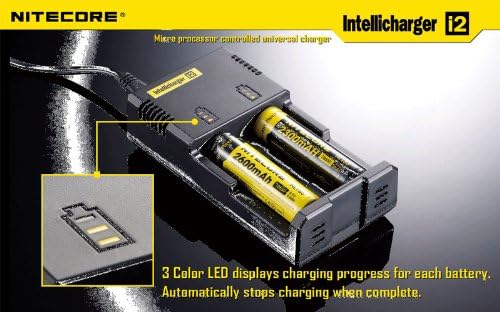
Image 4.1: The Nitecore i2 charger with batteries inserted, showing the 3-color LED indicators displaying charging progress.
5. Kompatibilità tal-Batterija
The Nitecore i2 Intellicharge Charger is compatible with a wide range of rechargeable battery types and sizes:
- Li-ion Batteries: 26650, 22650, 18650, 17670, 18490, 17500, 17335, 16340 (RCR123), 14500
- Ni-MH / Ni-Cd Batteries: AA, AAA, A, SC, C

Image 5.1: Visual representation of the Nitecore i2's compatibility with various Li-ion, Ni-MH, and Ni-Cd rechargeable batteries.
6. Indikaturi LED
The Nitecore i2 features three LED indicators per charging slot to display the charging status:
- All LEDs Off: No battery inserted or charger not connected to power.
- Bottom LED Solid: Charger in standby mode (no battery inserted).
- LEDs Flashing Sequentially (Bottom to Top): Battery is currently charging. The number of lit LEDs indicates the approximate charge level.
- All LEDs Solid: Iċċarġjar komplut.
- All LEDs Flashing Rapidly: Error condition (e.g., incorrect battery type, short circuit, or damaged battery). Remove the battery and inspect.
7. Manutenzjoni
- Ensure the charger is unplugged before cleaning.
- Clean the charger and charging contacts with a soft, dry cloth. Do not use abrasive cleaners or solvents.
- Aħżen il-ċarġer f'post frisk u niexef 'il bogħod mid-dawl tax-xemx dirett u temperaturi estremi.
- Iċċekkja perjodikament il-korda tad-dawl għal kwalunkwe sinjali ta 'ħsara.

Image 7.1: Close-up of the Nitecore i2 charger's ventilation slots, designed for optimal heat dissipation during operation.
8 Issolvi l-problemi
| Problema | Kawża Possibbli | Soluzzjoni |
|---|---|---|
| Il-ċarġer mhux qed jixgħel. | No power connection or faulty power cord. | Ensure power cord is securely plugged into both the charger and the outlet. Try a different outlet. |
| Battery not charging (LEDs not flashing). | Incorrect battery insertion, battery is fully charged, or battery is damaged. | Re-insert battery ensuring correct polarity. Check if LEDs are solid (fully charged). Try a different battery. |
| All LEDs flashing rapidly. | Error condition (e.g., short circuit, incompatible battery, or severely damaged battery). | Remove the battery immediately. Inspect the battery for damage. Do not attempt to charge damaged batteries. |
9. Speċifikazzjonijiet
- Input Voltage: AC 100-240V 50/60Hz, DC 12V
- Qawwa tad-Dħul: 10W
- Ħruġ Voltage: 4.2V ±1% / 1.48V ±1%
- Kurrent tal-Ħruġ: 0.5A x 2
- Dimensjonijiet: 131.5mm (Length) × 70mm (Width) × 35mm (Height)
- Piż: 103g (without batteries and power cord)

Image 9.1: Detailed specifications for the Nitecore i2 Intellicharge Charger.
10. Garanzija u Appoġġ
Nitecore products are backed by a warranty. For specific warranty terms and conditions, please refer to the warranty card included with your product or visit the official Nitecore website. For technical support, troubleshooting assistance, or warranty claims, please contact your authorized Nitecore dealer or Nitecore customer service directly.
Official Nitecore Websit: www.nitecore.com


