Introduzzjoni
This manual provides essential information for the safe and efficient operation of your APC SMT1500J Smart-UPS 1500VA LCD 100V. The Smart-UPS is an Uninterruptible Power Supply (UPS) designed to protect electronic equipment from power outages, sags, surges, and other power disturbances. Please read this manual thoroughly before installation and use.
Informazzjoni dwar is-Sigurtà
Observe all safety warnings and instructions in this manual. The UPS contains internal batteries and can present a shock hazard even when disconnected from the AC power source. Do not disassemble or modify the unit. This product is heavy; use proper lifting techniques or assistance when moving.

Figura 1: Il-Panel ta' Wara 'l Fuqview. This image displays the rear panel of the APC SMT1500J Smart-UPS. It features USB and Serial communication ports, multiple output receptacles (Group 1), a main power input, a battery connector (with a note about disconnecting during transport), and an overload protection reset button. Safety warnings indicate a risk of electric shock if disassembled or modified, and a weight warning for items over 18kg (40lbs).
Setup
- Spakkjar: Carefully unpack the UPS and inspect it for any shipping damage. Retain the packaging for future use.
- Konnessjoni tal-batterija: Connect the internal battery. Refer to the battery connection instructions provided with the unit. Ensure the battery connector is securely fastened.
- Pjazzament: Place the UPS in a location with adequate airflow, away from direct sunlight, excessive heat, or moisture.
- Connecting to Utility Power: Ipplaggja l-korda tal-enerġija tal-UPS f'bokk tal-AC ta' 100V ertjat.
- Tagħmir ta' Konnessjoni: Connect your devices to the output receptacles on the rear panel. For critical equipment, use the designated 'Group A' outlets if applicable.

Figure 2: Output Group Function. This diagram demonstrates the 'Output Group Function' which allows independent control of power to connected devices. Group A is for important products, while Group B is for less critical products. During a power outage, power to Group B can be cut to efficiently allocate capacity to Group A, extending runtime for essential equipment.
Istruzzjonijiet Operattivi
- Power On/Off: Agħfas il-buttuna tal-qawwa fuq il-pannell ta' quddiem biex tixgħel jew titfi l-UPS.
- Display LCD: The LCD provides real-time status information, including input/output voltage, livell ta 'ċarġ tal-batterija, perċentwali tat-tagħbijatage, and estimated runtime. Navigate through the display options using the control buttons.
- Ħruġ ta' Mewġ Sinus Pur: The SMT1500J provides a pure sine wave output, ensuring compatibility with sensitive electronic equipment.

Figure 3: Pure Sine Wave Output. This image illustrates the pure sine wave output capability of the APC Smart-UPS. The graphic shows a smooth sine wave, signifying that the UPS provides high-quality power suitable for sensitive electronic equipment.
- Vol. Awtomatikutage Regolament (AVR): L-UPS awtomatikament jikkoreġi l-volumi minuritagvarjazzjonijiet fil-temperatura mingħajr ma tuża l-enerġija tal-batterija, u b'hekk testendi l-ħajja tal-batterija.
- Modalità Aħdar: This feature optimizes energy efficiency by bypassing the internal AVR when utility power is stable, reducing power consumption and operating costs.

Figure 4: Green Mode Efficiency. This image highlights the 'Green Mode' feature, designed to reduce electricity costs. It shows a comparison where Smart-UPS with Green Mode reduces power consumption by 24-43% compared to older models without this feature. The actual reduction rate varies depending on the Smart-UPS capacity.
- Ġestjoni Intelliġenti tal-Batterija: The UPS features intelligent battery monitoring to ensure precise charging management, maximizing battery capacity, lifespan, and reliability.

Figure 5: Intelligent Battery Management. This image highlights the automatic voltage control and intelligent battery monitoring features. The text explains that precise charging management maximizes battery capacity, lifespan, and reliability, preventing battery degradation.
- Network Management (Optional): For advanced monitoring and control, an optional Network Management Card (NMC) can be installed. This allows for remote monitoring and safe shutdown of connected equipment via PowerChute software.

Figure 6: Network Management Overview. This diagram illustrates how an optional Network Management Card (NMC) can be used with PowerChute software to enable secure remote monitoring and control of the UPS over a network. It also allows for safe shutdown during power outages.
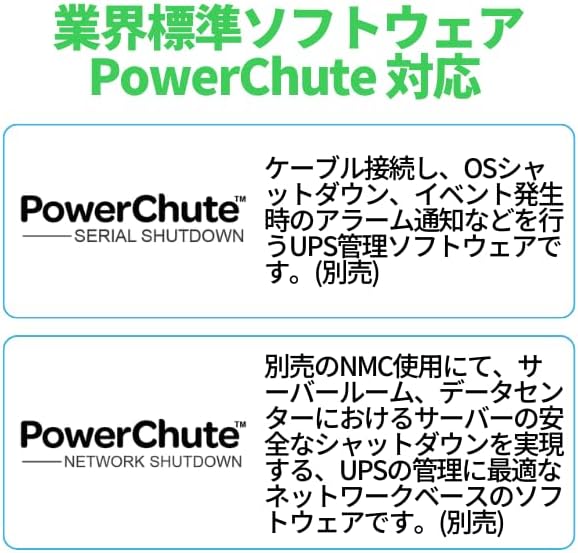
Figure 7: PowerChute Software. This image describes the industry-standard PowerChute software. It explains that PowerChute (Serial Shutdown) is UPS management software that handles cable connection, OS shutdown, and alarm notifications during events. PowerChute (Network Shutdown), when used with an optional NMC, is network-based software ideal for UPS management, enabling safe shutdown of servers in server rooms and data centers.
Manutenzjoni
- Kura tal-batterija: The UPS performs automatic battery self-tests. Replace the battery when indicated by the UPS or after its expected service life (typically 3-5 years). Refer to APC's official documentation for battery replacement procedures.
- Tindif: Żomm il-UPS nadif u ħieles mit-trab. Uża drapp niexef biex timsaħ il-barra. Tużax prodotti tat-tindif likwidi jew solventi.
- Ventilazzjoni: Kun żgur li l-fetħiet tal-ventilazzjoni fuq il-UPS mhumiex imblukkati biex tevita li s-sistema tissaħħan iżżejjed.
Issolvi l-problemi
If the UPS is not operating correctly, consult the following basic troubleshooting steps:
- Ebda Qawwa: Ensure the UPS is plugged into a live AC outlet and the power button is pressed. Check the circuit breaker.
- Batterija Mhux Iċċarġja: Verify the battery is properly connected. Allow the UPS to charge for at least 24 hours after initial installation or a deep discharge.
- Allarm ta' Tagħbija Eċċessiva: If an overload alarm sounds, disconnect non-essential equipment from the UPS outlets. Press the overload protection reset button on the rear panel if necessary.
- Consult LCD: The LCD display often provides error codes or messages that can help diagnose issues. Refer to the full user manual for a complete list of error codes.
Speċifikazzjonijiet
| Karatteristika | Speċifikazzjoni |
|---|---|
| Numru tal-Mudell | SMT1500J |
| Brand | APC |
| Voltage | 100 Volts |
| Ampetà | 15 A |
| Piż tal-oġġett | 62.000 lbs (28.12 kg) |
| Dimensjonijiet tal-Prodott (LxWxH) | 6.77 x 17.28 x 8.86 pulzieri |
| UPC | 731304290889 |
Garanzija
APC products typically come with a standard warranty. For specific warranty terms and conditions applicable to your SMT1500J Smart-UPS, please refer to the warranty card included with your product or visit the official APC websit. Żomm il-prova tax-xiri tiegħek għal talbiet ta' garanzija.
Appoġġ
For technical assistance, troubleshooting beyond this manual, or to inquire about replacement parts, please contact APC Customer Support. You can find contact information and additional resources on the official APC webis-sit jew billi żżur il- Ħanut tal-APC fuq Amazon.


