1. Introduzzjoni
This manual provides detailed instructions for the safe and efficient operation of your Vivitek Qumi Q5 Pocket DLP Projector. Please read this manual thoroughly before using the projector and retain it for future reference. The Vivitek Qumi Q5 is a compact, high-definition LED projector designed for portability and versatility, featuring 500 lumens brightness, WXGA resolution, and various connectivity options.
2. Informazzjoni Importanti dwar is-Sigurtà
Osserva l-prekawzjonijiet ta' sigurtà li ġejjin biex tevita ħsara lill-proġettur u tiżgura s-sigurtà tal-utent:
- Timblokkax il-fetħiet tal-ventilazzjoni. Kun żgur li jkun hemm fluss tal-arja adegwat madwar il-proġettazzjoni.
- Tħarisx direttament fil-lenti tal-proġettazzjoni meta tkun qed taħdem.amp mixgħul. Id-dawl qawwi jista’ jikkawża ħsara lill-għajnejn.
- Uża biss l-adapter tal-enerġija li jiġi mal-proġettur.
- Tesponix il-proġettazzjoni għax-xita jew għall-umdità biex tnaqqas ir-riskju ta’ nar jew xokk elettriku.
- Poġġi l-proġekter fuq wiċċ stabbli u livell.
- Unplug the projector from the power outlet before cleaning or when not in use for extended periods.
- Irreferi l-manutenzjoni kollha lil persunal tas-servizz kwalifikat.
3. Kontenut tal-Pakkett
Iċċekkja li l-oġġetti kollha elenkati hawn taħt huma inklużi fil-pakkett tiegħek:
- Vivitek Qumi Q5 Projector
- Adapter tal-Enerġija
- Universal I/O to VGA Cable
- Cable HDMI
- 3.5mm AV-in Cable
- Borża tal-Ġarr
- Kontroll mill-bogħod
- Gwida Quick Start
- Karta ta' Garanzija
4. Prodott Aktarview
Familiarize yourself with the various components and features of your Vivitek Qumi Q5 projector.
4.1 Quddiem View

Stampa 4.1: Quddiem view of the Vivitek Qumi Q5 projector, showing the lens and ventilation grilles.
The front of the projector features the projection lens and air vents for cooling. Ensure these vents are not obstructed during operation.
4.2 Fuq View

Stampa 4.2: Fuq view of the Vivitek Qumi Q5 projector, highlighting the touch-sensitive control panel.
The top panel includes touch-sensitive controls for navigation and menu selection. The "Qumi" logo is also visible.
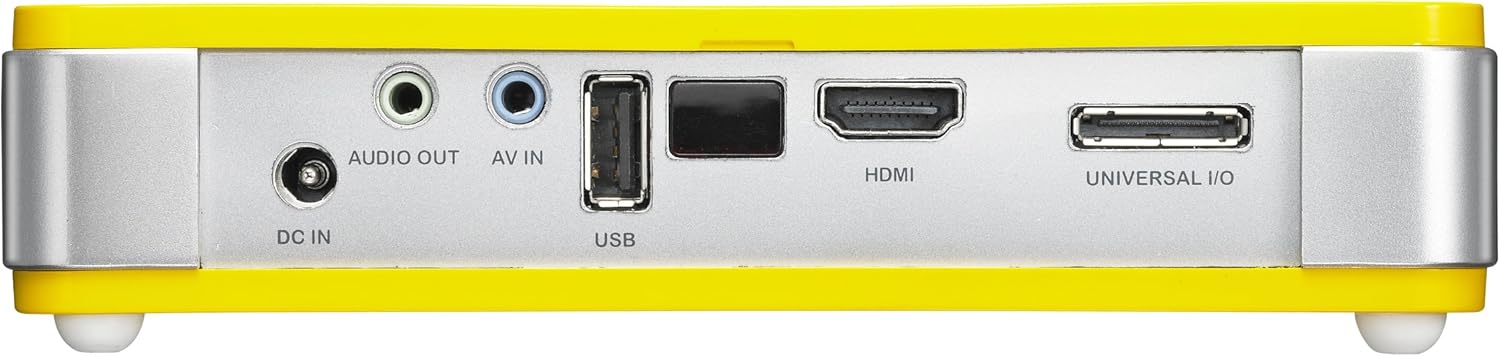
4.3 Wara View (Connectivity Ports)

Stampa 4.3: Wara view of the Vivitek Qumi Q5 projector, displaying all input and output ports.
The rear panel houses all essential connectivity ports:
- DC IN: Għall-konnessjoni tal-adapter tal-enerġija.
- ĦRUĠ AWDJO: 3.5mm jack for external speakers or headphones.
- AV IN: 3.5mm jack for composite video and stereo audio input.
- USB: Għall-konnessjoni ta' apparati tal-ħażna USB.
- HDMI: High-Definition Multimedia Interface for digital video and audio input.
- UNIVERSAL I/O: Multi-purpose port for VGA and other analog inputs via adapter.
5. Setup
Follow these steps to set up your Vivitek Qumi Q5 projector.
5.1 Powering On the Projector
- Qabbad l - adapter tad - dawl ma ' DC IN port fuq il-proġekter.
- Ipplaggja l-adapter tal-enerġija f'iżbokk tal-ħajt.
- Press the power button on the projector or remote control to turn on the device. The power indicator light will illuminate.
5.2 Konnessjoni tas-Sorsi tal-Input
The Qumi Q5 supports various input sources:
- HDMI: Connect an HDMI cable from your source device (e.g., laptop, Blu-ray player) to the HDMI port fuq il-proġekter.
- VGA: Use the supplied Universal I/O to VGA cable to connect your computer's VGA output to the UNIVERSAL I/O port.
- AV (Kompost): Use the supplied 3.5mm AV-in cable to connect composite video and stereo audio devices to the AV IN port.
- USB: Daħħal USB flash drive fil- USB port to play media files direttament.
- Bla fili (Mhux obbligatorju): If using an optional WiFi USB dongle, insert it into the USB port for wireless connectivity. Refer to the dongle's instructions for setup.
5.3 Aġġustament tal-Focus
Locate the focus wheel on the side of the projector. Rotate the wheel until the projected image appears sharp and clear on your screen or wall.
Stampa 5.3: Ġenb view of the Vivitek Qumi Q5, indicating the location of the focus adjustment wheel.
6. It-Tħaddim tal-Proġettur
6.1 Navigazzjoni fil-Menù
Use the touch-sensitive buttons on the top panel or the remote control to navigate the projector's on-screen display (OSD) menu. The menu allows you to adjust image settings, input sources, and other system configurations.
6.2 L-Għażla tas-Sors tal-Input
Press the "Source" button on the remote control or navigate through the OSD menu to select the desired input source (HDMI, VGA, AV, USB, or Wireless).
6.3 Aġġustamenti tal-Immaġni
Within the OSD menu, you can adjust various image parameters:
- Luminożità/Kuntrast: Adjust for optimal image visibility.
- Kulur/Tintura: Irfinar ir-riproduzzjoni tal-kulur.
- Proporzjon tal-aspett: Select between 4:3, 16:9, or other available ratios to match your content.
- Korrezzjoni Keystone: Correct trapezoidal distortion if the projector is not perfectly perpendicular to the screen.
6.4 Playing Media from USB
When a USB drive is inserted, the projector's media player interface will typically launch automatically. You can browse and play supported video, audio, and image files direttament mill-USB drive.
6.5 Funzjonalità 3D
The Qumi Q5 is 3D-ready via DLP Link technology. To view 3D content, you will need compatible 3D source material, a 3D-capable player, and active DLP Link 3D glasses (sold separately).
7. Manutenzjoni
Manutenzjoni xierqa tiżgura l-lonġevità u l-prestazzjoni ottimali tal-proġettazzjoni tiegħek.
7.1 Tindif tal-Proġettur
- Barra: Uża drapp ratba u mingħajr ħelu ftit dampimdaħħla bl-ilma jew soluzzjoni ħafifa għat-tindif. Tużax tindif jew solventi li joborxu.
- Lenti: Gently wipe the lens with a lens cleaning cloth or lens paper. Avoid touching the lens surface with your fingers.
- Ventijiet: Use a soft brush or compressed air to clear dust from the ventilation openings.
7.2 Sors tad-Dawl LED
The Qumi Q5 utilizes an LED light source with an estimated operational life of up to 30,000 hours, significantly reducing the need for lamp replacement compared to traditional projectors.
7.3 Ħażna
When not in use for extended periods, store the projector in its carrying pouch in a cool, dry place, away from direct sunlight and extreme temperatures.
8 Issolvi l-problemi
Irreferi għal din it-taqsima għal soluzzjonijiet għal kwistjonijiet komuni li tista' tiltaqa' magħhom.
| Problema | Kawża Possibbli | Soluzzjoni |
|---|---|---|
| Ebda immaġini murija. |
|
|
| L-immaġni hija mċajpra. |
|
|
| L-ebda awdjo. |
|
|
| Projector overheats or shuts down. |
|
|
9. Speċifikazzjonijiet
Key technical specifications for the Vivitek Qumi Q5 projector:
- Mudell: Qumi Q5
- Teknoloġija tal-Wiri: DLP Pico chipset
- Riżoluzzjoni Nattiva: WXGA (1280 x 720)
- Luminożità: Sa 500 Lumens
- Sors tad-Dawl: LED (Estimated 30,000 hours operation)
- Konnettività: HDMI, Universal I/O (VGA), AV mini-jack, USB, Audio-out mini-jack, Wireless (via optional USB dongle)
- Memorja Interna: 4GB
- 3D Lest: Yes, via DLP Link
- Dimensjonijiet: 4 x 6.3 x 1.3 pulzieri (10.16 x 16.00 x 3.30 ċm)
- Piż: 1.1 liri (0.5 kg)
- Provvista tal-Enerġija: Adapter tal-Enerġija Esterna
10. Garanzija u Appoġġ
Your Vivitek Qumi Q5 projector is covered by a limited warranty. Please refer to the included Warranty Card for specific terms and conditions, including warranty period and coverage details. For technical support, service, or further inquiries, please visit the official Vivitek webis-sit jew ikkuntattja lid-dipartiment tas-servizz tal-konsumatur tagħhom. Żomm l-irċevuta tax-xiri tiegħek bħala prova tax-xiri għal talbiet ta’ garanzija.


