1. Introduzzjoni
Thank you for choosing the TFA 30.5027.02 Digital Thermometer/Hygrometer. This device is designed to accurately measure and display indoor temperature and humidity, providing a clear indication of the comfort level in your environment. Its ultra-flat design and high-gloss surface make it a discreet and functional addition to any room. Please read this manual carefully to ensure proper setup and operation.
2. Informazzjoni dwar is-Sigurtà
- Żomm dan il-manwal ta' struzzjonijiet għal referenza futura.
- Dan l-apparat huwa maħsub għall-użu fuq ġewwa biss.
- Do not expose the device to extreme temperatures, direct sunlight, moisture, or strong vibrations.
- Tgħaddix l-apparat fl-ilma jew likwidi oħra.
- Do not attempt to open or modify the device. This will void the warranty.
- Żomm il-batteriji fejn ma jintlaħaqx mit-tfal. Jekk tibela', fittex attenzjoni medika immedjata.
- Armi batteriji użati skont ir-regolamenti lokali.
- Naddaf l-apparat b'artab, damp drapp. Tużax tindif jew solventi li joborxu.
3. Kontenut tal-Pakkett
Jekk jogħġbok iċċekkja li l-komponenti kollha huma preżenti u mhux imħassra:
- 1x TFA 30.5027.02 Digital Thermometer/Hygrometer
- 1x CR2 Lithium Battery (pre-installed or separate)
- 1x Manwal tal-Istruzzjonijiet (dan id-dokument)
4. Prodott Aktarview
The TFA 30.5027.02 features a clear digital display showing current temperature and humidity. It also includes a comfort level indicator and a maximum/minimum value memory function.

Figura 1: Quddiem view of the TFA 30.5027.02 Digital Thermometer/Hygrometer. The display shows temperature in Celsius and relative humidity percentage, along with a comfort level icon.
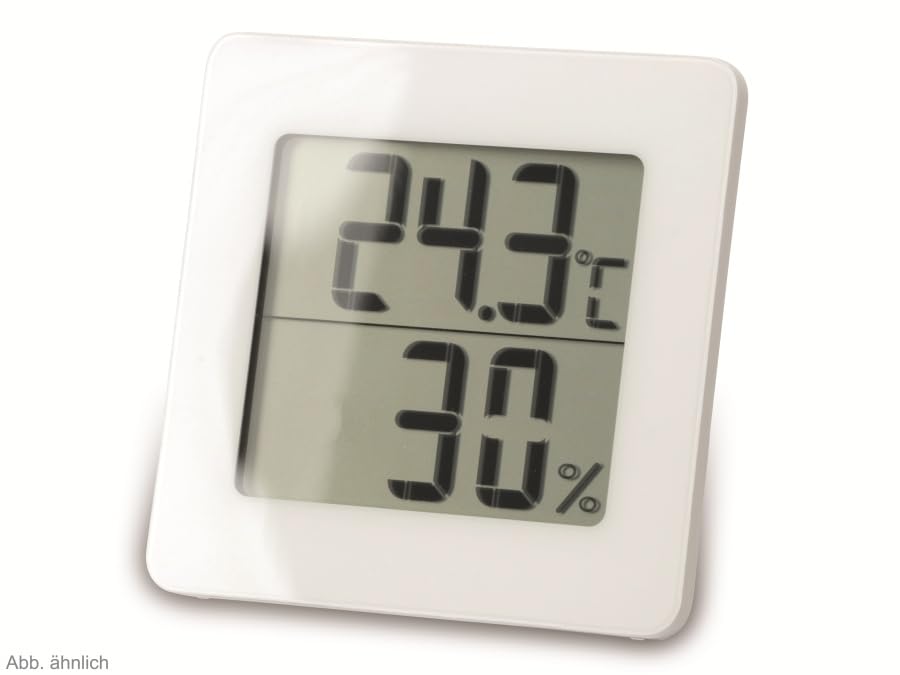
Figura 2: Sostitut view of the TFA 30.5027.02 showing different temperature and humidity readings, demonstrating the device's clear digital display.
Karatteristiċi ewlenin:
- Digital display for temperature (°C) and humidity (% RH)
- Ultra-flat design with high-gloss finish
- Comfort level indicator (smiley icon)
- Maximum and minimum value memory function
- Immontabbli fuq il-ħajt
5. Setup
5.1 Installazzjoni tal-batterija
- Sib l-għatu tal-kompartiment tal-batterija fuq wara tal-apparat.
- Neħħi l-għatu billi tiżżerżaqh jew tiftaħh bil-mod.
- Insert one CR2 Lithium battery, ensuring the correct polarity (+/-) as indicated inside the compartment.
- Ibdel l-għatu tal-kompartiment tal-batterija b'mod sikur.
- The device display should activate, showing current temperature and humidity readings.
5.2 Tqegħid Inizjali
For accurate readings, place the thermometer/hygrometer in a location free from direct sunlight, drafts, or heat sources. The device can be placed on a flat surface or mounted on a wall using the integrated mounting hole on the back.
- Immuntar tal-ħajt: Use a small screw (not included) suitable for your wall type. Hang the device securely.
- Poġġiment fuq il-mejda: Ensure the device is stable on a flat, level surface.
6. Istruzzjonijiet Operattivi
6.1 Display Overview
The large digital display shows two main values:
- Wirja ta' Fuq: Current temperature in degrees Celsius (°C).
- Display t'isfel: Current relative humidity in percentage (% RH).
- Indikatur tal-Livell ta' Kumdità: A small icon (e.g., a smiley face) indicates the current indoor climate comfort level based on temperature and humidity.
6.2 Max/Min Funzjoni
The device records the maximum and minimum temperature and humidity values measured since the last reset. To access these values:
- Agħfas il- MAX/MIN button (if present, typically on the back or side). The display will show the maximum recorded temperature and humidity.
- Agħfas il- MAX/MIN buttuna għal darb'oħra biex view the minimum recorded temperature and humidity.
- Agħfas il- MAX/MIN button a third time to return to current readings.
To reset the MAX/MIN values, press and hold the MAX/MIN button for a few seconds while viewing the MAX or MIN values. The memory will clear, and new maximum and minimum values will begin recording from that point.
6.3 Indikatur tal-Livell ta' Kumdità
The comfort level indicator provides a quick visual reference for indoor climate conditions:
- Happy Face: Indicates optimal comfort (e.g., 20-25°C and 40-70% RH).
- Wiċċ Newtrali: Indicates acceptable but not optimal conditions.
- Wiċċ Imdejjaq: Indicates uncomfortable conditions (e.g., too dry, too humid, too hot, or too cold).
Note: Specific ranges for comfort levels may vary slightly by model. Refer to the device's display for the exact icon representation.
7. Manutenzjoni
7.1 Tindif
Naddaf l-apparat b'artab, ftit damp cloth. Do not use abrasive cleaning agents, solvents, or alcohol, as these can damage the surface and display.
7.2 Sostituzzjoni tal-batterija
When the battery power is low, a low battery indicator (if available) will appear on the display. Replace the battery as follows:
- Iftaħ l-għatu tal-kompartiment tal-batterija fuq wara tal-apparat.
- Remove the old CR2 Lithium battery.
- Insert a new CR2 Lithium battery, observing the correct polarity (+/-).
- Agħlaq l-għatu tal-kompartiment tal-batterija.
Note: After battery replacement, the device may reset, and MAX/MIN values will be cleared.
8 Issolvi l-problemi
| Problema | Kawża Possibbli | Soluzzjoni |
|---|---|---|
| L-ebda wiri jew wiri dgħajjef | Il-batterija mejta jew imdaħħla ħażin. | Replace the battery with a new CR2 Lithium battery, ensuring correct polarity. |
| Qari mhux eżatt | Device is placed in an unsuitable location (e.g., near a window, heat source, or vent). | Relocate the device to a stable indoor environment away from direct influences. Allow 15-30 minutes for readings to stabilize. |
| Comfort indicator always shows the same face | Environmental conditions are consistently outside or within a specific comfort range. | This indicates the device is functioning correctly. Adjust your indoor environment if desired. |
9. Speċifikazzjonijiet
- Numru tal-Mudell: 30.5027.02
- Ditta: TFA
- Kulur: Abjad
- Dimensjonijiet tal-Prodott (L x W x H): 10 x 1.2 x 8.2 ċm (3.94 x 0.47 x 3.23 pulzieri)
- Piż tal-oġġett: 70 Gram (2.47 uqija)
- Batterija: 1 x CR2 Lithium (inkluża)
- Tip ta 'Immuntar: Mount Wall
- Operational Humidity Range: 20% sa 95% RH
- Upper Rated Temperature: 50°C (122°F)
- Preċiżjoni tat-Temperatura: ±1°C
- Preċiżjoni tal-Qari tat-Temperatura: ±1°C
10. Garanzija u Appoġġ
For warranty information and customer support, please refer to the terms and conditions provided by your retailer or contact the manufacturer directly. Keep your proof of purchase for any warranty claims.
Manifattur: TFA Dostmann GmbH & Co KG
For further assistance, please visit the official TFA websit jew ikkuntattja lid-dipartiment tas-servizz tal-konsumatur tagħhom.


