Introduzzjoni
This manual provides instructions for the setup, operation, and maintenance of your Magnavox NC003UD Remote Control Unit. This remote is designed to work seamlessly with compatible Magnavox DVR/HDD/DVD recorder models, offering direct control without the need for complex programming.
Mudelli Kompatibbli: MDR515H/F7, MDR533H/F7, MDR535H/F7, MDR537H/F7, MDR557H/F7.
Kontenut tal-Pakkett
- Magnavox NC003UD Remote Control Unit
- (Il-batteriji mhumiex inklużi u jridu jinxtraw separatament)
Setup
1. Installazzjoni ta 'batteriji
The Magnavox NC003UD remote control requires two AAA batteries (not included).
- Sib l-għatu tal-kompartiment tal-batterija fuq wara tal-kontroll remot.
- Press down on the tab and slide the cover off in the direction of the arrow.
- Daħħal żewġ batteriji AAA, waqt li tiżgura li t-terminali pożittivi (+) u negattivi (-) ikunu allinjati sew mal-marki ġewwa l-kompartiment.
- Żerżaq l-għatu tal-kompartiment tal-batterija lura f'postu sakemm tikklikkja sew.
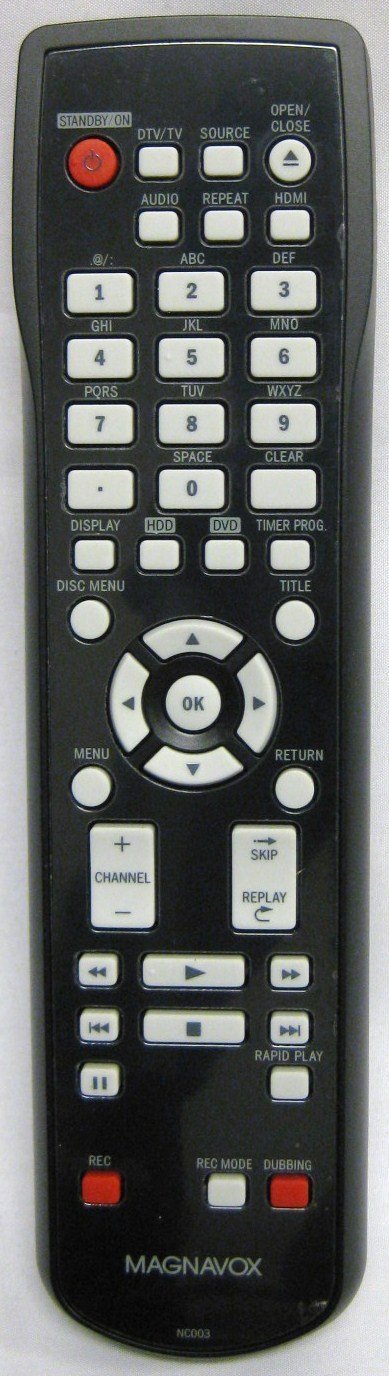
Image: The Magnavox NC003UD Remote Control Unit. This image displays the front of the remote, showing its various buttons and ergonomic design. The battery compartment is located on the reverse side.
2. Użu Inizjali
This remote control is an original factory replacement and typically requires no programming for the specified compatible Magnavox models. Once batteries are installed, it should function immediately with your device.
- Point the remote control directly at the infrared sensor on your Magnavox DVR/HDD/DVD recorder.
- Press any function button (e.g., Power, Play, Channel Up) to test its operation.
Istruzzjonijiet Operattivi
The NC003UD remote control provides full functionality for your compatible Magnavox DVR/HDD/DVD recorder. Refer to your device's specific manual for detailed functions of each button if needed.
Funzjonijiet Ewlenin Overview:
| Buttuna | Funzjoni |
|---|---|
| Qawwa | Turns the connected Magnavox device on or off. |
| Play/Pawsa | Starts or pauses playback of recorded content or DVDs. |
| Waqqaf | Jieqaf daqq. |
| Rewind/Fast Forward | Navigates backward or forward through content. |
| Rekord | Jibda r-reġistrazzjoni. |
| Kanal 'l fuq/'l isfel | Changes channels on the connected device. |
| Volum 'il fuq/'l isfel | Jaġġusta l-volum. |
| Menu | Jaċċessa l-menù prinċipali tal-apparat. |
| Vleġeġ tan-Navigazzjoni ('Il fuq, 'l isfel, Xellug, Lemin) | Used to navigate through menus and selections. |
| OK/Daħħal | Jikkonferma l-għażla. |
Note: Specific button layouts and advanced functions may vary slightly depending on the exact Magnavox model you are using.
Manutenzjoni
Tindif tal-Bogħod
- Imsaħ il-kontroll remot b'ċarruta ratba u niexfa.
- Għal ħmieġ iebes, neħħi ftitampen the cloth with water or a mild cleaning solution. Do not use abrasive cleaners or solvents.
- Ensure no liquid enters the remote control's interior.
Sostituzzjoni tal-batterija
- Ibdel il-batteriji meta r-rispons tar-remote isir kajman jew jieqaf jaħdem.
- Always replace both batteries at the same time with new AAA batteries.
- Tħallatx batteriji qodma u ġodda, jew tipi differenti ta 'batteriji.
- Neħħi l-batteriji jekk il-kontroll remot ma jkunx se jintuża għal perjodu estiż biex tevita t-tnixxija.
- Armi batteriji użati skont ir-regolamenti lokali.
Issolvi l-problemi
| Problema | Soluzzjoni |
|---|---|
| Ir-remote mhux qed jirrispondi. |
|
| Some buttons are not working. |
|
| Ir-remote jaħdem b'mod intermittenti. |
|
Speċifikazzjonijiet
- Numru tal-Mudell: NC003UD
- Ditta: Magnavox
- Apparati Kompatibbli: Magnavox DVR/HDD/DVD Recorders (MDR515H/F7, MDR533H/F7, MDR535H/F7, MDR537H/F7, MDR557H/F7)
- Teknoloġija tal-Konnettività: Infra-aħmar
- Sors tal-Enerġija: 2 x Batteriji AAA (mhux inklużi)
- Dimensjonijiet tal-Prodott: 8 x 1 x 2 pulzieri (bejn wieħed u ieħor)
- Piż tal-oġġett: 5 uqija (madwar)
- Karatteristika Speċjali: Disinn ergonomiku
Garanzija u Appoġġ
This product is an original factory remote control. For specific warranty information, please refer to the documentation provided with your original Magnavox DVR/HDD/DVD recorder or contact Magnavox customer support directly.
For further assistance or technical support, please visit the official Magnavox support website or consult your device's original user manual.
Note: As this is a replacement part, warranty terms may differ from the original device.


