Introduzzjoni
The Retro-Bit RetroDuo is a versatile 2-in-1 gaming console designed to play both Nintendo Entertainment System (NES) and Super Nintendo Entertainment System (SNES) game cartridges. This system allows users to enjoy a wide range of classic 8-bit and 16-bit games on a single device. This manual provides essential information for setting up, operating, and maintaining your RetroDuo system.
Kontenut tal-Pakkett
Jekk jogħġbok ivverifika li l-oġġetti kollha elenkati hawn taħt huma inklużi fil-pakkett tiegħek:
- 1 x Retro-Bit RetroDuo 2-in-1 Console
- 2 x Controllers (SNES-style)
- 1 x AC Power Adapter (5V)
- 1 x AV Cable (RCA composite)
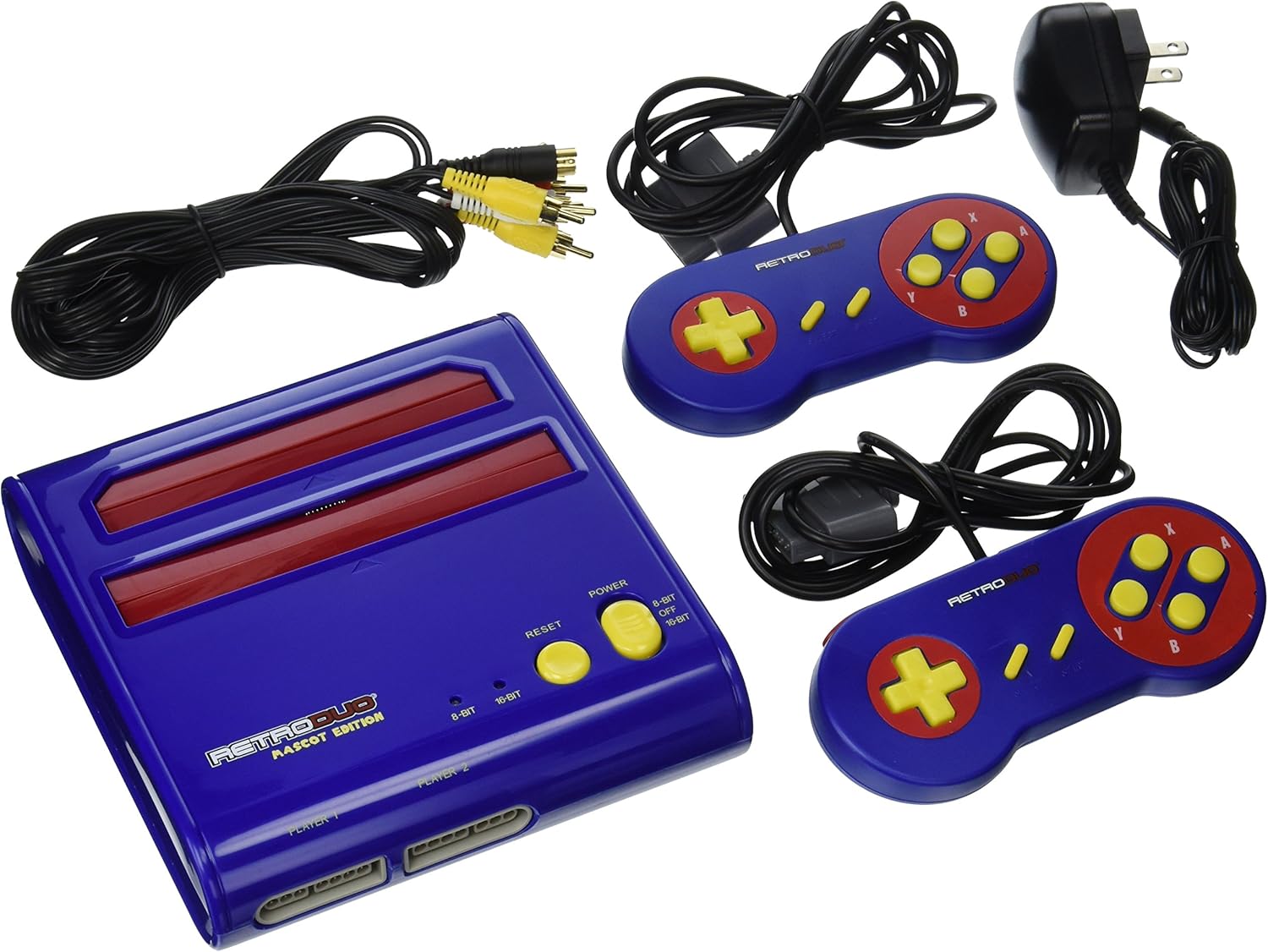
Figura 1: Contents of the Retro-Bit RetroDuo package, including the console, two controllers, AV cable, and AC power adapter.
Setup Istruzzjonijiet
- Qabbad mat-TV: Connect the yellow RCA plug of the AV cable to the video input (usually yellow) on your television. Connect the white and red RCA plugs to the corresponding audio inputs (white for left audio, red for right audio).
- Qabbad l-Enerġija: Insert the small barrel connector of the AC power adapter into the DC IN port on the RetroDuo console. Plug the AC adapter into a standard wall outlet.
- Qabbad il-Kontrolluri: Plug the two included controllers into the controller ports labeled "PLAYER 1" and "PLAYER 2" on the front of the console. The RetroDuo is also compatible with original 16-bit controllers.
- Insert Game Cartridge:
- For NES (8-bit) games, insert the cartridge into the upper slot.
- For SNES (16-bit) games, insert the cartridge into the lower slot.
Istruzzjonijiet Operattivi
- Qawwa Mixgħul: After connecting all cables and inserting a game, press the QAWWA button on the console to turn it on.
- Agħżel il-Modalità tas-Sistema: Use the "8-BIT / OFF / 16-BIT" switch located on the console to select the appropriate mode for your game:
- Issettja għal 8-BIT for NES games.
- Issettja għal 16-BIT for SNES games.
- Il- OFF position powers down the console.
- Ibda l-Logħba: Select the correct AV input channel on your television. The game should appear on the screen. If not, try pressing the RESET buttuna fuq il-console.
- Logħob Logħob: Use the connected controllers to play your games. The included controllers are SNES-style and are compatible with both NES and SNES games on this system.
- Itfi: When finished playing, press the QAWWA button to turn off the console. Remove game cartridges carefully.
Manutenzjoni
- Skrataċ tat-Tindif: Before inserting, ensure game cartridges are clean. Use a cotton swab lightly dampened with isopropyl alcohol to clean the metal contacts on the cartridge if necessary. Allow to dry completely before insertion.
- Tindif tal-Console: Keep the console free from dust and debris. Use a soft, dry cloth to wipe the exterior. Avoid using liquid cleaners directly on the console.
- Ventilazzjoni: The RetroDuo features air-through vents to prevent overheating. Ensure these vents are not blocked during operation to maintain optimal performance and longevity of the system.
- Tneħħija ta' Skartoċċ: When removing cartridges, pull them straight up with gentle, even pressure. Avoid wiggling or forcing them out, especially from the NES slot, which can have a firm grip.
Issolvi l-problemi
- No Video or Audio Output:
- Ensure AV cables are securely connected to both the console and the TV.
- Verify your TV is set to the correct AV input channel.
- Check that the power adapter is properly connected and the console is powered on.
- Confirm the 8-BIT/16-BIT switch is set to the correct position for the inserted game.
- Game Not Starting or Freezing:
- Remove the game cartridge and re-insert it firmly.
- Naddaf il-kuntatti tal-iskartoċċ kif deskritt fit-taqsima tal-Manutenzjoni.
- Agħfas il- RESET buttuna fuq il-console.
- Some games, particularly certain NES titles, may have compatibility variations.
- Audio Issues (e.g., incorrect sound, missing audio):
- Ensure audio RCA cables (white/red) are securely connected.
- Adjust the volume on your television.
- Some NES games may exhibit slight audio emulation differences compared to original hardware.
- Ħsara fil-Kontrollur:
- Ensure controllers are fully plugged into the correct ports.
- Test with the second included controller or an original 16-bit controller if available.
Speċifikazzjonijiet
| Numru tal-Mudell: | rb-rd-6751 |
| Kompatibilità: | Nintendo Entertainment System (NES) cartridges, Super Nintendo Entertainment System (SNES) cartridges (including most Japanese titles) |
| Kontrolluri: | 2 x SNES-style controllers included, compatible with original 16-bit controllers |
| Input ta' Enerġija: | Adapter AC 5V |
| Output tal-vidjo: | RCA Composite Video |
| Output Awdjo: | Stereo Audio RCA |
| Dimensjonijiet (L x W x H): | 33 x 28 x 6.4 ċm (madwar 13 x 11 x 2.5 pulzieri) |
| Piż: | 1.02 kg (madwar 2.25 lbs) |
Garanzija u Appoġġ
For warranty information or technical support, please contact Retro-Bit customer service. Details can typically be found on the official Retro-Bit website or product packaging. Please retain your proof of purchase for warranty claims.


