Introduzzjoni
Grazzi tax-xiriasing the GPX Weatherx WR282B Weather and Alert Radio. This portable radio is designed to provide you with AM/FM radio reception and access to all 7 NOAA weatherband channels, ensuring you stay informed during various conditions. It offers flexible power options, operating on either AC power or D-size batteries, making it suitable for both indoor and outdoor use.
Please read this manual thoroughly before operating the device to ensure proper use and to maximize its performance and longevity.
Informazzjoni Importanti dwar is-Sigurtà
- Aqra l-Istruzzjonijiet: L-istruzzjonijiet kollha tas-sigurtà u tat-tħaddim għandhom jinqraw qabel ma jitħaddem il-prodott.
- Żomm Istruzzjonijiet: L-istruzzjonijiet tas-sigurtà u tat-tħaddim għandhom jinżammu għal referenza futura.
- Oqgħod attent it-Twissijiet: It-twissijiet kollha fuq il-prodott u fl-istruzzjonijiet tat-tħaddim għandhom jiġu osservati.
- Segwi l-Istruzzjonijiet: L-istruzzjonijiet kollha tat-tħaddim u l-użu għandhom jiġu segwiti.
- Ilma u Umdità: Tużax dan il-prodott ħdejn l-ilma (eż., ħdejn bathtub, sink, sink tal-kċina, banju tal-ħasil tal-ħwejjeġ, f'kantina mxarrba, jew ħdejn pixxina).
- Tindif: Naddaf biss b'ċarruta niexfa.
- Ventilazzjoni: Timblokkax il-fetħiet tal-ventilazzjoni. Installa skont l-istruzzjonijiet tal-manifattur.
- Sħana: Tinstallax ħdejn xi sorsi tas-sħana bħal radjaturi, reġistri tas-sħana, stufi, jew apparat ieħor (inkluż amplifiers) li jipproduċu sħana.
- Protezzjoni tal-Korda tal-Enerġija: Ipproteġi l-korda tad-dawl milli timxi fuqha jew maqrusa, partikolarment fil-plakek, ir-reċipjenti tal-konvenjenza, u l-punt fejn joħorġu mill-apparat.
- Sajjetti: Aqla’ dan l-apparat waqt maltempati tas-sajjetti jew meta ma jintużax għal perjodi twal ta’ żmien.
- Servizzi: Irreferi l-manutenzjoni kollha lil persunal tas-servizz kwalifikat. Is-servizz huwa meħtieġ meta l-apparat ikun ġie bil-ħsara b'xi mod, bħal korda tal-provvista tal-enerġija jew plagg ikun bil-ħsara, likwidu jkun inxtered jew oġġetti jkunu waqgħu fl-apparat, l-apparat ikun ġie espost għax-xita jew umdità, ma jaħdimx b'mod normali , jew twaqqgħet.
Karatteristiċi
- Sintonizzatur tar-Radju AM/FM
- Weatherband - All 7 NOAA Channels
- Swivel Telescopic Antenna
- Kontroll tal-Volum
- Audio Line Input (Auxiliary Input)
- Immaniġġjar tal-Ġarr Integrat
- Dual Power Options: AC/DC Adapter or 3 x 'D' Batteries
Kontenut tal-Pakkett
- GPX Weatherx WR282B Weather and Alert Radio
- Adapter tal-Enerġija AC/DC
- Manwal għall-Utent (dan id-dokument)
Kontrolli u Indikaturi
Familiarize yourself with the various controls and indicators on your WR282B radio.
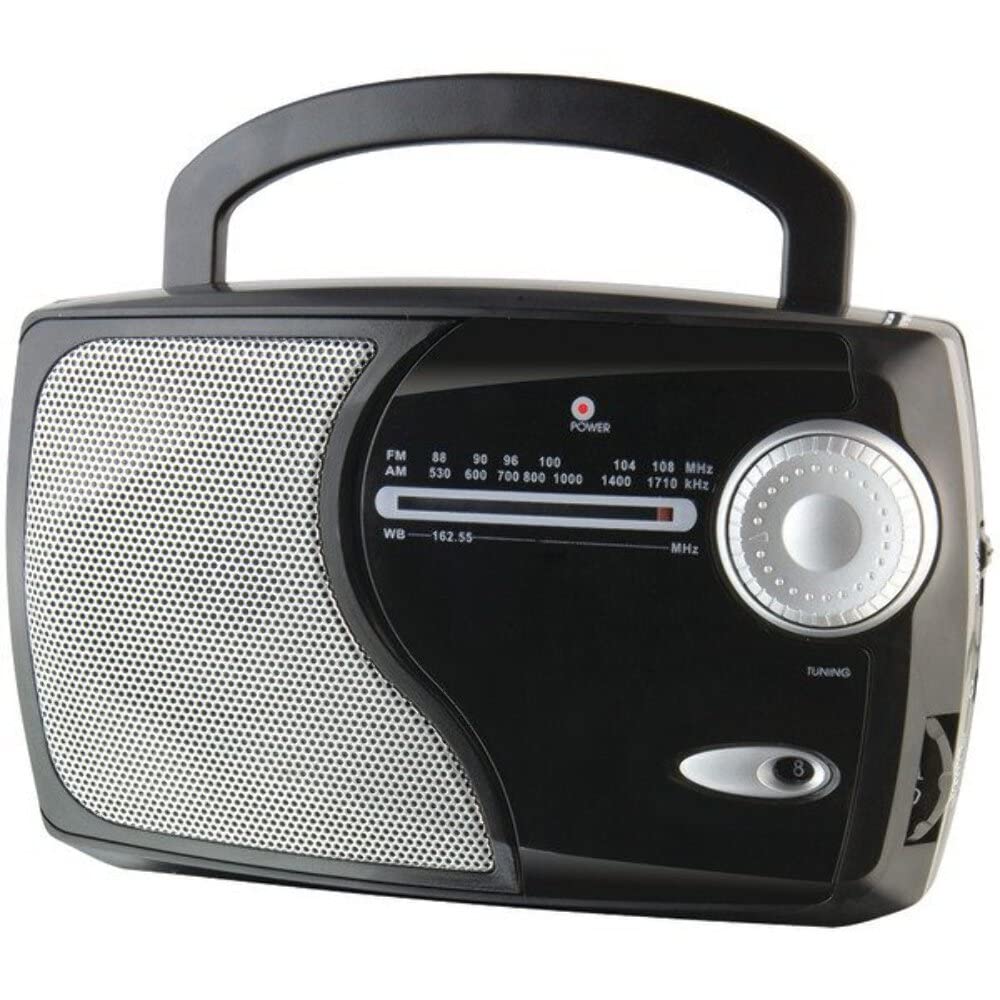
Immaġni: Quddiem view of the GPX Weatherx WR282B radio, showing the speaker, tuning dial, and control knobs.
- Pum tal-Qawwa/Volum: Turns the radio on/off and adjusts the audio output level.
- Swiċċ tas-Selettur tal-Banda: Selects between AM, FM, and Weatherband (WB) modes.
- Pum tal-irfinar: Adjusts the frequency to tune into desired radio stations or weather channels.
- Tuning Indicator: Illuminates when a strong signal is received.
- Dial tal-Frekwenza: Juri l-frekwenza tar-radju kurrenti.
- Antenna teleskopika: Extendable antenna for improved FM and Weatherband reception.
- Input Awżiljarju (AUX IN): Jack ta' 3.5mm għall-konnessjoni ta' apparati awdjo esterni.
- Input tal-Enerġija AC: Jack for connecting the included AC/DC power adapter.
- Kompartiment tal-batterija: Located on the back, holds 3 'D' size batteries.
- Manku tal-ġarr: Għal portabbiltà faċli.
Setup
Ixgħel ir-Radju
The WR282B radio can be powered using either the included AC/DC power adapter or three 'D' size batteries.
1. AC Power Operation
- Ensure the radio is turned off by rotating the Power/Volume knob counter-clockwise until it clicks.
- Insert the small plug of the AC/DC power adapter into the AC Power Input jack on the radio.
- Plug the other end of the AC/DC power adapter into a standard wall outlet (AC 120V~60Hz).
- Ir-radju issa lest għall-użu bl-enerġija AC.
Nota: When the AC adapter is connected, battery power is automatically disconnected.
2. Battery Power Operation
- Kun żgur li r-radju huwa mitfi.
- Sib il-kompartiment tal-batterija fuq wara tar-radju.
- Iftaħ l-għatu tal-kompartiment tal-batterija.
- Insert three (3) 'D' size batteries (not included) into the compartment, observing the correct polarity (+/-) as indicated inside the compartment.
- Agħlaq l-għatu tal-kompartiment tal-batterija sew.
- Ir-radju issa lest għall-użu bil-batterija.
Importanti: Neħħi l-batteriji jekk ir-radju ma se jintużax għal perjodu estiż biex tevita t-tnixxija u l-ħsara.
Istruzzjonijiet Operattivi
1. Turning On and Adjusting Volume
- Dawwar il- Pum tal-Qawwa/Volum clockwise to turn on the radio. Continue rotating to increase the volume to a comfortable listening level.
- Biex itfi r-radju, dawwar il-buttuna Pum tal-Qawwa/Volum counter-clockwise until it clicks.
2. Selecting a Radio Band (AM/FM/Weatherband)
- Uża l- Swiċċ Selettur tal-Banda to choose your desired listening mode:
- AM: Għal Amplitude Modulation radio stations.
- FM: For Frequency Modulation radio stations.
- WB: For NOAA Weatherband channels.
3. Tuning to a Station or Channel
- Estendi l- Antenna teleskopiku fully for optimal FM and Weatherband reception. For AM reception, the radio has a built-in antenna, and adjusting the radio's position may improve reception.
- Dawwar il- Buttuna tal-Irfinar to scan through frequencies on the Dial tal-Frekwenza.
- When a strong signal is received, the Indikatur tal-Irfinar id-dawl se jdawwal.
- For Weatherband (WB) mode, tune to one of the 7 NOAA weather channels (162.400 MHz to 162.550 MHz).
4. Using the Auxiliary Input (AUX IN)
- Connect a 3.5mm audio cable (not included) from your external audio device (e.g., MP3 player, smartphone) to the Input Awżiljarju (AUX IN) jack on the radio.
- Ensure the radio is turned on and the volume is adjusted.
- The audio from your external device will now play through the radio's speaker. Control playback and track selection from your external device.
Manutenzjoni
- Tindif: Wipe the exterior of the radio with a soft, dry cloth. Do not use abrasive cleaners, waxes, or solvents.
- Sostituzzjoni tal-batterija: Replace all three 'D' batteries when the radio's performance diminishes or if the unit will not be used for an extended period. Always replace with new batteries of the same type.
- Ħażna: When storing the radio for a long time, remove the batteries to prevent leakage. Store in a cool, dry place away from direct sunlight and extreme temperatures.
- Kura tal-antenna: Immaniġġja l-antenna teleskopika bil-mod biex tevita li titgħawweġ jew tinkiser.
Issolvi l-problemi
| Problema | Kawża Possibbli | Soluzzjoni |
|---|---|---|
| Ebda qawwa |
|
|
| Riċeviment ħażin tar-radju |
|
|
| L-ebda ħoss minn AUX IN |
|
|
Speċifikazzjonijiet
- Mudell: WR282B
- Bands tar-Radju: AM, FM, Weatherband (7 NOAA channels)
- Sors tal-Enerġija: AC 120V~60Hz (via included adapter) or 3 x 'D' Batteries (not included)
- Konnettività: 3.5mm Input Awżiljarju
- Antenna: Telescopic (FM/WB), Built-in Ferrite Bar (AM)
- Dimensjonijiet tal-Prodott: 8.86" L x 2.76" W x 5.51" H (approximately)
- Piż tal-oġġett: 1.06 liri (mingħajr batteriji)
Garanzija u Appoġġ
For detailed warranty information and customer support, please refer to the warranty card included with your product or visit the official GPX websit. Żomm l-irċevuta tax-xiri tiegħek bħala prova tax-xiri għal kwalunkwe talba ta' garanzija.
If you experience issues not covered in the troubleshooting section, please contact GPX customer service for assistance.


