1. Introduzzjoni
This manual provides essential instructions for the proper installation, operation, and maintenance of your Ricoh Aficio SPC430DN Toner Cartridge Set. This set includes genuine Ricoh OEM toner cartridges in Black, Cyan, Magenta, and Yellow, designed for optimal performance with compatible Ricoh printers.
Prodott Overview
The Ricoh Aficio SPC430DN Toner Cartridge Set ensures high-quality print output and reliable performance. Each cartridge is engineered to meet Ricoh's stringent standards for color accuracy and page yield.
Kompatibilità
This toner cartridge set is compatible with the following Ricoh printer models:
- Ricoh Aficio SP C430DN
- Ricoh Aficio SP C431DN
- Ricoh Aficio SP C431DN-HS
- Ricoh SP C440DN
X'hemm fil-Kaxxa
Your package contains one set of Ricoh OEM toner cartridges, including:
- 1 x Black Toner Cartridge
- 1 x Cyan Toner Cartridge
- 1 x Magenta Toner Cartridge
- 1 x Yellow Toner Cartridge
2. Setup u Installazzjoni
Follow these general steps to install the toner cartridges. Always refer to your specific printer's user manual for detailed, model-specific instructions and safety precautions.
- Itfi u Iftaħ: Kun żgur li l-istampatur tiegħek huwa mitfi. Iftaħ l-għatu ta' quddiem jew il-pannell tal-aċċess tal-istampatur tiegħek biex tikxef is-slots tal-iskartoċċ tat-toner.
- Neħħi l-Kartriġ il-Qadim (jekk applikabbli): Carefully remove the empty toner cartridge by pulling it straight out. Place it in a protective bag for recycling.
- Ipprepara Kartriġ Ġdid: Gently shake the new toner cartridge horizontally 5-6 times to distribute the toner evenly.
- Neħħi Materjali Protettivi: Remove any protective seals, tapes, or covers from the new cartridge. Be careful not to touch the imaging drum surface.
- Daħħal Skartoċċ Ġdid: Align the new toner cartridge with the corresponding slot in the printer. Push it firmly until it clicks into place. Ensure it is fully seated.
- Close Cover and Power On: Close the printer's cover or access panel. Power on the printer. The printer will typically perform a self-test or calibration after installation.
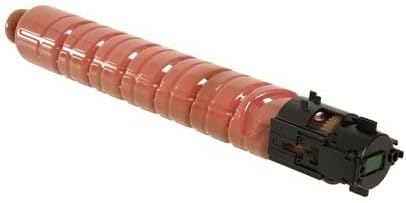
Image: The Ricoh Aficio SPC430DN Toner Cartridge Set, showing both the individual cartridges and their packaging. This illustrates the product as received and ready for installation.
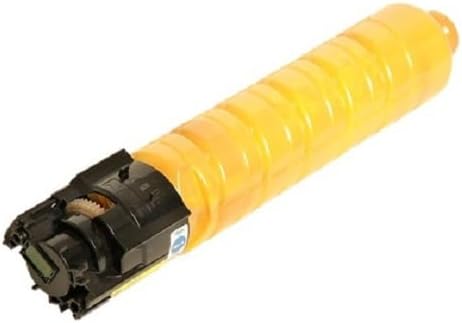


Image: Individual Ricoh Aficio SPC430DN toner cartridges in Magenta, Cyan, and Yellow. These images provide a clear view of the distinct color cartridges.
3. Istruzzjonijiet Operattivi
Once installed, the toner cartridges operate automatically with your Ricoh printer. The printer's software will manage toner levels and usage.
Page Yield
The approximate page yields for these OEM cartridges are:
- Black Toner: Madwar 21,000 paġna
- Cyan Toner: Madwar 24,000 paġna
- Magenta Toner: Madwar 24,000 paġna
- Yellow Toner: Madwar 24,000 paġna
Note: Page yield is based on ISO/IEC 19798 standards and may vary significantly depending on images printed, print settings, and other factors.
4. Manutenzjoni u Ħażna
Ħażna
- Store unused toner cartridges in their original, unopened packaging.
- Keep cartridges in a cool, dry place, away from direct sunlight and extreme temperatures.
- Avoid storing cartridges in areas with high humidity or dusty environments.
Prekawzjonijiet għall-Immaniġġjar
- Handle cartridges carefully to avoid dropping them, which could damage internal components.
- Do not touch the green imaging drum surface on the cartridge, as fingerprints or scratches can affect print quality.
- Żomm il-cartridges tat-toner fejn ma jintlaħqux mit-tfal.
5 Issolvi l-problemi
This section addresses common issues related to toner cartridges. For more complex printer problems, consult your printer's manual or Ricoh support.
- Poor Print Quality (Faded, Streaky, or Inconsistent Prints):
- Ensure the toner cartridge is correctly installed and fully seated.
- Gently shake the cartridge to redistribute toner, especially if it's nearing the end of its life.
- If the cartridge is old or empty, replace it with a new one.
- Perform a printer calibration or cleaning cycle as instructed in your printer's manual.
- "Low Toner" or "Toner Empty" Message:
- A "Low Toner" message indicates the cartridge is nearing depletion. Prepare a replacement.
- An "Empty Toner" message requires immediate replacement of the indicated cartridge.
- Ensure you are using genuine Ricoh OEM cartridges for accurate toner level detection.
- Kartriġ Mhux Rikonoxxut:
- Remove and reinsert the cartridge to ensure it is properly seated.
- Check for any protective seals or tapes that may not have been fully removed.
- Verify that the cartridge is the correct model for your printer.
- Ibda mill-ġdid l-istampatur.
6. Speċifikazzjonijiet
| Karatteristika | Dettall |
|---|---|
| Tip ta' Prodott | OEM Toner Cartridge Set |
| Brand | Ricoh |
| Kulur tal-linka | Iswed, Ċjan, Magenta, Isfar |
| Black Toner Page Yield | Appross. 21,000 paġna |
| Color Toner Page Yield (each) | Appross. 24,000 paġna |
| Kompatibilità tal-Mudell tal-Printer | Ricoh Aficio SP C430DN, C431DN, C431DN-HS, SP C440DN |
| Numri tal-Parti tal-Manifattur | 821105 (Black), 821106 (Cyan), 821107 (Magenta), 821108 (Yellow) |
| Piż tal-Oġġett (Sett) | 5.29 liri (2.4 kg) |
| Dimensjonijiet tal-Pakkett | 20.2 x 13.5 x 5.5 pulzieri (51.3 x 34.3 x 14 ċm) |
| Karatteristika Speċjali | High Print Quality |
7. Garanzija u Appoġġ
As genuine Ricoh OEM products, these toner cartridges are covered by Ricoh's standard warranty policy. For specific warranty terms and conditions, please refer to the documentation included with your printer or visit the official Ricoh websit.
Appoġġ għall-Klijent
For technical assistance, troubleshooting, or warranty claims, please contact Ricoh customer support through their official channels. You can typically find support information on the Ricoh webis-sit jew fil-manwal tal-utent tal-istampatur tiegħek.
For general inquiries or to explore other Ricoh products, you may visit the Ricoh Store on Amazon.


