1. Introduzzjoni
This manual provides instructions for the Uniden DECT 6.0 Cordless Phone, model D1364. This phone features DECT 6.0 digital technology for enhanced clarity, security, and range. It includes Caller ID, Call Waiting, a phonebook, and an Eco-Mode for power management.
For optimal performance and to prevent damage, please read these instructions thoroughly before using your new phone.
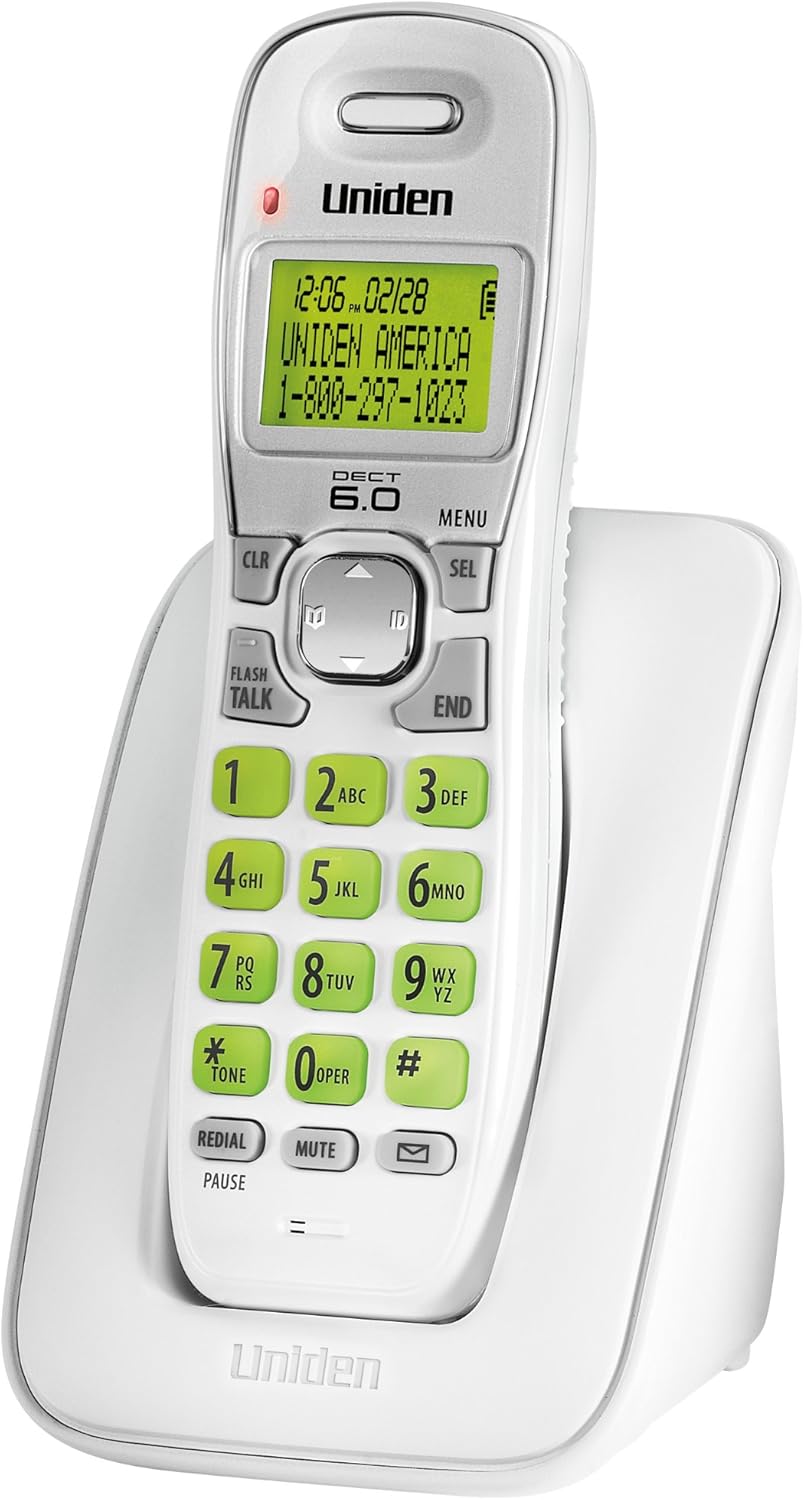
Figura 1: Uniden DECT 6.0 Cordless Phone D1364. This image shows the white cordless handset resting in its charging base. The handset features a green backlit LCD display showing time, date, and a sample caller ID entry. The keypad has large, green-backlit buttons for dialing and function keys like CLR, MENU, SEL, FLASH/TALK, END, REDIAL/PAUSE, MUTE, and a message indicator.
2. Kontenut tal-Pakkett
Ivverifika li l-pakkett tiegħek fih l-oġġetti li ġejjin:
- One (1) Cordless Handset (D1364)
- One (1) Handset Charging Base
- One (1) AC Adapter for the charging base
- One (1) Telephone Line Cord
- One (1) Rechargeable Battery Pack (Product Specific, included)
- Dan il-Manwal tal-Utent
3. Setup
3.1 Installazzjoni tal-batterija
- Sib l-għatu tal-kompartiment tal-batterija fuq wara tal-handset.
- Slide the cover down and lift it off.
- Connect the battery pack connector to the jack inside the compartment, ensuring correct polarity.
- Place the battery pack into the compartment.
- Replace the battery compartment cover, sliding it up until it clicks into place.
3.2 Konnessjoni tal-Unità Bażi
- Plug the small end of the AC adapter into the DC IN jack on the back of the charging base.
- Plug the large end of the AC adapter into a standard electrical outlet.
- Plug one end of the telephone line cord into the TEL LINE jack on the back of the charging base.
- Ipplaggja t-tarf l-ieħor tal-korda tat-telefon f'ġakk tat-telefon tal-ħajt.
3.3 Iċċarġjar Inizjali tal-Batterija
Place the handset on the charging base. The handset display will indicate charging. Allow the handset to charge for at least 15-20 sigħat before initial use to ensure full battery capacity.
3.4 Immuntar mal-Ħajt (Mhux obbligatorju)
The charging base includes a built-in wall mount feature. Consult the diagrams in the full manual for detailed wall mounting instructions, typically involving two screws spaced appropriately on the wall.
4. Istruzzjonijiet Operattivi
4.1 Tagħmel u Riċeviment Sejħiet
- Biex Tagħmel Sejħa: Agħfas FLASH/TALK, imbagħad ċempel in-numru. Inkella, ċempel in-numru l-ewwel, imbagħad agħfas FLASH/TALK.
- Biex Intemm Sejħa: Agħfas TMIEM or place the handset back on the charging base.
- Biex Twieġeb Sejħa: Meta t-telefon iċempel, agħfas FLASH/TALK.
4.2 Aġġustament tal-Volum
Waqt sejħa, uża l- Ċwievet tal-vleġġa UP / DOWN on the navigation pad to adjust the earpiece volume.
4.3 Ktieb tat-telefon
Il-ktieb tat-telefon jista’ jaħżen sa 30 isem u numri.
- To Add an Entry: Agħfas MENU, navigate to "Phonebook," select "Add Entry," and follow the on-screen prompts to enter the name and number.
- To Dial from Phonebook: Agħfas il- Ċwievet tal-vleġġa UP / DOWN to browse the phonebook, then press FLASH/TALK to dial the selected entry.
4.4 ID ta' min iċempel u Sejħa f'Stennija
This phone supports Caller ID and Call Waiting features (subscription required from your telephone service provider).
- The Caller ID list stores up to 30 incoming calls. Press the ID button (down arrow on navigation pad) to review il-lista tal-ID tas-Sejħiet.
- During a call, if you hear a Call Waiting tone, press FLASH to switch to the incoming call.
4.5 Issejjaħ mill-ġdid
The phone stores the last 5 numbers dialed.
- Agħfas REJID/PAWŻA biex view il-lista mill-ġdid.
- Uża l- Ċwievet tal-vleġġa UP / DOWN to select a number, then press FLASH/TALK biex tisselezzjona.
4.6 Funzjoni Mute
Waqt sejħa, agħfas MUTE to temporarily disable your microphone. The other party will not hear you. Press MUTE mill-ġdid biex jerġa’ jibda l-konversazzjoni.
4.7 Lokatur tal-Handset
If you misplace the handset, press the ISSIB button on the base unit. The handset will beep, allowing you to locate it.
4.8 Modalità Ekoloġika
The phone features Eco-Mode, which automatically manages power consumption to extend battery life. This mode is active by default and does not require manual activation.
5. Manutenzjoni
5.1 Tindif
Imsaħ it-telefon u l-unità bażi b'ċarruta ratba uamp cloth. Do not use cleaning sprays or abrasive cleaners, as they may damage the finish or electrical components.
5.2 Kura tal-Batterija
- Always use the specified rechargeable battery pack.
- If the phone will not be used for an extended period, remove the battery pack to prevent leakage.
- Dispose of old batteries according to local regulations. Do not dispose of them in fire.
5.3 Konsiderazzjonijiet Ambjentali
Avoid placing the phone in direct sunlight, near heat sources, or in areas with high humidity. Ensure proper ventilation around the base unit.
6 Issolvi l-problemi
| Problema | Kawża Possibbli | Soluzzjoni |
|---|---|---|
| L-ebda ton tal-arloġġ | Telephone line cord is disconnected. | Ensure the telephone line cord is securely plugged into the base and the wall jack. |
| Il-mowbajl ma jiċċarġjax | AC adapter is disconnected or handset is not seated correctly. | Verify the AC adapter is plugged into the base and a working outlet. Re-seat the handset firmly on the charging base. |
| Poor sound quality/static | Interference from other electronic devices or distance from base. | Move the handset closer to the base. Relocate the base away from other electronic devices (Wi-Fi routers, microwaves). |
| Caller ID not displaying | No subscription to Caller ID service. | Contact your telephone service provider to subscribe to Caller ID service. |
| Handset lost connection to base | Handset out of range or power interruption. | Move the handset closer to the base. Check power connections for the base. |
7. Speċifikazzjonijiet
| Karatteristika | Dettall |
|---|---|
| Mudell | D1364 |
| Teknoloġija | DECT 6.0 Diġitali |
| Kulur | Abjad |
| Memorja tal-ID tas-Sejjieħ | 30 names/numbers |
| Kapaċità Phonebook | 30 names/numbers |
| Memorja tad-Dial Mill-Ġdid | L-aħħar 5 numri |
| Wiri | Green Backlit LCD |
| Tastiera | Aħdar Backlit |
| Tip ta 'batterija | Rechargeable (Product Specific, included) |
| Talk Time (approx.) | Sa 7 sigħat |
| Standby Time (approx.) | Sa 6 jum |
| Sors tal-Enerġija | AC Adapter (Base), Battery Powered (Handset) |
| Dimensjonijiet (L x W x H) | 5.12 x 3.62 x 7.68 pulzieri |
| Piż tal-oġġett | 3.76 liri |
| Effiċjenza tal-Enerġija | Eco-Mode, Energy Star compliant |
8. Garanzija u Appoġġ
For warranty information and technical support, please refer to the warranty card included with your product or visit the official Uniden website. You may also contact Uniden customer service directly.
Uniden America Customer Service: 1-800-297-1023
Nota: L-ispeċifikazzjonijiet u l-karatteristiċi tal-prodott jistgħu jinbidlu mingħajr avviż.


