1. Introduzzjoni
This manual provides comprehensive instructions for the installation, operation, and maintenance of your OSD Audio PC540 Black 5.25-inch 2-Way Single 8 Ohm, 70V Pendant Speaker. Please read this manual thoroughly before installation and use to ensure proper function and safety.
The OSD Audio PC540 is a versatile pendant speaker designed for commercial applications, offering both 8 Ohm and 70V operation. It features a 5.25-inch polypropylene woofer and a 1-inch tweeter, delivering clear audio performance.
2. Istruzzjonijiet tas-Sigurtà
- Always disconnect power before installing or servicing the speaker.
- Kun żgur li l-konnessjonijiet kollha tal-wajers huma sikuri u polarizzati b'mod korrett.
- Tesponix l-ispiker għal umdità eċċessiva jew temperaturi estremi.
- Use appropriate mounting hardware and techniques to secure the pendant speaker safely. Consult a qualified installer if unsure.
- Evita li tpoġġi l-ispiker ħdejn sorsi ta’ sħana jew fix-xemx diretta għal perjodi twal.
- Do not attempt to repair the speaker yourself. Refer all servicing to qualified personnel.
3. Kontenut tal-Pakkett
Ivverifika li l-komponenti kollha huma preżenti fil-pakkett:
- OSD Audio PC540 Pendant Speaker (Black)
- 70V Transformer (integrated)
- Mounting Hardware (e.g., suspension cable, ceiling plate)
- Manwal ta 'Istruzzjoni (dan id-dokument)
4. Setup u Installazzjoni
The OSD Audio PC540 speaker is designed for pendant-style installation. Proper installation is crucial for both performance and safety.
4.1 Għażla ta' Post
Select a location that provides optimal sound dispersion and is structurally capable of supporting the speaker's weight. Ensure the chosen location allows for safe and secure suspension from the ceiling.
4.2 Wiring Connections (8 Ohm vs. 70V)
The PC540 speaker can operate in either 8 Ohm or 70V mode. The integrated 70V transformer has multiple tap settings. Select the appropriate wiring method for your audio system.
- Operazzjoni ta' 8 Ohm: For standard home audio receivers or amplifiers, connect the speaker directly to the amplifier's speaker outputs. Ensure the 70V transformer is bypassed or set to the 8 Ohm setting if available (consult specific product diagram for switch/tap setting).
- Operazzjoni 70V: For commercial audio systems utilizing 70V constant voltage amplifiers, select the desired wattage tap (20W, 10W, 5W, or 2.5W) on the speaker's transformer. Connect the speaker to the 70V amplifier output. This allows for multiple speakers to be connected in parallel.
Importanti: Do not connect the speaker to both 8 Ohm and 70V outputs simultaneously. Incorrect wiring can damage the speaker and ampaktar ħaj.
4.3 Armar tal-Ispeaker
- Ipprepara l-Punt tal-Immuntar: Securely attach the provided ceiling plate or mounting bracket to a structural ceiling beam or appropriate anchor point. Ensure it can safely support the speaker's weight (5.7 pounds).
- Qabbad il-Wiring: Route the speaker wire through the ceiling plate and connect it to the speaker's terminals according to your chosen 8 Ohm or 70V configuration.
- Attach Suspension Cable: Securely attach the suspension cable to the speaker's top mounting point and then to the ceiling plate. Adjust the cable length to achieve the desired hanging height.
- Kontroll Finali: Double-check all connections and ensure the speaker is securely suspended before applying power.

Figura 1: Fuq view of the PC540 speaker, illustrating the suspension point and connection area. This image shows the top of the spherical speaker with the suspension cable extending upwards, and the area where wiring connections are made.
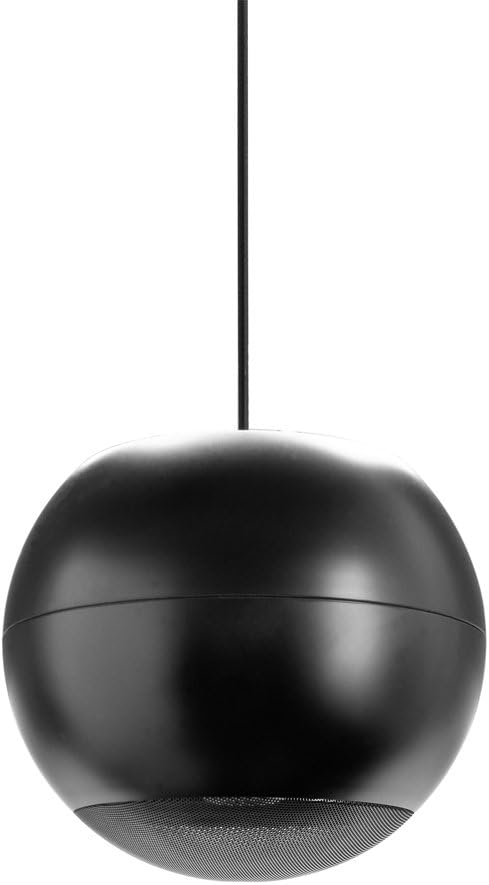
Figura 2: Sħiħa view of the OSD Audio PC540 pendant speaker. The image displays the black spherical speaker hanging from a single suspension cable, showcasinid-disinn tiegħu.
5. It-Tħaddim tal-Ispeaker
Once properly installed and wired, operating the PC540 speaker is straightforward.
- Qawwa Mixgħul: Ixgħel l-awdjo tiegħek amplifier jew riċevitur.
- Għażla tas-Sors: Select the desired audio source on your ampaktar ħaj.
- Aġġustament tal-Volum: Żid il-volum gradwalment għal livell ta’ smigħ komdu.
The PC540 speaker is designed for consistent audio output. For 70V systems, the volume for individual speakers is determined by the selected wattage tap setting during installation.

Figure 3: Close-up of the speaker grille. This image provides a detailed view of the perforated metal grille covering the speaker drivers at the bottom of the PC540 unit.
6. Manutenzjoni
The OSD Audio PC540 speaker requires minimal maintenance.
- Tindif: Wipe the speaker cabinet with a soft, dry cloth. Do not use abrasive cleaners or solvents.
- Spezzjoni: Periodically check the suspension cable and mounting hardware for any signs of wear or loosening.
- Ambjent: While designed for commercial use, avoid exposing the speaker to direct water spray or extreme environmental conditions not specified for its use.
7 Issolvi l-problemi
| Problema | Kawża Possibbli | Soluzzjoni |
|---|---|---|
| Ebda Ħoss |
|
|
| Ħoss Mgħawġ |
|
|
| Ħoss Intermittenti |
|
|
8. Speċifikazzjonijiet
| Mudell | PC540 |
| Tip ta' Kelliem | Pendant, 2-Way |
| Sewwieqa | 5.25" Polypropylene Woofer, 1" Tweeter |
| Impedenza | 8 Ohms |
| 70V Transformer Viti | 20W, 10W, 5W, 2.5W |
| Immaniġġjar tal-Enerġija | 10 sa 40 Watts |
| Rispons ta' Frekwenza | 120Hz sa 22kHz |
| Dispersjoni | 140 grad |
| Dimensjonijiet (Prodott) | 11.5 x 10.5 x 11 pulzieri (approssimattiv) |
| Piż tal-oġġett | 5.7 liri |
| Kulur | Iswed |
| Manifattur | Awdjo OSD |
| UPC | 810281016382 |
9. Informazzjoni dwar Garanzija
The OSD Audio PC540 speaker comes with a Limited Warranty. For specific terms and conditions, please refer to the warranty card included with your product or visit the official OSD Audio websit. Din il-garanzija tipikament tkopri difetti fil-materjali u l-abbilità taħt użu normali.
Jekk jogħġbok żomm il-prova tax-xiri tiegħek għal pretensjonijiet ta' garanzija.
10. Appoġġ u Kuntatt
If you encounter any issues or have questions not covered in this manual, please contact OSD Audio customer support.
- Websit: Żur il- Ħanut tal-Awdjo OSD għal informazzjoni dwar il-prodott u riżorsi ta' appoġġ.
- Kuntatt: Refer to the OSD Audio website for current contact information, including phone numbers and email addresses for technical support.