ATI Radeon HD 3450 Video Card Instruction Manual
Model: HD3450 (ATI-102-B62902(B))
PCIe x16 Low Profile
Introduzzjoni
This manual provides comprehensive instructions for the installation, operation, maintenance, and troubleshooting of your ATI Radeon HD 3450 PCIe x16 Low Profile video card. Please read this manual carefully before installation and use to ensure optimal performance and longevity of your product.
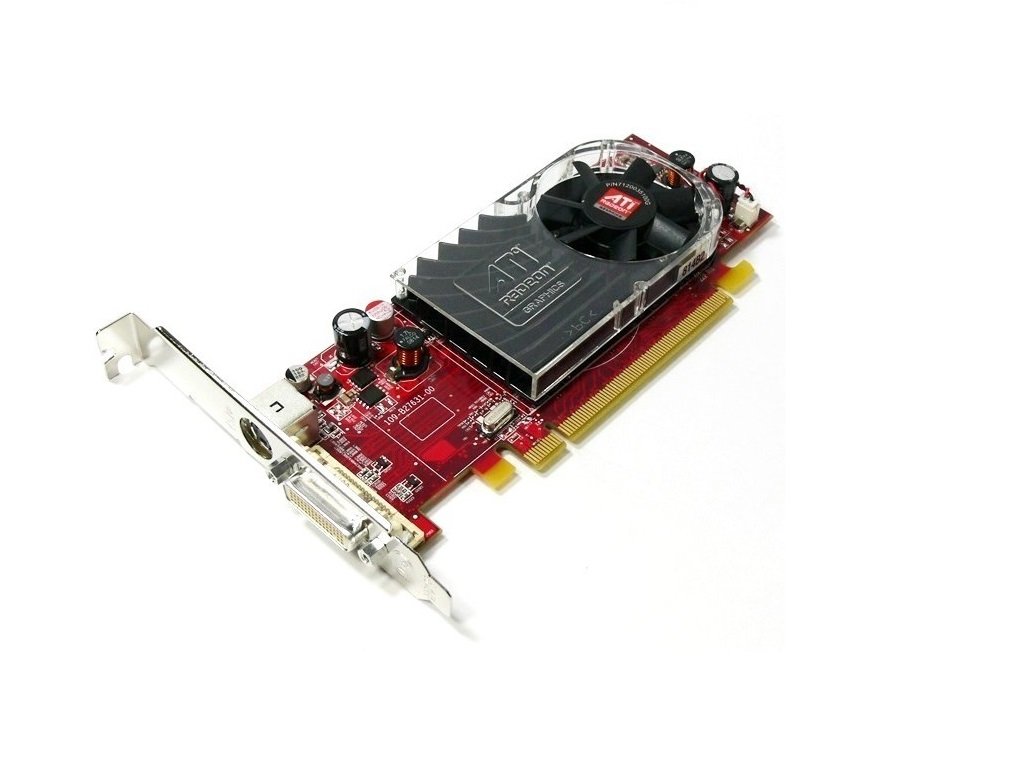
An image showing the ATI Radeon HD 3450 video card. It features a red PCB, a low-profile bracket, a cooling fan with an ATI Radeon logo, and a DVI output port. The PCIe x16 connector is visible at the bottom.
Setup
1. Installazzjoni Fiżika
- Itfi: Kun żgur li l-kompjuter tiegħek huwa mitfi kompletament u skonnettjat mill-plakka tal-ħajt.
- Kawża Miftuħa: Iftaħ il-kaxxa tal-kompjuter tiegħek biex taċċessa l-motherboard.
- Locate PCIe x16 Slot: Identify an available PCI Express x16 slot on your motherboard. This is typically the longest PCIe slot.
- Neħħi l-Għatu tas-Slott: Remove the metal slot cover from the back of your computer case corresponding to the chosen PCIe x16 slot.
- Insert Video Card: Carefully align the video card with the PCIe x16 slot and press down firmly until it is securely seated. You should hear a click from the retention clip.
- Karta Sikura: Secure the video card to the computer case with a screw or retention clip.
- Agħlaq il-Każ: Agħlaq il-kaxxa tal-kompjuter tiegħek u erġa' qabbad il-kejbils kollha.
2. Installazzjoni tas-sewwieq
- Qawwa Mixgħul: Power on your computer. The operating system may install a generic display driver automatically.
- Niżżel is-Sewwieqa: Visit the official AMD (formerly ATI) website or your computer manufacturer's support page to download the latest drivers for the Radeon HD 3450.
- Installa Sewwieqa: Run the downloaded driver installer and follow the on-screen prompts. You may need to restart your computer after installation.
- Ivverifika l-Installazzjoni: After restarting, verify that the drivers are correctly installed by checking your operating system's Device Manager (Windows) or System Information (Linux/macOS).
Operazzjoni
Once installed and drivers are updated, your ATI Radeon HD 3450 video card is ready for use. It supports multiple display outputs.
- Konnessjoni tad-Displays: Connect your monitor(s) to the available ports on the video card (VGA, DisplayPort, HDMI). Use appropriate cables and adapters.
- Issettjar tal-wiri: Access your operating system's display settings to configure resolution, refresh rate, and multiple monitor setups (extend, duplicate).
- AMD Catalyst Control Center (or equivalent): For advanced settings and performance tuning, use the AMD software suite installed with the drivers.
Manutenzjoni
Regular maintenance helps ensure the longevity and stable performance of your video card.
- Tneħħija tat-Trab: Periodically open your computer case and gently clean dust from the video card's fan and heatsink using compressed air. Ensure the fan blades do not spin rapidly during cleaning.
- Aġġornamenti tas-sewwieq: Check the AMD website regularly for updated drivers. Newer drivers often include performance improvements, bug fixes, and compatibility updates.
- Monitoraġġ tat-temperatura: Use system monitoring software to keep an eye on the GPU temperature, especially during heavy load. Excessive temperatures can indicate poor airflow or a failing fan.
Issolvi l-problemi
If you encounter issues with your video card, consider the following troubleshooting steps:
- L-ebda Output tal-Wiri:
- Ensure the monitor is connected securely to the video card and powered on.
- Verify the video card is fully seated in the PCIe slot.
- Ittestja b'monitor jew kejbil differenti jekk possibbli.
- Driver Issues (e.g., low resolution, artifacts):
- Reinstall the latest drivers from the AMD websit.
- Try uninstalling existing drivers completely before installing new ones.
- Instabbiltà/Ħsarat tas-Sistema:
- Ensure your power supply unit (PSU) meets the minimum requirements for your system, including the video card.
- Check for overheating (refer to Maintenance section).
Għal kwistjonijiet persistenti, ikkonsulta l-appoġġ tal-AMD website or your computer manufacturer's support resources.
Speċifikazzjonijiet
| Karatteristika | Dettall |
|---|---|
| Brand | ATI |
| Numru tal-Mudell | Ati Radeon HD3450 (ATI-102-B62902(B)) |
| Koproċessur tal-Grafika | AMD Radeon |
| Daqs tar-RAM tal-Grafika | 256 MB |
| Interface tal-Output tal-Vidjo | VGA, DisplayPort, HDMI |
| Interface | PCIe x16 |
| Fattur tal-Formola | Pro baxxfile |
| Piż tal-oġġett | 0.01 uqija |
| Manifattur | ATI Technologies |
Informazzjoni dwar Garanzija
Specific warranty terms for the ATI Radeon HD 3450 video card may vary depending on the retailer and region of purchase. Please refer to your purchase documentation or contact the seller for detailed warranty information. Keep your proof of purchase for any warranty claims.
Appoġġ
For further technical assistance, driver downloads, or product information, please visit the official AMD support website. You may also contact your computer manufacturer's support if the card was pre-installed in a system.
- Appoġġ tal-AMD: www.amd.com/support (Please note: ATI is now part of AMD)


