1. Introduzzjoni
Thank you for choosing the Cameo Light CLMPAR2 Compact LED Light System. This manual provides essential information for the safe and efficient operation of your device. Please read it thoroughly before initial use and keep it for future reference.
The CLMPAR2 is a versatile lighting solution featuring four flat PAR cans, each equipped with 7 super bright 3-watt TRI LEDs. It offers various control modes including DMX, master/slave, and standalone operation, making it suitable for a wide range of applications.
2. Istruzzjonijiet tas-Sigurtà
Dejjem osserva l-prekawzjonijiet ta' sigurtà li ġejjin biex tevita xokk elettriku, nar, jew korriment:
- Aqra l-istruzzjonijiet kollha bir-reqqa qabel ma tħaddem l-apparat.
- Tiżgura l-provvista tal-enerġija voltage jaqbel mar-rekwiżiti speċifikati fuq l-unità.
- Do not open the housing. There are no user-serviceable parts inside. Refer all servicing to qualified personnel.
- Evita l-espożizzjoni diretta tal-għajnejn għas-sors tad-dawl.
- Keep the device away from moisture, rain, and liquids.
- Kun żgur li jkun hemm ventilazzjoni adegwata madwar l-unità biex tevita li tissaħħan iżżejjed.
- Immonta l-apparat b'mod sikur billi tuża hardware xieraq.
- Disconnect from the mains power before cleaning or maintenance.
3. Kontenut tal-Pakkett
Ivverifika li l-oġġetti kollha huma preżenti u f'kundizzjoni tajba meta tiftaħ il-pakkett:
- 4 x Flat PAR Cans with TRI LEDs
- 1 x Light Bar
- 1 x Transport Bag/Case
- 1 x Manwal tal-Istruzzjonijiet (dan id-dokument)
- Kejbil tal-Enerġija
- Mounting Hardware (e.g., tripod mount adapter)

Image: The Cameo Light CLMPAR2 system neatly packed within its dedicated transport case, showcasing the four PAR cans, the light bar, and accessories.
4. Prodott Aktarview
The Cameo Light CLMPAR2 system consists of a central light bar with four adjustable PAR cans. Each PAR can features 7 x 3W TRI LEDs, capable of producing a wide spectrum of colors.
4.1 Quddiem View

Immaġni: Quddiem view of the Cameo Light CLMPAR2 LED system. Four individual PAR cans are attached to a horizontal bar, each emitting a different color (yellow, blue, green, purple), demonstrating the TRI-LED capabilities.
4.2 Wara View u Konnessjonijiet

Immaġni: Wara view of the Cameo Light CLMPAR2 LED system. The central light bar features the control panel with an LCD display, DMX input/output ports, and power connections. The back of the four PAR cans are also visible.
The rear panel provides access to the control interface and various input/output connections:
- Input ta' Enerġija: Connects to mains power.
- DMX IN/OUT: 3-pin XLR connectors for DMX control.
- Wirja tal-Kontroll: LCD screen for menu navigation and settings.
- Buttuni tal-Kontroll: MODE, ENTER, UP, DOWN for navigating the menu and adjusting settings.
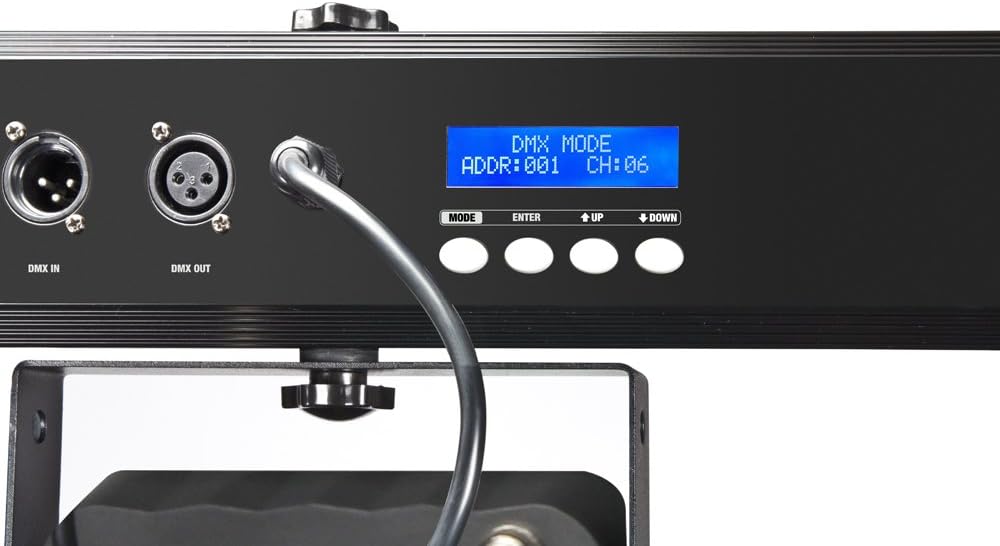
Immaġni: Close-up view of the control panel on the Cameo Light CLMPAR2. The LCD display shows "DMX MODE ADDR:001 CH:06", indicating DMX address and channel settings. Buttons for MODE, ENTER, UP, and DOWN are clearly visible.
5. Setup
5.1 Immuntar
The CLMPAR2 system is designed for easy mounting on a standard lighting tripod or truss system. It includes a tripod mount adapter compatible with 28mm TV outlets.
- Attach the light bar securely to a stable tripod or truss using the provided mounting hardware.
- Ensure all connections are tight and the system is balanced.
- Adjust the angle of each PAR can as desired.

Image: The Cameo Light CLMPAR2 system is shown mounted on a tall, silver tripod. The four PAR cans are illuminated with different colors. A foot controller is visible on the ground, connected to the system.
5.2 Konnessjoni tal-Enerġija
Connect the supplied power cable to the power input on the rear of the light bar, then plug it into a suitable mains power outlet.
6. Operazzjoni
The CLMPAR2 offers multiple operating modes:
6.1 Modalità Standalone
In standalone mode, the system operates using its internal programs without external control. Use the MODE, ENTER, UP, and DOWN buttons on the rear panel to select desired programs, colors, or sound-activated modes.
- Agħfas il- MODALITÀ button to cycle through available standalone programs.
- Uża l- UP u 'L isfel buttons to adjust parameters (e.g., speed, sensitivity).
- Agħfas DĦUL biex tikkonferma l-għażliet.
6.2 Modalità Master/Slave
Connect multiple CLMPAR2 units using DMX cables. Set one unit as the "Master" and others as "Slave" units. The slave units will mirror the master's operation.
- Connect the DMX OUT of the Master unit to the DMX IN of the first Slave unit.
- Daisy-chain subsequent Slave units by connecting DMX OUT to DMX IN.
- Configure the Master unit to its desired standalone program.
- Set all Slave units to "Slave" mode via their control panels.
6.3 Modalità ta 'Kontroll DMX
For advanced control, connect the CLMPAR2 to a DMX controller. The system supports various DMX channel modes.
- Connect the DMX OUT of your DMX controller to the DMX IN of the CLMPAR2.
- If using multiple DMX devices, daisy-chain them: DMX OUT of the first device to DMX IN of the next.
- Set a unique DMX start address for each CLMPAR2 unit using the control panel (refer to the display image in Section 4.2).
- Select the desired DMX channel mode (e.g., 3-channel, 6-channel) on the CLMPAR2 control panel to match your DMX controller's settings.
- Consult your DMX controller's manual for specific programming instructions.
7. Manutenzjoni
Regular maintenance ensures optimal performance and longevity of your CLMPAR2 system.
- Tindif: Disconnect the unit from power. Use a soft, lint-free cloth to wipe the exterior. For lenses, use a specialized lens cleaner and cloth. Do not use abrasive cleaners or solvents.
- Spezzjoni: Periodically check cables, connectors, and mounting hardware for any signs of wear or damage. Replace damaged components immediately.
- Ħażna: When not in use, store the system in its transport case in a dry, dust-free environment.
8 Issolvi l-problemi
| Problema | Kawża Possibbli | Soluzzjoni |
|---|---|---|
| Ebda qawwa | Power cable disconnected; faulty outlet | Iċċekkja l-konnessjoni tal-kejbil tal-enerġija; ittestja s-sokit b'apparat ieħor. |
| Lights not responding to DMX | Incorrect DMX address; wrong DMX mode; faulty DMX cable; DMX controller issue | Verify DMX address and mode settings; check DMX cable connections; test with a different DMX controller or cable. |
| Lights flickering or inconsistent | Loose connections; power fluctuations; DMX signal interference | Check all power and DMX connections; ensure stable power supply; use DMX terminator if necessary. |
| Is-sħana żejda | Blocked ventilation; prolonged use in high ambient temperature | Ensure clear airflow around the unit; operate in a cooler environment if possible. |
9. Speċifikazzjonijiet
| Brand | Cameo |
| Numru tal-Mudell | CLMPAR2 |
| Manifattur | Dawl Cameo |
| Sors tad-Dawl | 28 x 3W TRI Colour LEDs (7 LEDs per PAR can) |
| Wat totalitage | 3 Watts (per LED, total system wattage not specified but implied by 28x3W) |
| Modi ta' Kontroll | DMX control, Standalone, Master/Slave |
| Materjal | Aluminju |
| Sors tal-Enerġija | Mejn li jaħdem |
| Tip ta 'Immuntar | Rack mounting, Tripod mount (28mm TV outlets) |
| Piż tal-oġġett | 10 Kilogrammi |
| Dimensjonijiet tal-Pakkett | 110.4 x 37.2 x 17 ċm |
| ASIN | B007IFHXV4 |
| Data L-Ewwel Disponibbli | 8 ta’ Awwissu 2012 |
10. Garanzija u Appoġġ
For warranty information and technical support, please refer to the documentation provided with your purchase or visit the official Cameo Light websit. Żomm il-prova tax-xiri tiegħek għal talbiet ta' garanzija.
Manifattur: Dawl Cameo
Websit: www.cameolight.com (Eżampil-link, il-link attwali jista' jvarja)


