1. Introduzzjoni
This manual provides detailed instructions for the installation, operation, and maintenance of your Pioneer DEH-80PRS CD Receiver. Please read this manual thoroughly before using the product to ensure proper operation and to prevent damage.
The Pioneer DEH-80PRS is an advanced car audio CD receiver designed for superior sound quality, featuring a 3-Way Active Crossover Network, Auto EQ, Auto Time Alignment, Bluetooth connectivity, and HD Radio capabilities.

Figure 1: Pioneer DEH-80PRS CD Receiver
2. Informazzjoni dwar is-Sigurtà
Prekawzjonijiet ta' Sigurtà Importanti:
- Do not attempt to install or service this product yourself. Refer installation and service to qualified personnel.
- Do not operate this product in any way that distracts you from safe driving. Always observe traffic regulations.
- Żomm il-volum f'livell fejn xorta tista' tisma' ħsejjes minn barra, bħal sireni ta' vetturi ta' emerġenza.
- Evita li tesponi l-unità għall-umdità jew temperaturi estremi.
Propożizzjoni 65 Twissija:
Dan il-prodott fih kimiċi magħrufa mill-Istat ta’ Kalifornja li jikkawżaw kanċer u difetti fit-twelid jew ħsara riproduttiva oħra.
3. Kontenut tal-Pakkett
Verify that all items are present in the box before proceeding with installation:
- Pioneer DEH-80PRS CD Receiver
- Kontroll mill-bogħod
- External Microphone for Auto EQ/Time Alignment
- Qfil tal-Wajers
- Cable ta 'estensjoni USB
- RCA Cables (for pre-outs)
- Installation Hardware (screws, mounting cage)
- Manwal tas-Sid (dan id-dokument)

Figure 2: Included accessories for the DEH-80PRS
4. Prodott Aktarview
4.1 Kontrolli ta' Front Panel
The front panel features a large rotary volume knob, various function buttons for source selection, menu navigation, and audio adjustments, and a multi-line display. The display provides information on the current source, track, radio station, and audio settings.

Figure 3: Front panel of the DEH-80PRS and remote control
4.2 Konnessjonijiet tal-Panew ta' wara
The rear panel provides connections for power, speakers, external amplifiers (RCA pre-outs), USB devices, and the external microphone. It also includes a fuse for protection.
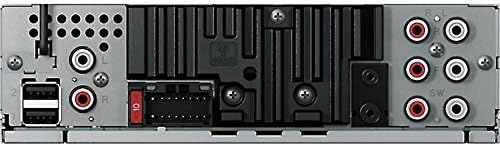
Figure 4: Rear panel showing power, speaker, and RCA connections
5. Setup u Installazzjoni
Professional installation is recommended for optimal performance and to avoid damage to your vehicle's electrical system. Ensure the vehicle's battery is disconnected before starting installation.
5.1 Konnessjonijiet tal-Wiring
- Connect the wiring harness to the vehicle's power, ground, and speaker wires according to the wiring diagram provided in the separate installation guide.
- Connect the RCA pre-out cables to your external amplifiers għall-kanali ta' quddiem, ta' wara, u tas-subwoofer.
- Connect the external microphone to the designated input for Auto EQ and Auto Time Alignment functions.
- Connect any USB devices or storage via the USB extension cable.
5.2 Settings Inizjali
After installation, reconnect the vehicle's battery. The unit will power on. Follow the on-screen prompts for initial setup, including language selection and clock settings.
Importanti: The DEH-80PRS features a switch on the chassis to select between Standard (STD) mode and Network (NW) mode for the 3-Way Active Crossover. Ensure this switch is set correctly for your speaker configuration before performing audio adjustments. Changing this switch requires a system reset.
6. Istruzzjonijiet Operattivi
6.1 Operazzjoni Bażika
- Power On/Off: Agħfas il-buttuna SRC (Sors) biex tixgħel l-unità. Agħfas u żomm SRC biex titfiha.
- Kontroll tal-Volum: Rotate the large rotary knob to adjust the volume.
- Għażla tas-Sors: Press the SRC button repeatedly to cycle through available sources (CD, Tuner, USB, SD, Bluetooth Audio, AUX).
6.2 Daqq ta' CD
Insert a CD into the disc slot. Playback will begin automatically. Use the track skip buttons to navigate between tracks. Press the BAND button to switch between CD text display modes.
6.3 Tuner Operation (AM/FM/HD Radio)
Select the Tuner source. Press the BAND button to switch between FM1, FM2, FM3, and AM bands. Use the seek buttons to find stations. For HD Radio, the unit will automatically detect and tune to HD Radio broadcasts where available.
6.4 Konnettività Bluetooth
The DEH-80PRS supports Bluetooth for audio streaming and hands-free calling.
- Tqabbil: Enable Bluetooth on your mobile device. On the DEH-80PRS, navigate to the Bluetooth menu and select 'Pairing'. Select 'Pioneer DEH-80PRS' from your device's Bluetooth list. Enter the PIN if prompted (default is '0000').
- Streaming tal-Awdjo: Once paired, select 'Bluetooth Audio' as the source to stream music from your device.
- Sejħat mingħajr idejn: When a call comes in, the unit will display the caller ID. Press the phone button to answer or end a call.
6.5 Daqq tal-USB/SD
Insert a USB device into the USB port or an SD card into the SD card slot. The unit will automatically detect and begin playback of compatible audio files. Use the navigation buttons to browse folders and tracks.
6.6 Advanced Audio Settings
The DEH-80PRS offers extensive audio customization for audiophile-grade sound.
- 3-Way Active Crossover Network: This feature allows precise control over the frequency ranges sent to your tweeters, mid-range speakers, and subwoofers. Access this in the Audio menu to set crossover points and slopes for each channel. This is especially powerful in Network mode.
- Ekwivalenza Awtomatika: Use the supplied microphone to automatically equalize the sound output to your vehicle's acoustics. Place the microphone in the listening position (e.g., driver's headrest), ensure the car is quiet with windows closed, and initiate the Auto EQ process from the Audio menu.
- Allinjament Awtomatiku tal-Ħin: This feature measures the distance from each speaker to the listening position and adjusts the sound output timing to ensure all sound reaches the listener simultaneously, creating a more focused soundstage. Use the same microphone placement as Auto EQ and initiate from the Audio menu.
- Manual EQ/Sound Adjustments: For further fine-tuning, the unit provides a 16-band graphic equalizer, listening position selector, and other manual sound controls.
7. Manutenzjoni
7.1 Tindif tal-Unità
Wipe the front panel with a soft, dry cloth. Do not use harsh chemicals or abrasive cleaners. For stubborn dirt, lightly dampmt id-drapp bl-ilma.
7.2 Batterija tal-Kontroll mill-bogħod
If the remote control stops responding, replace the lithium coin cell battery (CR2025). Refer to the remote control's specific instructions for battery replacement.
8 Issolvi l-problemi
Jekk tiltaqa' ma' problemi, irreferi għat-tabella t'hawn taħt għal problemi u soluzzjonijiet komuni.
| Problema | Kawża Possibbli | Soluzzjoni |
|---|---|---|
| Ebda qawwa | Blown fuse; incorrect wiring | Check the fuse; verify wiring connections. |
| L-ebda ħoss | Volume too low; incorrect source; speaker wiring issue | Increase volume; select correct source; check speaker connections. |
| Il-Bluetooth mhux qed jgħaqqad | L-apparat mhux fil-modalità ta' tqabbil; l-unità ma tistax tiġi skoperta | Ensure both devices are in pairing mode; delete previous pairings and try again. |
| CD error | Dirty or scratched disc; disc inserted incorrectly | Clean the disc; ensure it is inserted correctly. |
Jekk il-problema tippersisti wara li tipprova dawn is-soluzzjonijiet, ikkuntattja l-appoġġ għall-klijenti ta' Pioneer jew tekniku tas-servizz kwalifikat.
9. Speċifikazzjonijiet
- Dimensjonijiet tal-Prodott: 11.7 x 6.4 x 8.9 pulzieri
- Piż tal-oġġett: 2.64 libbra (1.2 Kilogrammi)
- Numru tal-Mudell tal-Oġġett: DEH80PRS
- Batteriji: 1 Lithium Metal battery required (for remote)
- Teknoloġiji tal-Komunikazzjoni mingħajr Fili: Bluetooth
- Teknoloġiji tal-Konnettività: Bil-fili
- Karatteristiċi Speċjali: CD Player, 3-Way Active Crossover Network, Auto EQ, Auto Time Alignment
- Apparati Kompatibbli: Kelliem, Smartphone
- Tip ta' Konnettur: 3.5mm Jack, USB
- Modalità tal-Ħruġ tal-Awdjo: Stereo
- Konfigurazzjoni tal-Kanal tal-Ħsejjes Surround: 5.1 (via pre-outs)
- Manifattur: Pijunier
- Data L-Ewwel Disponibbli: 16 ta’ Jannar, 2012
10. Garanzija u Appoġġ
Għal informazzjoni dwar il-garanzija, jekk jogħġbok irreferi għall-karta tal-garanzija separata inkluża mal-prodott tiegħek jew żur is-sit uffiċjali ta' Pioneer. website. For technical support, product registration, or to find authorized service centers, please contact Pioneer customer service directly.
You can typically find support contact details on the official Pioneer websit: www.pioneerelectronics.com


