1. Introduzzjoni
This manual provides detailed instructions for the setup, operation, maintenance, and troubleshooting of your Timex Men's Ironman Triathlon Essential 10 40mm Watch. Please read this manual thoroughly to ensure proper use and to maximize the lifespan of your watch.
2. Prodott Aktarview
The Timex Ironman Triathlon Essential 10 is a durable and lightweight digital watch designed for active lifestyles. It features a resin case, acrylic lens, and a comfortable resin strap. Key functions include a 100-hour chronograph, 10-lap memory, 24-hour countdown timer, customizable alarm, and Indiglo night-light.
2.1 Komponenti tal-Arloġġ
- Wiri: Digital screen showing time, date, and function readouts.
- Buttuna MODE: Cycles through watch modes (Time, Chronograph, Timer, Alarm).
- SET/RECALL Button: Used for setting time/date and recalling lap times.
- START/SPLIT Button: Initiates and pauses chronograph/timer, records lap splits.
- Buttuna STOP/RESET: Stops chronograph/timer, resets values.
- Buttuna INDIGLO: Jattiva d-dawl tal-lejl Indiglo.

Figura 1: Quddiem view of the Timex Ironman Triathlon Essential 10 Watch, displaying the digital screen and button labels.
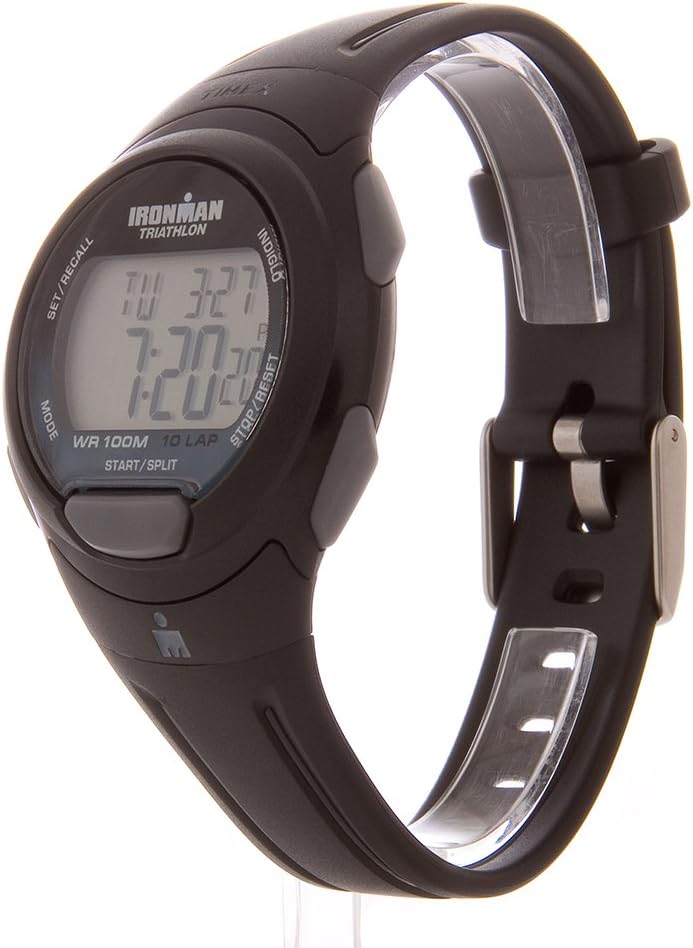
Figura 2: Ġenb view of the watch, highlighting the MODE and SET/RECALL buttons on the left, and INDIGLO, STOP/RESET, START/SPLIT buttons on the right.

Figura 3: Lura view of the watch, showing the stainless steel case back with water resistance information and battery type.
3. Setup
3.1 L-issettjar tal-Ħin u d-Data
- From the Time-of-Day mode, press and hold the SSET/SEJĦAR Agħfas il-buttuna sakemm id-displej jteptep.
- Agħfas il- BIDU / TAQSAM button to advance the flashing segment (e.g., seconds, minutes, hours).
- Agħfas il- MODALITÀ button to move to the next segment.
- Repeat steps 2 and 3 to set the year, month, date, 12/24-hour format, and two time zones.
- Agħfas SSET/SEJĦAR biex toħroġ mill-modalità tas-settings.
3.2 Issettjar tal-Allarm
- From Time-of-Day mode, press the MODALITÀ button repeatedly until 'ALARM' appears.
- Agħfas u żomm il- SSET/SEJĦAR Agħfas il-buttuna sakemm il-ħin tal-allarm jteptep.
- Uża l- BIDU / TAQSAM button to adjust the hour and minute.
- Agħfas il- MODALITÀ button to toggle between AM/PM (if in 12-hour format).
- Agħfas SSET/SEJĦAR to save the alarm time.
- Biex tattiva/tiddiżattiva l-allarm, agħfas il-buttuna BIDU / TAQSAM button while in Alarm mode. An alarm icon will appear when active.
4. Istruzzjonijiet Operattivi
4.1 L-Użu tal-Kronografu (Stopwatch)
The chronograph measures elapsed time up to 100 hours with 10-lap memory.
- From Time-of-Day mode, press the MODALITÀ button until 'CHRONO' appears.
- Agħfas BIDU / TAQSAM biex tibda timing.
- To record a lap time, press BIDU / TAQSAM again. The lap time will display briefly, and the chronograph will continue running in the background.
- Agħfas STOP / RESET to pause the chronograph. Press BIDU / TAQSAM biex jerġa’ jibda.
- To reset the chronograph, press STOP / RESET when paused, then press and hold STOP / RESET mill-ġdid.
- To recall lap times, press SSET/SEJĦAR filwaqt li l-kronografu jitwaqqaf.
4.2 L-Użu tat-Tajmer tal-Countdown
The 24-hour countdown timer can be used for various activities.
- From Time-of-Day mode, press the MODALITÀ button until 'TIMER' appears.
- Agħfas u żomm il- SSET/SEJĦAR button until the timer flashes.
- Uża l- BIDU / TAQSAM button to adjust the hours, minutes, and seconds.
- Agħfas il- MODALITÀ button to move between segments.
- Agħfas SSET/SEJĦAR to save the timer setting.
- Agħfas BIDU / TAQSAM biex tibda l-countdown.
- Agħfas STOP / RESET to pause the timer. Press BIDU / TAQSAM biex jerġa’ jibda.
- When the timer reaches zero, an audible alert will sound. Press any button to stop the alert.
4.3 Dawl tal-Lejl Indiglo
Agħfas il- INDIGLO button to illuminate the watch dial for easy viewing f’kundizzjonijiet ta’ dawl baxx.
5. Manutenzjoni
5.1 Reżistenza għall-Ilma
This watch is water resistant to 100 meters (330 feet). It is suitable for swimming and snorkeling. However, it is not recommended for diving. Do not press any buttons while the watch is submerged, as this can compromise the water resistance seal.
5.2 Sostituzzjoni tal-batterija
The watch uses one Lithium Metal battery (CR2016). When the display dims or functions become erratic, it may be time to replace the battery. Battery replacement should ideally be performed by a qualified watch technician to ensure proper sealing and maintain water resistance. Opening the watch case yourself may void the warranty and compromise water resistance.
5.3 Tindif
Naddaf l-arloġġ tiegħek b'drapp artab u dryer.amp drapp. Evita li tuża kimiċi ħarxa jew materjali li joborxu, li jistgħu jagħmlu ħsara lill-kaxxa jew liċ-ċinga.
6 Issolvi l-problemi
| Problema | Kawża Possibbli | Soluzzjoni |
|---|---|---|
| Id-displej huwa mudlam jew vojt. | Batterija baxxa. | Replace battery (refer to Section 5.2). |
| Arloġġ mhux qed iżomm il-ħin preċiż. | Issettjar tal-ħin mhux korrett jew batterija baxxa. | Reset time (refer to Section 3.1) or replace battery. |
| Il-buttuni ma jirrispondux. | L-arloġġ jista' jkun fil-modalità msakkra jew hemm problema interna. | Ipprova agħfas il-buttuni kollha sew. Jekk il-problema tippersisti, ikkuntattja l-appoġġ għall-klijenti. |
| Ilma ġewwa l-arloġġ. | Ir-reżistenza għall-ilma hija kompromessa. | Ħu l-arloġġ minnufih għand ċentru ta' servizz kwalifikat. Tippruvax tnixxfu int stess. |
7. Speċifikazzjonijiet
- Numru tal-Mudell: T5K608SU
- Materjal tal-Każ: Reżina
- Materjal tal-lenti: Akriliku
- Materjal taċ-ċinga: Reżina
- Dijametru tal-Każ: 40mm
- Reżistenza għall-Ilma: 100m (330-il pied)
- Tip ta 'batterija: 1 batterija tal-litju tal-metall (CR2016)
- Kronografu: 100 siegħa b'memorja ta' 10 dawra
- Timer: 24-hour countdown
- Allarm: Customizable
- Karatteristiċi addizzjonali: Indiglo night-light, 24-hour military time mode, 2 time zones, day/date/month calendar.
- Dimensjonijiet tal-Prodott: 10 x 7.99 x 2.99 pulzieri; 1.28-il uqija
8. Garanzija u Appoġġ
This Timex watch is manufactured by Timex. For warranty information, service, or support, please refer to the warranty card included with your purchase or visit the official Timex websit. Tista' ssib aktar informazzjoni wkoll fuq is-sit Ħanut Timex fuq Amazon.


